Touchpad not working in Windows 7 but works in 10

lokeshhxox

New member
Local time
11:59 AM
Messages
2
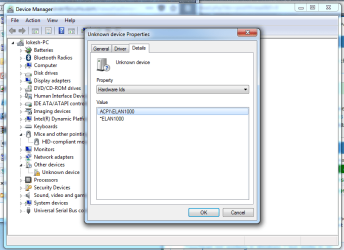
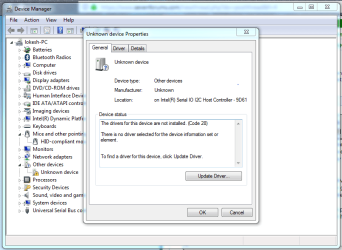
I own ASUS laptop R558UR. It came with DOS, so I installed Windows 10 because ASUS provided drivers for only Windows 10. (At that time the touchpad was working even without any drivers.) I really didn't like Windows 10, so I installed Windows 7 on the laptop. I managed to get and install driver for every device and its working fine. (Much much better than Windows 10 :rolleyes:) There's just one problem. I'm not able to install driver for my touchpad and the touchpad is not at all working. Here's how Device Manager shows it (see the image below).

I have tried installing many drivers (like Synaptic, Elantech, ASUS Smart Gesture) but none of them works. Some drivers got installed but didn't work. Some drivers gave some error saying device not supported during the installation. I even force installed them by adding my device ID in the list of supported devices. I also tried Windows Update and go nothing.

I searched many forums and saw some posts where people are facing the same issue but unfortunately none of those threads were solved. You are my last hope, please help!
 

Attachments
  • Capture.PNG
    Capture.PNG
    35.9 KB · Views: 1
  • Capture1.PNG
    Capture1.PNG
    41.3 KB · Views: 0

My Computer My Computer

At a glance

Windows 7 Ultimate E x64i512GB
Computer type
Laptop
Computer Manufacturer/Model Number
Asus
OS
Windows 7 Ultimate E x64
CPU
i5
Memory
12GB

My Computers My Computers

  • At a glance

    7 X64i5 84002x8gb 3200mhz
    Computer type
    PC/Desktop
    OS
    7 X64
    CPU
    i5 8400
    Motherboard
    gigabyte b365m ds3h
    Memory
    2x8gb 3200mhz
    Hard Drives
    various
    PSU
    pure power 11 400w cm
    Case
    Coolermaster
    Cooling
    cryorig m9i
  • At a glance

    7x64g54008gb ddr4 2400
    Computer type
    PC/Desktop
    OS
    7x64
    CPU
    g5400
    Motherboard
    ga b365m ds3h
    Memory
    8gb ddr4 2400
    PSU
    xfx pro 450w
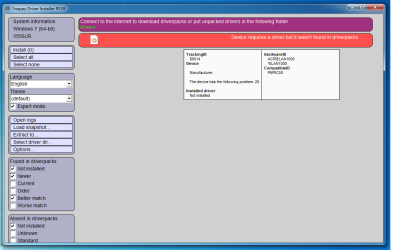
I installed it and it says the driver wasn't found in DriverPacks.
 

Attachments

  • Untitled.png
    Untitled.png
    29.7 KB · Views: 0

My Computer My Computer

At a glance

Windows 7 Ultimate E x64i512GB
Computer type
Laptop
Computer Manufacturer/Model Number
Asus
OS
Windows 7 Ultimate E x64
CPU
i5
Memory
12GB

My Computer My Computer

At a glance

Win 10 x64, Linux Lite, Win 7 x64, BlackArch,...
Computer type
PC/Desktop
Computer Manufacturer/Model Number
HP Desktop & Compaq Laptop
OS
Win 10 x64, Linux Lite, Win 7 x64, BlackArch, & Kali
Hard Drives
Samsung 850 Pro 256Gb,
Hitachi HDD 1Tb,
Crucial MX SSD 250Gb
Segate 3Tb USB 3.0 Ext. Backup HDD
Internet Speed
150Mbps dn, 20Mbps up
Antivirus
Avast Free, Malwarebytes Anti-Exploit & Anti-Ransomware
Browser
Firefox, Chrome, Opera, & VPN
Latest version is not R539- Connect to internet. It will prompt you to update the program and download the indexes.

I installed it and it says the driver wasn't found in DriverPacks.
 

My Computers My Computers

  • At a glance

    7 X64i5 84002x8gb 3200mhz
    Computer type
    PC/Desktop
    OS
    7 X64
    CPU
    i5 8400
    Motherboard
    gigabyte b365m ds3h
    Memory
    2x8gb 3200mhz
    Hard Drives
    various
    PSU
    pure power 11 400w cm
    Case
    Coolermaster
    Cooling
    cryorig m9i
  • At a glance

    7x64g54008gb ddr4 2400
    Computer type
    PC/Desktop
    OS
    7x64
    CPU
    g5400
    Motherboard
    ga b365m ds3h
    Memory
    8gb ddr4 2400
    PSU
    xfx pro 450w
ASUS laptop R558UR is a clickpad laptop, so it should be support the ASUS Smart Gesture. You do not need to install other touchpad driver. And from the hardware id, the Elan means it is a ASUS Elan TouchPad device. We know the ASUS Smart gesture contains ASUS Elan TouchPad driver and ASUS Virtual Touch adapter. Try to uninstall the Unknown device at first.

The asus smart gesture is listed in control panel > program features? If it is list here, uninstall it and then download the new one from the ASUS official site.

If the asus smart gesture can show normal in the device manager, but it cannot work properly, maybe it is the error settings for your touchpad, check it.

You can get more information from here: [Solved] ASUS Smart Gesture Not Working on Windows 10 - Windows 10 Skills

Here are more particulars maybe you should to pay attention.

Wish this can help.
 

My Computer My Computer

At a glance

Windows 7 Ultimate (64 bit)Intel(R) Core(TM) i5-3450
Computer type
PC/Desktop
Computer Manufacturer/Model Number
Dell Vostro 470
OS
Windows 7 Ultimate (64 bit)
CPU
Intel(R) Core(TM) i5-3450
Motherboard
Dell 0NW73C
I faced the similar issue regarding screen brightness with my HP laptop, tried everything then a software guy tell to download the genetic pnp from official site and it works fine. I recommend finding drivers from official site can save the hassle for you as well
 

My Computer My Computer

At a glance

Win 10 pro 64 biti5 6th gen8 gb
Computer type
Laptop
Computer Manufacturer/Model Number
Lenovo
OS
Win 10 pro 64 bit
CPU
i5 6th gen
Memory
8 gb
I never allow MS update to install other manufacturer component drivers, and go directly to their sites for them.
 

My Computer My Computer

At a glance

Win 10 x64, Linux Lite, Win 7 x64, BlackArch,...
Computer type
PC/Desktop
Computer Manufacturer/Model Number
HP Desktop & Compaq Laptop
OS
Win 10 x64, Linux Lite, Win 7 x64, BlackArch, & Kali
Hard Drives
Samsung 850 Pro 256Gb,
Hitachi HDD 1Tb,
Crucial MX SSD 250Gb
Segate 3Tb USB 3.0 Ext. Backup HDD
Internet Speed
150Mbps dn, 20Mbps up
Antivirus
Avast Free, Malwarebytes Anti-Exploit & Anti-Ransomware
Browser
Firefox, Chrome, Opera, & VPN
I dug around and a few others got theirs to work via one of the following methods:

1) go into bios and select "Load optimized defaults", or
2) try the Vista driver from the ASUS page, or
3) update bios to latest version, or
4) within bios do this: bios > Advanced tab, enable INTERNAL POINTING DEVICE.
 

My Computer My Computer

At a glance

Win7 pro x64stock i7 7700kCorsair Vengeance LPX 16GB (2x8GB) DDR4 @ 320...integrated Intel HD 630
Computer type
PC/Desktop
Computer Manufacturer/Model Number
diy
OS
Win7 pro x64
CPU
stock i7 7700k
Motherboard
Gigabyte Z270N-WIFI mini-ITX
Memory
Corsair Vengeance LPX 16GB (2x8GB) DDR4 @ 3200MHz
Graphics Card(s)
integrated Intel HD 630
Sound Card
onboard Realtek ALC1220
Monitor(s) Displays
two vertically mounted samsung 55" 4k un55mu8000
Screen Resolution
1920x1280
Hard Drives
256GB Samsung EVO 960 M.2 pci-e NVMe SSD
PSU
SilverStone Nightjar ST45NF 450Watt Fanless
Case
No case. Motherboard is mounted directly onto power supply
Cooling
Evercool low profile 815EP with Panaflow 12L fan at 7v
Keyboard
Ortek MCK-86 mini
Mouse
Belkin 5-button USB
Internet Speed
spectrum 400mbps
BIOS try switching Touchpad option from Advanced to Basic.
 

My Computers My Computers

  • At a glance

    7 X64i5 84002x8gb 3200mhz
    Computer type
    PC/Desktop
    OS
    7 X64
    CPU
    i5 8400
    Motherboard
    gigabyte b365m ds3h
    Memory
    2x8gb 3200mhz
    Hard Drives
    various
    PSU
    pure power 11 400w cm
    Case
    Coolermaster
    Cooling
    cryorig m9i
  • At a glance

    7x64g54008gb ddr4 2400
    Computer type
    PC/Desktop
    OS
    7x64
    CPU
    g5400
    Motherboard
    ga b365m ds3h
    Memory
    8gb ddr4 2400
    PSU
    xfx pro 450w
I installed it and it says the driver wasn't found in DriverPacks.

Hey, Lokeshhxox! Did you resolve your problem? I've got the same hassle. Thanks in advance!
 

My Computer My Computer

At a glance

Windows 10 Pro x64i3 Kaby Lake-R4 GB + 16 OptaneIntal UHD 620 + Geforce MX130
Computer type
Laptop
Computer Manufacturer/Model Number
Asus
OS
Windows 10 Pro x64
CPU
i3 Kaby Lake-R
Motherboard
Asustek
Memory
4 GB + 16 Optane
Graphics Card(s)
Intal UHD 620 + Geforce MX130
Hard Drives
1 TB
Antivirus
ESET
Browser
Firefox
Back
Top