Solved No sound via HDMI to ASUS Monitor

2MoveWreckingCr

New member
Local time
8:51 PM
Messages
18
No sound via HDMI to ASUS Monitor [SOLVED]

I've enjoyed a lot of the useful information from you all on this forum. My problem is that when I connect my Acer Aspire 5810T Laptop to my Asus Monitor MT276 via HDMI, I get video on my Asus but no sound through its speakers. I'm getting sound through my laptop though.

I'm unable to see the HDMI sound icon when I use "Manage Audio Devices" even though I checked to show disabled and disconnected devices. I think it may be because of my graphics or sound card (which I've tried updating via device manager but still no luck).

My system specs are to the right and if you require any other information let me know. Any suggestions on how I can get sound through the monitor's speakers?

[SOLVED]

I now get sound and video via HDMI through my Asus monitor. The way I got it to work was by updated my chipset driver to an older version.

Steps I took:
1) Go to Device Manager
2) Open Display Adapters and right click and select Update Driver Software
3) Select Browse my computer for driver software
4) Select Let me pick from a list of device drivers on my computer
5) I then was given a list of drivers and selected the oldest version (2/26/09)

I restarted my computer and plugged in the HDMI and the HDMI icon magically showed up when I went into Playback Devices.

I have updated the OP to show my solution. Thank you all for your help. You guys have a very good community here.
 
Last edited:

My Computer My Computer

At a glance

Windows 7 Home Premium 32bit3Mobile Intel 4 Series Express Chipset Family
Computer Manufacturer/Model Number
Acer Aspire 5810T
OS
Windows 7 Home Premium 32bit
Memory
3
Graphics Card(s)
Mobile Intel 4 Series Express Chipset Family
Sound Card
Intel HD Audio HDMI
Go to the Control Panel/Hardware and Sound and finally the Sound panel. If you have HDMI Audio, there will be an icon for this. Set this as the default playback device and that should get you HDMI Audio.
 

My Computer My Computer

At a glance

Windows 10 64 bitIntel i7 6700K16GB Corsair DominatorIntel CPU Graphics
Computer type
PC/Desktop
Computer Manufacturer/Model Number
My Own Build
OS
Windows 10 64 bit
CPU
Intel i7 6700K
Motherboard
ASUS ROG Maximus VIII Hero
Memory
16GB Corsair Dominator
Graphics Card(s)
Intel CPU Graphics
Sound Card
RealTek
Monitor(s) Displays
27" Dell S2719dgf
Screen Resolution
2560X1440
Hard Drives
1 TB Samsung 850 EVO SSD for Win 10 Pro
500GB Samsung 850 EVO SSD for Win 10 Insider
2 TB drive for backup
PSU
EVGA Supernova 750G2
Case
BeQuiet Silent Base 600
Cooling
Deepcool Captain 120EX
Keyboard
Microsoft Wireless 2000
Mouse
Microsoft wireless
Internet Speed
100 MB/sec (Cable)
Antivirus
Microsoft Defender and Malwarebytes
Browser
Edge/Firefox
Other Info
Cakewalk (Sonar) by BandLab and Studio One 4.1 Pro recording studio software. MOTU 896Mk3 Hybrid recording interface, Frontier Tranzport wireless control unit, Behringer X-Touch Control Surface.
Five USB connected optical drives for CD Audio production using Nero BurningROM
Go to the Control Panel/Hardware and Sound and finally the Sound panel. If you have HDMI Audio, there will be an icon for this. Set this as the default playback device and that should get you HDMI Audio.

As I stated in the first post, I have no HDMI Audio icon when I go into sound devices. I made sure to show disabled and disconnected devices. I only see the Speakers and Realtek icons.
 

My Computer My Computer

At a glance

Windows 7 Home Premium 32bit3Mobile Intel 4 Series Express Chipset Family
Computer Manufacturer/Model Number
Acer Aspire 5810T
OS
Windows 7 Home Premium 32bit
Memory
3
Graphics Card(s)
Mobile Intel 4 Series Express Chipset Family
Sound Card
Intel HD Audio HDMI
It has to be the Video card either does not support audio or has to have some external connection to get the audio. I don't have any info on the Intel HD Video.
 

My Computer My Computer

At a glance

Windows 10 64 bitIntel i7 6700K16GB Corsair DominatorIntel CPU Graphics
Computer type
PC/Desktop
Computer Manufacturer/Model Number
My Own Build
OS
Windows 10 64 bit
CPU
Intel i7 6700K
Motherboard
ASUS ROG Maximus VIII Hero
Memory
16GB Corsair Dominator
Graphics Card(s)
Intel CPU Graphics
Sound Card
RealTek
Monitor(s) Displays
27" Dell S2719dgf
Screen Resolution
2560X1440
Hard Drives
1 TB Samsung 850 EVO SSD for Win 10 Pro
500GB Samsung 850 EVO SSD for Win 10 Insider
2 TB drive for backup
PSU
EVGA Supernova 750G2
Case
BeQuiet Silent Base 600
Cooling
Deepcool Captain 120EX
Keyboard
Microsoft Wireless 2000
Mouse
Microsoft wireless
Internet Speed
100 MB/sec (Cable)
Antivirus
Microsoft Defender and Malwarebytes
Browser
Edge/Firefox
Other Info
Cakewalk (Sonar) by BandLab and Studio One 4.1 Pro recording studio software. MOTU 896Mk3 Hybrid recording interface, Frontier Tranzport wireless control unit, Behringer X-Touch Control Surface.
Five USB connected optical drives for CD Audio production using Nero BurningROM
It has to be the Video card either does not support audio or has to have some external connection to get the audio. I don't have any info on the Intel HD Video.

Ok I could really use some info on Intel HD Video. Anyone with some knowledge on this?
 

My Computer My Computer

At a glance

Windows 7 Home Premium 32bit3Mobile Intel 4 Series Express Chipset Family
Computer Manufacturer/Model Number
Acer Aspire 5810T
OS
Windows 7 Home Premium 32bit
Memory
3
Graphics Card(s)
Mobile Intel 4 Series Express Chipset Family
Sound Card
Intel HD Audio HDMI

My Computer My Computer

At a glance

Windows 7 Home Premium 32bit3Mobile Intel 4 Series Express Chipset Family
Computer Manufacturer/Model Number
Acer Aspire 5810T
OS
Windows 7 Home Premium 32bit
Memory
3
Graphics Card(s)
Mobile Intel 4 Series Express Chipset Family
Sound Card
Intel HD Audio HDMI
If it has HDMI - it supports video/sound. I'm thinking driver or configuration on this one.

Can you send me a link to your video card / onboard stats?
 

My Computer My Computer

At a glance

7 Pro
OS
7 Pro
If it has HDMI - it supports video/sound. I'm thinking driver or configuration on this one.

Can you send me a link to your video card / onboard stats?

Thanks for the reply brady. Here is a link to my video card specs from GPU-Z: http://gpuz.techpowerup.com/10/12/30/ez4.png

Again my laptop is a Acer Aspire Timeline AS5810TZ-4274. I attached my DXDIAG info of my computer specs. If you need any more info please let me know.
 

Attachments

My Computer My Computer

At a glance

Windows 7 Home Premium 32bit3Mobile Intel 4 Series Express Chipset Family
Computer Manufacturer/Model Number
Acer Aspire 5810T
OS
Windows 7 Home Premium 32bit
Memory
3
Graphics Card(s)
Mobile Intel 4 Series Express Chipset Family
Sound Card
Intel HD Audio HDMI
This worked for me

Hello

I had intermittent detection of the HDMI in "Control Panel/Sound", and eventually no detection (the following solution may also work for those who were never able to obtain a signal at all). For me updating the audio driver fixed the problem. You can update the audio and video drivers by following the steps below (found these steps at Microsoft website). My computer is only 6 months old, but still needed the drivers updated. No special system setting are required as written in previous posts, if the driver is the problem. I was also extremely frustrated with the ongoing problem and hope the driver updates work for you. Good luck!

  1. Open Device Manager by clicking the Start button
    4f6cbd09-148c-4dd8-b1f2-48f232a2fd33.png
    , clicking Control Panel, clicking System and Maintenance, and then clicking Device Manager.*
    18abb370-ac1e-4b6b-b663-e028a75bf05b.png
    If you are prompted for an administrator password or confirmation, type the password or provide confirmation.
  2. In Device Manager, locate the device you want to update, and then double-click the device name.
  3. Click sound video and gaming controller
  4. Open each audio controller in sound video and gaming (one at a time) and update by Clicking the Driver tab, and then click Update Driver and follow the instructions.
 

My Computer My Computer

At a glance

Windows 7 64bit
OS
Windows 7 64bit
Hello

I had intermittent detection of the HDMI in "Control Panel/Sound", and eventually no detection (the following solution may also work for those who were never able to obtain a signal at all). For me updating the audio driver fixed the problem. You can update the audio and video drivers by following the steps below (found these steps at Microsoft website). My computer is only 6 months old, but still needed the drivers updated. No special system setting are required as written in previous posts, if the driver is the problem. I was also extremely frustrated with the ongoing problem and hope the driver updates work for you. Good luck!

  1. Open Device Manager by clicking the Start button
    4f6cbd09-148c-4dd8-b1f2-48f232a2fd33.png
    , clicking Control Panel, clicking System and Maintenance, and then clicking Device Manager.*
    18abb370-ac1e-4b6b-b663-e028a75bf05b.png
    If you are prompted for an administrator password or confirmation, type the password or provide confirmation.
  2. In Device Manager, locate the device you want to update, and then double-click the device name.
  3. Click sound video and gaming controller
  4. Open each audio controller in sound video and gaming (one at a time) and update by Clicking the Driver tab, and then click Update Driver and follow the instructions.

Thanks Rodney. I tried updating the devices using your method and windows said that they are both up to date. Still no sound through my monitor when connected via HDMI. Any other suggestions?
 

My Computer My Computer

At a glance

Windows 7 Home Premium 32bit3Mobile Intel 4 Series Express Chipset Family
Computer Manufacturer/Model Number
Acer Aspire 5810T
OS
Windows 7 Home Premium 32bit
Memory
3
Graphics Card(s)
Mobile Intel 4 Series Express Chipset Family
Sound Card
Intel HD Audio HDMI
Sorry to hear it did not work (already update)

Not sure what you have done thus far. As far as settings go; in control panel/sound, is HDMI output recognized (is it there)? If so, make sure it is set as default device (by right clicking on it). You could also try unplugging and plugging back in the HDMI cable while the TV and PC are both turned on (this may allow the PC to recognize TV). I am not a super-tech-type, so this is about all i have for you at this point. Good luck
 

My Computer My Computer

At a glance

Windows 7 64bit
OS
Windows 7 64bit

My Computer My Computer

At a glance

Win 7 Ultimate x64FX-8350 @ 4.6 GHz so farADATA XPG V1 Series Black 8GB DDR3 1600Sapphire R9 270x Dual-X
Computer type
PC/Desktop
Computer Manufacturer/Model Number
Me
OS
Win 7 Ultimate x64
CPU
FX-8350 @ 4.6 GHz so far
Motherboard
Asus M5A97 EVO
Memory
ADATA XPG V1 Series Black 8GB DDR3 1600
Graphics Card(s)
Sapphire R9 270x Dual-X
Sound Card
Xonar DGX w/ Corsair Vengence 1300
Monitor(s) Displays
Acer S232HL Abid
Screen Resolution
1920x1080
Hard Drives
120 GB OCZ Vertex 3
500 GB Seagate 7200.12
PSU
Antec Earthwatts 650W Green
Case
Antec Three Hundred
Cooling
Cooler Master 212 EVO
Keyboard
Logitech G510
Mouse
Logitech G500s
Internet Speed
35000/3000
Assuming that dxdiag log is today's, you don't have the sound driver installed. At the moment it is running on the default Windows driver, which will provide basic audio but no advanced/extra features such as HDMI audio. Start with downloading and installing the latest Realtek HD audio driver,

http://www.sevenforums.com/sound-audio/3756-latest-realtek-hd-audio-driver-version.html

and then see if the options shows up.

Still no luck. I downloaded and installed the "Vista, Windows7 Driver (32/64bits) Driver only (Executable file)", restarted and installed the driver twice, and still no option for HDMI when I look at Playback Devices (I have checked to show disabled and disconnected devices).

Perhaps I did not install it correctly? Do I need to download the "ATI HDMI Audio Device" driver too?

Here is my DXDiag after I installed the new driver.
 

Attachments

My Computer My Computer

At a glance

Windows 7 Home Premium 32bit3Mobile Intel 4 Series Express Chipset Family
Computer Manufacturer/Model Number
Acer Aspire 5810T
OS
Windows 7 Home Premium 32bit
Memory
3
Graphics Card(s)
Mobile Intel 4 Series Express Chipset Family
Sound Card
Intel HD Audio HDMI
Do I need to download the "ATI HDMI Audio Device" driver too?

No as from what I can see that model laptop came with either/or ATI or Intel for the video, and there is nothing in your dxdiag log that would indicate that it has the ATI.

May not make any difference but go here,

Acer Support - Drivers & Download

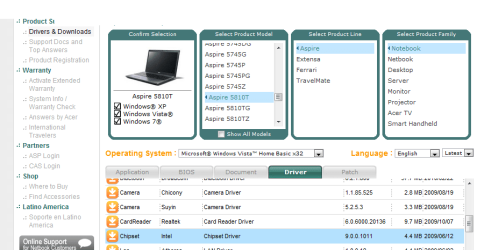
and get the chipset driver for it. From the looks of the log it appears that pretty much all chipset related drivers are using the Windows defaults. It could be that it will take the proper chipset driver for it to show up, as for a lot of things the Windows default drivers are enough to get things up and running but takes the proper drivers for things to work as they should.
 

My Computer My Computer

At a glance

Win 7 Ultimate x64FX-8350 @ 4.6 GHz so farADATA XPG V1 Series Black 8GB DDR3 1600Sapphire R9 270x Dual-X
Computer type
PC/Desktop
Computer Manufacturer/Model Number
Me
OS
Win 7 Ultimate x64
CPU
FX-8350 @ 4.6 GHz so far
Motherboard
Asus M5A97 EVO
Memory
ADATA XPG V1 Series Black 8GB DDR3 1600
Graphics Card(s)
Sapphire R9 270x Dual-X
Sound Card
Xonar DGX w/ Corsair Vengence 1300
Monitor(s) Displays
Acer S232HL Abid
Screen Resolution
1920x1080
Hard Drives
120 GB OCZ Vertex 3
500 GB Seagate 7200.12
PSU
Antec Earthwatts 650W Green
Case
Antec Three Hundred
Cooling
Cooler Master 212 EVO
Keyboard
Logitech G510
Mouse
Logitech G500s
Internet Speed
35000/3000
May not make any difference but go here,

Acer Support - Drivers & Download

and get the chipset driver for it. From the looks of the log it appears that pretty much all chipset related drivers are using the Windows defaults. It could be that it will take the proper chipset driver for it to show up, as for a lot of things the Windows default drivers are enough to get things up and running but takes the proper drivers for things to work as they should.

I visited the site and downloaded and installed the chipset pictured here. It seemed to have no effect. When I visit Intel's website for information on the driver it tells me that the Mobile Intel(R) 4 Series Express Chipset Family is "A customized computer manufacturer driver is installed on your computer. The Intel Driver Update Utility is not able to update the driver. Installing a generic Intel driver instead of the customized computer manufacturer driver may cause technical issues. Contact your computer manufacturer for the latest driver for your computer. "

So is there any driver on the Acer site that I should download that could make a difference and stop the drivers from using the Windows defaults? I've also upload my new DXDiag log.
 

Attachments

  • Chipset Downloaded.png
    Chipset Downloaded.png
    25.6 KB · Views: 47
  • DxDiag 1.2.11.txt
    DxDiag 1.2.11.txt
    39.2 KB · Views: 9

My Computer My Computer

At a glance

Windows 7 Home Premium 32bit3Mobile Intel 4 Series Express Chipset Family
Computer Manufacturer/Model Number
Acer Aspire 5810T
OS
Windows 7 Home Premium 32bit
Memory
3
Graphics Card(s)
Mobile Intel 4 Series Express Chipset Family
Sound Card
Intel HD Audio HDMI
Try connecting your HDMI laptop to a different HDMI device, like a TV or a friends TV if you don't have an HDMI TV. Not all HDMI ports are alike. :) -WS
 

My Computer My Computer

At a glance

Windows 7 Enterprise (x64); Windows Server 20...16GB
Computer type
PC/Desktop
Computer Manufacturer/Model Number
Dell OP7010
OS
Windows 7 Enterprise (x64); Windows Server 2008 R2 (x64)
Memory
16GB
Monitor(s) Displays
4 Dell 24" LCD
Screen Resolution
1280x1024
Keyboard
Dell
Mouse
Dell Optical
Internet Speed
40meg
Try connecting your HDMI laptop to a different HDMI device, like a TV or a friends TV if you don't have an HDMI TV. Not all HDMI ports are alike. :) -WS

Tried hooking it up to a another TV with no luck unfortunately. The icon still did not appear. I'm assuming this is happening because I upgraded from Vista to Windows 7?
 

My Computer My Computer

At a glance

Windows 7 Home Premium 32bit3Mobile Intel 4 Series Express Chipset Family
Computer Manufacturer/Model Number
Acer Aspire 5810T
OS
Windows 7 Home Premium 32bit
Memory
3
Graphics Card(s)
Mobile Intel 4 Series Express Chipset Family
Sound Card
Intel HD Audio HDMI
Bump
 

My Computer My Computer

At a glance

Windows 7 Home Premium 32bit3Mobile Intel 4 Series Express Chipset Family
Computer Manufacturer/Model Number
Acer Aspire 5810T
OS
Windows 7 Home Premium 32bit
Memory
3
Graphics Card(s)
Mobile Intel 4 Series Express Chipset Family
Sound Card
Intel HD Audio HDMI
I am at a loss on this one. I assume it is a falty driver. My home video card with HDMI used the drivers from the Video driver download to install both the HDMI video and the audio. ?? Maybe send an email to the vendor of the drivers asking for help ?? Sorry I cannot be more help. -WS
 

My Computer My Computer

At a glance

Windows 7 Enterprise (x64); Windows Server 20...16GB
Computer type
PC/Desktop
Computer Manufacturer/Model Number
Dell OP7010
OS
Windows 7 Enterprise (x64); Windows Server 2008 R2 (x64)
Memory
16GB
Monitor(s) Displays
4 Dell 24" LCD
Screen Resolution
1280x1024
Keyboard
Dell
Mouse
Dell Optical
Internet Speed
40meg
According to the DxDiag, your sound device vendor is 10EC which is Realtek,
so it's ok to install the Realtek HD audio driver.
However, it doesn't enable HDMI sound.

According to the DxDiag, your display device vendor is 8086 which is Intel.
So you should have the "Intel Graphics" driver installed.
The HDMI driver may be packaged with the Intel Graphics driver.
Intel probably packaged it there, just as ATI does with it's video drivers.
So you probably won't find a download for an Intel HDMI audio driver on the
Intel site.

You can try uninstalling the Intel video driver and install this driver.......
http://downloadcenter.intel.com/Detail_Desc.aspx?agr=Y&DwnldID=19468&ProdId=2991&lang=eng
 
Last edited:

My Computer My Computer

At a glance

Windows 7 Home Premium 64 bitIntel Core i7-4790G.SKILL 8GB (2 x 4GB) DDR3 F3-10666CL9D-8GBNTAMD Radeon R7 250
Computer type
PC/Desktop
Computer Manufacturer/Model Number
Custom Build
OS
Windows 7 Home Premium 64 bit
CPU
Intel Core i7-4790
Motherboard
GA-Z87X-D3H
Memory
G.SKILL 8GB (2 x 4GB) DDR3 F3-10666CL9D-8GBNT
Graphics Card(s)
AMD Radeon R7 250
Sound Card
Realtek ALC892
Monitor(s) Displays
Samsung UN32EH5000, Dell 1703FPT
Screen Resolution
1920 x 1080, 1280 x 1024
Hard Drives
WD5003AZEX
WD10EZEX
Samsung HD103SJ
Samsung 128 GB 840 PRO
PSU
SeaSonic M12II SS-500GM
Case
Fractal Design Define R4
Cooling
Zalman CNPS9900ALED
Keyboard
Logitech K800
Mouse
Logitech M705
Internet Speed
16 Mbps
Antivirus
Avast
Browser
Firefox
Other Info
Bose Companion 2 Multimedia Speakers
Back
Top