First of all, I don't expect to find a solution to this problem, because it seems really weird to me. Recently, my monitor has been emitting a split second crackling/static like sound two or three times a day - I dunno. But when that happens, and I happen to be moving my mouse, it will freeze for a split second then go back to normal. But the screen doesn't freeze if I'm pan-scrolling with my middle mouse button. It's almost not a problem because of how infrequent and short it is, but I thought I'd post it in case anyone knew what the hell I was talking about.
It seems like it's been happening more often recently, that's why I've noticed it more and finally became inclined to post about it here. Hell, I'm not even sure if this would belong in this section of the forums. It could not be related to my graphics card, but since it sounds like the sound is coming from the speaker from my monitor, this is the closest place I could think of posting it. And yes, I've updated my graphics card driver to the latest one. I had 197.45 last time and updated to 257.21. Dunno why they jumped a lot of numbers cuz I update it every now and then.
So... anyone have any ideas?
My Computer
At a glance
Windows 7 Ultimate 64 bit (6.1, Build 7601) S...Intel Core i7 (4700MQ, 2.4Ghz-3.4Ghz, 6MB Cac...16GB (DDR3 1600MHz Dual Channel Memory - 2 SO...Intel HD 4600 Graphics
Computer type
Laptop
Computer Manufacturer/Model Number
Sager NP2650 (Clevo W650SZ) - Custom Built
OS
Windows 7 Ultimate 64 bit (6.1, Build 7601) Service Pack 1
Built-in 802.11 Wireless B/G/N - Stock Wireless Card + Bluetooth™ 4.0 | Internal 9-in-1 Card Reader (MMC/RSMMC/SD/Mini SD/SDHC/SDXC/MS/MS Pro/MS Duo) | Built in 2.0 Megapixel Camera | Rosewill RX-358-S BLACK 3.5" SATA to eSATA External Enclosure with Internal 80mm fan
That used to happen on "old" PC's and usually the problem was the graphics card. If you haven't done it, reseat the video card and see if that helps. With the PC powered off, disconnect the Video cable to the monitor and then remove the Video card. Then reinstall it, reconnect the Video cable.
My Computer
At a glance
Windows 10 64 bitIntel i7 6700K16GB Corsair DominatorIntel CPU Graphics
Computer type
PC/Desktop
Computer Manufacturer/Model Number
My Own Build
OS
Windows 10 64 bit
CPU
Intel i7 6700K
Motherboard
ASUS ROG Maximus VIII Hero
Memory
16GB Corsair Dominator
Graphics Card(s)
Intel CPU Graphics
Sound Card
RealTek
Monitor(s) Displays
27" Dell S2719dgf
Screen Resolution
2560X1440
Hard Drives
1 TB Samsung 850 EVO SSD for Win 10 Pro
500GB Samsung 850 EVO SSD for Win 10 Insider
2 TB drive for backup
PSU
EVGA Supernova 750G2
Case
BeQuiet Silent Base 600
Cooling
Deepcool Captain 120EX
Keyboard
Microsoft Wireless 2000
Mouse
Microsoft wireless
Internet Speed
100 MB/sec (Cable)
Antivirus
Microsoft Defender and Malwarebytes
Browser
Edge/Firefox
Other Info
Cakewalk (Sonar) by BandLab and Studio One 4.1 Pro recording studio software. MOTU 896Mk3 Hybrid recording interface, Frontier Tranzport wireless control unit, Behringer X-Touch Control Surface.
Five USB connected optical drives for CD Audio production using Nero BurningROM
Built-in 802.11 Wireless B/G/N - Stock Wireless Card + Bluetooth™ 4.0 | Internal 9-in-1 Card Reader (MMC/RSMMC/SD/Mini SD/SDHC/SDXC/MS/MS Pro/MS Duo) | Built in 2.0 Megapixel Camera | Rosewill RX-358-S BLACK 3.5" SATA to eSATA External Enclosure with Internal 80mm fan
Built-in 802.11 Wireless B/G/N - Stock Wireless Card + Bluetooth™ 4.0 | Internal 9-in-1 Card Reader (MMC/RSMMC/SD/Mini SD/SDHC/SDXC/MS/MS Pro/MS Duo) | Built in 2.0 Megapixel Camera | Rosewill RX-358-S BLACK 3.5" SATA to eSATA External Enclosure with Internal 80mm fan
After re-reading your post I don't think this is a "sound" problem. If the monitor is "crackling" that use to occur with old CRT monitors and the high voltage, but that's not a common problem with modern LCD monitors.
As you have quite a bit with the TV card, etc. Try removing some components and it get it down to a basic PC with just the Video card and monitor and see what happens. If it works OK with the basics then start adding components, one at a time. It will take a little time (several days) to do this but it may find what is causing it.
May even be the 500 watt power supply. I had an Antec 550 watt in my PC and it didn't have quite what yours has and it was overheating.
My Computer
At a glance
Windows 10 64 bitIntel i7 6700K16GB Corsair DominatorIntel CPU Graphics
Computer type
PC/Desktop
Computer Manufacturer/Model Number
My Own Build
OS
Windows 10 64 bit
CPU
Intel i7 6700K
Motherboard
ASUS ROG Maximus VIII Hero
Memory
16GB Corsair Dominator
Graphics Card(s)
Intel CPU Graphics
Sound Card
RealTek
Monitor(s) Displays
27" Dell S2719dgf
Screen Resolution
2560X1440
Hard Drives
1 TB Samsung 850 EVO SSD for Win 10 Pro
500GB Samsung 850 EVO SSD for Win 10 Insider
2 TB drive for backup
PSU
EVGA Supernova 750G2
Case
BeQuiet Silent Base 600
Cooling
Deepcool Captain 120EX
Keyboard
Microsoft Wireless 2000
Mouse
Microsoft wireless
Internet Speed
100 MB/sec (Cable)
Antivirus
Microsoft Defender and Malwarebytes
Browser
Edge/Firefox
Other Info
Cakewalk (Sonar) by BandLab and Studio One 4.1 Pro recording studio software. MOTU 896Mk3 Hybrid recording interface, Frontier Tranzport wireless control unit, Behringer X-Touch Control Surface.
Five USB connected optical drives for CD Audio production using Nero BurningROM
Yeah, it might be the 500 watt power supply. I hope it isn't related to the capture card though.
For the record, the crackling sound has happened at times when the capture card was inactive.
Is there any way to disable my monitor's speaker? I already have two crappy speakers that sounds better than the monitor's speaker. I wanna see if that fixes it. I can't find the monitor speak option in the sound options.
My Computer
At a glance
Windows 7 Ultimate 64 bit (6.1, Build 7601) S...Intel Core i7 (4700MQ, 2.4Ghz-3.4Ghz, 6MB Cac...16GB (DDR3 1600MHz Dual Channel Memory - 2 SO...Intel HD 4600 Graphics
Computer type
Laptop
Computer Manufacturer/Model Number
Sager NP2650 (Clevo W650SZ) - Custom Built
OS
Windows 7 Ultimate 64 bit (6.1, Build 7601) Service Pack 1
Built-in 802.11 Wireless B/G/N - Stock Wireless Card + Bluetooth™ 4.0 | Internal 9-in-1 Card Reader (MMC/RSMMC/SD/Mini SD/SDHC/SDXC/MS/MS Pro/MS Duo) | Built in 2.0 Megapixel Camera | Rosewill RX-358-S BLACK 3.5" SATA to eSATA External Enclosure with Internal 80mm fan
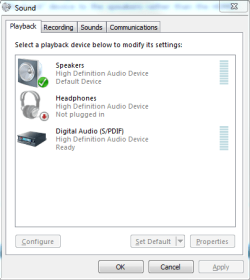
Can you hook up the monitor with DVI or VGA rather than the HDMI? Or, can you change the default "Playback" device to the speakers rather than the HDMI?
My Computer
At a glance
Windows 10 64 bitIntel i7 6700K16GB Corsair DominatorIntel CPU Graphics
Computer type
PC/Desktop
Computer Manufacturer/Model Number
My Own Build
OS
Windows 10 64 bit
CPU
Intel i7 6700K
Motherboard
ASUS ROG Maximus VIII Hero
Memory
16GB Corsair Dominator
Graphics Card(s)
Intel CPU Graphics
Sound Card
RealTek
Monitor(s) Displays
27" Dell S2719dgf
Screen Resolution
2560X1440
Hard Drives
1 TB Samsung 850 EVO SSD for Win 10 Pro
500GB Samsung 850 EVO SSD for Win 10 Insider
2 TB drive for backup
PSU
EVGA Supernova 750G2
Case
BeQuiet Silent Base 600
Cooling
Deepcool Captain 120EX
Keyboard
Microsoft Wireless 2000
Mouse
Microsoft wireless
Internet Speed
100 MB/sec (Cable)
Antivirus
Microsoft Defender and Malwarebytes
Browser
Edge/Firefox
Other Info
Cakewalk (Sonar) by BandLab and Studio One 4.1 Pro recording studio software. MOTU 896Mk3 Hybrid recording interface, Frontier Tranzport wireless control unit, Behringer X-Touch Control Surface.
Five USB connected optical drives for CD Audio production using Nero BurningROM
Yes, I can do the former, but I thought HDMI would always be the best option. My monitor doesn't go higher than 1080p so I didn't see the point in using DVI. Here's a screenshot of my Sound settings.
Attachments
dsfagsdfgsdggg.PNG
12 KB
· Views: 4
My Computer
At a glance
Windows 7 Ultimate 64 bit (6.1, Build 7601) S...Intel Core i7 (4700MQ, 2.4Ghz-3.4Ghz, 6MB Cac...16GB (DDR3 1600MHz Dual Channel Memory - 2 SO...Intel HD 4600 Graphics
Computer type
Laptop
Computer Manufacturer/Model Number
Sager NP2650 (Clevo W650SZ) - Custom Built
OS
Windows 7 Ultimate 64 bit (6.1, Build 7601) Service Pack 1
Built-in 802.11 Wireless B/G/N - Stock Wireless Card + Bluetooth™ 4.0 | Internal 9-in-1 Card Reader (MMC/RSMMC/SD/Mini SD/SDHC/SDXC/MS/MS Pro/MS Duo) | Built in 2.0 Megapixel Camera | Rosewill RX-358-S BLACK 3.5" SATA to eSATA External Enclosure with Internal 80mm fan