MSE 2 Final Released!

Burtie:

Wait a day or two and see if it comes back when MSE definitions are updated.
 

My Computer

Computer type
PC/Desktop
Computer Manufacturer/Model Number
Ignatz Special; 4 speed manual gearbox; factory air conditioning; one of one
OS
Windows 7 Home Premium SP1, 64-bit
CPU
Intel Skylake i5-6600K, not overclocked
Motherboard
AsRock Z170M Extreme 4, micro ATX
Memory
8 GB HyperX DDR4-2666 (2 x 4 GB)
Graphics Card(s)
none; graphics are integrated on CPU
Sound Card
onboard: Realtek ALC1150; external: USB Behringer UF0-202
Monitor(s) Displays
Dell S2340M 23 inch IPS
Screen Resolution
1600 x 900
Hard Drives
System: Crucial MX100 series SSD, 128 GB;
Data: Samsung Spinpoint 103SJ, 1 TB;
Backup: WD Caviar Green WD30EZRX-00D8PB0, 3 TB
PSU
Rosewill SilentNight 500 watt fanless, semi-modular
Case
Antec Solo II
Cooling
Noctua NH-U12S; Noctua F12 intake, Noctua S12A exhaust
Keyboard
Microsoft 200 6JH-00001 USB
Mouse
Dell or Microsoft optical wired; USB
Antivirus
Microsoft Security Essentials and Malwarebytes Premium
Browser
Pale Moon
Other Info
All fans PWM; speeds at idle: CPU circa 500 rpm; intake circa 600 rpm; exhaust circa 600 rpm; CPU temps 27 idle and 47 C load in a warm room (27 C/81 F) when running Intel Extreme Tuning Utility stress test.
Burtie:

Wait a day or two and see if it comes back when MSE definitions are updated.

OK thanks will do :)

Right click empty spot on task bar > Properties > Customize... (button in notification area.) New dialog box opens. Make sure "Show icons and notifications" is set for MSE.
 

My Computer

Computer type
Laptop
Computer Manufacturer/Model Number
Sony Vaio VPCEB47GM Laptop
OS
Win 7 Pro 64-bit
CPU
Intel i5 2.4 Ghz
Memory
8GB DDR3
Graphics Card(s)
Intel HD 3000
Sound Card
IDT High Definition
Monitor(s) Displays
15.6 WGXA Anti-Glare LED
Screen Resolution
1280x800
Hard Drives
640Gb 7200rpm
Antivirus
MSE
Browser
Opera (primary) with IE9 backup
Well, I just did a full scan. 9 hours spanning 10,000,000 files :D

I did not get the JAVA malware as reported by other users. Although I'm already updated to the latest version.

As for the network inspection, I did not notice any network performance degradation.

I guess that's it for my report.
 

My Computer

Computer type
PC/Desktop
Computer Manufacturer/Model Number
Custom Build
OS
Windows 7 Ultimate x64 Service Pack 1
CPU
AMD Athlon II x4 Propus 2.9 GHz
Motherboard
ASRock N68C-GS FX
Memory
2 x 4GB Corsair XMS 3 DDR3 -1600 CL9
Graphics Card(s)
AMD Radeon HD 5850 1GB GDDR5
Sound Card
On-board 6-Channel HD Audio
Monitor(s) Displays
18' LG Flatron E1942TC-BN on DVI, 18' Chimei 95ND on HDMI
Screen Resolution
1366 x 768 x 2
Hard Drives
1 x 500 GB Seagate
1 x 1 TB Western Digital Caviar Green
1 x 1 TB Hitachi Touro Mobile USB 3
PSU
Seasonic S12II 520W
Case
Generic with Cable Management
Cooling
Deep Cool Gammaxx 200
Keyboard
Dragonwar Desert Eagle
Mouse
Logitech B85
Internet Speed
5Mb/s DL, 0.9Mb/s UL
Antivirus
ESET Nod32
Browser
Google Chrome 64 Bit
Other Info
LG G4 H818P - Rooted with Xposed Framework
many thanks for this..

was a bit late getting the update (was running BETA)..

the new download dropped a pop-up which allowed me to auto-update..

- nice one..!!
 

My Computer

Computer type
PC/Desktop
Computer Manufacturer/Model Number
benchtec, built to personal specs
OS
Windows10 Pro - 64Bit vs.10547
CPU
i7-965 Extreme Edition (8 Cores) at 3.3GHz (no OC)
Motherboard
BloodRageX58 (Socket1366)
Memory
12G Corsair Dominator DDR3 - tripled
Graphics Card(s)
2xAMD SapphireNITRO R9 380(4G) crossfire
Sound Card
Sonar(SB)X-Fi onboard
Monitor(s) Displays
SyncMaster P2050 20"
Screen Resolution
1600x900 (widescreen)
Hard Drives
480G\OCZSolid3SSD, 64G\OCZVertex3SSD,60G\OCZVertex2SSD, 1TB\spinpointF1SATAHDD
PSU
1200w Power Station Gold
Case
ANTEC 900/2 all blue lights, etc..
Cooling
Noctua SE1366 NH-U12P - a tight fit, but a monster cooler!!
Keyboard
Logitech G19 (wired)
Mouse
Logitech G9 Laser (wired)
Internet Speed
150mb unlimited
Browser
IE11(RP)
Other Info
Xbox One, Nokia735 Windows10 mobile, LG HD/DVD/Blu-Ray r/w, CyberlinkPowerDVD15, LogitechZ5500-SS(5.1), LogitechG35Phones-SS(7.1),MSOffice 2007,CorelDrawX7,Painter2016, Wacom Intuos Pro-SE
Hi guys

i upgrade from avast free av to MSE as avast was creating problems in my system

but i was amazed at the amount of ram MSE is using on my system
there are 3 processes of MSE with RAM consumptions

MsMpEng - 60MB
msseces - 4MB
NisSrv - 2MB

thats a total of 66 ****in MBs of my 4GB ram
avast used to consume only 10-15 MBs!!!

is there a way to reduce RAM consumption by MSE??
i have turned off the scheduled scans and have latest definition updates

also i am using comodo firewall and have windows firewall and windows defender disabled
 

My Computer

Computer Manufacturer/Model Number
mii-darling
OS
Windows 7 Ultimate x64 SP1
CPU
AMD Phenom II X4 955 BE
Motherboard
ASUS M4A87TD EVO
Memory
2X2 GB CORSAIR DDR3 @ 1333MHz
Graphics Card(s)
ASUS EAH 6850
Sound Card
On-Board
Monitor(s) Displays
viewsonic 19"
Screen Resolution
1440x900
Hard Drives
2x250 GB Seagate Baracudas
PSU
Corsair VX 550W
Case
CM Elite 430
Cooling
CM Hyper 212+
Keyboard
Logitech Wireless MK320
Mouse
Logitech Wireless MK320
Internet Speed
dont even ask :(
That's less than 2% of your RAM.

If 66 MB is too much, then 10 or 15 MB is too much. I can't imagine that the difference (51 to 56) is pushing you over the edge.

Like gas in a gas tank, RAM is meant to be used. It's running around 80 MB for a dollar at the RAM station.
 

My Computer

Computer type
PC/Desktop
Computer Manufacturer/Model Number
Ignatz Special; 4 speed manual gearbox; factory air conditioning; one of one
OS
Windows 7 Home Premium SP1, 64-bit
CPU
Intel Skylake i5-6600K, not overclocked
Motherboard
AsRock Z170M Extreme 4, micro ATX
Memory
8 GB HyperX DDR4-2666 (2 x 4 GB)
Graphics Card(s)
none; graphics are integrated on CPU
Sound Card
onboard: Realtek ALC1150; external: USB Behringer UF0-202
Monitor(s) Displays
Dell S2340M 23 inch IPS
Screen Resolution
1600 x 900
Hard Drives
System: Crucial MX100 series SSD, 128 GB;
Data: Samsung Spinpoint 103SJ, 1 TB;
Backup: WD Caviar Green WD30EZRX-00D8PB0, 3 TB
PSU
Rosewill SilentNight 500 watt fanless, semi-modular
Case
Antec Solo II
Cooling
Noctua NH-U12S; Noctua F12 intake, Noctua S12A exhaust
Keyboard
Microsoft 200 6JH-00001 USB
Mouse
Dell or Microsoft optical wired; USB
Antivirus
Microsoft Security Essentials and Malwarebytes Premium
Browser
Pale Moon
Other Info
All fans PWM; speeds at idle: CPU circa 500 rpm; intake circa 600 rpm; exhaust circa 600 rpm; CPU temps 27 idle and 47 C load in a warm room (27 C/81 F) when running Intel Extreme Tuning Utility stress test.
Hi guys

i upgrade from avast free av to MSE as avast was creating problems in my system

but i was amazed at the amount of ram MSE is using on my system
there are 3 processes of MSE with RAM consumptions

MsMpEng - 60MB
msseces - 4MB
NisSrv - 2MB

thats a total of 66 ****in MBs of my 4GB ram
avast used to consume only 10-15 MBs!!!

is there a way to reduce RAM consumption by MSE??
i have turned off the scheduled scans and have latest definition updates

also i am using comodo firewall and have windows firewall and windows defender disabled
So what? You have 4GB, why would you worry about 66MB? ;)
 

My Computer

Computer type
PC/Desktop
Computer Manufacturer/Model Number
Gigabyte Technology Co., Ltd.
OS
Win 7 Ultimate 64-bit SP1 (desktop)
CPU
Intel Core 2 Duo E8400
Motherboard
Gigabyte GA-EP35-DS3R
Memory
2x 2GB OCZ DDR II SDRAM PC2-6400
Graphics Card(s)
NVIDIA GeForce 9400GT
Monitor(s) Displays
HP 2009m(primary), Acer P191W
Screen Resolution
1600x900, 1440x900
Hard Drives
Internal:WD Caviar Black 640GB 32MB cache 7200RPM
External:Samsung Story Station 1TB HDD desktop drive
500GB Toshiba portable drive
PSU
Antec Earthwatts EA500D
Case
Antec Sonata III
Cooling
4 fans
Keyboard
Logitech Wave
Mouse
Logitech M-SBF90
Internet Speed
Slow due to home Wireless-G router
Antivirus
MSE, Hitman Pro, Malwarebytes
Browser
Chrome and Palemoon
Other Info
Laptop....Acer 5750Z-4835
15.6" HD Widescreen CineCrystal™ LED-backlit LCD Display: (1366x768 resolution, 16:9 aspect ratio)
Intel® Pentium® Processor B940 (2.0GHz, 2MB L3 cache)
Windows® 7 Home Premium,500GB Hard Drive,4GB DDR3 RAM, Intel® HD Graphics,8X DVD-Super Multi Double-Layer Drive
Multi-in-1 Digital Media Card Reader,802.11b/g/n Wi-Fi
Chrome and Palemoon, MSE, Hitman Pro
hihihihi

but coming from avast's 10-15 mb, 66 is a huge jump
there must be some reason to it........
 

My Computer

Computer Manufacturer/Model Number
mii-darling
OS
Windows 7 Ultimate x64 SP1
CPU
AMD Phenom II X4 955 BE
Motherboard
ASUS M4A87TD EVO
Memory
2X2 GB CORSAIR DDR3 @ 1333MHz
Graphics Card(s)
ASUS EAH 6850
Sound Card
On-Board
Monitor(s) Displays
viewsonic 19"
Screen Resolution
1440x900
Hard Drives
2x250 GB Seagate Baracudas
PSU
Corsair VX 550W
Case
CM Elite 430
Cooling
CM Hyper 212+
Keyboard
Logitech Wireless MK320
Mouse
Logitech Wireless MK320
Internet Speed
dont even ask :(
I'm sure you are right. I'm sure there is a reason.

Would it be better if there were no reason?

You have to decide if the difference in RAM usage is a show-stopper for you.

If it is, then you have two choices:

1: Don't use MSE

2: Buy more RAM
 

My Computer

Computer type
PC/Desktop
Computer Manufacturer/Model Number
Ignatz Special; 4 speed manual gearbox; factory air conditioning; one of one
OS
Windows 7 Home Premium SP1, 64-bit
CPU
Intel Skylake i5-6600K, not overclocked
Motherboard
AsRock Z170M Extreme 4, micro ATX
Memory
8 GB HyperX DDR4-2666 (2 x 4 GB)
Graphics Card(s)
none; graphics are integrated on CPU
Sound Card
onboard: Realtek ALC1150; external: USB Behringer UF0-202
Monitor(s) Displays
Dell S2340M 23 inch IPS
Screen Resolution
1600 x 900
Hard Drives
System: Crucial MX100 series SSD, 128 GB;
Data: Samsung Spinpoint 103SJ, 1 TB;
Backup: WD Caviar Green WD30EZRX-00D8PB0, 3 TB
PSU
Rosewill SilentNight 500 watt fanless, semi-modular
Case
Antec Solo II
Cooling
Noctua NH-U12S; Noctua F12 intake, Noctua S12A exhaust
Keyboard
Microsoft 200 6JH-00001 USB
Mouse
Dell or Microsoft optical wired; USB
Antivirus
Microsoft Security Essentials and Malwarebytes Premium
Browser
Pale Moon
Other Info
All fans PWM; speeds at idle: CPU circa 500 rpm; intake circa 600 rpm; exhaust circa 600 rpm; CPU temps 27 idle and 47 C load in a warm room (27 C/81 F) when running Intel Extreme Tuning Utility stress test.
Though I understand you feel like the program is using too much RAM, I have to concur with the others, 66MB of RAM usage (if that's what it's actually using) isn't going to break your 4gig bank.

As to why it uses that much, I have no idea.

Good luck.
 

My Computer

Computer type
PC/Desktop
Computer Manufacturer/Model Number
Custom built by me.
OS
Windows 10 Pro
CPU
Intel Core i7-4770K (3.5Ghz)
Motherboard
Gigabyte G1 Sniper 5 (F10 Bios)
Memory
32 gig Corsair Dominator Platinum (4x8Gig)
Graphics Card(s)
Sapphire Tri-X R9 Fury
Sound Card
Soundblaster ZXR
Monitor(s) Displays
NEC PA242W 24" LCD Monitor
Screen Resolution
1920 x 1200
Hard Drives
Primary - Samsung 850 Pro (512gig), Samsung 840 Pro (256gig), 2TB WD Caviar Black.
PSU
EVGA Supernova 1000 G2
Case
Cooler Master HAF X
Cooling
Corsair H100i with Corsair Air Series SP120 Quiet Fans
Keyboard
Logitech Wireless Wave
Mouse
Logitech Performance MX
Internet Speed
High Speed Cable
Antivirus
Norton Security
Browser
IE11
Other Info
Memory Timings - 1866MHz @ 9-9-9-27-1T @ 1.5 volts
For the RAM concerns, as an old guy I would watch my RAM usage like a hawk. Any program which seemed to be a little too RAM-greedy got black marks in my book. It took me a long time to get used to MSE using so much.

Then I read some things about how Win 7 manages memory differently from previous Windows versions, with the point being made that idle RAM is memory you have paid for which is doing absolutely nothing to speed up or run your computer. Win 7 puts the slackers to work.

Older Windows versions which did not manage memory very well needed to keep a bunch in reserve for sudden demands. Win 7 uses everything it can find a good use for all the time. But, it is also good about reallocating resources on the fly as demand changes. Using RAM like this is like having your cake and eating it too. :)

...the new download dropped a pop-up which allowed me to auto-update...
How? Where? What???!!!! :eek:

That's my only real complaint about MSE - the constant popup from WU telling me that updates are available. As a general rule I like to see what I'm updating before installing it, but not the Virus Definitions. What MSE version are you now running?
 

My Computer

Computer Manufacturer/Model Number
Self
OS
Main - Windows 7 Pro SP1 64-Bit; 2nd - Windows Server 2008 R2
CPU
Main - Core i7 2600K; 2nd - Core i7 920
Motherboard
Main - Asus P8Z68-V Pro/Gen3; 2nd - Gigabyte GA-EX58-UDR3
Memory
Main - 16GB Corsair Vengeance; 2nd - 12GB Corsair Vengeance
Graphics Card(s)
Main - XFX Radeon 6870 1GB; 2nd - XFX Radeon 4870 1GB
Sound Card
Both: Onboard Realtek Azalia
Monitor(s) Displays
Main - Hann 25" + I-INC 25" + Acer 23"; 2nd - Upgrading Soon
Screen Resolution
Main - 1920x1080 (All Three Monitors); 2nd - Upgrading Soon
Hard Drives
Main - (1) Crucial M4 128GB (Boot)
Main - (1) Seagate 2TB 64MB Cache (Data)
Main - (1) Seagate 2TB 64MB Cache (Data Backup)
2nd - (1) Intel X25-M SSD 80GB (Boot)
2nd - (3) Seagate 1TB 32MB Cache (Data Backup)
2nd - (1) Seagate 320GB (Because)
PSU
Main - OCZ 600W Modular; 2nd - OCZ 600W
Case
Main - Thermaltake Element G; 2nd - NZXT something or other
Cooling
Main - Corsair H80; 2nd - Prolimatech Megahalems
Keyboard
Main - Razer Reclusa; 2nd - Old MS Keyboard
Mouse
Main - Logitech MX Revolution; 2nd - Old MS Mouse
Internet Speed
20Mbps Time-Warner Cable
Might as well use the RAM if you have it. Having free ram just sitting there idle is really silly. Other operating systems have been working like this for years. It's like buying a really huge house and only decorating 1 or 2 rooms and leaving the rest completely unused....for the time when you might have 8-10 children.
 

My Computer

Computer Manufacturer/Model Number
Self-Built in July 2009
OS
Windows 7 Ultimate x64
CPU
Intel Q9550 2.83Ghz OC'd to 3.40Ghz
Motherboard
Gigabyte GA-EP45-UD3R rev. 1.1, F12 BIOS
Memory
8GB G.Skill PI DDR2-800, 4-4-4-12 timings
Graphics Card(s)
EVGA 1280MB Nvidia GeForce GTX570
Sound Card
Realtek ALC899A 8 channel onboard audio
Monitor(s) Displays
23" Acer x233H
Screen Resolution
1920x1080
Hard Drives
Intel X25-M 80GB Gen 2 SSD
Western Digital 1TB Caviar Black, 32MB cache. WD1001FALS
PSU
Corsair 620HX modular
Case
Antec P182
Cooling
stock
Keyboard
ABS M1 Mechanical
Mouse
Logitech G9 Laser Mouse
Internet Speed
15/2 cable modem
Other Info
Windows and Linux enthusiast. Logitech G35 Headset.
Then I read some things about how Win 7 manages memory differently from previous Windows versions, with the point being made that idle RAM is memory you have paid for which is doing absolutely nothing to speed up or run your computer. Win 7 puts the slackers to work.

Well said :D


...the new download dropped a pop-up which allowed me to auto-update...
How? Where? What???!!!! :eek:

Yeah I never got a pop up telling me about a new release. Maybe because I jumped the gun? :)
 

My Computer

Computer type
PC/Desktop
Computer Manufacturer/Model Number
Custom built by me.
OS
Windows 10 Pro
CPU
Intel Core i7-4770K (3.5Ghz)
Motherboard
Gigabyte G1 Sniper 5 (F10 Bios)
Memory
32 gig Corsair Dominator Platinum (4x8Gig)
Graphics Card(s)
Sapphire Tri-X R9 Fury
Sound Card
Soundblaster ZXR
Monitor(s) Displays
NEC PA242W 24" LCD Monitor
Screen Resolution
1920 x 1200
Hard Drives
Primary - Samsung 850 Pro (512gig), Samsung 840 Pro (256gig), 2TB WD Caviar Black.
PSU
EVGA Supernova 1000 G2
Case
Cooler Master HAF X
Cooling
Corsair H100i with Corsair Air Series SP120 Quiet Fans
Keyboard
Logitech Wireless Wave
Mouse
Logitech Performance MX
Internet Speed
High Speed Cable
Antivirus
Norton Security
Browser
IE11
Other Info
Memory Timings - 1866MHz @ 9-9-9-27-1T @ 1.5 volts
@profdlp

thnx for the info:D
now i fell much better;)

also is there a way to stop automatic updates of MSE and put it to manual??

one more thing guys
is background intelligent transfer service related to MSE, coz in my case even after disabling it, it automatically restarts and hogs my bandwidth?
 
Last edited:

My Computer

Computer Manufacturer/Model Number
mii-darling
OS
Windows 7 Ultimate x64 SP1
CPU
AMD Phenom II X4 955 BE
Motherboard
ASUS M4A87TD EVO
Memory
2X2 GB CORSAIR DDR3 @ 1333MHz
Graphics Card(s)
ASUS EAH 6850
Sound Card
On-Board
Monitor(s) Displays
viewsonic 19"
Screen Resolution
1440x900
Hard Drives
2x250 GB Seagate Baracudas
PSU
Corsair VX 550W
Case
CM Elite 430
Cooling
CM Hyper 212+
Keyboard
Logitech Wireless MK320
Mouse
Logitech Wireless MK320
Internet Speed
dont even ask :(
@profdlp

thnx for the info:D
now i fell much better;)

also is there a way to stop automatic updates of MSE and put it to manual??

one more thing guys
is background intelligent transfer service related to MSE, coz in my case even after disabling it, it automatically restarts and hogs my bandwidth?

I believe that the Background Intelligent Transfer Service is used by Windows Update. Read more about it here.

Link

I'd have to get back on you on disabling it manually though. As I'm not at my house and I don't have it in front of me, if there even is such an option.
 
Last edited:

My Computer

Computer type
PC/Desktop
Computer Manufacturer/Model Number
Custom Build
OS
Windows 7 Ultimate x64 Service Pack 1
CPU
AMD Athlon II x4 Propus 2.9 GHz
Motherboard
ASRock N68C-GS FX
Memory
2 x 4GB Corsair XMS 3 DDR3 -1600 CL9
Graphics Card(s)
AMD Radeon HD 5850 1GB GDDR5
Sound Card
On-board 6-Channel HD Audio
Monitor(s) Displays
18' LG Flatron E1942TC-BN on DVI, 18' Chimei 95ND on HDMI
Screen Resolution
1366 x 768 x 2
Hard Drives
1 x 500 GB Seagate
1 x 1 TB Western Digital Caviar Green
1 x 1 TB Hitachi Touro Mobile USB 3
PSU
Seasonic S12II 520W
Case
Generic with Cable Management
Cooling
Deep Cool Gammaxx 200
Keyboard
Dragonwar Desert Eagle
Mouse
Logitech B85
Internet Speed
5Mb/s DL, 0.9Mb/s UL
Antivirus
ESET Nod32
Browser
Google Chrome 64 Bit
Other Info
LG G4 H818P - Rooted with Xposed Framework
thnx bro

i "was" a symbian addict, using n95 8gb but after that nokia lost the way..............
 

My Computer

Computer Manufacturer/Model Number
mii-darling
OS
Windows 7 Ultimate x64 SP1
CPU
AMD Phenom II X4 955 BE
Motherboard
ASUS M4A87TD EVO
Memory
2X2 GB CORSAIR DDR3 @ 1333MHz
Graphics Card(s)
ASUS EAH 6850
Sound Card
On-Board
Monitor(s) Displays
viewsonic 19"
Screen Resolution
1440x900
Hard Drives
2x250 GB Seagate Baracudas
PSU
Corsair VX 550W
Case
CM Elite 430
Cooling
CM Hyper 212+
Keyboard
Logitech Wireless MK320
Mouse
Logitech Wireless MK320
Internet Speed
dont even ask :(
hihihihi

but coming from avast's 10-15 mb, 66 is a huge jump
there must be some reason to it........


- that's the best value for 66MB you're likely to see in a good while..

- enjoy!!


:geek:
 

My Computer

Computer type
PC/Desktop
Computer Manufacturer/Model Number
benchtec, built to personal specs
OS
Windows10 Pro - 64Bit vs.10547
CPU
i7-965 Extreme Edition (8 Cores) at 3.3GHz (no OC)
Motherboard
BloodRageX58 (Socket1366)
Memory
12G Corsair Dominator DDR3 - tripled
Graphics Card(s)
2xAMD SapphireNITRO R9 380(4G) crossfire
Sound Card
Sonar(SB)X-Fi onboard
Monitor(s) Displays
SyncMaster P2050 20"
Screen Resolution
1600x900 (widescreen)
Hard Drives
480G\OCZSolid3SSD, 64G\OCZVertex3SSD,60G\OCZVertex2SSD, 1TB\spinpointF1SATAHDD
PSU
1200w Power Station Gold
Case
ANTEC 900/2 all blue lights, etc..
Cooling
Noctua SE1366 NH-U12P - a tight fit, but a monster cooler!!
Keyboard
Logitech G19 (wired)
Mouse
Logitech G9 Laser (wired)
Internet Speed
150mb unlimited
Browser
IE11(RP)
Other Info
Xbox One, Nokia735 Windows10 mobile, LG HD/DVD/Blu-Ray r/w, CyberlinkPowerDVD15, LogitechZ5500-SS(5.1), LogitechG35Phones-SS(7.1),MSOffice 2007,CorelDrawX7,Painter2016, Wacom Intuos Pro-SE
thnx bro

i "was" a symbian addict, using n95 8gb but after that nokia lost the way..............

You're welcome mate.

Well, you should really try out Symbian^3 devices such as the C7. Great features, fluid UI and really cheap. But if you're looking for something completely different, then there's nothing to see.
 

My Computer

Computer type
PC/Desktop
Computer Manufacturer/Model Number
Custom Build
OS
Windows 7 Ultimate x64 Service Pack 1
CPU
AMD Athlon II x4 Propus 2.9 GHz
Motherboard
ASRock N68C-GS FX
Memory
2 x 4GB Corsair XMS 3 DDR3 -1600 CL9
Graphics Card(s)
AMD Radeon HD 5850 1GB GDDR5
Sound Card
On-board 6-Channel HD Audio
Monitor(s) Displays
18' LG Flatron E1942TC-BN on DVI, 18' Chimei 95ND on HDMI
Screen Resolution
1366 x 768 x 2
Hard Drives
1 x 500 GB Seagate
1 x 1 TB Western Digital Caviar Green
1 x 1 TB Hitachi Touro Mobile USB 3
PSU
Seasonic S12II 520W
Case
Generic with Cable Management
Cooling
Deep Cool Gammaxx 200
Keyboard
Dragonwar Desert Eagle
Mouse
Logitech B85
Internet Speed
5Mb/s DL, 0.9Mb/s UL
Antivirus
ESET Nod32
Browser
Google Chrome 64 Bit
Other Info
LG G4 H818P - Rooted with Xposed Framework
MSE 2 released

Microsoft has reportedly released Microsoft Security Essentials 2.

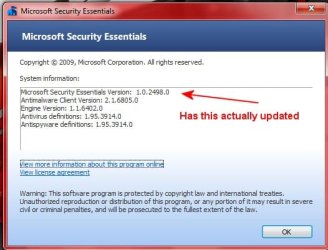
mse.jpg

This is my "About MSE" as of this morning. MSE2 is suppose to update from Windows update without me having to do anything. As of this time my Windows has all the latest updates but I can not tell if MSE actually updated to version 2.

Does anyone know if it has?

If I download MSE2 and install it, do I have to uninstall ver 1 first ?

MSE is working as it should (which is fantastic). This is the best antivirus I have ever used. All I am interested in is having the latest version :sarc:.

Any information would be greatly appreciated.
 

My Computer

OS
Windows 7 Pro
CPU
Intel(R) Pentium(R) Duel CPU E2200 2.20 Ghz
Motherboard
GA-G41M-ES2L
Memory
4 gb 2.96 Usable
Graphics Card(s)
Onboard
Sound Card
Onboard
Hard Drives
2 - 1TB WD Sata Drives
Back
Top