
MSDT.exe Corrupt file virus? And explorer not working right

redblade8

New member
Member
VIP
Local time
1:52 AM
Messages
144
Hallo, I keep getting a 'msdt.exe file is corrupt' message in my system tray. I looked this up

on google, and this came up as a virus/worm of some sort. Most post's were from 2009

though...Also, it seems it has messed up my explorer too, as I can't change some system settings

or anything either. Even my anti-virus can't get to the virus , the location it's in I can't get

to either. I have uploaded some pictures to tinypic to show you this.


1. Internet not working - MSDT.exe virus in tray.
http://i44.tinypic.com/qyheyu.jpg
2. Ping request's not working right - MSDT.exe virus in tray
http://i39.tinypic.com/350162p.jpg
3. End of SFC/Scannow ( it was suggested to do this on a site I found while searching up msdt.exe )
http://i41.tinypic.com/11tr2m9.png
4. Avast reporting that it can't scan the location where the virus is.
http://i41.tinypic.com/w6wq6e.png
5. MSDT.exe virus shown in tray notifications.
http://i41.tinypic.com/n50dqx.png
6. Right clicking on system icon brings up box saying that I'm not admin when I am?
http://i40.tinypic.com/29m7lt2.png
7. Some examples of not being able to change explorer settings. I used a file from this site, small icons for taskbar.reg. I also tryed it as it is done usually as shown in this picture, but that also does nothing.
http://i39.tinypic.com/2mxr0o6.png

8. Another explorer setting I can't change, and it reverts back to what it was without change after I close the box. ( In this one 'show hidden files and folders' )
http://i41.tinypic.com/hsolqr.png

9. Can't add new keys to explorer part of registry.
http://i44.tinypic.com/2yjrgbm.png

How do I fix this without re-installing windows or anything?
Thanks.
 

My Computer My Computer

At a glance

Windows 7...Ultimate x64Intel Core i7 2630QM4 GB DDR3NVidea GeForce 540M
Computer Manufacturer/Model Number
ASUS N53SV
OS
Windows 7...Ultimate x64
CPU
Intel Core i7 2630QM
Motherboard
ASUS
Memory
4 GB DDR3
Graphics Card(s)
NVidea GeForce 540M
Hard Drives
750GB SATA
Cooling
Only CPU cooling, none for graphics. Always cool though.
Sounds like you've caught a fake antivirus - malware they're really quite common unfortunately.

The is a solution that thankfully does not involve a re-format.

1, Restart your machine and as soon as you have the desktop showing (if not before the icons appear) right-click the taskbar and select Task Manager

   Note
Fake AV's will disable access to this once loaded into memory


2, Look for the MSDT.exe process then right-click and select End Process Tree which will/should kill the process and anything related to it

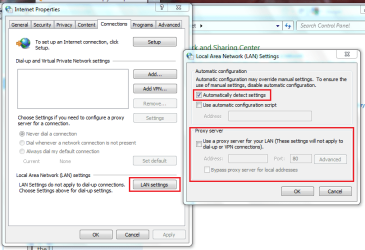
3, Open Control Panel > Network and Internet > Internet Options and under the Connections tab click Lan Settings and make sure that your settings match the image below

Internetn Options.PNG
   Note
This will re-enable Internent access


4, Download MalwareBytes, install, run and perform a Full Scan

Malwarebytes should now scan your computer and detect then remove any infected files

   Tip
You may wish to run a second scan after the 1st reboot


Hope it helps :)
 

My Computer My Computer

At a glance

Windows 7 Ultimate x64AMD Sempron Dual Core3GBNVIDIA GeForce 6150SE nForce 430
Computer Manufacturer/Model Number
Compaq Desktop
OS
Windows 7 Ultimate x64
CPU
AMD Sempron Dual Core
Memory
3GB
Graphics Card(s)
NVIDIA GeForce 6150SE nForce 430
Screen Resolution
1024x768
Hard Drives
150GB Sata
Hi, I have malware bytes already installed, but I haven't done a scan in a while. I'll get it updated & run a scan in safe mode. I can't seem to find the process in the task manager )= It's not named a simple 'msdt.exe' in there, everything just looks like generic things to me...There was a process there around when the infection happened though, it had a really long and gibberish kind of name ( it's not there anymore...) I think if I follow what it says about running a chkdsk the infection might get worse too? But I'll see what comes up in safe mode, thanks.
 

My Computer My Computer

At a glance

Windows 7...Ultimate x64Intel Core i7 2630QM4 GB DDR3NVidea GeForce 540M
Computer Manufacturer/Model Number
ASUS N53SV
OS
Windows 7...Ultimate x64
CPU
Intel Core i7 2630QM
Motherboard
ASUS
Memory
4 GB DDR3
Graphics Card(s)
NVidea GeForce 540M
Hard Drives
750GB SATA
Cooling
Only CPU cooling, none for graphics. Always cool though.
Hi, redblade8.

Malwarebytes performs best when scanning in normal mode. Please try that first.
 

My Computer My Computer

At a glance

Windows 7 & Windows Vista Ultimate
OS
Windows 7 & Windows Vista Ultimate
Normal mode? Not safe mode you mean? I did a 'quick-scan' in normal mode which turned up nothing :\
Also, I can't get into safe mode now, it stops at loading driver 'windows/system32/classpnp.sys'
Another thing I have noticed too is that when running other programs, the 'msdt.exe is a corrupt file' shown in my system tray can also change to 'spywareterminator.exe is a corrupt file...'
 

My Computer My Computer

At a glance

Windows 7...Ultimate x64Intel Core i7 2630QM4 GB DDR3NVidea GeForce 540M
Computer Manufacturer/Model Number
ASUS N53SV
OS
Windows 7...Ultimate x64
CPU
Intel Core i7 2630QM
Motherboard
ASUS
Memory
4 GB DDR3
Graphics Card(s)
NVidea GeForce 540M
Hard Drives
750GB SATA
Cooling
Only CPU cooling, none for graphics. Always cool though.
Hi, redblade8.

Correct, I meant Normal Mode. Malwarebytes works best in Normal Mode with a quick scan. As to your problem accessing Safe Mode, there is a long topic at the TechNet site with a similar problem with solutions that worked for others (See Windows 7 fails to go into safe mode. Stuck at classpnp.sys.)

The thing is that the classpnp.sys error could also be related to the corrupt errors you've received. You may want to start by uninstalling SpywareTerminator.exe and see if that solves the msdt.exe corrupt message.

Let us know how you make out and if any portion of the problems has been solved.
 

My Computer My Computer

At a glance

Windows 7 & Windows Vista Ultimate
OS
Windows 7 & Windows Vista Ultimate

My Computer My Computer

At a glance

Windows 7...Ultimate x64Intel Core i7 2630QM4 GB DDR3NVidea GeForce 540M
Computer Manufacturer/Model Number
ASUS N53SV
OS
Windows 7...Ultimate x64
CPU
Intel Core i7 2630QM
Motherboard
ASUS
Memory
4 GB DDR3
Graphics Card(s)
NVidea GeForce 540M
Hard Drives
750GB SATA
Cooling
Only CPU cooling, none for graphics. Always cool though.
Microsoft Distributed Transaction - msdt.exe - Program Information: Added by the W32/Tilebot-BQ worm. When started, this infection connects to a remote IRC server where it waits for commands to execute.

The location does not match what your images showed. Have you manually deleted the file in AppData? If not, download TFC by Old Timer from here (direct download): http://www.itxassociates.com/OT-Tools/TFC.exe

  • First, save any files as TFC will close ALL open programs including your browser!
  • Double-click on TFC.exe to run it. If you are using Vista/Windows 7 right-click on the file and choose Run As Administrator.
  • Click the Start button to begin the cleaning process and let it run uninterrupted to completion.
  • Important! If TFC prompts you to reboot, please do so immediately. If not prompted, manually reboot the machine anyway to ensure a complete clean.

More info:
TFC (Temp File Cleaner) will clear out all temp folders for all user accounts (temp, IE temp, java, FF, Opera, Chrome, Safari), including Administrator, All Users, LocalService, NetworkService, and any other accounts in the user folder. It also cleans out the %systemroot%\temp folder and checks for .tmp files in the %systemdrive% root folder, %systemroot%, and the system32 folder (both 32bit and 64bit on 64bit OSs). It shows the amount removed for each location found (in bytes) and the total removed (in MB).

Before running, it will stop Explorer and all other running applications. When finished, if a reboot is required the user must reboot to finish clearing any in-use temp files.
-- TFC only cleans temp folders.
-- TFC will not clean URL history, prefetch, or cookies. Depending on how often someone cleans their temp folders, their system hardware, and how many accounts are present, it can take anywhere from a few seconds to a minute or more. TFC will completely clear all temp files where other temp file cleaners may fail.

TFC requires a reboot immediately after running. Be sure to save any unsaved work before running TFC.
 

My Computer My Computer

At a glance

Windows 7 & Windows Vista Ultimate
OS
Windows 7 & Windows Vista Ultimate
Back
Top