Solved EMET Issues with DEP

brewmaster

New member
Local time
6:52 AM
Messages
15
Hi ,

I have been trying to find/ uninstall EMET on my pc , as it won`t allow me into DEP to allow some software that I bought ( Easycap device) to install . It just gives me a greyed out window box and I can`t select any controls at all . It completely took away my administrative authority altogether . The software is legit and there are no issues with it , so I want to let it through . I have a dvd install disc as well as the usb capture device .
I believe that I may have uninstalled the EMET about a month ago because I can`t seem to find it anywhere on my pc , even after downloading the EMET uninstall program . I have heard from others that even if it`s uninstalled that it still may be running in the background ?
I tried Windows support online and they want $ 200 to fix it ? I`m on a disability pension so that was a no go for sure . Can anyone help with this situation ?
Thanks !
 

My Computer

Computer type
PC/Desktop
Computer Manufacturer/Model Number
HP Media Center
OS
Vista 32 bit
Antivirus
AVG , Malwarebytes anti .
Browser
IE , Chrome
Hello brewmaster, and welcome to Seven Forums.

If DEP is grayed out and EMET is not installed, then DEP would be disabled.

DEP - Enable or Disable

If that's the case, then DEP shouldn't be causing an issue with the program. What error message are you getting when trying to install Easycap?

If you have a 64-bit processor, then it may have a no execute (NX bit) feature that behaves like DEP giving you the warning instead.

Either way, if the program is tripping this, I'd be a bit concerned about trying to install it. If you truly feel that it's a legit program, then you would be best to contact the developer to see what they have to say about this as well.
 

My Computer

Computer type
PC/Desktop
Computer Manufacturer/Model Number
Self built custom
OS
64-bit Windows 11 Pro for Workstations
CPU
Intel i7-8700K OC'd to 5 GHz
Motherboard
ASUS ROG Maximus XI Formula Z390
Memory
64 GB (4x16GB) G.SKILL TridentZ RGB DDR4 3600 MHz
Graphics Card(s)
ASUS ROG-STRIX-GTX1080TI-O11G-GAMING
Sound Card
Integrated
Monitor(s) Displays
2 x Samsung Odyssey G7 27"
Screen Resolution
2560x1440
Hard Drives
1TB Samsung 990 PRO M.2,
4TB Samsung 990 PRO PRO M.2,
TerraMaster F8 SSD Plus NAS
PSU
Seasonic Prime Titanium 850W
Case
Thermaltake Core P3
Cooling
Corsair Hydro H115i
Keyboard
Logitech wireless K800
Mouse
Logitech MX Master 4
Internet Speed
2 Gb/s Download and 100 Mb/s Upload
Antivirus
Malwarebyte Anti-Malware Premium
Browser
Google Chrome
Other Info
Logitech Z625 speaker system,
Logitech BRIO 4K Pro webcam,
HP Color LaserJet Pro MFP M477fdn,
APC SMART-UPS RT 1000 XL - SURT1000XLI,
Galaxy S23 Plus phone
EMET -remove

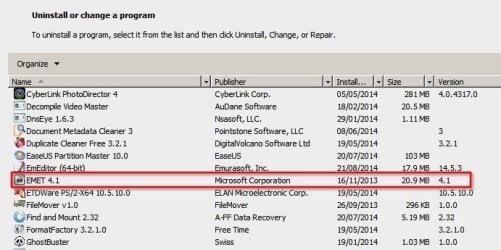
Have a look for an entry like this. The version number might be different.

EMET.jpg

EDIT: If you don't see it then it's not installed. If you think that it's somehow still running - install it again then remove it. See the post below this one.

Also try right-clicking Start button> Properties> Taskbar> Notification Area> Customize.

Then check for EMET in the list and set it to display (if hidden)

Once EMET is shown in the system tray - double click the icon.

Choose Add Wildcard and type the path to the executable but there's no need to add the whole path.

Example:

To add Cyberfox.exe

Default path is "C:\Program Files\Cyberfox\Cyberfox.exe"

All you need to add to EMET using a wildcard is to type the following:

*\Cyberfox\Cyberfox.exe

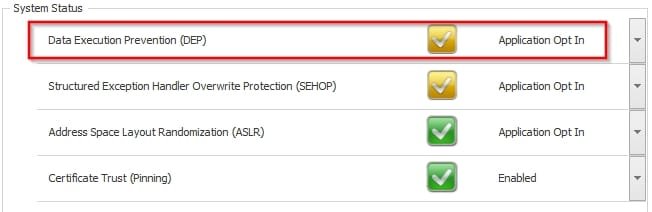
However check your settings as I reckon that you need to configure as shown here:

Enhanced Mitigation Experience Toolkit.jpg

Then manually add apps as shown above when you install them.
 
Last edited:

My Computer

Computer type
Laptop
Computer Manufacturer/Model Number
ASUS
OS
Microsoft Windows 7 Home Premium 64-bit 7601 Multiprocessor Free Service Pack 1
CPU
AMD C-60 APU with Radeon(tm) HD Graphics
Motherboard
ASUSTeK COMPUTER INC. X501U
Memory
4.00 GB
Graphics Card(s)
AMD Radeon HD 6290 Graphics
Sound Card
(1) AMD High Definition Audio Device (2) Realtek High Defi
Screen Resolution
1366 x 768 x 32 bits (4294967296 colors) @ 60 Hz
Hard Drives
Hitachi HTS545050A7E380 SATA Disk Device
Antivirus
Comodo CIS & FW, SecureAplus App Whitelisting, Threatfire
Browser
Cyberfox 64bit, Opera 64bit, Airfox
Other Info
Spy-The-Spy, HitmanPro.Alert, Norton Connect Safe, MJRegWatcher, BitDefender TrafficLight, Voodoo Shield, Zemana AntiMalware
No, not running in the background but modified system settings that still exist after removing EMET. See if you have an EMET icon in the systray, a gray/black lock. See my avatar picture for example.

EMET disables the DEP settings from System Properties so you can't change it anymore. Instead it's controlled by the system wide settings in EMET. You could try installing EMET again and change profile to the Recommended security setting. Recommended settings is probably "Opt In" x 3. Reboot and then uninstall EMET.
 

My Computer

Computer type
Laptop
Computer Manufacturer/Model Number
HP Elitebook 8540p
OS
Windows 7 Pro 32
CPU
Intel(R) Core(TM) i5 CPU M 540 @ 2.53GHz
Motherboard
Hewlett-Packard 1521
Memory
4,00 GB (Usable 2,98)
Graphics Card(s)
NVIDIA NVS 5100M
Sound Card
NVIDIA High Definition Audio
Screen Resolution
1600x900
Hard Drives
INTEL SSDSA2CW120G3
Antivirus
F-Secure Internet Security
Browser
IE, Firefox, Opera
Other Info
Sandboxie,
SRP (Software Restriction Policy),
EMET (Enhanced Mitigation Experience Toolkit),
WFC (Windows Firewall Control by BiniSoft),
Malwarebytes Premium
Thanks to all of you who replied , very much appreciated ! I haven`t had a chance to look into anything yet as i`m in the middle of painting my house , but hope to try some of these fix`s later on tonight .
Thanks again !
 

My Computer

Computer type
PC/Desktop
Computer Manufacturer/Model Number
HP Media Center
OS
Vista 32 bit
Antivirus
AVG , Malwarebytes anti .
Browser
IE , Chrome
Found EMET notification

Hi Callendar , I found EMET notification where you said to go ( in past items list )and set it to display . I saved it and then , well , this is going to sound really funny to someone like you , but i`m not computer savvy, is the system tray right beside the start button ? Anyway , it didn`t show up there if that`s where i`m supposed to look for it . I looked under hidden icons on the opposite side as well , but didn`t find anything .
I`m wondering if it`s even on here at this point ? Should I re install it as another member said , and set it to the proper configeration and then uninstall emet to see if that will have any effect ?

Thanks a bunch !


Have a look for an entry like this. The version number might be different.

View attachment 330936

EDIT: If you don't see it then it's not installed. If you think that it's somehow still running - install it again then remove it. See the post below this one.

Also try right-clicking Start button> Properties> Taskbar> Notification Area> Customize.

Then check for EMET in the list and set it to display (if hidden)

Once EMET is shown in the system tray - double click the icon.

Choose Add Wildcard and type the path to the executable but there's no need to add the whole path.

Example:

To add Cyberfox.exe

Default path is "C:\Program Files\Cyberfox\Cyberfox.exe"

All you need to add to EMET using a wildcard is to type the following:

*\Cyberfox\Cyberfox.exe

However check your settings as I reckon that you need to configure as shown here:

View attachment 330938

Then manually add apps as shown above when you install them.
 

My Computer

Computer type
PC/Desktop
Computer Manufacturer/Model Number
HP Media Center
OS
Vista 32 bit
Antivirus
AVG , Malwarebytes anti .
Browser
IE , Chrome
brewmaster,

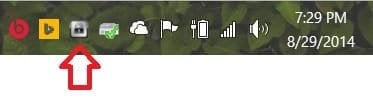
Check to see if you see the EMET icon below in your notification area on the right side of your taskbar by the time like below. If you have it, then double click on it to open EMET.

EMET_notification_icon.jpg

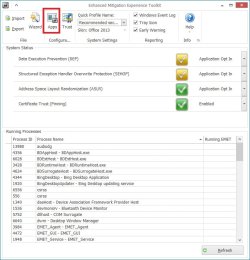
When EMET opens, click on the Apps icon on the toolbar like below.

EMET_apps.jpg

Look to see if the .exe file for Easycap is listed. If so, either remove it, or uncheck all it's options, and click on OK.

remove.jpg

Hope this helps, :)
Shawn
 

My Computer

Computer type
PC/Desktop
Computer Manufacturer/Model Number
Self built custom
OS
64-bit Windows 11 Pro for Workstations
CPU
Intel i7-8700K OC'd to 5 GHz
Motherboard
ASUS ROG Maximus XI Formula Z390
Memory
64 GB (4x16GB) G.SKILL TridentZ RGB DDR4 3600 MHz
Graphics Card(s)
ASUS ROG-STRIX-GTX1080TI-O11G-GAMING
Sound Card
Integrated
Monitor(s) Displays
2 x Samsung Odyssey G7 27"
Screen Resolution
2560x1440
Hard Drives
1TB Samsung 990 PRO M.2,
4TB Samsung 990 PRO PRO M.2,
TerraMaster F8 SSD Plus NAS
PSU
Seasonic Prime Titanium 850W
Case
Thermaltake Core P3
Cooling
Corsair Hydro H115i
Keyboard
Logitech wireless K800
Mouse
Logitech MX Master 4
Internet Speed
2 Gb/s Download and 100 Mb/s Upload
Antivirus
Malwarebyte Anti-Malware Premium
Browser
Google Chrome
Other Info
Logitech Z625 speaker system,
Logitech BRIO 4K Pro webcam,
HP Color LaserJet Pro MFP M477fdn,
APC SMART-UPS RT 1000 XL - SURT1000XLI,
Galaxy S23 Plus phone
Emet

Hi Shawn ,

Thanks for the reply . Emet doesn`t show up in the lower right notification area , so i`m not sure what to make of the situation . Bit of a conundrum .If the emet notification showed up in the past items in the task bar & start menu properties yet not on the lower right notification area it seems kind of strange , no ?

Thanks !
 

My Computer

Computer type
PC/Desktop
Computer Manufacturer/Model Number
HP Media Center
OS
Vista 32 bit
Antivirus
AVG , Malwarebytes anti .
Browser
IE , Chrome
Not really. EMET could still show up in your recent items, but still be uninstalled.

If EMET isn't listed in your Programs and Features like Callender posted above, then EMET is not installed.

Were you able to check using the tutorial I posted above to make sure that DEP is enabled?

If you like, go ahead and post any screenshots where you see EMET at and the error you get with Easycap to see if it may help.

http://www.sevenforums.com/tutorials/9733-screenshots-files-upload-post-seven-forums.html
 

My Computer

Computer type
PC/Desktop
Computer Manufacturer/Model Number
Self built custom
OS
64-bit Windows 11 Pro for Workstations
CPU
Intel i7-8700K OC'd to 5 GHz
Motherboard
ASUS ROG Maximus XI Formula Z390
Memory
64 GB (4x16GB) G.SKILL TridentZ RGB DDR4 3600 MHz
Graphics Card(s)
ASUS ROG-STRIX-GTX1080TI-O11G-GAMING
Sound Card
Integrated
Monitor(s) Displays
2 x Samsung Odyssey G7 27"
Screen Resolution
2560x1440
Hard Drives
1TB Samsung 990 PRO M.2,
4TB Samsung 990 PRO PRO M.2,
TerraMaster F8 SSD Plus NAS
PSU
Seasonic Prime Titanium 850W
Case
Thermaltake Core P3
Cooling
Corsair Hydro H115i
Keyboard
Logitech wireless K800
Mouse
Logitech MX Master 4
Internet Speed
2 Gb/s Download and 100 Mb/s Upload
Antivirus
Malwarebyte Anti-Malware Premium
Browser
Google Chrome
Other Info
Logitech Z625 speaker system,
Logitech BRIO 4K Pro webcam,
HP Color LaserJet Pro MFP M477fdn,
APC SMART-UPS RT 1000 XL - SURT1000XLI,
Galaxy S23 Plus phone
EMET issues

Well if it just shows up as a past item in the notification area then you can remove the icon like this:

http://www.sevenforums.com/tutorials/13102-notification-area-icons-reset.html

You could also try running this before attemptimg to reinstall EMET as it might just fix your DEP issues anyway.

DEP Fixit:

Fix security issues to protect and secure Windows automatically

Personally I'd install EMET and configure it as shown by Brink but if you'd rather not use it it's your choice!

The system tray/ notification area is the same thing and is where you see running program icons near the bottom right of your screen.
 
Last edited:

My Computer

Computer type
Laptop
Computer Manufacturer/Model Number
ASUS
OS
Microsoft Windows 7 Home Premium 64-bit 7601 Multiprocessor Free Service Pack 1
CPU
AMD C-60 APU with Radeon(tm) HD Graphics
Motherboard
ASUSTeK COMPUTER INC. X501U
Memory
4.00 GB
Graphics Card(s)
AMD Radeon HD 6290 Graphics
Sound Card
(1) AMD High Definition Audio Device (2) Realtek High Defi
Screen Resolution
1366 x 768 x 32 bits (4294967296 colors) @ 60 Hz
Hard Drives
Hitachi HTS545050A7E380 SATA Disk Device
Antivirus
Comodo CIS & FW, SecureAplus App Whitelisting, Threatfire
Browser
Cyberfox 64bit, Opera 64bit, Airfox
Other Info
Spy-The-Spy, HitmanPro.Alert, Norton Connect Safe, MJRegWatcher, BitDefender TrafficLight, Voodoo Shield, Zemana AntiMalware
EMET & DEP issues

Hi Callendar ,

I tried the DEP Fixit:, but it said that Windows found no errors in the system . I might try to re install EMET and set it to preferred settings and then uninstall it to see if DEP becomes functional .

Thanks again for the help!
 

My Computer

Computer type
PC/Desktop
Computer Manufacturer/Model Number
HP Media Center
OS
Vista 32 bit
Antivirus
AVG , Malwarebytes anti .
Browser
IE , Chrome
Hi Brink , I didn`t find EMET in the windows tray or notification area , so I couldn`t check if DEP is enabled or not , everytime I go there the whole section is just greyed out . As a result , i couldn`t check using the tutorial.
Thanks much for the help though !
 

My Computer

Computer type
PC/Desktop
Computer Manufacturer/Model Number
HP Media Center
OS
Vista 32 bit
Antivirus
AVG , Malwarebytes anti .
Browser
IE , Chrome
Hi Brink , I didn`t find EMET in the windows tray or notification area , so I couldn`t check if DEP is enabled or not , everytime I go there the whole section is just greyed out . As a result , i couldn`t check using the tutorial.
Thanks much for the help though !

Check using the tutorial below to see if DEP is enabled. This doesn't involve EMET. :)

DEP - Enable or Disable
 

My Computer

Computer type
PC/Desktop
Computer Manufacturer/Model Number
Self built custom
OS
64-bit Windows 11 Pro for Workstations
CPU
Intel i7-8700K OC'd to 5 GHz
Motherboard
ASUS ROG Maximus XI Formula Z390
Memory
64 GB (4x16GB) G.SKILL TridentZ RGB DDR4 3600 MHz
Graphics Card(s)
ASUS ROG-STRIX-GTX1080TI-O11G-GAMING
Sound Card
Integrated
Monitor(s) Displays
2 x Samsung Odyssey G7 27"
Screen Resolution
2560x1440
Hard Drives
1TB Samsung 990 PRO M.2,
4TB Samsung 990 PRO PRO M.2,
TerraMaster F8 SSD Plus NAS
PSU
Seasonic Prime Titanium 850W
Case
Thermaltake Core P3
Cooling
Corsair Hydro H115i
Keyboard
Logitech wireless K800
Mouse
Logitech MX Master 4
Internet Speed
2 Gb/s Download and 100 Mb/s Upload
Antivirus
Malwarebyte Anti-Malware Premium
Browser
Google Chrome
Other Info
Logitech Z625 speaker system,
Logitech BRIO 4K Pro webcam,
HP Color LaserJet Pro MFP M477fdn,
APC SMART-UPS RT 1000 XL - SURT1000XLI,
Galaxy S23 Plus phone
DEP

Hi Brink ,

Ok , just did that . (command prompt -opted in ) reboot and then command prompt and checked status and got message # 2 . Where do we go from here ? Did you see the other post about my printer install & current OS: 600 ? Surely something is wrong there isn`t it ? I have Vista 32 bit .

When it rains it pours over here...
 

My Computer

Computer type
PC/Desktop
Computer Manufacturer/Model Number
HP Media Center
OS
Vista 32 bit
Antivirus
AVG , Malwarebytes anti .
Browser
IE , Chrome
Success !

Thanks a bunch Brink , my Easy Cap device is now installed , so I decided to try my printer disk and it at least started installing and then had an issue . I`ll start a new thread for it though .
Thanks again for all of your help , much appreciated !

Thanks to everyone who helped out with this problem , very much appreciated !
 
Last edited:

My Computer

Computer type
PC/Desktop
Computer Manufacturer/Model Number
HP Media Center
OS
Vista 32 bit
Antivirus
AVG , Malwarebytes anti .
Browser
IE , Chrome

My Computer

Computer type
PC/Desktop
Computer Manufacturer/Model Number
Self built custom
OS
64-bit Windows 11 Pro for Workstations
CPU
Intel i7-8700K OC'd to 5 GHz
Motherboard
ASUS ROG Maximus XI Formula Z390
Memory
64 GB (4x16GB) G.SKILL TridentZ RGB DDR4 3600 MHz
Graphics Card(s)
ASUS ROG-STRIX-GTX1080TI-O11G-GAMING
Sound Card
Integrated
Monitor(s) Displays
2 x Samsung Odyssey G7 27"
Screen Resolution
2560x1440
Hard Drives
1TB Samsung 990 PRO M.2,
4TB Samsung 990 PRO PRO M.2,
TerraMaster F8 SSD Plus NAS
PSU
Seasonic Prime Titanium 850W
Case
Thermaltake Core P3
Cooling
Corsair Hydro H115i
Keyboard
Logitech wireless K800
Mouse
Logitech MX Master 4
Internet Speed
2 Gb/s Download and 100 Mb/s Upload
Antivirus
Malwarebyte Anti-Malware Premium
Browser
Google Chrome
Other Info
Logitech Z625 speaker system,
Logitech BRIO 4K Pro webcam,
HP Color LaserJet Pro MFP M477fdn,
APC SMART-UPS RT 1000 XL - SURT1000XLI,
Galaxy S23 Plus phone
Back
Top