System Image Issues with builtin Windows BU and WinRE environment...

KenEE

New member
Local time
8:29 AM
Messages
4
Hi,

We use Windows BU to create a system image for use in Recovery. We have a single SSD with a boot C: and D: partitions.

The drive image is stored on a motherboard soldered emmc drive with a recovery partition for WinRE.

Anyway, this has been working fine for a long long time on many systems, but recently we have an issue where the drive image is including the (I think ) the emmc itself and so when you go to select it for recovery you get an error.
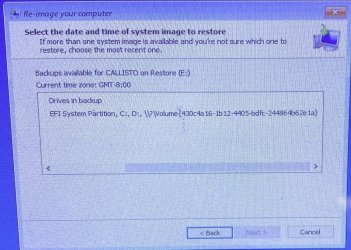
In the past if you select the recovery image it lists only the expected C: and D: drives/partitions. But now it's including a third drive \\?\Volume\{long GUID}

Anyone know how to remove this third drive from the image? Or what we might be (unintentionally) doing different during the creation of the image?

I've attached a picture of the three drives listed in the image file.

Thanks!
Ken
 

Attachments
  • Capture.JPG
    Capture.JPG
    309.7 KB · Views: 0

My Computers My Computers

System One System Two

  • Computer type
    PC/Desktop
    Computer Manufacturer/Model Number
    Custom build
    OS
    Windows 10
    CPU
    Celeron N3350
    Motherboard
    AAEON
    Memory
    4 GB
    Graphics Card(s)
    integrated
    Hard Drives
    Kingston or Transcend 128GB mSATA SSD
    32 GB emmc on motherboard for recovery
    Antivirus
    Windows Defender
    Browser
    Edge
  • Computer type
    PC/Desktop
1.
The drive image is stored on a motherboard soldered emmc drive

win7 doesnt normally recognize emmc disks. Does your win7 have a 3rd party driver that enables it to see emmc disks?

A lot of people would be interested in that.

Installing Windows 7 on Sandisk eMMC chip

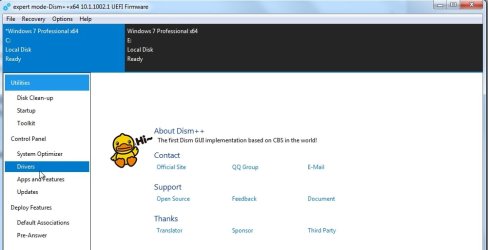
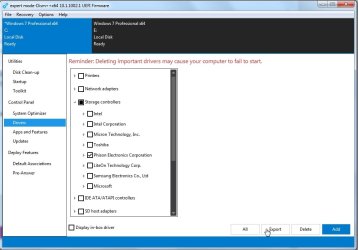
you can export the drivers from your current win7 using dism++

https://github.com/Chuyu-Team/Dism-.../download/v10.1.1002.2/Dism++10.1.1002.1B.zip

dism++drivers1.jpg

dism++drivers2.jpg

- - - Updated - - -

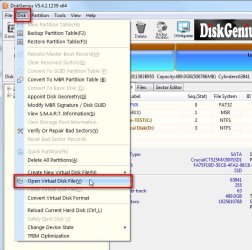
2. If you are wondering about that disk mapping, you can find it with either diskgenius (free version) look for the GUID Path
DiskGenius: Data Recovery, Partition Manager, Backup & Disk Utilities


diskgenius-guid-path.jpg


or by using siv SIV - System Information Viewer

3. In addititon, you could load the system image vhd file in diskgenius and look at what is in there:

dg-vhd1.jpg

dg-vhd2.jpg

4. It is also possible to restore any of the volumes from a system image using wbadmin commands.
 

My Computers My Computers

System One System Two

  • Computer type
    PC/Desktop
    OS
    7 X64
    CPU
    i5 8400
    Motherboard
    gigabyte b365m ds3h
    Memory
    2x8gb 3200mhz
    Hard Drives
    various
    PSU
    pure power 11 400w cm
    Case
    Coolermaster
    Cooling
    cryorig m9i
  • Computer type
    PC/Desktop
    OS
    7x64
    CPU
    g5400
    Motherboard
    ga b365m ds3h
    Memory
    8gb ddr4 2400
    PSU
    xfx pro 450w
Hi - Thanks for all the info. It's Win10. I didn't know/think SevenForums literally meant only Win7. My bad!

In case Win10 is not a sin (it rhymes) the idea is to restore the image from the builtin Recovery Environment so that no 3rd party app or usb boot drive or anything like that is required. I will look into the tools you reference above to see if they offer any support for editing system bu images or creating them compatible with winRE.
It's nice when it works. Just tell the user to reboot into winRE and select the restore image. Just need to figure out what we did to break it!
Thanks
 

My Computers My Computers

System One System Two

  • Computer type
    PC/Desktop
    Computer Manufacturer/Model Number
    Custom build
    OS
    Windows 10
    CPU
    Celeron N3350
    Motherboard
    AAEON
    Memory
    4 GB
    Graphics Card(s)
    integrated
    Hard Drives
    Kingston or Transcend 128GB mSATA SSD
    32 GB emmc on motherboard for recovery
    Antivirus
    Windows Defender
    Browser
    Edge
  • Computer type
    PC/Desktop
editing or creating?

wbadmin commands can be used to select any individual volume from a system image and restore it.

diskgenius can load virtual disks ( including vhd or vhdx) and display the contents read only. Therefore you can find out what volumes are in the image and clone any of the volumes to any suitable disk and/or just copy out individual files.

you could also just run diskgenius and it will display all the disks and partitions on your system together with the symbolic link and Guid path to help identify what that guid path in your system image relates to.
 

My Computers My Computers

System One System Two

  • Computer type
    PC/Desktop
    OS
    7 X64
    CPU
    i5 8400
    Motherboard
    gigabyte b365m ds3h
    Memory
    2x8gb 3200mhz
    Hard Drives
    various
    PSU
    pure power 11 400w cm
    Case
    Coolermaster
    Cooling
    cryorig m9i
  • Computer type
    PC/Desktop
    OS
    7x64
    CPU
    g5400
    Motherboard
    ga b365m ds3h
    Memory
    8gb ddr4 2400
    PSU
    xfx pro 450w
Very cool. I feel like what I need is to remove the emmc backup from the vhdx(s) WinRE complains that it's restoring a disk that is included in the image (the emmc disk). But I never wanted to backup that disk in the first place. It's just there to hold the bu image for C: and D:.

So If I could create the system backup image correctly (with DiskGenius?) with only C: and D: then I could put that on emmc drive and it would probably work. What do you think?
That's if I create a NEW bu image.
I was thinking another option would be to edit the existing BU Image and remove the unwanted emmc files and leave only the desired C: and D:

Let me know what you think. I'm going to ask the DiskGenius guys too.
 

My Computers My Computers

System One System Two

  • Computer type
    PC/Desktop
    Computer Manufacturer/Model Number
    Custom build
    OS
    Windows 10
    CPU
    Celeron N3350
    Motherboard
    AAEON
    Memory
    4 GB
    Graphics Card(s)
    integrated
    Hard Drives
    Kingston or Transcend 128GB mSATA SSD
    32 GB emmc on motherboard for recovery
    Antivirus
    Windows Defender
    Browser
    Edge
  • Computer type
    PC/Desktop
diskgenius does not create windows system backup images

[ diskgenius does have its own proprietary backup image format which can be useful in some circumstances, but there is no scheduling so is not intended as regular system image solution. ]

I am not aware of a way to "edit" a windows system image by removing one of the volumes.

wbadmin can list all the volumes in the image and let you restore only the volumes you choose.

wbadmin does not remove one of the volumes from the image. It remains in the image even if you chose to only restore the others.
 
Last edited:

My Computers My Computers

System One System Two

  • Computer type
    PC/Desktop
    OS
    7 X64
    CPU
    i5 8400
    Motherboard
    gigabyte b365m ds3h
    Memory
    2x8gb 3200mhz
    Hard Drives
    various
    PSU
    pure power 11 400w cm
    Case
    Coolermaster
    Cooling
    cryorig m9i
  • Computer type
    PC/Desktop
    OS
    7x64
    CPU
    g5400
    Motherboard
    ga b365m ds3h
    Memory
    8gb ddr4 2400
    PSU
    xfx pro 450w
Well thanks for all the help. Saved me a ton of time and gave me a few ideas. Headin' home! Have a Great Weekend!
 

My Computers My Computers

System One System Two

  • Computer type
    PC/Desktop
    Computer Manufacturer/Model Number
    Custom build
    OS
    Windows 10
    CPU
    Celeron N3350
    Motherboard
    AAEON
    Memory
    4 GB
    Graphics Card(s)
    integrated
    Hard Drives
    Kingston or Transcend 128GB mSATA SSD
    32 GB emmc on motherboard for recovery
    Antivirus
    Windows Defender
    Browser
    Edge
  • Computer type
    PC/Desktop
:-)
 

My Computers My Computers

System One System Two

  • Computer type
    PC/Desktop
    OS
    7 X64
    CPU
    i5 8400
    Motherboard
    gigabyte b365m ds3h
    Memory
    2x8gb 3200mhz
    Hard Drives
    various
    PSU
    pure power 11 400w cm
    Case
    Coolermaster
    Cooling
    cryorig m9i
  • Computer type
    PC/Desktop
    OS
    7x64
    CPU
    g5400
    Motherboard
    ga b365m ds3h
    Memory
    8gb ddr4 2400
    PSU
    xfx pro 450w
Back
Top