

brownbeardad
New member
0X490 error, “Boot sector for system disk partition is corrupt”
[FONT="]I was researching startup programs in Msconfig start tab, comparing those programs to info in Pacs-Portal website. I unchecked two Toshiba bloatware programs and had not select apply. I left the laptop for about one minute and upon returning the “Hard Drive Wipe in Progress” message was in large font on the screen. I pressed and held down the power key until a forced shutdown occurred. At the next Win 7 Home Premium start, the Windows screen showed briefly then Startup Repair commenced. The startup repair diagnosis resulted in message "Boot sector for system disk partition is corrupt", repair boot sector repair action, and 0x490error.
[/FONT][FONT="]
[/FONT][FONT="]I researched the Windows Seven Forum and found “Troubleshooting Windows 7 Failure to Start”, Published by gregrocker, 15 Mar 2012. I performed these actions in this order:[/FONT]
[FONT="]I was researching startup programs in Msconfig start tab, comparing those programs to info in Pacs-Portal website. I unchecked two Toshiba bloatware programs and had not select apply. I left the laptop for about one minute and upon returning the “Hard Drive Wipe in Progress” message was in large font on the screen. I pressed and held down the power key until a forced shutdown occurred. At the next Win 7 Home Premium start, the Windows screen showed briefly then Startup Repair commenced. The startup repair diagnosis resulted in message "Boot sector for system disk partition is corrupt", repair boot sector repair action, and 0x490error.
[/FONT][FONT="]
[/FONT][FONT="]I researched the Windows Seven Forum and found “Troubleshooting Windows 7 Failure to Start”, Published by gregrocker, 15 Mar 2012. I performed these actions in this order:[/FONT]
- [FONT="]Bootrec command: Used /FixMbr then restarted the OS. The Windows screen showed briefly, Startup Repair opened and the boot sector repair failed. The same message occurred, “Boot sector the system disk partition is corrupt.” Then used /FixBoot with the same results.[/FONT]
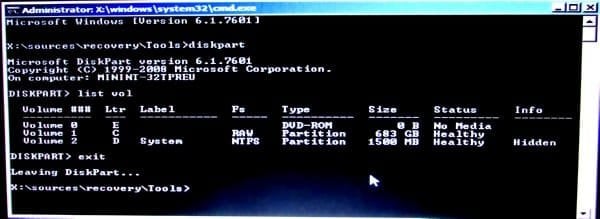
- [FONT="]DiskPart:[/FONT]
[FONT="]Drive W:, the Linux partition, did not show.[/FONT]
- [FONT="]Chkdsk: Ran once and command ran for about two minutes. Messages were “Correcting error in index $I30 for file XXXXX”. This message would repeat once, then “Sorting index $I30 in file XXXXX.” 569,595 index entries were processed. Restarted OS with the same Windows screen and Startup Repair commencing. Errors could not be corrected.[/FONT]
- [FONT="]Mini-Tool Partition Wizard: Ran once with the following results[/FONT]
[FONT="] [/FONT]
[FONT="]
Selected the w: drive for repair. The three Boot partitions were greyed out showing overlap with w:. I also selected system and HDDRECOVERY partitions. And selected apply. The W: and Boot partitions were not repaired.[/FONT]
[/FONT][FONT="]
Selected the w: drive for repair. The three Boot partitions were greyed out showing overlap with w:. I also selected system and HDDRECOVERY partitions. And selected apply. The W: and Boot partitions were not repaired.[/FONT]
- [FONT="]Startup Repair: Ran Startup Repair for three simultaneous runs. The Boot System error0X490 was not corrected.[/FONT]
Last edited:
My Computer
At a glance
Microsoft Windows 7 Home Premium 64-bit 7601 ...Intel(R) Core(TM) i7-2630QM CPU @ 2.00GHz16.00 GB(1) NVIDIA GeForce GT 540M (2) Intel(R) HD Gr...
- Computer type
- Laptop
- Computer Manufacturer/Model Number
- Toshiba Satellite P755-S5269
- OS
- Microsoft Windows 7 Home Premium 64-bit 7601 Multiprocessor Free Service Pack 1
- CPU
- Intel(R) Core(TM) i7-2630QM CPU @ 2.00GHz
- Motherboard
- TOSHIBA PEQAA
- Memory
- 16.00 GB
- Graphics Card(s)
- (1) NVIDIA GeForce GT 540M (2) Intel(R) HD Graphics Fami
- Sound Card
- (1) Realtek High Definition Audio (2) Intel(R) Display Aud
- Monitor(s) Displays
- HD TruBrite® LED Backlit display
- Screen Resolution
- 0 x 0 x 0 bits (0 colors) @ 0 Hz
- Hard Drives
- (1) TOSHIBA MK7575GSX (2) JMCR SD SCSI Disk Device
- Mouse
- Logitech M505
- Internet Speed
- 18 GB/sec
- Antivirus
- Bitdefender 2018
- Browser
- Mozilla Firefox
- Other Info
- DVD-SuperMulti drive (+/-R double layer), Li-Ion (96Wh, 12-Cell), Graphics Memory 1GB GDDR3,


