0x80070035 When trying to access network share even from local

jamesod90

New member
Local time
12:09 PM
Messages
6
Hi,

2 Weeks ago I started having this very peculiar issue where I cannot access any of my network shares even when trying from the local machine.

Symptoms are:

Unable to access shares with \\192.168.2.42\etc... or \\SYSTEMNAME\etc... from remote machines or the local machine...

\\SYSTEMNAME\etc... does list the shared folders but none are accessible local or remote.

\\127.0.0.1\ is fine and I can access the folders and files fine.

---
What I've tried so far.
---

Restart services relating to network shares (Server, Computer Browser, NetBios etc)
Un share and re share all folders, reboot the machine.

Add a second network card to the machine with IP 192.168.1.105 still to no avail locally or remorselessly.

I'm completely at a loss any advise much appreciated, ps. there is no antivirus on the machine.

Thanks

James
 

My Computer My Computer

At a glance

Windows 7 Ultimate 64
Computer type
PC/Desktop
OS
Windows 7 Ultimate 64
Welcome to the forum. What folders are you sharing specifically. You can set up a share and set it to everyone but then NTFS permissions kick in if they don't have the right access you won't get in as you say it works local it suggests that's the problem as local you would have rights but unknown users haven't got rights
 

My Computer My Computer

At a glance

win 8 32 bit
Computer type
PC/Desktop
OS
win 8 32 bit
Hi,

Thanks for the response, I'm sharing 2 data folders, I thought that at first my self however its set to share with everyone and I've even gone as far as creating the same accounts on other machines.

What is strange is that when I try to open the shares using the machine name (\\MACHINENAME\) I get a window showing the shares but I'm unable to open them using (\\192.168.2.42) I get nothing at all.

The only way it opens on the local machine is using 127.0.0.1 using the static network IP I get the same result as remote machines...

Thanks

James
 

My Computer My Computer

At a glance

Windows 7 Ultimate 64
Computer type
PC/Desktop
OS
Windows 7 Ultimate 64
quick update on this, I've uninstalled all network adapters, still no change.
 

My Computer My Computer

At a glance

Windows 7 Ultimate 64
Computer type
PC/Desktop
OS
Windows 7 Ultimate 64
What data folders if it's in a users profile by default even admins are denied create a folder on c away from users folder share that set NTFS permissions to everyone
 

My Computer My Computer

At a glance

win 8 32 bit
Computer type
PC/Desktop
OS
win 8 32 bit
Hi, the folders are on the D drive so not falling under any user profiles...
 

My Computer My Computer

At a glance

Windows 7 Ultimate 64
Computer type
PC/Desktop
OS
Windows 7 Ultimate 64
If you created folders on there your likley the owner
 

My Computer My Computer

At a glance

win 8 32 bit
Computer type
PC/Desktop
OS
win 8 32 bit
Hi,

I've attached some screen shots to better show whats going on, I doubt it has anything at all to do with permissions as would other machines not just ask for credentials?? Never the less I gone ahead and played around with them to no avail.

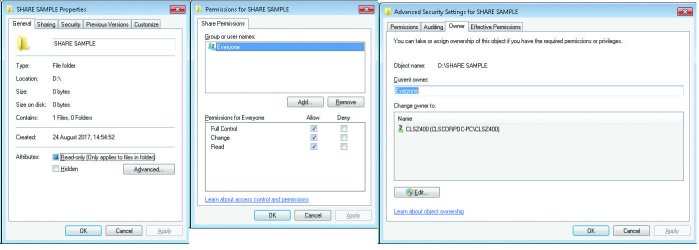
PIC 1 - Shows a sample folder with the permissions and owner details.

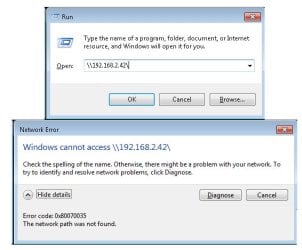
PIC 2 - Shows what happens when I try and open the machines shared folders by IP 192.168.2.42 (THIS IS FROM THE LOCAL MACHINE NOT A NETWORKED ONE)

PIC 3 - Shows what happens when I use \\127.0.0.1\ (Obviously from the local machine)

PIC 4 - Shows what happens when I try and open the machines shared folders by machine name (THIS IS FROM THE LOCAL MACHINE NOT A NETWORKED ONE)

Thanks

James
 

Attachments

  • 1.jpg
    1.jpg
    770 KB · Views: 1
  • 2.jpg
    2.jpg
    53.1 KB · Views: 15
  • 3.jpg
    3.jpg
    55 KB · Views: 1
  • 4.jpg
    4.jpg
    87.1 KB · Views: 0

My Computer My Computer

At a glance

Windows 7 Ultimate 64
Computer type
PC/Desktop
OS
Windows 7 Ultimate 64
Does anyone have any other advice on this I'm really close to just formatting the machine, not something I really want to do
 

My Computer My Computer

At a glance

Windows 7 Ultimate 64
Computer type
PC/Desktop
OS
Windows 7 Ultimate 64
I'm experiencing the same behavior on a Win 10 Pro system. Was there ever any resolution to this?
 

My Computer My Computer

At a glance

Windows 10
Computer type
PC/Desktop
OS
Windows 10
Back
Top