Help - Unable to access network shares

Leeboy

New member
Local time
6:10 PM
Messages
11
Location
South Africa
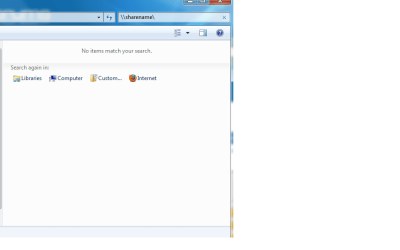
When i try and access a network share windows seems to be searching for files on my HD. Also i cant find the "display run command " option in start menu properties.

moz-screenshot.png
 

Attachments

  • Sha_nam.png
    Sha_nam.png
    12.3 KB · Views: 198

My Computer My Computer

Computer Manufacturer/Model Number
DELL LATITUDE E6400
OS
Windows Se7en
CPU
2.26-GHz Intel Core 2 Duo P8400 processor and 2GB of RAM
Hard Drives
150gb
Hi Leeboy, welcome to the forums.

I'm still very much a noob at networking so can't answer the first question, sorry :o

I can, however, answer the second....

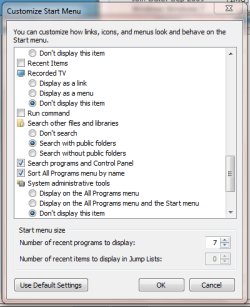
Capture.PNG

Right-Click the Taskbar -> Properties -> Start Menu -> Customize, it's about 2/3 down the list
 

My Computer My Computer

Computer Manufacturer/Model Number
Compaq Desktop
OS
Windows 7 Ultimate x64
CPU
AMD Sempron Dual Core
Memory
3GB
Graphics Card(s)
NVIDIA GeForce 6150SE nForce 430
Screen Resolution
1024x768
Hard Drives
150GB Sata
Thanks - I dont have that option
 

My Computer My Computer

Computer Manufacturer/Model Number
DELL LATITUDE E6400
OS
Windows Se7en
CPU
2.26-GHz Intel Core 2 Duo P8400 processor and 2GB of RAM
Hard Drives
150gb
When i try and access a network share windows seems to be searching for files on my HD.
Insufficient info: for example how is your network setup? have you mapped network drives? are you accessing a share on another computer and if so what OS?


Also i cant find the "display run command " option in start menu properties.
The RUN command is also in the "Accessories" folder of your start menu. You can just type "run" in the search box:

Find_run_01.png

Cheers!

Robert
 

My Computer My Computer

OS
...
or Win + R ;)

but perhaps the admin has disabled him from using Run, through group policy or somethin'
 

My Computer My Computer

Computer Manufacturer/Model Number
Too many to list.
OS
XP, Seven, 2008R2
CPU
AMD, Intel, VIA
Motherboard
Various
Memory
Corsair, Kingston, etc.
Graphics Card(s)
ATI, NVIDIA
Monitor(s) Displays
Samsung
Hard Drives
Maxtor, Western Digital
Keyboard
qwerty
Internet Speed
22 Mb/s @ home, 1 Gb/s @ server
Other Info
All of my systems still run fastest on XP 32-bit for the most part. Win7 is fun to play with, but I still prefer XP for raw speed, security, and functionality.
When i try and access a network share windows seems to be searching for files on my HD. Also i cant find the "display run command " option in start menu properties.

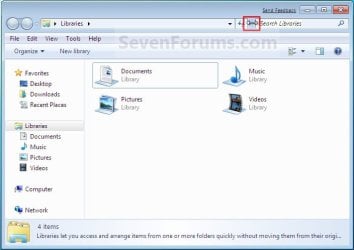
That's because you're typing it in the search box... Can't take screens now because I'm not on at home. But where the folder path is there, you can erase that and that's where your type in your \\sharename\

Edit.. Found this picture..

3991d1233510732-windows-explorer-address-search-bar-change-size-step1.jpg

Where you see Libraries there, you can backspace and type in there.

Hope this helps.
 

My Computer My Computer

Computer type
PC/Desktop
Computer Manufacturer/Model Number
DELL VOSTRO 3650
OS
Windows 8.1 PRO
CPU
3rd Generation Intel Core i7‐3612QM CPU @ 2.10GHZ
Memory
8GB DDR3
Graphics Card(s)
NVIDIA GeForce GT 525M (128 bit), 1GB Grpahics
Screen Resolution
1920X1080
Hard Drives
750GB 5400RPM
Thanks everyone - I managed to solve the problem the run command as well as registry editing was disabled by group policy.
 

My Computer My Computer

Computer Manufacturer/Model Number
DELL LATITUDE E6400
OS
Windows Se7en
CPU
2.26-GHz Intel Core 2 Duo P8400 processor and 2GB of RAM
Hard Drives
150gb
Back
Top