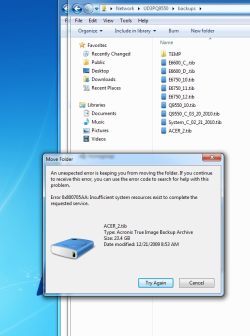
0x800705AA Insufficient System Resources

Ken429

New member
Member
Local time
10:36 AM
Messages
56
Need a little help. I have three W7 Home Premium Systems running on a gigabit network. When I copy a huge Acronis backup files (20+GB) from system B (using Windows Explorer on System B) to system A it runs at 40+ MB/Sec and quickly fails with the 0x800705AA error code. When I copy the same file from from system B (using Windows Explorer on System A) to system A it runs at 90+ MB/Sec and completes normally. This error seems to be a pretty common problem based on Bing and Google searches. Can someone please give me a hint on what is going on and where I can find a reputable W7 fix. I have never seen this error on any of the systems until today but then I don't normally move backup files from one computer to another.
 
Last edited:

My Computer

OS
Windows 7 Home Premium 64-bit
CPU
2600K
Motherboard
Asus P8Z68-V pro
Memory
8 GB Corsair Vengence C8
Graphics Card(s)
MSI 560 TI
Sound Card
Intel on MB
Monitor(s) Displays
Samsung 2433
Screen Resolution
1920X1080
Hard Drives
120 GB Mushkin Deluxe SATA III SSD
2 - WD 300 GB Raptors
PSU
SeaSonic X850
Case
Corsair 600T
Cooling
Corsair H60
Keyboard
Logitech Wireless
Mouse
Logitech Wireless
Internet Speed
Cable
A little more information - both systems are running Windows 7 Home Premium 64-bit, both systems have 4 GB of memory and both systems are using a EP45-UD3P motherboard. The only difference is system A has BIOS version FD and system B has the latest and greatest BIOS version FE. System A Has a Q9550 processor and system B has a E6750 processor.
 

Attachments

  • W7 Error_1.png
    W7 Error_1.png
    57.1 KB · Views: 146

My Computer

OS
Windows 7 Home Premium 64-bit
CPU
2600K
Motherboard
Asus P8Z68-V pro
Memory
8 GB Corsair Vengence C8
Graphics Card(s)
MSI 560 TI
Sound Card
Intel on MB
Monitor(s) Displays
Samsung 2433
Screen Resolution
1920X1080
Hard Drives
120 GB Mushkin Deluxe SATA III SSD
2 - WD 300 GB Raptors
PSU
SeaSonic X850
Case
Corsair 600T
Cooling
Corsair H60
Keyboard
Logitech Wireless
Mouse
Logitech Wireless
Internet Speed
Cable
I am fighting exactly the same problem. Did you find a solution for it ?
Is it the source or the destination causing this error ?

Thanks.
 

My Computer

OS
windows 7
I did some more tests, just to add to my confusion.
Both systems are Windows 7 (64bit), the file ( 4.5 GB ) used for testing is always the same.
1. Go to system A
Copy file to B : It fails in close to all cases
Get file from B : Always ok.
2. Go to system B
Copy file to A : Always ok
Get file from A : Always ok.
3. Copy between A or B and a Linux system is always ok.

Workaround for the failure case :
Using a special copy program ( like TeraCopy ) solves the problem, but :

Speed is about 50 % of the normal
These programs are not easily integrated into file managers, which I prefer instead of Windows Explorer.
 

My Computer

OS
windows 7
Yes I found a fix at least for me. The problem is caused by too many entries in the system log files. I found a program/script that automatically clears the log files (I did it manually the first time) and the "problem" goes away. That is the reason it worked on one machine and not the other even though they were basically the same. I'm pretty sure this is where I got the script.
http://www.sevenforums.com/tutorials/25480-event-viewer-one-click-clear.html
 

My Computer

OS
Windows 7 Home Premium 64-bit
CPU
2600K
Motherboard
Asus P8Z68-V pro
Memory
8 GB Corsair Vengence C8
Graphics Card(s)
MSI 560 TI
Sound Card
Intel on MB
Monitor(s) Displays
Samsung 2433
Screen Resolution
1920X1080
Hard Drives
120 GB Mushkin Deluxe SATA III SSD
2 - WD 300 GB Raptors
PSU
SeaSonic X850
Case
Corsair 600T
Cooling
Corsair H60
Keyboard
Logitech Wireless
Mouse
Logitech Wireless
Internet Speed
Cable
Thanks, but it does not help.
I cleaned both systems, but the error stays.
When checking the event logs, there is no event generated, i.e. I will have problems to see which system resources is causing troubles.

- Wolfgang
 

My Computer

OS
windows 7
Have you tried clearing out all the other stuff that W7 generates on updates and BOSD? You might want to consider C:\Windows\System32\cleanmgr.exe. The system I was having trouble with had been in use awhile and had several recovery points and system dumps. I deleted all that at the same time as the log files.
 

My Computer

OS
Windows 7 Home Premium 64-bit
CPU
2600K
Motherboard
Asus P8Z68-V pro
Memory
8 GB Corsair Vengence C8
Graphics Card(s)
MSI 560 TI
Sound Card
Intel on MB
Monitor(s) Displays
Samsung 2433
Screen Resolution
1920X1080
Hard Drives
120 GB Mushkin Deluxe SATA III SSD
2 - WD 300 GB Raptors
PSU
SeaSonic X850
Case
Corsair 600T
Cooling
Corsair H60
Keyboard
Logitech Wireless
Mouse
Logitech Wireless
Internet Speed
Cable
Yesterday I replaced the Ethernet driver and since then I did not see any copy
problems anymore. To be honest, I have no idea what is different in that driver version, need to keep an eye on it and see how it works.

Thanks for your effort ,

Wolfgang
 

My Computer

OS
windows 7
Fixed the same issue on my computer by:

1. Run MSCONFIG
2. Click Services tab
3. Enable all "Removable Storage" services
4. Reboot.


After that I can now drag and drop files to my flash drive.
 

My Computer

OS
Windows 7
Back
Top