
Solved 0x80300021 install error Windows 7 Pro Dual Boot

wideminnow70

New member
Local time
5:40 PM
Messages
13
0x80300021 install error Windows 7 Pro Dual Boot
I have a system with two hard drives for a dual boot system.
I swapped out the two hard drives for larger ones.
I installed Windows 7 Home on the first hard drive and everything worked fine with no problems.
When I went to install Windows 7 Pro on the second hard drive, I keep getting the 0x80300021 error message and I can not install the window 7 Pro OS. The second drive is formatted and checked for errors.
See attachment for disk layout. I am trying to load Windows 7 Pro on Disk 1 7-PRO (P drive)
 

Attachments
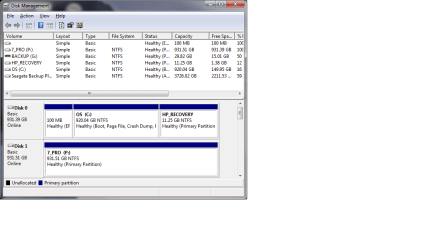
  • DISK MANAGEMENT.png
    DISK MANAGEMENT.png
    22.8 KB · Views: 3

My Computer My Computer

Computer type
PC/Desktop
Computer Manufacturer/Model Number
HP
OS
Windows 7 Home 64 bit, Wndows 7 Po 64 bit
CPU
Intel (R) Core (M)
Memory
8 gb
Sound Card
Realtec High Defination Audio
Monitor(s) Displays
HP 2511 S
Screen Resolution
Series Wide LCD Monitor, Sylvania
Hard Drives
1 TB Hitachi
1 TB Western Digital
Keyboard
HID Keyboard Device
Mouse
HID Compliant mouse
Internet Speed
50 gb
Antivirus
Norton , Microsoft Essentials
Browser
internet explorer 11
Why are you installing two Win 7's on your PC? It does not serve any purpose and you are legally supposed to have two Product Keys to do this.
 

My Computer My Computer

Computer type
PC/Desktop
Computer Manufacturer/Model Number
Custom Build
OS
Windows 7 Home Premium 32-Bit - Build 7600 SP1
CPU
Intel Core i3-2120 3.30Ghz
Motherboard
Asus P8Z68-V LX Intel Z68 Socket H2 ATX
Memory
Kingston 4 GB DDR3 1333 mhz
Graphics Card(s)
AMD Radeon HD6670
Sound Card
Sound Blaster Audigy SE 24-Bit
Monitor(s) Displays
Asus VE228
Screen Resolution
1440 X 900
Hard Drives
OCZ Vertex 3 120 GB Sata 3 SSD ==
Kingston SH103/S3 120 G Hyper X 120 GB SSD ==
Western Digital 500 GB Caviar Green 7200 RPM ==
PSU
Corsair CX600M == 600 Watt
Case
NZXT Apollo - Silver with Clear Side Panel
Cooling
Three 120 mm Fans
Keyboard
Microsoft Natural 4000
Mouse
Microsoft Custom Optical 3000
Internet Speed
AT&T Fiber Optic Wireless Network
Antivirus
Microsoft Security Essentials
Browser
Chrome
Other Info
120 mm Blue LED Fan -- Three Blue LED Lazer Light Sticks
I have two separate product keys with 2 separate install disks.
One is for Windows 7 Home and the other is for Windows 7 Professional.
I do a lot of testing on the Windows 7 Home system and when it works properly, I load it on the Windows 7 Pro drive.
Also on the Windows 7 Home disk, I run Windows XP mode that I can not run on Windows 7.
 

My Computer My Computer

Computer type
PC/Desktop
Computer Manufacturer/Model Number
HP
OS
Windows 7 Home 64 bit, Wndows 7 Po 64 bit
CPU
Intel (R) Core (M)
Memory
8 gb
Sound Card
Realtec High Defination Audio
Monitor(s) Displays
HP 2511 S
Screen Resolution
Series Wide LCD Monitor, Sylvania
Hard Drives
1 TB Hitachi
1 TB Western Digital
Keyboard
HID Keyboard Device
Mouse
HID Compliant mouse
Internet Speed
50 gb
Antivirus
Norton , Microsoft Essentials
Browser
internet explorer 11
Why didn`t you unplug Disk 0 before you attempted the install on Disk 1 ?

You`d still have a dual boot and better control over it.

If you swapped out the drives, how did you end up with a recovery partition on Disk 0 ? Did you clone it ?

Where did the Windows 7 Pro installer come from ?

Did you create it, it could be bad, just need to create a new one.
 

My Computer My Computer

Computer type
PC/Desktop
Computer Manufacturer/Model Number
Skylake Special #666
OS
Windows 10 Pro x64
CPU
Intel Core i7 6700K
Motherboard
Asus Sabertooth Z170 Mark 1
Memory
GSkill TridentZ RGB 16GB 3600 16-16-16-36
Graphics Card(s)
EVGA GTX 980 Ti SC x2
Sound Card
Realtek High Definition
Monitor(s) Displays
AOC G2460PG
Screen Resolution
1920 x 1080 144Hz
Hard Drives
Samsung 860 Pro 256GB, Seagate Barracuda 4TB x2
PSU
EVGA 1000 P2, EVGA White Custom Braided Cables
Case
Corsair Vengeance C70 Gunmetal Black
Cooling
Corsair H100i v2, Corsair ML120 x2, Thermal Grizzly Kryonaut
Keyboard
Logitech G910 Orion Spectrum
Mouse
Logitech G700s
Internet Speed
Verizon Fios Quantum Gateway 75/75
Antivirus
Windows Defender, Malwarebytes Free 3.8.3
Browser
Chrome
Other Info
Corsair SP120 x4, LG Blu-ray Drive, Durabrand HT-395 100 Watt Dolby Digital Amp, Corsair H2100 Wireless 7.1 Headset
The first time I loaded Windows 7 Pro, on 2 separate drives it loaded with no problems without unplugging Disk 0.
The HP Recovery is a copy of the OS that I copied from the original CD for a backup.
The Windows 7 Pro is a OEM disk from Microsoft.
I will try unplugging Disk 0 to see how it works.
Does the Original "C" drive letter change when I plug the Disk 0 drive back in?

Unplugged Drive "0' Worked fine.


Thanks...
 
Last edited:

My Computer My Computer

Computer type
PC/Desktop
Computer Manufacturer/Model Number
HP
OS
Windows 7 Home 64 bit, Wndows 7 Po 64 bit
CPU
Intel (R) Core (M)
Memory
8 gb
Sound Card
Realtec High Defination Audio
Monitor(s) Displays
HP 2511 S
Screen Resolution
Series Wide LCD Monitor, Sylvania
Hard Drives
1 TB Hitachi
1 TB Western Digital
Keyboard
HID Keyboard Device
Mouse
HID Compliant mouse
Internet Speed
50 gb
Antivirus
Norton , Microsoft Essentials
Browser
internet explorer 11
Back
Top