0x80780119 error

panais

New member
Guru
Gold Member
VIP
Local time
10:41 PM
Messages
4,725
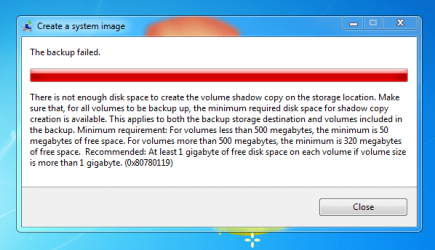
I get this error when i try to create a system image in my D:\ or E:\.
My hard disk are 1.5TB each,are almost empty and i need only 22GB for the image.
I have read all the threads and tried everything but no solution for me.
Win 7 ultimate 64bit
Please help.
Thanks
Btw which is the most reliable backup software?

http://www.sevenforums.com/installation-setup/68952-win-7-system-reserved.html
 

Attachments
  • Capture.PNG
    Capture.PNG
    22.2 KB · Views: 52
Last edited:

My Computer

Computer Manufacturer/Model Number
Custom Built by me.
OS
Windows 7 Ultimate 64bit SP1
CPU
Intel Core 2 Quad Q6600
Motherboard
Gigabyte GA-X38-DS4
Memory
2X2GB DDR2 PC6400 800MHZ DUAL CHANNEL
Graphics Card(s)
XFX RADEON HD 6850 1GB GDDR5
Sound Card
2/4/5.1/7.1-channel Realtek High Definition
Monitor(s) Displays
Samsung LE40A656F1 1080p 100Hz LCD HD TV 50,000:1
Screen Resolution
1366x768 in Desktop,1920x1080p in gaming and video
Hard Drives
C:\WD VelociRaptor 150 GB,10,000 RPM
E:\WESTERN DIGITAL WD15EADS 1.5TB CAVIAR GREEN SATA2 F:\WESTERN DIGITAL WD15EADS 1.5TB CAVIAR GREEN SATA2
PSU
THERMALTAKE W0229 TOUGHPOWER XT 750W
Case
A-Case Twin Engine BB
Cooling
3 x thermaltake smart case fan II + 1 arctic cooling fan
Keyboard
Wireless Logitech LX710
Mouse
Logitech Wireless Gaming Mouse G700
Internet Speed
ADSL 12000 plus
Other Info
Mouse Logitech G700,with 13 buttons who needs keyboard in RPG?

D:\Sony high speed sata Dvd Rewriter
Logitech Cordless Rumblepad 2

My Computer

Computer Manufacturer/Model Number
Custom Built by me.
OS
Windows 7 Ultimate 64bit SP1
CPU
Intel Core 2 Quad Q6600
Motherboard
Gigabyte GA-X38-DS4
Memory
2X2GB DDR2 PC6400 800MHZ DUAL CHANNEL
Graphics Card(s)
XFX RADEON HD 6850 1GB GDDR5
Sound Card
2/4/5.1/7.1-channel Realtek High Definition
Monitor(s) Displays
Samsung LE40A656F1 1080p 100Hz LCD HD TV 50,000:1
Screen Resolution
1366x768 in Desktop,1920x1080p in gaming and video
Hard Drives
C:\WD VelociRaptor 150 GB,10,000 RPM
E:\WESTERN DIGITAL WD15EADS 1.5TB CAVIAR GREEN SATA2 F:\WESTERN DIGITAL WD15EADS 1.5TB CAVIAR GREEN SATA2
PSU
THERMALTAKE W0229 TOUGHPOWER XT 750W
Case
A-Case Twin Engine BB
Cooling
3 x thermaltake smart case fan II + 1 arctic cooling fan
Keyboard
Wireless Logitech LX710
Mouse
Logitech Wireless Gaming Mouse G700
Internet Speed
ADSL 12000 plus
Other Info
Mouse Logitech G700,with 13 buttons who needs keyboard in RPG?

D:\Sony high speed sata Dvd Rewriter
Logitech Cordless Rumblepad 2
Another solution

Well I tried the above link and got the idea for these. Actually from what I could infer was that if you recently reinstalled WIN7 without formatting the system reserved part than the old data tends to remain there in the system reserved partition itself!! So what you need to do is delete the old data. For that I used the following two softwares:
1. Partition wizard home edition(pwhe)
2. EasyBcd2.02
(Google them and download them)
Next open pwhe and assign a drive letter to the system reserved drive. Now format the drive using the options of pwhe and click apply in the top left part of the software. Now your system reserved drive is clean. So to install the bootloader for your current windows you need EasyBcd.
Open EasyBcd. An error message stating that you dont have a bcd registry will pop when you open it. Click"No". Now go to bootloader setup option in the main interface of EasyBcd. There choose the option to "Install Bcd". Make sure you install it in the right partition(The one which u just formatted using pwhe). After doing this go to the third option in EasyBcd which says"Add new entry". There select Windows7 and install it in the drive where your widows is installed(Mostly C:). Thats all!!!Now try running the backup once again.

I tried this and wrote it in a hurry......!! I hope its useful for some1 who needs it....:)
 

My Computer

Computer Manufacturer/Model Number
DELL-Inspiron1545
OS
Windows 7 Ultimate 64bit
CPU
Intel [email protected]
Motherboard
Intel
Memory
3GB
Graphics Card(s)
ATI Radeon 256MB
Sound Card
IDT
Hard Drives
320GB internal(WD)+320GB External(WD)
I just ran into the same problem after restored Windows 7 from WindowsImageBackup.

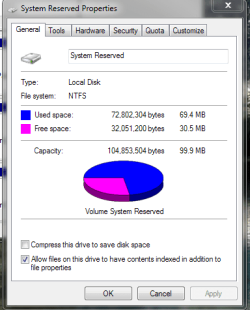
My 100MB system volume didn't have enough room for the shadow copy, I needed about 50MB but only have 38MB free....so backup failed :cry:

The easiest fix to this problem is... just walk away, go get something to drink or listen to a music or something ;)

Here is the deal. After you restored shadowed image is accumulated on system volume on the reserved partition. Some how Windows know after a certain period of time Windows will automatically delete the shadow image from the reserved partition.

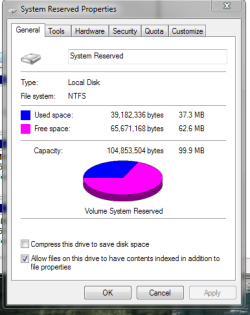
I have no idea how long, 30 min + would be a safe bet. In my case I came back about 1 hr later now I have 71MB free in my reserved partition. :p

Now you can do the back up.
 

My Computer

Computer Manufacturer/Model Number
Homebrew
OS
Windows 7 Pro 64bit
CPU
AMD Phenom II X6 1090T at 4013MHz
Motherboard
ASUS M4A87TD/USB 3.0
Memory
8GB A-DATA 1600
Graphics Card(s)
GTX460
Sound Card
On-board
Monitor(s) Displays
ACER H233H and ACER X203H
Hard Drives
2x Crucial C300-64GB RAID 0
2x WD 1TB BLACK RAID 0
1x WD 1TB BLACK
1x WD 1TB GREEN
PSU
750 WATTS
Case
Antec Three Hundred
Cooling
Zalman CNPS10X Performa (Push/Pull)
Keyboard
M$
Mouse
M$
Internet Speed
Verizon FiOS 20/20
hi all
seems looking around net this is a common problem, just received new laptop windows 7 pro and trying to create system image i recieve same error.
But also reaserching seems no-one has been able to resolve this issue.
Why would microsoft release this with O/S when most cannot use ?
Would it be possible for other members of this great forum jump onboard, there must be a solution to this problem.

thanks

P.S on my system i have no reserved partition.
 

My Computer

Computer Manufacturer/Model Number
toshiba c650
OS
7 pro 64 bit
Memory
2gb
Hard Drives
250gb
FWIW

Here is the shot of my reserved system min after restored. 30MB free and 20 min later almost 63MB is what I have without doing anything just step out and got me a soda. But since you have no system reserved I am don't really know what is the problem.

You see no system reserved via the Computer Management > Storage > Disk Management?
 

Attachments

  • shadow_1.PNG
    shadow_1.PNG
    16.2 KB · Views: 18
  • shadow_2.PNG
    shadow_2.PNG
    15.2 KB · Views: 19

My Computer

Computer Manufacturer/Model Number
Homebrew
OS
Windows 7 Pro 64bit
CPU
AMD Phenom II X6 1090T at 4013MHz
Motherboard
ASUS M4A87TD/USB 3.0
Memory
8GB A-DATA 1600
Graphics Card(s)
GTX460
Sound Card
On-board
Monitor(s) Displays
ACER H233H and ACER X203H
Hard Drives
2x Crucial C300-64GB RAID 0
2x WD 1TB BLACK RAID 0
1x WD 1TB BLACK
1x WD 1TB GREEN
PSU
750 WATTS
Case
Antec Three Hundred
Cooling
Zalman CNPS10X Performa (Push/Pull)
Keyboard
M$
Mouse
M$
Internet Speed
Verizon FiOS 20/20
Back
Top