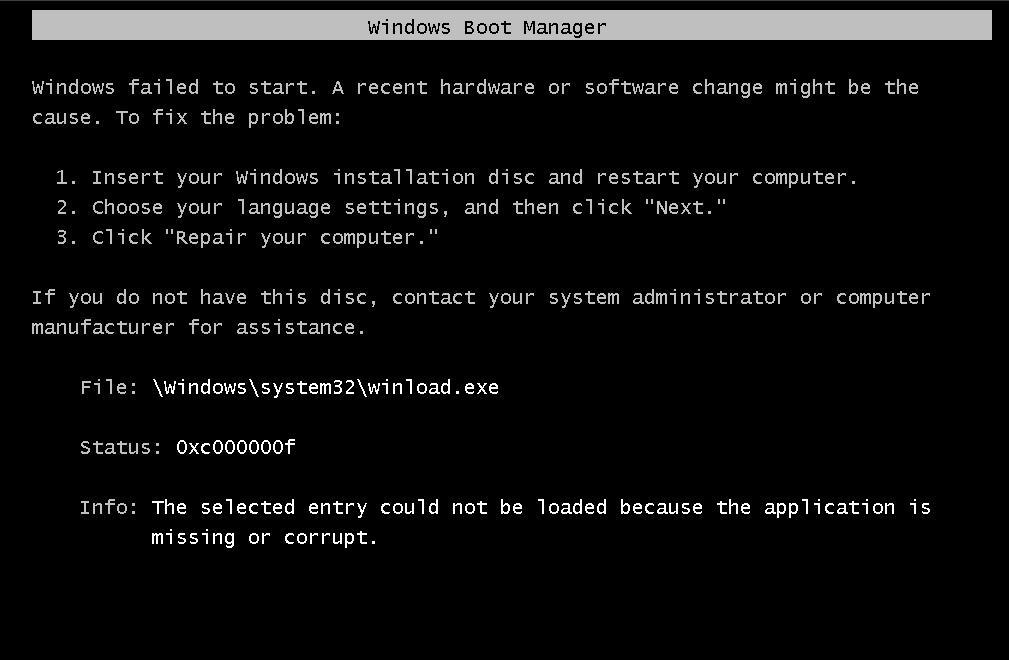
0xc000000f missing or corrupt winload.exe

darkjeremy4

New member
Local time
2:18 PM
Messages
2
winload_exe_vista_missing_or_corrupt.jpg

can anyone help me with this problem??

I've try to reformat my PC in the same OS which is Windows7 Ultimate 32bit, due to some viruses. I've booted the OS disk, it was normally booted but an accidental brown out happened before "Windows Set-Up" shows.

Then, when lights up, i booted again the OS disk and such error occurred, it says;


"Press any key to boot... NTLDR not found"

after a second, the above picture comes out.
help me pls...


P.S. Make this thread a hot topic. It will be a great help to others in future when they encounter it.
 

My Computer

OS
Windows 7 Ultimate 32bit

My Computer

Computer Manufacturer/Model Number
Samsung NP550P5C-S02IN
OS
Windows 7 Ultimate - 64-bit | Windows 8 Pro - 64-bit
CPU
Intel® Core™ i7 Processor 3,610QM (2.30Hz, 6MB L3 Cach
Memory
8 GB
Graphics Card(s)
NVIDIA® GeForce® GT 650M 2GB Graphics, Optimus™ techno
Sound Card
SoundAlive™ JBL 3 Speakers (With sub-Woofer)
Monitor(s) Displays
39.62cm (15.6) SuperBright 300nit HD+ LED Display
Screen Resolution
1,600 x 900, Anti-Reflective
Hard Drives
1TB S-ATA II Hard Drive (5,400RPM)
I'll try it. Thanks tho...
Oh by the way, I only downloaded my OS not purchased, will it work?
 

My Computer

OS
Windows 7 Ultimate 32bit

My Computer

Computer Manufacturer/Model Number
Samsung NP550P5C-S02IN
OS
Windows 7 Ultimate - 64-bit | Windows 8 Pro - 64-bit
CPU
Intel® Core™ i7 Processor 3,610QM (2.30Hz, 6MB L3 Cach
Memory
8 GB
Graphics Card(s)
NVIDIA® GeForce® GT 650M 2GB Graphics, Optimus™ techno
Sound Card
SoundAlive™ JBL 3 Speakers (With sub-Woofer)
Monitor(s) Displays
39.62cm (15.6) SuperBright 300nit HD+ LED Display
Screen Resolution
1,600 x 900, Anti-Reflective
Hard Drives
1TB S-ATA II Hard Drive (5,400RPM)
It sounds like you have a multiboot with XP, because the ntldr file is necessary for XP, not Win7. Ususally when it tells you that the ntldr file is missing or corrupt, it's because the boot configuration is pointed at the wrong partition - it needs to find the boot.ini, ntldr and NTdetect files to boot XP.

The 0x000000f error and corrupt winload are serious Win7 issues - I think I would do a clean install of Win7. Then run EasyBCD and you can use it add the XP partition and get boot manager pointed to the correct drive for it.

I would also be concerned about the virus infestation from before - you may have to properly wipe the hard disk, not just reformat a partition or two, and start all over, if you can't get it sorted by normal means.
 

My Computer

OS
Windows 7
Back
Top