1.5TB External HDD shows in Win7 as EFI Partition, but only in WinOS

cowboyuptx

New member
Local time
1:37 AM
Messages
11
I'll ask the main question first, and you can decide how much more you want or need to read...

How can I get Windows 7 to stop seeing my external HDD as an EFI System Partition?

It still has all its movies on it, I can see them in Linux, but not in Windows 7 OS... Conversely my Linux OS sees the external HDD that windows cant see, but it doesn't see the other two Large HDDs


THE BACK STORY - - - I recently migrated from Ubuntu back to windows 7. After switching to Win7, I was not liking the slowness, so I wanted to try to setup a dual boot option for Windows 7 and Kodibuntu. Both OS were 32 bit, and both were to be installed on the same Samsung 250GB HDD
During the Kodibuntu install, there was an option to setup a dual boot, but that option wasn't working for me, so I had to partition the 250GB OS disk myself. I followed an instructional guide that I found on askubuntu, and all seemed to go well. It said that Kodibuntu was installed correctly and that the system needed to reboot and so it did...

When the system rebooted I was not prompted with any sort of dual boot option, it just went straight to Windows. I'm honestly not certain if all my HDDs were showing in the Windows OS at this point, I was at that time more concerned with getting the dual boot option working... So I made a USB-Key with linux "boot-repair-disk" on it, I booted it in the system, it did its thing and seemed to work, because when it rebooted I was presented with the option to load either Windows or Kodibuntu, or Kodibuntu would eventually load by default...

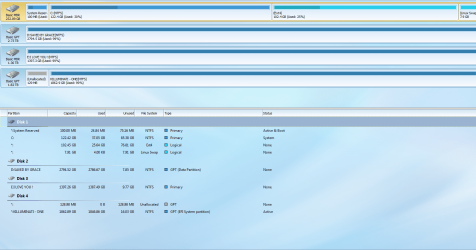
THE MEAT OF THE QUESTION - - - So then I loaded the Kodibuntu OS for the first time, shortly after which I discovered that ONLY my external 2TB HDD was being recognized in Kodibuntu. So I rebooted and loaded Windows 7, where I found that Windows was showing my (internal) 1.5TB HDD and my (internal) 3TB HDD, but Win7 did NOT show the external 2TB HDD. So I have 2 Internal HDDs not showing up in Kodibuntu, and my external HDD not showing in Windows 7... I did notice in Windows "Disk Management" utility, that while my external drive is not being shown in Windows explorer, it does show in "Disk Management", sort of.... for some reason the external HDD space is being listed as an EFI Drive Partition in Windows "Disk Management" utility... Also, the Windows OS does chime when the external drive is inserted or removed...
What do you guys think I should do? I'm pretty noobish...So lost here....

Thank you in advance to anybody who offers help.
 

My Computer My Computer

At a glance

Windows 7
Computer type
PC/Desktop
OS
Windows 7
You may need to run a mount command in ubuntu terminal to see other internal drives.

What is on the external drive?
 

My Computer My Computer

At a glance

Linux Lite 3.2 x64; Windows 7, 8.1Core2Duo 2.46GB ddr2nVidia
Computer type
PC/Desktop
Computer Manufacturer/Model Number
dell precision t3400 tower
OS
Linux Lite 3.2 x64; Windows 7, 8.1
CPU
Core2Duo 2.4
Memory
6GB ddr2
Graphics Card(s)
nVidia
Hard Drives
120gb SSD, 1TB HD, 2TB HD; sata II
Internet Speed
12/2
Browser
Vivaldi, Slimjet (Chromium) x64
Can you post a disk management picture so that we can see the details.
 

My Computer My Computer

At a glance

Vista, Windows7, Mint Mate, Zorin, Windows 8from 1.6GHz Duo to i7
Computer Manufacturer/Model Number
HP, Dell, Gateway, Toshiba - 4 laptops and 2 desktops
OS
Vista, Windows7, Mint Mate, Zorin, Windows 8
CPU
from 1.6GHz Duo to i7
Monitor(s) Displays
2x HP w2207
Hard Drives
5x HDD, 7x SSD, 12x Externals
Keyboard
with trackball - no mices
Mouse
Trackball mice
Internet Speed
DSL 6000
You may need to run a mount command in ubuntu terminal to see other internal drives.

What is on the external drive?

I'm sorry it has taken so long for me to reply to my own thread, just been so busy....

I was able to get the HDDs to all be seen and functional on my linux OS by entering the correct mount commands, but I'm still trying to figure out what to do about windows not seeing the external drive...

As for what's on the drive, mostly movies and tv shows... So it wouldn't be the end of the world if I had to format it, but it did take me a long time to compile all that media...
 

My Computer My Computer

At a glance

Windows 7
Computer type
PC/Desktop
OS
Windows 7
Can you post a disk management picture so that we can see the details.

Again, thank you for your willingness to help... And sorry it took me a few days to reply...

For good measure, let me show you what my HDDs look like inside my Linux OS when I run "sudo fdisk -l".... The drive in question is actually a 2TB (not a 1.5TB, my bad) and it is listed as "sdd1" at the bottom.
Code:
plex@plex-TZ68K ~ $ sudo fdisk -l

Disk /dev/sda: 250.1 GB, 250059350016 bytes
255 heads, 63 sectors/track, 30401 cylinders, total 488397168 sectors
Units = sectors of 1 * 512 = 512 bytes
Sector size (logical/physical): 512 bytes / 512 bytes
I/O size (minimum/optimal): 512 bytes / 512 bytes
Disk identifier: 0x0007f670

   Device Boot      Start         End      Blocks   Id  System
/dev/sda1   *        2048      206847      102400    7  HPFS/NTFS/exFAT
/dev/sda2          206848   256952319   128372736    7  HPFS/NTFS/exFAT
/dev/sda3       256954366   488396799   115721217    5  Extended
/dev/sda5       471803904   488396799     8296448   82  Linux swap / Solaris
/dev/sda6       256954368   471803903   107424768   83  Linux

Partition table entries are not in disk order

WARNING: GPT (GUID Partition Table) detected on '/dev/sdb'! The util fdisk doesn't support GPT. Use GNU Parted.


Disk /dev/sdb: 3000.6 GB, 3000592982016 bytes
255 heads, 63 sectors/track, 364801 cylinders, total 5860533168 sectors
Units = sectors of 1 * 512 = 512 bytes
Sector size (logical/physical): 512 bytes / 4096 bytes
I/O size (minimum/optimal): 4096 bytes / 4096 bytes
Disk identifier: 0x00000000

   Device Boot      Start         End      Blocks   Id  System
/dev/sdb1               1  4294967295  2147483647+  ee  GPT
Partition 1 does not start on physical sector boundary.

Disk /dev/sdc: 1500.3 GB, 1500301910016 bytes
255 heads, 63 sectors/track, 182401 cylinders, total 2930277168 sectors
Units = sectors of 1 * 512 = 512 bytes
Sector size (logical/physical): 512 bytes / 512 bytes
I/O size (minimum/optimal): 512 bytes / 512 bytes
Disk identifier: 0x47d9be29

   Device Boot      Start         End      Blocks   Id  System
/dev/sdc1            2048  2930274303  1465136128    7  HPFS/NTFS/exFAT

WARNING: GPT (GUID Partition Table) detected on '/dev/sdd'! The util fdisk doesn't support GPT. Use GNU Parted.


Disk /dev/sdd: 2000.4 GB, 2000398934016 bytes
255 heads, 63 sectors/track, 243201 cylinders, total 3907029168 sectors
Units = sectors of 1 * 512 = 512 bytes
Sector size (logical/physical): 512 bytes / 512 bytes
I/O size (minimum/optimal): 512 bytes / 512 bytes
Disk identifier: 0x00000000

   Device Boot      Start         End      Blocks   Id  System
/dev/sdd1               1  3907029167  1953514583+  ee  GPT
And here's a Screenshot of what it looks like in my Windows 7 "Disk Management" utility...
The picture is kinda small so click on it and then the magnifying glass for a larger version of it... Screenshot - 1_8_2016 12_28_21 AM_zpsh7iy3wb6.png Photo by shanebuyscar | Photobucket

 
Last edited:

My Computer My Computer

At a glance

Windows 7
Computer type
PC/Desktop
OS
Windows 7
You should be able to change the partition type using a partition program in either linux or windows. It would be a good idea to copy the data over first.
 

My Computer My Computer

At a glance

Linux Lite 3.2 x64; Windows 7, 8.1Core2Duo 2.46GB ddr2nVidia
Computer type
PC/Desktop
Computer Manufacturer/Model Number
dell precision t3400 tower
OS
Linux Lite 3.2 x64; Windows 7, 8.1
CPU
Core2Duo 2.4
Memory
6GB ddr2
Graphics Card(s)
nVidia
Hard Drives
120gb SSD, 1TB HD, 2TB HD; sata II
Internet Speed
12/2
Browser
Vivaldi, Slimjet (Chromium) x64
I would just reformat the whole disk3
 

My Computer My Computer

At a glance

Vista, Windows7, Mint Mate, Zorin, Windows 8from 1.6GHz Duo to i7
Computer Manufacturer/Model Number
HP, Dell, Gateway, Toshiba - 4 laptops and 2 desktops
OS
Vista, Windows7, Mint Mate, Zorin, Windows 8
CPU
from 1.6GHz Duo to i7
Monitor(s) Displays
2x HP w2207
Hard Drives
5x HDD, 7x SSD, 12x Externals
Keyboard
with trackball - no mices
Mouse
Trackball mice
Internet Speed
DSL 6000
I would just reformat the whole disk3

Well, unfortunately I don't have an extra unused 2TB HDD laying around, so formatting would mean just giving up all of my data... I'd prefer to find some software that at least gives me a fighting chance of achieving what I've set out to do, which is to return the drive to being fully functional in Windows OS, and to retain all of my data. On the other hand, it's sad that I dont have a measly $150 for a 5TB to backup most of my data.

I know there's a lot of programs out there that can change a HDD/partition from GPT to MBR, and I'm assuming that's what I would need? Can anybody recommend a good software for this?

One more thing, did you notice that there's another large HDD on my system that's listed as a GPT volume, yet windows has no problem accessing and playing off of that HDD.... So is my problem for windows really that it's listed as a GPT volume? And if so, then why does Windows access the other GPT HDD just fine?

In the Windows OS the drive shows an "EFI partition"...... What's that? Is it the type of partition designated to an OS?

Thanks again for the help guys...
 

My Computer My Computer

At a glance

Windows 7
Computer type
PC/Desktop
OS
Windows 7
I would just reformat the whole disk3

Well, unfortunately I don't have an extra unused 2TB HDD laying around, so formatting would mean just giving up all of my data... I'd prefer to find some software that at least gives me a fighting chance of achieving what I've set out to do, which is to return the drive to being fully functional in Windows OS, and to retain all of my data. On the other hand, it's sad that I dont have a measly $150 for a 5TB to backup most of my data.

I know there's a lot of programs out there that can change a HDD/partition from GPT to MBR, and I'm assuming that's what I would need? Can anybody recommend a good software for this?

One more thing, did you notice that there's another large HDD on my system that's listed as a GPT volume, yet windows has no problem accessing and playing off of that HDD.... So is my problem for windows really that it's listed as a GPT volume? And if so, then why does Windows access the other GPT HDD just fine?

In the Windows OS the drive shows an "EFI partition"...... What's that? Is it the type of partition designated to an OS?

Thanks again for the help guys...

http://www.sevenforums.com/tutorials/26203-convert-gpt-disk-mbr-disk.html
 

My Computer My Computer

At a glance

Windows 7 Home Premium 32-Bit - Build 7600 SP1Intel Core i3-2120 3.30GhzKingston 4 GB DDR3 1333 mhzAMD Radeon HD6670
Computer type
PC/Desktop
Computer Manufacturer/Model Number
Custom Build
OS
Windows 7 Home Premium 32-Bit - Build 7600 SP1
CPU
Intel Core i3-2120 3.30Ghz
Motherboard
Asus P8Z68-V LX Intel Z68 Socket H2 ATX
Memory
Kingston 4 GB DDR3 1333 mhz
Graphics Card(s)
AMD Radeon HD6670
Sound Card
Sound Blaster Audigy SE 24-Bit
Monitor(s) Displays
Asus VE228
Screen Resolution
1440 X 900
Hard Drives
OCZ Vertex 3 120 GB Sata 3 SSD ==
Kingston SH103/S3 120 G Hyper X 120 GB SSD ==
Western Digital 500 GB Caviar Green 7200 RPM ==
PSU
Corsair CX600M == 600 Watt
Case
NZXT Apollo - Silver with Clear Side Panel
Cooling
Three 120 mm Fans
Keyboard
Microsoft Natural 4000
Mouse
Microsoft Custom Optical 3000
Internet Speed
AT&T Fiber Optic Wireless Network
Antivirus
Microsoft Security Essentials
Browser
Chrome
Other Info
120 mm Blue LED Fan -- Three Blue LED Lazer Light Sticks
Basically there is something suspicious about your Disk 3.

My observations:

1.If it is a GPT drive, Windows Disk Management will not show the 128MB MSR partition.Here it shows up in WDM as an unallocated partition. ( In comparison look at your Disk 1, the 3TB drive, which you say is a GPT drive. It does not show the 128 MB MSR partition.) Note: The 128 MB MSR partition can be seen in Partition Wizard and AOMEI Partition Assistant as 'others" but not as unallocated.

2. Also an external drive initialised as a GPT and formatted with Windows or any partitioning software such as AOMEI Partition Assistant or Partition Wizard will not show the main partition as EFI system Partition.

To me it looks like that the HDD itself was a system drive earlier on an EFI system and you have put that drive now in an external casing.

Please give the complete history of your Disk 3 including any and all formatting done earlier on that drive , and its component parts. Make, model No. manufacturer and whether it is a branded drive or consists of an external casing where you have put an HDD and made it an external drive and if so its past history.

Don't hurry and attempt of converting GPT to MBR without finding the root cause why your Disk 3 appears like this. You may lose all data in it, especially the tutorial suggested by bigmck. Quote from that tutorial "Before you convert a disk, be sure to backup anything that you do not want to lose on that disk. Converting the disk requires that all partitions and volumes are deleted on the disk first." - unquote.

(One can use AOMEI Partition Assistant or MiniTool Partition Wizard to convert from GPT to MBR and viceversa without data loss but in this case of suspicion/mystery I would hesitate to do that without backing up the data on it..)

As whs suggested in a previous post, it would be better if you can copy all data to another drive and format the drive in Windows the way you want instead of trying to untangle this mystery and set it right. It can perhaps be done but it may be a laborious process involving long investigative procedures.

Edit: I also understand that Linux can format external drives as bootable drives. Hence creation of a bootable EFI system partition cannot be ruled out. In such a case it could well be that Windows will not recognise an external drive that is bootable having a EFI system partition.So a mix of Linux and Windows with drives formatted in Linux may be unreadable by Windows.

EDIT: Please upload any screenshots to Seven Forums servers instead of third party servers.
http://www.sevenforums.com/tutorials/9733-screenshots-files-upload-post-seven-forums.html
 
Last edited:

My Computer My Computer

At a glance

Windows 7 Home Premium 32 bit
OS
Windows 7 Home Premium 32 bit
I would just reformat the whole disk3

Well, unfortunately I don't have an extra unused 2TB HDD laying around, so formatting would mean just giving up all of my data... I'd prefer to find some software that at least gives me a fighting chance of achieving what I've set out to do, which is to return the drive to being fully functional in Windows OS, and to retain all of my data. On the other hand, it's sad that I dont have a measly $150 for a 5TB to backup most of my data.

I know there's a lot of programs out there that can change a HDD/partition from GPT to MBR, and I'm assuming that's what I would need? Can anybody recommend a good software for this?

One more thing, did you notice that there's another large HDD on my system that's listed as a GPT volume, yet windows has no problem accessing and playing off of that HDD.... So is my problem for windows really that it's listed as a GPT volume? And if so, then why does Windows access the other GPT HDD just fine?

In the Windows OS the drive shows an "EFI partition"...... What's that? Is it the type of partition designated to an OS?

Thanks again for the help guys...

Hmm, in your snip the EFI partition is 100% empty.
 

My Computer My Computer

At a glance

Vista, Windows7, Mint Mate, Zorin, Windows 8from 1.6GHz Duo to i7
Computer Manufacturer/Model Number
HP, Dell, Gateway, Toshiba - 4 laptops and 2 desktops
OS
Vista, Windows7, Mint Mate, Zorin, Windows 8
CPU
from 1.6GHz Duo to i7
Monitor(s) Displays
2x HP w2207
Hard Drives
5x HDD, 7x SSD, 12x Externals
Keyboard
with trackball - no mices
Mouse
Trackball mice
Internet Speed
DSL 6000
^ I presume it is so since Windows does not see any file system and no drive letter assigned.. I also noticed now that the OP has two partitions in Disk 0 too 102.45 GB and 7.91 GB with no file system. All show free space. But I think the OP can mount all these on Linux. Atleast that is what I have understood- rightly or wrongly.:)
 

My Computer My Computer

At a glance

Windows 7 Home Premium 32 bit
OS
Windows 7 Home Premium 32 bit
Basically there is something suspicious about your Disk 3.

My observations:

1.If it is a GPT drive, Windows Disk Management will not show the 128MB MSR partition.Here it shows up in WDM as an unallocated partition. ( In comparison look at your Disk 1, the 3TB drive, which you say is a GPT drive. It does not show the 128 MB MSR partition.) Note: The 128 MB MSR partition can be seen in Partition Wizard and AOMEI Partition Assistant as 'others" but not as unallocated.

So since that 128 MB is showing in WDM, does that mean that it is not a GPT drive?

2. Also an external drive initialised as a GPT and formatted with Windows or any partitioning software such as AOMEI Partition Assistant or Partition Wizard will not show the main partition as EFI system Partition.

To me it looks like that the HDD itself was a system drive earlier on an EFI system and you have put that drive now in an external casing.

To my knowledge (best I can remember), there has never been an attempt to install an OS on the drive, nor was it ever (intentionally) partitioned.

Please give the complete history of your Disk 3 including any and all formatting done earlier on that drive , and its component parts. Make, model No. manufacturer and whether it is a branded drive or consists of an external casing where you have put an HDD and made it an external drive and if so its past history.

The drive is a 1.5TB Western Digital green drive, the exact same as this WD 1.5TB SATA 3.5-inch Hard Drive - WD15EARS
The HDD is housed in a nice aluminum enclosure...

Don't hurry and attempt of converting GPT to MBR without finding the root cause why your Disk 3 appears like this. You may lose all data in it, especially the tutorial suggested by bigmck. Quote from that tutorial "Before you convert a disk, be sure to backup anything that you do not want to lose on that disk. Converting the disk requires that all partitions and volumes are deleted on the disk first." - unquote.

(One can use AOMEI Partition Assistant or MiniTool Partition Wizard to convert from GPT to MBR and viceversa without data loss but in this case of suspicion/mystery I would hesitate to do that without backing up the data on it..)

As whs suggested in a previous post, it would be better if you can copy all data to another drive and format the drive in Windows the way you want instead of trying to untangle this mystery and set it right. It can perhaps be done but it may be a laborious process involving long investigative procedures.

I can be patient for now, because it at least still works in Linux...

Edit: I also understand that Linux can format external drives as bootable drives. Hence creation of a bootable EFI system partition cannot be ruled out. In such a case it could well be that Windows will not recognise an external drive that is bootable having a EFI system partition.So a mix of Linux and Windows with drives formatted in Linux may be unreadable by Windows.

The thing to remember, is that only a week ago this same drive had no problem working in either Windows or Linux. This problem arose shortly after installing Linux Peppermint as a dual-boot setup with Windows 7, but I'm certain that I did not accidentally partition the drive during that installation.

The only thing I can think of that could have caused a problem, is that I think I might have accidentally set the BIOS to try to boot off this drive, instead of off the flash drive which was what I had meant to do... I'm not 100% sure that I actually made this error, but I do remember having to fiddle with the boot options more than once...

EDIT: Please upload any screenshots to Seven Forums servers instead of third party servers.
Will do... My apologies...
 

My Computer My Computer

At a glance

Windows 7
Computer type
PC/Desktop
OS
Windows 7
^ I presume it is so since Windows does not see any file system and no drive letter assigned.. I also noticed now that the OP has two partitions in Disk 0 too 102.45 GB and 7.91 GB with no file system. All show free space. But I think the OP can mount all these on Linux. Atleast that is what I have understood- rightly or wrongly.:)

I think the 102 GB is for the Peppermint OS, and the other 8 GB is the swap partition for that OS.
 

My Computer My Computer

At a glance

Windows 7
Computer type
PC/Desktop
OS
Windows 7
"So since that 128 MB is showing in WDM, does that mean that it is not a GPT drive?"

That was a good question and here is the answer.

When a drive is initialised as GPT and formatted, Windows creates a 128 MB MSR partition but that will not be visible in Windows Disk Management. AOMEI Partition assistant as well as Partition Wizard will however show that MSR partition as "other".I had also said that using these two partitioning software one can nondestructively (without data loss) convert the drive from GPT to MBR. When that is done that 128 MB MSR partition will become unallocated. It can be seen as Unallocated in Windows Disk Management too now.When again you convert the same drive from MBR to GPT, ahoy!,it does become a GPT drive but the 128MB unallocated space will still remain as unallocated.

So the answer is it can still be a GPT drive. But what is evident is that some sort of conversion has taken place in your external drive/ the 1.5TB WD Green drive at some point of time as a result of which it now shows the 128 MB erstwhile MSR partition as unallocated.

I rightly guessed that your external drive could in fact be be a third party enclosure into which you have put a desktop drive.You have now admitted that :).Would Linux installed on some other drive make your external drive into EFI System drive? I think there are many gaps in your story.That is why it is suspicious and mysterious. :)

I still do not know the history of that 1.5TB WD Green drive. What is the necessity of a 1.5TB drive to be initialised as a GPT drive? Did you buy it new?Wherefrom did it come?

I know that this discussion is not going to resolve your query as to how to get the main partition recognised by Windows. You asked a question and I have answered :)

Now answer my question. I do not know anything Linux.

Your system drive must have been all NTFS before you started installing Linux. You installed Peppermint. Why does it now show two partitions without any file system in Windows? ( Yes I knew that it was Linux swap/ Solaris and Linux - sda5 and sda6 - from your Linux screenshot. In my post#12, I was only answering to whs inviting his attention that just like your enclosure +1.5TB drive in it, you also have two partitions in your system drive which Windows shows as 100% free. No file system recognised by Windows, no drive letter - and it does not mean it is really empty :))
 
Last edited:

My Computer My Computer

At a glance

Windows 7 Home Premium 32 bit
OS
Windows 7 Home Premium 32 bit
"So since that 128 MB is showing in WDM, does that mean that it is not a GPT drive?"

That was a good question and here is the answer.

When a drive is initialised as GPT and formatted, Windows creates a 128 MB MSR partition but that will not be visible in Windows Disk Management. AOMEI Partition assistant as well as Partition Wizard will however show that MSR partition as "other".I had also said that using these two partitioning software one can nondestructively (without data loss) convert the drive from GPT to MBR. When that is done that 128 MB MSR partition will become unallocated. It can be seen as Unallocated in Windows Disk Management too now.When again you convert the same drive from MBR to GPT, ahoy!,it does become a GPT drive but the 128MB unallocated space will still remain as unallocated.

So the answer is it can still be a GPT drive. But what is evident is that some sort of conversion has taken place in your external drive/ the 1.5TB WD Green drive at some point of time as a result of which it now shows the 128 MB erstwhile MSR partition as unallocated.

I rightly guessed that your external drive could in fact be be a third party enclosure into which you have put a desktop drive.You have now admitted that :).Would Linux installed on some other drive make your external drive into EFI System drive? I think there are many gaps in your story.That is why it is suspicious and mysterious. :)

I don't know what those "gaps" might be... It was working in both Windows and Linux only about 8 days ago...

I still do not know the history of that 1.5TB WD Green drive. What is the necessity of a 1.5TB drive to be initialised as a GPT drive? Did you buy it new?Wherefrom did it come?

I bought the drive new from amazon... It has been housed in a metal Nexstar enclosure ever since I bought it about 5 years ago... Like I said, as best as I can recall, I never attempted to put any OS on that drive, nor did I ever intentionally partition the drive...

As I also stated previously, it's only been about a week since the HDD was last known to be fully functional in both Linux and Windows' OS...

While preparing to install the Linux OS, I think I might have accidentally set the drive in question to be the #1 Boot Option in the BIOS screen... I corrected that error right away and set BIOS to boot off the thumb-drive, which was what I had originally intended, the 1.5TB is no longer listed as a boot option.... But do you think that simply telling the system to attempt to boot off of that drive, could that have caused the drive to be changed, or to be viewed different by the system?

I know that this discussion is not going to resolve your query as to how to get the main partition recognised by Windows. You asked a question and I have answered :)

Now answer my question. I do not know anything Linux.

Your system drive must have been all NTFS before you started installing Linux. You installed Peppermint. Why does it now show two partitions without any file system in Windows? ( Yes I knew that it was Linux swap/ Solaris and Linux - sda5 and sda6 - from your Linux screenshot. In my post#12, I was only answering to whs inviting his attention that just like your enclosure +1.5TB drive in it, you also have two partitions in your system drive which Windows shows as 100% free. No file system recognised by Windows, no drive letter - and it does not mean it is really empty :))

I appreciate you
taking the time to explain some of this to me, sorry I kinda made you repeat yourself...
 

My Computer My Computer

At a glance

Windows 7
Computer type
PC/Desktop
OS
Windows 7
I went ahead and downloaded the free edition of MiniTool Partition Wizard...

Do you think that it would work if I just formatted the 128MB partition on that drive? Or do you think I should go ahead and try to convert the whole drive from GPT to MBR?
 

My Computer My Computer

At a glance

Windows 7
Computer type
PC/Desktop
OS
Windows 7
None of it.

Since Linux sees your external drive and all data in it, your best option now will be to backup all data to another drive and then format the drive with Windows.. You can wait till you are able to do it.

For the present just run Partition Wizard, take the screenshot of how your external drive looks in it and post it. - the very first screen after you launch the application. After taking the screenshot close Partition Wizard. We can see whether it is really a GPT drive. Don't do anything else.
 

My Computer My Computer

At a glance

Windows 7 Home Premium 32 bit
OS
Windows 7 Home Premium 32 bit
It's definitely listed as a GPT Volume... And you were right about using the forum's uploader instead of photobucket, it looks much better anyway.
 

Attachments

  • Screenshot - 1_11_2016 , 1_55_05 AM.png
    Screenshot - 1_11_2016 , 1_55_05 AM.png
    227.5 KB · Views: 6

My Computer My Computer

At a glance

Windows 7
Computer type
PC/Desktop
OS
Windows 7
OK, I have seen your post but will take sometime to come up with further instructions.( Right now I am busy with other things.) Don't do anything till I return.
 

My Computer My Computer

At a glance

Windows 7 Home Premium 32 bit
OS
Windows 7 Home Premium 32 bit
Back
Top