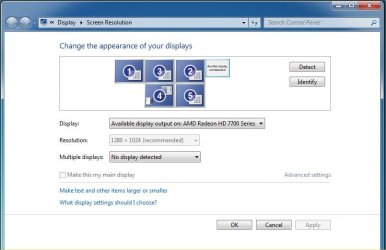
1 monitor stopped be detected

FlightsimTed

New member
Local time
1:48 PM
Messages
4
My PC is dual boot - Windows 7 32 or 64 bit. I have 6 Dell monitors connected to my PC. I usually boot into win 7 32 bit where all 6 monitors work. Today I booted into Win 7 64 bit and one of the monitors does not show the green power light just orange. The other five are OK. If I restart and boot into win 7 32 all is well again and the monitor with the orange light in win 7 64 bit goes green. In win 7 64 bit there only shows 5 monitors. Any idea what might be wrong? I assume that it is a software problem.
 

My Computer My Computer

At a glance

Windows 7 Professional 32 and 64 bitIntel Core i7-3770 CPU @ 3.50GHz, 4 Cores, 8 ...32 Gm2 x Radeon HD7700 + GTX 1070Ti
Computer type
PC/Desktop
Computer Manufacturer/Model Number
Home made
OS
Windows 7 Professional 32 and 64 bit
CPU
Intel Core i7-3770 CPU @ 3.50GHz, 4 Cores, 8 Logical Process
Motherboard
Gigabite Z77X-UP7
Memory
32 Gm
Graphics Card(s)
2 x Radeon HD7700 + GTX 1070Ti
Monitor(s) Displays
6 Dell
Hard Drives
1 off Seagate ST2000M001-1CH164 ATA
1 off Seagate ST2000M001-1ER164 ATA
1 OFF Western Digital WDC 2002FAEX-007BA0 ATA
Antivirus
Vipre Internet Security 2016
Browser
Edge, Firefox, Chrome
I would start to investigate settings in your video control panel. What kind of GPU do you have? How are these six monitors even connected?


jyhukoyuik.jpg
 

My Computer My Computer

At a glance

Windows 7 Ultimate x64
Computer type
PC/Desktop
OS
Windows 7 Ultimate x64
I have 2 x Radeon HD7700 + GTX 1070Ti
3 monitors (DELL E190S) are connected to the GTX 1070Ti via Startech 3 way splitter DP port on the GTX in – 3 x DP out to VGA monitors.
1 monitor (DELL P190S) is connected to the GTX via [FONT=&quot]dual-link DVI port to dual-link DVI port on the monitor[/FONT][FONT=&quot][/FONT]

1 each (DELL P190S) are connected to the HD7700's dual-link DVI port to the dual-link DVI port on the monitors. It is one of these monitors that is not working in the win 7 64 bit. It does work in the win 7 32 bit with no changes in any lead or other connections.

This setup has worked flawlessly for at least 2 years.

- - - Updated - - -

Hello F22 Simpilot
Thank you for helping me.
here are some screen shots
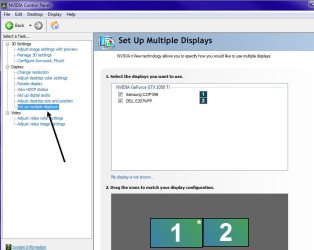
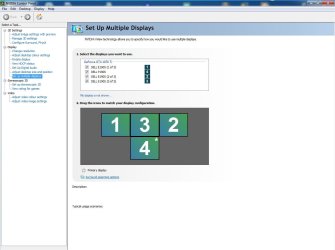
The image Win 7 32 and 64 bit.jpg is identical on both systems
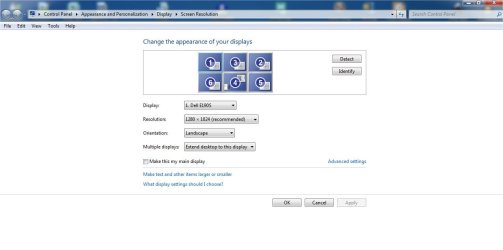
The image windows 7 32 bit screen resolution.jpg Shows all 6 monitors detected and OK
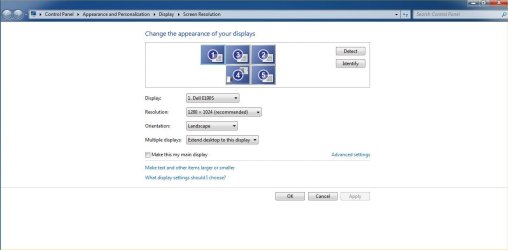
The image windows 7 64 bit screen resolution.jpg shows only 5 monitors
The image windows 7 64 bit screen resolution press detect.jpg after pressing the detect button. clicking the No display detected drop down box only shows Try in VGA mode. This too does not work.
 

Attachments

  • Win 7 32 and 64 bit.jpg
    Win 7 32 and 64 bit.jpg
    65 KB · Views: 0
  • windows 7 32 bit screen resolution.jpg
    windows 7 32 bit screen resolution.jpg
    42.7 KB · Views: 0
  • windows 7 64 bit screen resolution.jpg
    windows 7 64 bit screen resolution.jpg
    43.3 KB · Views: 0
  • windows 7 64 bit screen resolution press detect.jpg
    windows 7 64 bit screen resolution press detect.jpg
    40.4 KB · Views: 1

My Computer My Computer

At a glance

Windows 7 Professional 32 and 64 bitIntel Core i7-3770 CPU @ 3.50GHz, 4 Cores, 8 ...32 Gm2 x Radeon HD7700 + GTX 1070Ti
Computer type
PC/Desktop
Computer Manufacturer/Model Number
Home made
OS
Windows 7 Professional 32 and 64 bit
CPU
Intel Core i7-3770 CPU @ 3.50GHz, 4 Cores, 8 Logical Process
Motherboard
Gigabite Z77X-UP7
Memory
32 Gm
Graphics Card(s)
2 x Radeon HD7700 + GTX 1070Ti
Monitor(s) Displays
6 Dell
Hard Drives
1 off Seagate ST2000M001-1CH164 ATA
1 off Seagate ST2000M001-1ER164 ATA
1 OFF Western Digital WDC 2002FAEX-007BA0 ATA
Antivirus
Vipre Internet Security 2016
Browser
Edge, Firefox, Chrome
I have a felling you need to use the AMD GPU driver control panel for the configuration of those connected monitors and the Nvidea control panel for the configuration of its connected monitors.

Mixing two different brands of GPUs is not a good idea...
 

My Computer My Computer

At a glance

Windows 7 Ultimate x64
Computer type
PC/Desktop
OS
Windows 7 Ultimate x64
I too are believing that it is something with the Radeon HD7700 graphics card but this system has worked setup has worked flawlessly for at least 2 years. I will look in to this. Thank you again
 

My Computer My Computer

At a glance

Windows 7 Professional 32 and 64 bitIntel Core i7-3770 CPU @ 3.50GHz, 4 Cores, 8 ...32 Gm2 x Radeon HD7700 + GTX 1070Ti
Computer type
PC/Desktop
Computer Manufacturer/Model Number
Home made
OS
Windows 7 Professional 32 and 64 bit
CPU
Intel Core i7-3770 CPU @ 3.50GHz, 4 Cores, 8 Logical Process
Motherboard
Gigabite Z77X-UP7
Memory
32 Gm
Graphics Card(s)
2 x Radeon HD7700 + GTX 1070Ti
Monitor(s) Displays
6 Dell
Hard Drives
1 off Seagate ST2000M001-1CH164 ATA
1 off Seagate ST2000M001-1ER164 ATA
1 OFF Western Digital WDC 2002FAEX-007BA0 ATA
Antivirus
Vipre Internet Security 2016
Browser
Edge, Firefox, Chrome
Well, it's kinda like plugging a hole on a steam pipe with bubble gum. At first it may work for awhile, but eventually it won't....
 

My Computer My Computer

At a glance

Windows 7 Ultimate x64
Computer type
PC/Desktop
OS
Windows 7 Ultimate x64
I have just completely uninstalled the 2 HD7700 cards and reinstalled them with the drivers DVD that came with them. It all works again. The drivers were not the drivers they have now. The windows system did not recognise the monitor so it did not show on the ADM control panel. With the windows 7 32 bit system it uses the same graphics system and has been running for over 5 years. Something updated the HD 7700 cards driver.
Thank you for your help
 
Last edited:

My Computer My Computer

At a glance

Windows 7 Professional 32 and 64 bitIntel Core i7-3770 CPU @ 3.50GHz, 4 Cores, 8 ...32 Gm2 x Radeon HD7700 + GTX 1070Ti
Computer type
PC/Desktop
Computer Manufacturer/Model Number
Home made
OS
Windows 7 Professional 32 and 64 bit
CPU
Intel Core i7-3770 CPU @ 3.50GHz, 4 Cores, 8 Logical Process
Motherboard
Gigabite Z77X-UP7
Memory
32 Gm
Graphics Card(s)
2 x Radeon HD7700 + GTX 1070Ti
Monitor(s) Displays
6 Dell
Hard Drives
1 off Seagate ST2000M001-1CH164 ATA
1 off Seagate ST2000M001-1ER164 ATA
1 OFF Western Digital WDC 2002FAEX-007BA0 ATA
Antivirus
Vipre Internet Security 2016
Browser
Edge, Firefox, Chrome
Back
Top