
12/9/14 windows update>pc won't boot from ssd

matix018

New member
Local time
1:56 AM
Messages
21
Shut my computer down the night of the update and turned it on the next day and my computer wouldn't boot Windows from my ssd :( I've been searching for answers but haven't landed on anything yet. When I put the win7 disc in to try to restore from image it fails, and when I run startup repair it says the root cause is that the partition table does not have a valid system partition. When I try the system restore option it says I have to specify which Windows installation to restore but have nowhere to select that. I've heard done talk of getting my hands on a Windows 8disc and repair it with that but don't have the disc (yet...not sure if anyone else thinks this will work?) and also some command prompt suggestions, but I don't know a heck of a lot about that. I also have a hdd with most of my documents that I don't want to lose if possible.

What are my options? Anyone know how I can fix this? Need more info?

Many thanks for any help :huh:
 

My Computer My Computer

At a glance

windows 7 home premium 64bitintel core i72x4gevga gtx560ti
Computer type
PC/Desktop
Computer Manufacturer/Model Number
custom
OS
windows 7 home premium 64bit
CPU
intel core i7
Motherboard
asus p8z68-v pro/gen3
Memory
2x4g
Graphics Card(s)
evga gtx560ti
Hard Drives
1t samsung HDD - storage only
Intel 510 series SSD. 120gb - for windows only
1. Does the SSD show in the BIOS/uEFI?
2. What error message do you get when you try to boot from the SSD?
 

My Computer My Computer

At a glance

Windows 10 Pro x64 ; Xubuntu x64Intel i7 860 @ 2.80 GHz O/C'ed to 4.0GHz16GB Corsair Vengance DDR3 @ 661 MHz Dual Cha...EVGA NVidia GTX 560 1024MB
Computer type
PC/Desktop
Computer Manufacturer/Model Number
Golden Mk. I.4
OS
Windows 10 Pro x64 ; Xubuntu x64
CPU
Intel i7 860 @ 2.80 GHz O/C'ed to 4.0GHz
Motherboard
Gigabyte P55A-UD3R Rev.1. Award BIOS F13
Memory
16GB Corsair Vengance DDR3 @ 661 MHz Dual Channel (9-9-9-24)
Graphics Card(s)
EVGA NVidia GTX 560 1024MB
Sound Card
Realtek Integrated
Monitor(s) Displays
Dual Samsung SyncMaster 2494HS
Screen Resolution
1920*1080 and 1920*1080
Hard Drives
1*Samsung 840 EVO 120GB SSD;
1*OCZ Vertex 2 60GB SSD;
2*Samsung F3 SpinPoint 1TB in RAID0;
1*Samsung F1 SpinPoint 1TB;
2*Western Digital 1TB External USB 3.0
1*Western Digital 500GB External USB 3.0
1*Seagate 500GB External USB 2.0
PSU
Thermaltake ToughPower QFan 750W
Case
Thermaltake Element S VK60001W2Z
Cooling
Corsair H60 Water Cooling, 2*230mm and 2*80mm case fans
Keyboard
Logitech G110
Mouse
Logitech MX518
It shows up in bios in the areas only where it allows me to select a drive to start Windows from and then it takes me to a black screen with a blinking underscore in the upper left, but does not show up in the boot section to set the sequence of which drives to start from.
 

My Computer My Computer

At a glance

windows 7 home premium 64bitintel core i72x4gevga gtx560ti
Computer type
PC/Desktop
Computer Manufacturer/Model Number
custom
OS
windows 7 home premium 64bit
CPU
intel core i7
Motherboard
asus p8z68-v pro/gen3
Memory
2x4g
Graphics Card(s)
evga gtx560ti
Hard Drives
1t samsung HDD - storage only
Intel 510 series SSD. 120gb - for windows only
Use bootable Partition Wizard to boot the computer and look at the disks/partitions present. use a camera to take a phot of those, and upload it here.
 

My Computer My Computer

At a glance

Windows 10 Pro x64 ; Xubuntu x64Intel i7 860 @ 2.80 GHz O/C'ed to 4.0GHz16GB Corsair Vengance DDR3 @ 661 MHz Dual Cha...EVGA NVidia GTX 560 1024MB
Computer type
PC/Desktop
Computer Manufacturer/Model Number
Golden Mk. I.4
OS
Windows 10 Pro x64 ; Xubuntu x64
CPU
Intel i7 860 @ 2.80 GHz O/C'ed to 4.0GHz
Motherboard
Gigabyte P55A-UD3R Rev.1. Award BIOS F13
Memory
16GB Corsair Vengance DDR3 @ 661 MHz Dual Channel (9-9-9-24)
Graphics Card(s)
EVGA NVidia GTX 560 1024MB
Sound Card
Realtek Integrated
Monitor(s) Displays
Dual Samsung SyncMaster 2494HS
Screen Resolution
1920*1080 and 1920*1080
Hard Drives
1*Samsung 840 EVO 120GB SSD;
1*OCZ Vertex 2 60GB SSD;
2*Samsung F3 SpinPoint 1TB in RAID0;
1*Samsung F1 SpinPoint 1TB;
2*Western Digital 1TB External USB 3.0
1*Western Digital 500GB External USB 3.0
1*Seagate 500GB External USB 2.0
PSU
Thermaltake ToughPower QFan 750W
Case
Thermaltake Element S VK60001W2Z
Cooling
Corsair H60 Water Cooling, 2*230mm and 2*80mm case fans
Keyboard
Logitech G110
Mouse
Logitech MX518
My passport disk 3 is just an external used for storage
 

Attachments

  • 14188602727101765181476.jpg
    14188602727101765181476.jpg
    1,016.1 KB · Views: 4
Last edited:

My Computer My Computer

At a glance

windows 7 home premium 64bitintel core i72x4gevga gtx560ti
Computer type
PC/Desktop
Computer Manufacturer/Model Number
custom
OS
windows 7 home premium 64bit
CPU
intel core i7
Motherboard
asus p8z68-v pro/gen3
Memory
2x4g
Graphics Card(s)
evga gtx560ti
Hard Drives
1t samsung HDD - storage only
Intel 510 series SSD. 120gb - for windows only
When you boot as normal, what message appears? can you take a photo and upload that too please?
 

My Computer My Computer

At a glance

Windows 10 Pro x64 ; Xubuntu x64Intel i7 860 @ 2.80 GHz O/C'ed to 4.0GHz16GB Corsair Vengance DDR3 @ 661 MHz Dual Cha...EVGA NVidia GTX 560 1024MB
Computer type
PC/Desktop
Computer Manufacturer/Model Number
Golden Mk. I.4
OS
Windows 10 Pro x64 ; Xubuntu x64
CPU
Intel i7 860 @ 2.80 GHz O/C'ed to 4.0GHz
Motherboard
Gigabyte P55A-UD3R Rev.1. Award BIOS F13
Memory
16GB Corsair Vengance DDR3 @ 661 MHz Dual Channel (9-9-9-24)
Graphics Card(s)
EVGA NVidia GTX 560 1024MB
Sound Card
Realtek Integrated
Monitor(s) Displays
Dual Samsung SyncMaster 2494HS
Screen Resolution
1920*1080 and 1920*1080
Hard Drives
1*Samsung 840 EVO 120GB SSD;
1*OCZ Vertex 2 60GB SSD;
2*Samsung F3 SpinPoint 1TB in RAID0;
1*Samsung F1 SpinPoint 1TB;
2*Western Digital 1TB External USB 3.0
1*Western Digital 500GB External USB 3.0
1*Seagate 500GB External USB 2.0
PSU
Thermaltake ToughPower QFan 750W
Case
Thermaltake Element S VK60001W2Z
Cooling
Corsair H60 Water Cooling, 2*230mm and 2*80mm case fans
Keyboard
Logitech G110
Mouse
Logitech MX518
Use partition wizard to set the 100MB system reserved partition active. It is in the partition tab > Modify. Then try to boot again.
 

My Computer My Computer

At a glance

Vista, Windows7, Mint Mate, Zorin, Windows 8from 1.6GHz Duo to i7
Computer Manufacturer/Model Number
HP, Dell, Gateway, Toshiba - 4 laptops and 2 desktops
OS
Vista, Windows7, Mint Mate, Zorin, Windows 8
CPU
from 1.6GHz Duo to i7
Monitor(s) Displays
2x HP w2207
Hard Drives
5x HDD, 7x SSD, 12x Externals
Keyboard
with trackball - no mices
Mouse
Trackball mice
Internet Speed
DSL 6000
Image 1 is my boot order set in bios
Image 2 is what I get when I boot normally
 

Attachments

  • 14188618923331411319820.jpg
    14188618923331411319820.jpg
    879 KB · Views: 1
  • 1418862004376188264387.jpg
    1418862004376188264387.jpg
    476.8 KB · Views: 1

My Computer My Computer

At a glance

windows 7 home premium 64bitintel core i72x4gevga gtx560ti
Computer type
PC/Desktop
Computer Manufacturer/Model Number
custom
OS
windows 7 home premium 64bit
CPU
intel core i7
Motherboard
asus p8z68-v pro/gen3
Memory
2x4g
Graphics Card(s)
evga gtx560ti
Hard Drives
1t samsung HDD - storage only
Intel 510 series SSD. 120gb - for windows only
It just stays there forever 😞
 

My Computer My Computer

At a glance

windows 7 home premium 64bitintel core i72x4gevga gtx560ti
Computer type
PC/Desktop
Computer Manufacturer/Model Number
custom
OS
windows 7 home premium 64bit
CPU
intel core i7
Motherboard
asus p8z68-v pro/gen3
Memory
2x4g
Graphics Card(s)
evga gtx560ti
Hard Drives
1t samsung HDD - storage only
Intel 510 series SSD. 120gb - for windows only
Whs - it isn't allowing me to set as active 😒
 

Attachments

  • 14188783366551411319820.jpg
    14188783366551411319820.jpg
    984.9 KB · Views: 2

My Computer My Computer

At a glance

windows 7 home premium 64bitintel core i72x4gevga gtx560ti
Computer type
PC/Desktop
Computer Manufacturer/Model Number
custom
OS
windows 7 home premium 64bit
CPU
intel core i7
Motherboard
asus p8z68-v pro/gen3
Memory
2x4g
Graphics Card(s)
evga gtx560ti
Hard Drives
1t samsung HDD - storage only
Intel 510 series SSD. 120gb - for windows only
It would allow me for disk 2 and 3, though, if I wanted to...
 

My Computer My Computer

At a glance

windows 7 home premium 64bitintel core i72x4gevga gtx560ti
Computer type
PC/Desktop
Computer Manufacturer/Model Number
custom
OS
windows 7 home premium 64bit
CPU
intel core i7
Motherboard
asus p8z68-v pro/gen3
Memory
2x4g
Graphics Card(s)
evga gtx560ti
Hard Drives
1t samsung HDD - storage only
Intel 510 series SSD. 120gb - for windows only
Try "Set Windows Boot Partition" which is 3 steps under Modify.
 

My Computer My Computer

At a glance

Vista, Windows7, Mint Mate, Zorin, Windows 8from 1.6GHz Duo to i7
Computer Manufacturer/Model Number
HP, Dell, Gateway, Toshiba - 4 laptops and 2 desktops
OS
Vista, Windows7, Mint Mate, Zorin, Windows 8
CPU
from 1.6GHz Duo to i7
Monitor(s) Displays
2x HP w2207
Hard Drives
5x HDD, 7x SSD, 12x Externals
Keyboard
with trackball - no mices
Mouse
Trackball mice
Internet Speed
DSL 6000
Error: failed to find Windows directory
 

My Computer My Computer

At a glance

windows 7 home premium 64bitintel core i72x4gevga gtx560ti
Computer type
PC/Desktop
Computer Manufacturer/Model Number
custom
OS
windows 7 home premium 64bit
CPU
intel core i7
Motherboard
asus p8z68-v pro/gen3
Memory
2x4g
Graphics Card(s)
evga gtx560ti
Hard Drives
1t samsung HDD - storage only
Intel 510 series SSD. 120gb - for windows only
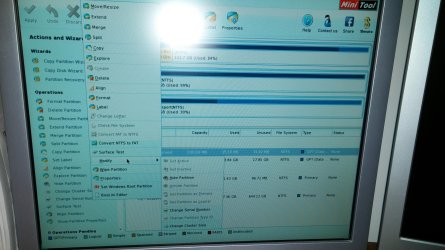
Question: Has the SSD always been GPT ??
 

My Computer My Computer

At a glance

Vista, Windows7, Mint Mate, Zorin, Windows 8from 1.6GHz Duo to i7
Computer Manufacturer/Model Number
HP, Dell, Gateway, Toshiba - 4 laptops and 2 desktops
OS
Vista, Windows7, Mint Mate, Zorin, Windows 8
CPU
from 1.6GHz Duo to i7
Monitor(s) Displays
2x HP w2207
Hard Drives
5x HDD, 7x SSD, 12x Externals
Keyboard
with trackball - no mices
Mouse
Trackball mice
Internet Speed
DSL 6000
I'm sorry, Im not sure. gpt vs mbr is a completely new topic to me :( I haven't knowingly done anything to change it
 

My Computer My Computer

At a glance

windows 7 home premium 64bitintel core i72x4gevga gtx560ti
Computer type
PC/Desktop
Computer Manufacturer/Model Number
custom
OS
windows 7 home premium 64bit
CPU
intel core i7
Motherboard
asus p8z68-v pro/gen3
Memory
2x4g
Graphics Card(s)
evga gtx560ti
Hard Drives
1t samsung HDD - storage only
Intel 510 series SSD. 120gb - for windows only
Then I suspect the SSD already came GPT initiated from the factory. That is not very smart of them for such a small disk. Here is why:

Most OSes have GPT-specific boot quirks on BIOS-based computers. The best, such as Linux, install and boot fine on GPT systems, so long as you follow the advice for creating appropriate partitions. Others, such as Windows, are much more challenging to get booting in this way. With all OSes, be aware that there are some buggy BIOSes that have problems booting from GPT disks. These problems can usually be overcome, but you should be aware of the issue before you try to set up a system to boot from a GPT disk in BIOS mode.

Source: Booting from GPT

I have an idea how to fix it, but it will be some work. We'll have to image the 2 partitions and delete them from the disk. Then convert the disk to MBR and put the image back on. Would you be OK with that ?? I would show you the steps.
 

My Computer My Computer

At a glance

Vista, Windows7, Mint Mate, Zorin, Windows 8from 1.6GHz Duo to i7
Computer Manufacturer/Model Number
HP, Dell, Gateway, Toshiba - 4 laptops and 2 desktops
OS
Vista, Windows7, Mint Mate, Zorin, Windows 8
CPU
from 1.6GHz Duo to i7
Monitor(s) Displays
2x HP w2207
Hard Drives
5x HDD, 7x SSD, 12x Externals
Keyboard
with trackball - no mices
Mouse
Trackball mice
Internet Speed
DSL 6000
Yes, I would be most grateful!
 

My Computer My Computer

At a glance

windows 7 home premium 64bitintel core i72x4gevga gtx560ti
Computer type
PC/Desktop
Computer Manufacturer/Model Number
custom
OS
windows 7 home premium 64bit
CPU
intel core i7
Motherboard
asus p8z68-v pro/gen3
Memory
2x4g
Graphics Card(s)
evga gtx560ti
Hard Drives
1t samsung HDD - storage only
Intel 510 series SSD. 120gb - for windows only
OK

Step 1 - download this .iso from my Onedrive (right click on the icon at my OneDrive). Burn that .iso to a CD. This is a live CD of the Macrium imaging program.

Step 2 - Make a folder on your external Passport and call it "Images". Then boot the PC with the Macrium CD and make an image of the 2 partitions on the SSD. Here is a Macrium tutorial I made. If you have questions, ask back.

Step 3 - delete the 2 partitions from the SSD using the bootable partition wizard. Make sure you end up with unallocated space.

Step 4 - Convert the SSD to MBR disk with partition wizard

Step 5 - put the image of the 2 partitions back on the SSD. For that you also use the Macrium CD. Here is a tutorial that mu friend Keith made on how to restore an image. When it asks you to restore the MBR, say yes.

Step 6 - have a look at the restored SSD using partition wizard, take a picture and post it here. In principle the SSD should boot now. If it does not, there is a problem with the bootmgr or the MBR, but that can be fixed.
 

My Computer My Computer

At a glance

Vista, Windows7, Mint Mate, Zorin, Windows 8from 1.6GHz Duo to i7
Computer Manufacturer/Model Number
HP, Dell, Gateway, Toshiba - 4 laptops and 2 desktops
OS
Vista, Windows7, Mint Mate, Zorin, Windows 8
CPU
from 1.6GHz Duo to i7
Monitor(s) Displays
2x HP w2207
Hard Drives
5x HDD, 7x SSD, 12x Externals
Keyboard
with trackball - no mices
Mouse
Trackball mice
Internet Speed
DSL 6000
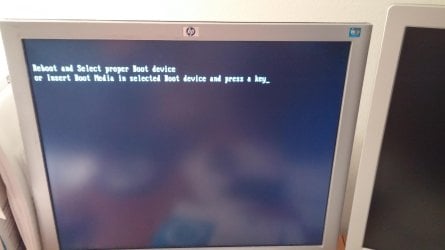
I've burned the iso file but am now getting this message:

(I can open the CD on another computer and macrium is there, and when I insert the partition wizard disc into my pc I can boot just fine)
 

Attachments

  • 1418949369350284124020.jpg
    1418949369350284124020.jpg
    287.5 KB · Views: 2

My Computer My Computer

At a glance

windows 7 home premium 64bitintel core i72x4gevga gtx560ti
Computer type
PC/Desktop
Computer Manufacturer/Model Number
custom
OS
windows 7 home premium 64bit
CPU
intel core i7
Motherboard
asus p8z68-v pro/gen3
Memory
2x4g
Graphics Card(s)
evga gtx560ti
Hard Drives
1t samsung HDD - storage only
Intel 510 series SSD. 120gb - for windows only
Is this an 8.1 UEFI system. If yes, you have to change the BIOS to legacy mode.
 

My Computer My Computer

At a glance

Vista, Windows7, Mint Mate, Zorin, Windows 8from 1.6GHz Duo to i7
Computer Manufacturer/Model Number
HP, Dell, Gateway, Toshiba - 4 laptops and 2 desktops
OS
Vista, Windows7, Mint Mate, Zorin, Windows 8
CPU
from 1.6GHz Duo to i7
Monitor(s) Displays
2x HP w2207
Hard Drives
5x HDD, 7x SSD, 12x Externals
Keyboard
with trackball - no mices
Mouse
Trackball mice
Internet Speed
DSL 6000
Back
Top