
12/9/14 windows update>pc won't boot from ssd

Sorry, I'm unsure of that as well :( Is there an easy way to tell? Also can't find anything on changing to Legacy mode in BIOS
 

My Computer My Computer

At a glance

windows 7 home premium 64bitintel core i72x4gevga gtx560ti
Computer type
PC/Desktop
Computer Manufacturer/Model Number
custom
OS
windows 7 home premium 64bit
CPU
intel core i7
Motherboard
asus p8z68-v pro/gen3
Memory
2x4g
Graphics Card(s)
evga gtx560ti
Hard Drives
1t samsung HDD - storage only
Intel 510 series SSD. 120gb - for windows only
Well, is it a Windows 7 or a Windows 8.1 system ??
 

My Computer My Computer

At a glance

Vista, Windows7, Mint Mate, Zorin, Windows 8from 1.6GHz Duo to i7
Computer Manufacturer/Model Number
HP, Dell, Gateway, Toshiba - 4 laptops and 2 desktops
OS
Vista, Windows7, Mint Mate, Zorin, Windows 8
CPU
from 1.6GHz Duo to i7
Monitor(s) Displays
2x HP w2207
Hard Drives
5x HDD, 7x SSD, 12x Externals
Keyboard
with trackball - no mices
Mouse
Trackball mice
Internet Speed
DSL 6000
Windows 7 :)
 

My Computer My Computer

At a glance

windows 7 home premium 64bitintel core i72x4gevga gtx560ti
Computer type
PC/Desktop
Computer Manufacturer/Model Number
custom
OS
windows 7 home premium 64bit
CPU
intel core i7
Motherboard
asus p8z68-v pro/gen3
Memory
2x4g
Graphics Card(s)
evga gtx560ti
Hard Drives
1t samsung HDD - storage only
Intel 510 series SSD. 120gb - for windows only
So that is a normal MBR system. I still wonder how that SSD became GPT.

For your boot problem with the CD - did you change the temporary boot sequence to boot from DC.
 

My Computer My Computer

At a glance

Vista, Windows7, Mint Mate, Zorin, Windows 8from 1.6GHz Duo to i7
Computer Manufacturer/Model Number
HP, Dell, Gateway, Toshiba - 4 laptops and 2 desktops
OS
Vista, Windows7, Mint Mate, Zorin, Windows 8
CPU
from 1.6GHz Duo to i7
Monitor(s) Displays
2x HP w2207
Hard Drives
5x HDD, 7x SSD, 12x Externals
Keyboard
with trackball - no mices
Mouse
Trackball mice
Internet Speed
DSL 6000
Yes, which is I think why the other disc (partition wizard) still worked.
 

My Computer My Computer

At a glance

windows 7 home premium 64bitintel core i72x4gevga gtx560ti
Computer type
PC/Desktop
Computer Manufacturer/Model Number
custom
OS
windows 7 home premium 64bit
CPU
intel core i7
Motherboard
asus p8z68-v pro/gen3
Memory
2x4g
Graphics Card(s)
evga gtx560ti
Hard Drives
1t samsung HDD - storage only
Intel 510 series SSD. 120gb - for windows only
Now you confused me. What exactly is the problem now. Sorry but I am a bit lost.
 

My Computer My Computer

At a glance

Vista, Windows7, Mint Mate, Zorin, Windows 8from 1.6GHz Duo to i7
Computer Manufacturer/Model Number
HP, Dell, Gateway, Toshiba - 4 laptops and 2 desktops
OS
Vista, Windows7, Mint Mate, Zorin, Windows 8
CPU
from 1.6GHz Duo to i7
Monitor(s) Displays
2x HP w2207
Hard Drives
5x HDD, 7x SSD, 12x Externals
Keyboard
with trackball - no mices
Mouse
Trackball mice
Internet Speed
DSL 6000
I can't boot my PC with the Macrium CD because I get the message shown from my last picture: Reboot or select proper boot device or insert boot media in selected boot device and press a key...

So I'm just stuck in step 2 of your directions :(
 

My Computer My Computer

At a glance

windows 7 home premium 64bitintel core i72x4gevga gtx560ti
Computer type
PC/Desktop
Computer Manufacturer/Model Number
custom
OS
windows 7 home premium 64bit
CPU
intel core i7
Motherboard
asus p8z68-v pro/gen3
Memory
2x4g
Graphics Card(s)
evga gtx560ti
Hard Drives
1t samsung HDD - storage only
Intel 510 series SSD. 120gb - for windows only
That's what I thought. But now we are both stuck. I just cannot figure out what is going wrong.

At this stage of the game no OS is involved - it is just the BIOS. So something must be wrong in the BIOS. It can be reset by removing the CMOS battery for a few minutes. If that is the custom desktop from your profile, then this should be easy. But if have never done that, you better ask a friend who is used to deal with the hardware. Do you have that option ??

Another option we have is to take this SSD out and deal with it on another PC from an external USB attached disk enclosure.
 

My Computer My Computer

At a glance

Vista, Windows7, Mint Mate, Zorin, Windows 8from 1.6GHz Duo to i7
Computer Manufacturer/Model Number
HP, Dell, Gateway, Toshiba - 4 laptops and 2 desktops
OS
Vista, Windows7, Mint Mate, Zorin, Windows 8
CPU
from 1.6GHz Duo to i7
Monitor(s) Displays
2x HP w2207
Hard Drives
5x HDD, 7x SSD, 12x Externals
Keyboard
with trackball - no mices
Mouse
Trackball mice
Internet Speed
DSL 6000
This may help.
Please don't hit me if it doesn't. I'm very tender.

Motherboards - P8Z68-V PRO/GEN3 - ASUS


UEFI BIOS (EZ Mode) - Flexible & Easy BIOS Interface
How many drives are hook to the system and what is on the drives?
Is the Samsung a hard drive or SSD?

This is confusing from matix018 specs.

Hard Drives 1t samsung Intel 510 series. 120gb

If the Intel SSD has the Reserve and Windows 7 on it unhook all other drives and see if the system will boot.
 

My Computer My Computer

At a glance

Windows 10 Pro. 64/ version 1709 Windows 7 Pr...Intel i7-6800K @ 4.3Corsair Platinum 16 gig @2400EVGA GTX 1070 OC
Computer type
PC/Desktop
Computer Manufacturer/Model Number
Home made Desktop
OS
Windows 10 Pro. 64/ version 1709 Windows 7 Pro/64
CPU
Intel i7-6800K @ 4.3
Motherboard
ASUS X-99 Deluxe II
Memory
Corsair Platinum 16 gig @2400
Graphics Card(s)
EVGA GTX 1070 OC
Monitor(s) Displays
Asus 27" LED LCD/VE278Q
Screen Resolution
1920-1080 or 1280-720 HDMI
Hard Drives
INTEL SSD 730-240 Gb Sata 3.0/
PSU
EVGA Platium 1200W
Case
Phanteks Luxe Tempered Glass 8 fans/ one radiator
Cooling
XSPC/ Water Cooled CPU
Keyboard
Das 4 Professional
Mouse
Logitech M705/MX Anywhere 2-S
Internet Speed
100 mbits
Antivirus
Microsoft Security Essentials/ Malwarebytes Premium 3.0/ SAS
Browser
I.E. 11 default/Firefox/ ISP Time Warner Cable/Spectrum
Other Info
LG BluRay Burner/
Sound system-KLipsch-THX/
Icy Dock ssd Hot Swap bays.
Layback bear - the Intel is the ssd that I use to boot Windows from, and the Samsung is a hdd that is used for storage. I tried unhooking the Samsung hdd, but I didn't boot :( I just got a black screen with a blinking white underscore in the upper left.

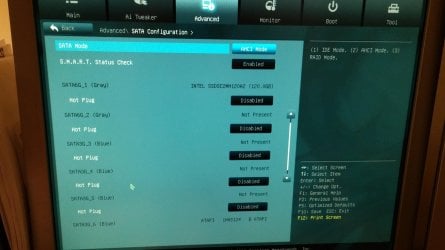
This was after I tried whs's battery removal method. It reset my bios, and I went in and saved/reset and still got the black screen with blinking underscore. I tried both of these options with the different boot priority combos. One thing I noticed when it reset my bios is that it disabled all sata slots shown on my attached image. Do these need to be all disabled, or do I need to enable the occupied slots? (Ive tried both ways with no luck but am just curious)
 

Attachments

  • 1419058153341284124020.jpg
    1419058153341284124020.jpg
    604.3 KB · Views: 3

My Computer My Computer

At a glance

windows 7 home premium 64bitintel core i72x4gevga gtx560ti
Computer type
PC/Desktop
Computer Manufacturer/Model Number
custom
OS
windows 7 home premium 64bit
CPU
intel core i7
Motherboard
asus p8z68-v pro/gen3
Memory
2x4g
Graphics Card(s)
evga gtx560ti
Hard Drives
1t samsung HDD - storage only
Intel 510 series SSD. 120gb - for windows only
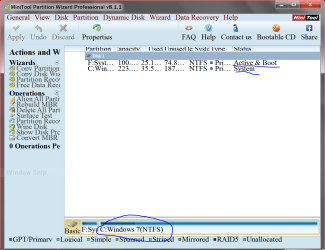
Is it still worth getting an external disc enclosure to work from another pc?
 

My Computer My Computer

At a glance

windows 7 home premium 64bitintel core i72x4gevga gtx560ti
Computer type
PC/Desktop
Computer Manufacturer/Model Number
custom
OS
windows 7 home premium 64bit
CPU
intel core i7
Motherboard
asus p8z68-v pro/gen3
Memory
2x4g
Graphics Card(s)
evga gtx560ti
Hard Drives
1t samsung HDD - storage only
Intel 510 series SSD. 120gb - for windows only
I personally have all hot-swaps enabled. It shouldn't matter if you only have one drive with Windows 7 in the first sata port on the motherboard.
Is their anything on the Intel drive?
Exactly what is on the DVD that you are trying to boot with and where did you get it?

Has this ssd with Windows 7 on it ever booted in this troubled computer?
If so did this computer have the motherboard that it has now?

Here is a tutorial by Gregrocker with a lot of information that could help.

http://www.sevenforums.com/tutorials/219533-troubleshooting-windows-7-failure-boot.html

I'm trying to understand what you have and what you have done.
Reading through this thread again 2 + 2 is not adding up to 4.

The pictures you post # 5 doesn't allow us to see drive letters or where the active flag (system) is.

Example:

Today only.PNG
 
Last edited:

My Computer My Computer

At a glance

Windows 10 Pro. 64/ version 1709 Windows 7 Pr...Intel i7-6800K @ 4.3Corsair Platinum 16 gig @2400EVGA GTX 1070 OC
Computer type
PC/Desktop
Computer Manufacturer/Model Number
Home made Desktop
OS
Windows 10 Pro. 64/ version 1709 Windows 7 Pro/64
CPU
Intel i7-6800K @ 4.3
Motherboard
ASUS X-99 Deluxe II
Memory
Corsair Platinum 16 gig @2400
Graphics Card(s)
EVGA GTX 1070 OC
Monitor(s) Displays
Asus 27" LED LCD/VE278Q
Screen Resolution
1920-1080 or 1280-720 HDMI
Hard Drives
INTEL SSD 730-240 Gb Sata 3.0/
PSU
EVGA Platium 1200W
Case
Phanteks Luxe Tempered Glass 8 fans/ one radiator
Cooling
XSPC/ Water Cooled CPU
Keyboard
Das 4 Professional
Mouse
Logitech M705/MX Anywhere 2-S
Internet Speed
100 mbits
Antivirus
Microsoft Security Essentials/ Malwarebytes Premium 3.0/ SAS
Browser
I.E. 11 default/Firefox/ ISP Time Warner Cable/Spectrum
Other Info
LG BluRay Burner/
Sound system-KLipsch-THX/
Icy Dock ssd Hot Swap bays.
Nothing is on the Intel other than Windows and a few things I could re download. It is the same motherboard I've had for the past 3 years, and the same ssd with widows on it that has always booted for me before the 12/9 windows update. These parts have always and only been in this machine which has worked great for the past 3years. This disc I'm trying to run is the Macrium Iso from whs, which he posted previously.

I did notice after going into partition wizard that it gives me the option to convert gpt disk to mbr disc for the ssd...and the other way around for hdd. The Intel is usually c: and the hdd either g or h. Not sure how to make partition wizard show that or which drive is system etc though.
 
Last edited:

My Computer My Computer

At a glance

windows 7 home premium 64bitintel core i72x4gevga gtx560ti
Computer type
PC/Desktop
Computer Manufacturer/Model Number
custom
OS
windows 7 home premium 64bit
CPU
intel core i7
Motherboard
asus p8z68-v pro/gen3
Memory
2x4g
Graphics Card(s)
evga gtx560ti
Hard Drives
1t samsung HDD - storage only
Intel 510 series SSD. 120gb - for windows only

My Computer My Computer

At a glance

Windows 10 Pro. 64/ version 1709 Windows 7 Pr...Intel i7-6800K @ 4.3Corsair Platinum 16 gig @2400EVGA GTX 1070 OC
Computer type
PC/Desktop
Computer Manufacturer/Model Number
Home made Desktop
OS
Windows 10 Pro. 64/ version 1709 Windows 7 Pro/64
CPU
Intel i7-6800K @ 4.3
Motherboard
ASUS X-99 Deluxe II
Memory
Corsair Platinum 16 gig @2400
Graphics Card(s)
EVGA GTX 1070 OC
Monitor(s) Displays
Asus 27" LED LCD/VE278Q
Screen Resolution
1920-1080 or 1280-720 HDMI
Hard Drives
INTEL SSD 730-240 Gb Sata 3.0/
PSU
EVGA Platium 1200W
Case
Phanteks Luxe Tempered Glass 8 fans/ one radiator
Cooling
XSPC/ Water Cooled CPU
Keyboard
Das 4 Professional
Mouse
Logitech M705/MX Anywhere 2-S
Internet Speed
100 mbits
Antivirus
Microsoft Security Essentials/ Malwarebytes Premium 3.0/ SAS
Browser
I.E. 11 default/Firefox/ ISP Time Warner Cable/Spectrum
Other Info
LG BluRay Burner/
Sound system-KLipsch-THX/
Icy Dock ssd Hot Swap bays.
You had me unhook all other drives in a previous post from page 3 in this thread, and try booting, but it did not work. I tried again and still nothing. I'm going to pick up a friend's laptop and got an external enclosure. Thank you for the tutorial link, I'll try going through that. In the mean time, any thoughts on what's going on or what the quickest fix would be based on everything that's been going on?
 

My Computer My Computer

At a glance

windows 7 home premium 64bitintel core i72x4gevga gtx560ti
Computer type
PC/Desktop
Computer Manufacturer/Model Number
custom
OS
windows 7 home premium 64bit
CPU
intel core i7
Motherboard
asus p8z68-v pro/gen3
Memory
2x4g
Graphics Card(s)
evga gtx560ti
Hard Drives
1t samsung HDD - storage only
Intel 510 series SSD. 120gb - for windows only
Back
Top