15 minute boot time...

Drips

New member
Local time
2:02 PM
Messages
13
Basic info about my laptop:
34hjvis.png


-Already reinstalled Windows 7
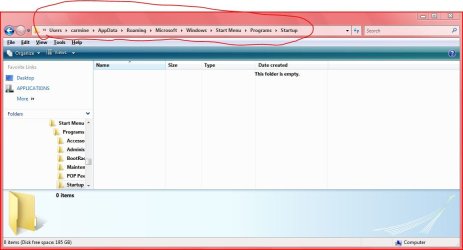
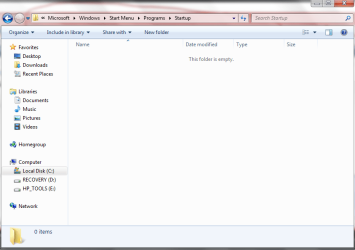
-Already removed everything in the start up programs
zldtgm.png


34dmumv.png


-Already tested Hard Drive and Memory in BIOS Menu, all tests passed.
-Tried sfc /scannow in CMD and got Windows Resource Protection did not find any integrity violations
-Tried Error-Checking Local Disk C, took roughly 3 hours to finish.
-ESET NOD32 Anti-Virus doesn't detect any viruses.

Other than the 15 minute loading time to get to the desktop, there's no other problem after that.

Also, is this topic in the correct section? Kinda new here :D
 
Last edited by a moderator:

My Computer

Computer Manufacturer/Model Number
Laptop - HP Pavilion dv6
OS
MS Windows 7 Home Premium 64-bit
CPU
Intel Core i7 720QM @ 1.60GH, Clarksfield 45nm Techno
Motherboard
Hewlett-Packard 3659 (CPU)
Memory
4.00 GB Dual-Channel DDR3 @ 665MHz (9-9-9-24)
Graphics Card(s)
Generic PnP Monitor (1366x768@60Hz) NVIDIA GeForce GT 230M
Sound Card
IDT High Definition Audio CODEC
Hard Drives
625GB Western Digital WDC WD6400BEVT-60A0RT0 (SATA)
Other Info
Optical reader - hp DVD RW AD-7586H

Monitor:
Generic PnP Monitor on NVIDIA GeForce GT 230M
Current Resolution 1366x768 pixels
Work Resolution 1366x768 pixels
State enabled, primary
Monitor Width 1366
Monitor Height 768
Monitor BPP 32 bits per pixel
Monitor Frequency 60 Hz
Device \\.\DISPLAY1\Monitor0

My Computer

Computer Manufacturer/Model Number
HP Pavilion Elite 495UK
OS
Windows 7 Ultimate SP1 64-Bit
CPU
Intel Core i7 870 @ 2.93GHz
Motherboard
MSI 2A9C (CPU1)
Memory
8Gb Dual-Channel DDR3 @ 664MHz
Graphics Card(s)
nVidia GeForce GTX 460 1024MB dedicated RAM
Sound Card
Realtek HD Audio
Monitor(s) Displays
HP2310i
Screen Resolution
1920 x 1080
Hard Drives
1x1954GB Hitachi HDS22020ALA 330 (RAID), 1x1954GB Hitachi External for backup and storage
PSU
460W
Case
HP Elite
Cooling
Air cooled
Keyboard
Logitech K750 solar-powered keyboard
Mouse
Logitech Wireless M180 mouse
Internet Speed
2Mb
Other Info
Pure Avanti Flow Internet Radio with iPod Dock, 64Gb iPod, HP USB Speakers, Sony MDR-V500 Headphones, Sony Vaio F-Series Laptop
You can also run Soluto. It will tell you all the details for each process (about 50 to 60 processes) that are loading. http://www.soluto.com/
 

My Computer

Computer Manufacturer/Model Number
HP, Dell, Gateway, Toshiba - 4 laptops and 2 desktops
OS
Vista, Windows7, Mint Mate, Zorin, Windows 8
CPU
from 1.6GHz Duo to i7
Monitor(s) Displays
2x HP w2207
Hard Drives
5x HDD, 7x SSD, 12x Externals
Keyboard
with trackball - no mices
Mouse
Trackball mice
Internet Speed
DSL 6000

My Computer

Computer Manufacturer/Model Number
HP Pavilion Elite 495UK
OS
Windows 7 Ultimate SP1 64-Bit
CPU
Intel Core i7 870 @ 2.93GHz
Motherboard
MSI 2A9C (CPU1)
Memory
8Gb Dual-Channel DDR3 @ 664MHz
Graphics Card(s)
nVidia GeForce GTX 460 1024MB dedicated RAM
Sound Card
Realtek HD Audio
Monitor(s) Displays
HP2310i
Screen Resolution
1920 x 1080
Hard Drives
1x1954GB Hitachi HDS22020ALA 330 (RAID), 1x1954GB Hitachi External for backup and storage
PSU
460W
Case
HP Elite
Cooling
Air cooled
Keyboard
Logitech K750 solar-powered keyboard
Mouse
Logitech Wireless M180 mouse
Internet Speed
2Mb
Other Info
Pure Avanti Flow Internet Radio with iPod Dock, 64Gb iPod, HP USB Speakers, Sony MDR-V500 Headphones, Sony Vaio F-Series Laptop
You didn't post the brand but your image of process leads me to believe it is an HP (or Compaq). I have a Compaq and the default load and settings from HP caused it to be a dog, but not quite as slow as you are experiencing. I removed a lot of the HP startup processes and it helped a lot (but I eventually wiped the drive and loaded Win7 Pro).

Can you resize the "Startup Item" column and expand the window down (to more easily see all of the items) and post a new screen shot?

Have you checked on the HP forums for ideas/solutions?

Regards,
GEWB
 

My Computer

Computer type
PC/Desktop
Computer Manufacturer/Model Number
(7 different computers booting up to 10 systems)
OS
Linux Mint / XP / Win7 Home, Pro, Ultimate / Win8.1 / Win10
Other Info
Four desktops, two laptops, one notebook and one tablet
Does the lag time seem to occur during POST, just after post or when loading the desktop?
 

My Computer

OS
Win7U 64 RTM
CPU
Q9550
Motherboard
GA-EP45-UD3R
Memory
8GB Gskill
Graphics Card(s)
ASUS|EAH4850/HTDI/1GD3/A
Sound Card
xfi Plat
Monitor(s) Displays
Dell 2405fpw
Screen Resolution
1920x1200
Hard Drives
Seagate & WD sata Drives
PSU
Antec
Case
Antec
Keyboard
MS Natural Ergonomic 4000
Mouse
Logitech MX610 USB Cordless
Install, update and Run a full scan with Malwarebytes

Uncheck everything in msconfig>Startup except AV and gadgets. Startup Programs - Change

After several restarts in msconfig>Services choose "Hide all MS services" to see what's running without your knowledge. Uncheck these, then after several restarts check both places to see if anything has written itself back in. Turn it off in its program Preferences or Uninstall.

I would also run Disk Check again from the DVD/Repair CD Command line to see if it finds any errors to repair.

Check the logs and System Resources for clues as to what is hanging boot: troubleshooting steps

Here are tips to clean up factory bloatware while monitoring System stability: Clean up factory bloatware

Finally, you can use the tool the Pro's use to trace slow boot: Trace Windows 7 boot-shutdown-hibernate-standby-resume issues - MSFN Forums
 
Last edited:
You didn't post the brand but your image of process leads me to believe it is an HP (or Compaq). I have a Compaq and the default load and settings from HP caused it to be a dog, but not quite as slow as you are experiencing. I removed a lot of the HP startup processes and it helped a lot (but I eventually wiped the drive and loaded Win7 Pro).

Can you resize the "Startup Item" column and expand the window down (to more easily see all of the items) and post a new screen shot?

Have you checked on the HP forums for ideas/solutions?

Regards,
GEWB

-HP Pavilion dv6 is the model of the laptop.
-MSconfig can't be resized =(
-Already checked HP forums for solutions and it's the ones in my first post.

Does the lag time seem to occur during POST, just after post or when loading the desktop?

The 15 minute wait is in here: http://techgenie.com/wp-content/uploads/boot_screen.png


Welcome to Windows Seven Forums.

Windows 7's Event Viewer should be able to give you some idea as to why your boot time is so long:

http://www.sevenforums.com/tutorials/174750-boot-times-monitor-event-viewer.html


Tried that event viewer thingy and got this: Boot times.evtx
Don't know what to do with this lol
 

My Computer

Computer Manufacturer/Model Number
Laptop - HP Pavilion dv6
OS
MS Windows 7 Home Premium 64-bit
CPU
Intel Core i7 720QM @ 1.60GH, Clarksfield 45nm Techno
Motherboard
Hewlett-Packard 3659 (CPU)
Memory
4.00 GB Dual-Channel DDR3 @ 665MHz (9-9-9-24)
Graphics Card(s)
Generic PnP Monitor (1366x768@60Hz) NVIDIA GeForce GT 230M
Sound Card
IDT High Definition Audio CODEC
Hard Drives
625GB Western Digital WDC WD6400BEVT-60A0RT0 (SATA)
Other Info
Optical reader - hp DVD RW AD-7586H

Monitor:
Generic PnP Monitor on NVIDIA GeForce GT 230M
Current Resolution 1366x768 pixels
Work Resolution 1366x768 pixels
State enabled, primary
Monitor Width 1366
Monitor Height 768
Monitor BPP 32 bits per pixel
Monitor Frequency 60 Hz
Device \\.\DISPLAY1\Monitor0
Have you checked that your drivers are all up to date?
Is your Anti-virus set to scan at bootup?
 

My Computer

Computer type
PC/Desktop
Computer Manufacturer/Model Number
Bruce ... somewhere in his 40's
OS
Windows 7 Ultimate 32bit SP1
CPU
Intel(R) Core(TM)2 Quad CPU @ 2.40GHz, 2400 MHz
Motherboard
INTEL/D975XBX2
Memory
4 GB
Graphics Card(s)
ATI Radeon HD 2600 Pro
Monitor(s) Displays
Samsung SyncMaster 914v
Screen Resolution
1280 x 1024
Hard Drives
2/500GB each ... ST3500630AS ATA Device.
One is not connected
PSU
Rocketfish 700 W
Case
G.Skill Gigabyte Chassis
Keyboard
Standard PS/2 Keyboard
Mouse
Microsoft PS/2 Mouse
Internet Speed
DSL
Antivirus
Avira Internet Security
Browser
IE 11
Other Info
ATI HDMI Audio

Attachments

  • 591.PNG
    591.PNG
    4.7 KB · Views: 798

My Computer

Computer Manufacturer/Model Number
Laptop - HP Pavilion dv6
OS
MS Windows 7 Home Premium 64-bit
CPU
Intel Core i7 720QM @ 1.60GH, Clarksfield 45nm Techno
Motherboard
Hewlett-Packard 3659 (CPU)
Memory
4.00 GB Dual-Channel DDR3 @ 665MHz (9-9-9-24)
Graphics Card(s)
Generic PnP Monitor (1366x768@60Hz) NVIDIA GeForce GT 230M
Sound Card
IDT High Definition Audio CODEC
Hard Drives
625GB Western Digital WDC WD6400BEVT-60A0RT0 (SATA)
Other Info
Optical reader - hp DVD RW AD-7586H

Monitor:
Generic PnP Monitor on NVIDIA GeForce GT 230M
Current Resolution 1366x768 pixels
Work Resolution 1366x768 pixels
State enabled, primary
Monitor Width 1366
Monitor Height 768
Monitor BPP 32 bits per pixel
Monitor Frequency 60 Hz
Device \\.\DISPLAY1\Monitor0
what is in your startup folder?
 

Attachments

  • Capture.JPG
    Capture.JPG
    59.8 KB · Views: 20

My Computer

Computer Manufacturer/Model Number
Gateway/NV7923u & NV79C52u Laptops
OS
windows 7 professional & ultimate 64bit laptops
CPU
2.27 boost to 2.53 & 2.53 boost to 2.80
Motherboard
Mobile Intel® HM55 Express Chipset ???
Memory
4GB
Graphics Card(s)
Intel® Graphics Media Accelerator HD
Sound Card
realtek High-definition audio support
Monitor(s) Displays
17.3 " HD 1600 x 900
Hard Drives
hatachi Travelstar 5400 500GB & west digital 500GB
Internet Speed
35MB fios
This problem did not exist from day one on your system.

One possible cause of such a long time is a virus.

The running of MalwareBytes is absolutely essential.

When you run MalwareBytes, get back to us with the results.

=======================================

As you noticed, msconfig's startup tab is not documentation friendly.

Download,install and run CCLeaner which is free. (Link in my sig).

After running CCleaner, carry out following procedure:
LIST OF STARTUP PROGRAMS USING CCLEANER


CCleaner | Tools icon | Startup tab | click on Save to text file button (bottom right side)

Using the PAPER CLIP icon in the top panel of a Message Reply window, attach the .txt file generated by CCleaner.
--------------------------------------------------------------------

You can also help us in determining possible causes by completing your System Specs.

Please use this procedure to fill out your system specs:

UPDATE YOUR SEVENFORUMS SYSTEM SPECS


User CP (3rd item in the top menu bar) |
in left-hand column, under Your Profile, Edit System Spec |


Use Speccy - System Information - Free Download
and/or SIW to gather info for filling in the blanks.

Do me a favor and add the word laptop or desktop to the “system manufacturer” block.

Use the “Other Info” block for Optical Reader, Mouse, touchpad, wifi adapter, speakers, monitor

Scroll down and click on the SAVE CHANGES button.
 

My Computer

Computer Manufacturer/Model Number
Toshiba Satellite S875D-S7239 laptop
OS
MS Windows 7 Ultimate SP1 64-bit
CPU
AMD A10-4600M
Motherboard
AMD Pumori (Socket FT1)
Memory
6.00 GB Dual-Channel DDR3 @ 798MHz (11-11-12-28)
Graphics Card(s)
AMD Radeon HD 7660G
Sound Card
High Definition Audio Device
Monitor(s) Displays
Generic PnP Monitor (1600x900@60Hz)
Screen Resolution
1600x900@60Hz
Hard Drives
SSD 119GB Corsair CSSD-V128GB2 ATA Device
Keyboard
Standard PS/2 Keyboard
Mouse
HP Wireless Optical Mobile Mouse Model FHA-3410
Internet Speed
What the local pub, local coffee shop offers.
Other Info
Optical Drive:MATSHITA BD-CMB UJ160B ATA Device


Also have an Asus ha1002xp netbook with Win 7 Ultimate installed.
What was the result for each troubleshooting step I gave?

@ Attachments

This problem did not exist from day one on your system.

One possible cause of such a long time is a virus.

The running of MalwareBytes is absolutely essential.

When you run MalwareBytes, get back to us with the results.

=======================================

As you noticed, msconfig's startup tab is not documentation friendly.

Download,install and run CCLeaner which is free. (Link in my sig).

After running CCleaner, carry out following procedure:
LIST OF STARTUP PROGRAMS USING CCLEANER


CCleaner | Tools icon | Startup tab | click on Save to text file button (bottom right side)

Using the PAPER CLIP icon in the top panel of a Message Reply window, attach the .txt file generated by CCleaner.
--------------------------------------------------------------------

You can also help us in determining possible causes by completing your System Specs.

Please use this procedure to fill out your system specs:

UPDATE YOUR SEVENFORUMS SYSTEM SPECS


User CP (3rd item in the top menu bar) |
in left-hand column, under Your Profile, Edit System Spec |


Use Speccy - System Information - Free Download
and/or SIW to gather info for filling in the blanks.

Do me a favor and add the word laptop or desktop to the “system manufacturer” block.

Use the “Other Info” block for Optical Reader, Mouse, touchpad, wifi adapter, speakers, monitor

Scroll down and click on the SAVE CHANGES button.

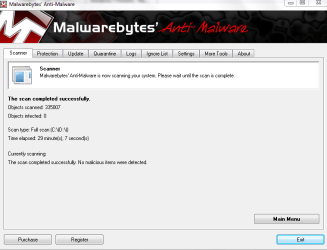
-Malwarebytes Full Scan @ attachments.
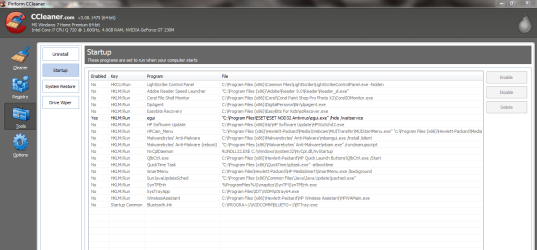
-CCleaner start up list @ attachments.
-Updated system specs
 

Attachments

  • startup.txt
    startup.txt
    4 KB · Views: 19
  • ads.PNG
    ads.PNG
    25.9 KB · Views: 15
  • malwarebytes.PNG
    malwarebytes.PNG
    30.4 KB · Views: 17

My Computer

Computer Manufacturer/Model Number
Laptop - HP Pavilion dv6
OS
MS Windows 7 Home Premium 64-bit
CPU
Intel Core i7 720QM @ 1.60GH, Clarksfield 45nm Techno
Motherboard
Hewlett-Packard 3659 (CPU)
Memory
4.00 GB Dual-Channel DDR3 @ 665MHz (9-9-9-24)
Graphics Card(s)
Generic PnP Monitor (1366x768@60Hz) NVIDIA GeForce GT 230M
Sound Card
IDT High Definition Audio CODEC
Hard Drives
625GB Western Digital WDC WD6400BEVT-60A0RT0 (SATA)
Other Info
Optical reader - hp DVD RW AD-7586H

Monitor:
Generic PnP Monitor on NVIDIA GeForce GT 230M
Current Resolution 1366x768 pixels
Work Resolution 1366x768 pixels
State enabled, primary
Monitor Width 1366
Monitor Height 768
Monitor BPP 32 bits per pixel
Monitor Frequency 60 Hz
Device \\.\DISPLAY1\Monitor0
Please follow the steps exactly as given if you want this fixed - they really aren't negotiable.

What about the real Startup List in msconfig? Startup Programs - Change

After unchecking everything except AV and gadgets, restart several times. Then enter msconfig>Services, check "Hide All MS Services" to see what is running without your knowledge. Uncheck there and restart again to see if anything writes itself back in, turn it off in Program Preferences or Uninstall.

Continue working through the steps and you will most definitely get it fixed, since the final step is a boot trace which cannot miss the problem.
 
Please follow the steps exactly as given if you want this fixed - they really aren't negotiable.

What about the real Startup List in msconfig? Startup Programs - Change

After unchecking everything except AV and gadgets, restart several times. Then enter msconfig>Services, check "Hide All MS Services" to see what is running without your knowledge. Uncheck there and restart again to see if anything writes itself back in, turn it off in Program Preferences or Uninstall.

Continue working through the steps and you will most definitely get it fixed, since the final step is a boot trace which cannot miss the problem.

Which ones are the gadgets here? (@attachments)
I'm a noob, I know lol
 

Attachments

  • sadds.PNG
    sadds.PNG
    41.2 KB · Views: 25
Last edited:

My Computer

Computer Manufacturer/Model Number
Laptop - HP Pavilion dv6
OS
MS Windows 7 Home Premium 64-bit
CPU
Intel Core i7 720QM @ 1.60GH, Clarksfield 45nm Techno
Motherboard
Hewlett-Packard 3659 (CPU)
Memory
4.00 GB Dual-Channel DDR3 @ 665MHz (9-9-9-24)
Graphics Card(s)
Generic PnP Monitor (1366x768@60Hz) NVIDIA GeForce GT 230M
Sound Card
IDT High Definition Audio CODEC
Hard Drives
625GB Western Digital WDC WD6400BEVT-60A0RT0 (SATA)
Other Info
Optical reader - hp DVD RW AD-7586H

Monitor:
Generic PnP Monitor on NVIDIA GeForce GT 230M
Current Resolution 1366x768 pixels
Work Resolution 1366x768 pixels
State enabled, primary
Monitor Width 1366
Monitor Height 768
Monitor BPP 32 bits per pixel
Monitor Frequency 60 Hz
Device \\.\DISPLAY1\Monitor0
I do not see gadgets. Do you use them? They are a MS listing ending with sidebar.

You don't need any of those except by personal preference except ESET, unless the Malwarebytes is the paid version then I'd have it started to provide its shield.
 
Guys - what's happening at the "splash" screen is driver load and PnP enumeration. If most of the time is spent there, then cleaning out startup, gadgets, etc is NOT going to be helpful. Stop bleeding all over a brick wall ;).
 

My Computer

Computer type
PC/Desktop
Computer Manufacturer/Model Number
Custom
OS
Windows 10 Pro x64
CPU
Intel Core i7 4790K @ 4.5GHz
Motherboard
Asus Maximus Hero VII
Memory
32GB DDR3
Graphics Card(s)
Nvidia GeForce GTX970
Sound Card
Realtek HD Audio
Screen Resolution
1920x1200
Hard Drives
1x Samsung 250GB SSD
4x WD RE 2TB (RAIDZ)
PSU
Corsair AX760i
Case
Fractal Design Define R4
Cooling
Noctua NH-D15
I do not see gadgets. Do you use them? They are a MS listing ending with sidebar.

You don't need any of those except by personal preference except ESET, unless the Malwarebytes is the paid version then I'd have it started to provide its shield.

The Malwarebytes isn't the paid version and my laptop randomly crashed 2 times today >.>
Gonna try the MSconfig>services now.


Guys - what's happening at the "splash" screen is driver load and PnP enumeration. If most of the time is spent there, then cleaning out startup, gadgets, etc is NOT going to be helpful. Stop bleeding all over a brick wall ;).

Got any other solutions?
 

My Computer

Computer Manufacturer/Model Number
Laptop - HP Pavilion dv6
OS
MS Windows 7 Home Premium 64-bit
CPU
Intel Core i7 720QM @ 1.60GH, Clarksfield 45nm Techno
Motherboard
Hewlett-Packard 3659 (CPU)
Memory
4.00 GB Dual-Channel DDR3 @ 665MHz (9-9-9-24)
Graphics Card(s)
Generic PnP Monitor (1366x768@60Hz) NVIDIA GeForce GT 230M
Sound Card
IDT High Definition Audio CODEC
Hard Drives
625GB Western Digital WDC WD6400BEVT-60A0RT0 (SATA)
Other Info
Optical reader - hp DVD RW AD-7586H

Monitor:
Generic PnP Monitor on NVIDIA GeForce GT 230M
Current Resolution 1366x768 pixels
Work Resolution 1366x768 pixels
State enabled, primary
Monitor Width 1366
Monitor Height 768
Monitor BPP 32 bits per pixel
Monitor Frequency 60 Hz
Device \\.\DISPLAY1\Monitor0
Yup - give me some time, I'm writing something up. You comfortable with installing something and executing one command from a command line?
 

My Computer

Computer type
PC/Desktop
Computer Manufacturer/Model Number
Custom
OS
Windows 10 Pro x64
CPU
Intel Core i7 4790K @ 4.5GHz
Motherboard
Asus Maximus Hero VII
Memory
32GB DDR3
Graphics Card(s)
Nvidia GeForce GTX970
Sound Card
Realtek HD Audio
Screen Resolution
1920x1200
Hard Drives
1x Samsung 250GB SSD
4x WD RE 2TB (RAIDZ)
PSU
Corsair AX760i
Case
Fractal Design Define R4
Cooling
Noctua NH-D15
Back
Top