So there are three devices causing delays, according to the trace:
"USB\VID_064E&PID_A127\CN0316-S30C-OV10-VH-R02.01.00" - USB composite device
"USB\VID_064E&PID_A127&MI_00\7&1a444de9&0&0000" - HP WebCam
"Root\volmgr\0000" - Volume Manager mount point on Hard disk 0
I decided to break it down into 3 sections - you have about 33 seconds wasted even before the kernel finishes loading and passes off to smss.exe to begin the rest of the boot process, so that's the first phase. Your machine actually takes a LONG time loading the volsnap (VSS) driver as well, and enumerating volume snapshot mount points takes almost 50% of that time, so that would potentially point to disk or filesystem issues.
Second, it takes smss.exe 308 seconds (this is the splash screen delay you see) to finish getting everything up and running, and 148 seconds of that delay is actually caused by accesses (mostly reads) to the hard disk. From what I see here, it would appear that either the disk is failing, or the NTFS filesystem on it has become in some way screwed up.
The third section is actually the winlogon+explorer+postboot section, which takes 127 seconds. That delay is mostly down to your antivirus hammering the disk (scanning during boot) and the fact that the disk itself is actually quite fragmented and slow. That could also be due to the fact that your disk is a (very) large portion of cause in your boot delay, and given the other sections also show an inordinate time spent on disk, this seems just more evidence of a disk or filesystem issue.
At this point, I would strongly suggest you follow my previous advice (chkdsk c: /r, reboot, uninstall software, defragment, and reboot again), and unless you are able to do so you probably aren't going to make much headway. Also, it seems that your webcam driver has something to do with this, and note that this is NOT the first time I've seen HP's webcam driver cause boot delays! The last piece is it does seem something attached to the USB bus is also at fault, but I don't know for sure if the HP Webcam hangs off of the USB bus internally, but I'd bet it does (the driver is snp2uvc.sys, which is a USB webcam video driver - which is also responsible for the lion's share of disk I/O not related to metadata during boot). So, after careful review, my initial observations on this appear to be confirmed - you have a disk problem, and also a problem with the HP webcam driver.
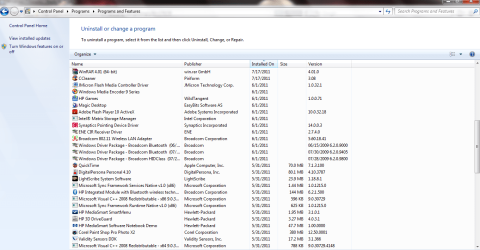
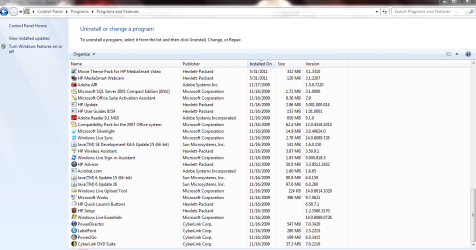
As to your question about what to remove, I'd recommend the following:
- Speccy
- Soluto
- MalwareBytes
- ESet
- Conduit
- JMicron driver
- ENE driver
- LightScribe
- HP DriveGuard
- ValiditySensors
- HP WebCam
- Cyberlink software (all 4 items)
Those would all be initial culprits in the delays, although Speccy and Soluto are more "just in case" options rather than real problem areas.


.