

I hope this is the right section?


Gentlemen, I have been trying for the last couple of days or so to try and get my pc to recognise my second hard disk, (it was labeled 'Back up'), to no avail, it did have an old original backup I did when I first had the pc on one partition, and on the second just photos and a few programs. I removed the backup and all the photo's and programs. I wanted to use the whole disk for a backup so I could try Windows 8. I have tried a few programs to help me. I am not an expert but can find my way round a pc. The programs tried:-
Paragon Partition, Paragon Backup, ZAR 8.9 Zero Assumption Recovery and Seagate Disk Wizard. I have even tried Diskpart, from an elevated DOS. I am beginning to think that the disk is 'Dead', Gone to meet its maker. The disk shows in 'at start-up in POST, Computer and in Device Manager and in Computer Management. In computer management there is no 'Initialize' when I right click the disk. All the blogs and help forums say 'Right click' and then 'Initialize' but I haven't got 'Initialize'
Should I reload win 7 and try all over again or in your expert opinions is it the hard disk??
If the disk is kaput would it still 'Format', Simple Volume, stripe etc, in 'Disk Management?'
Any/all suggestions appreciated,
Gentlemen, I have been trying for the last couple of days or so to try and get my pc to recognise my second hard disk, (it was labeled 'Back up'), to no avail, it did have an old original backup I did when I first had the pc on one partition, and on the second just photos and a few programs. I removed the backup and all the photo's and programs. I wanted to use the whole disk for a backup so I could try Windows 8. I have tried a few programs to help me. I am not an expert but can find my way round a pc. The programs tried:-
Paragon Partition, Paragon Backup, ZAR 8.9 Zero Assumption Recovery and Seagate Disk Wizard. I have even tried Diskpart, from an elevated DOS. I am beginning to think that the disk is 'Dead', Gone to meet its maker. The disk shows in 'at start-up in POST, Computer and in Device Manager and in Computer Management. In computer management there is no 'Initialize' when I right click the disk. All the blogs and help forums say 'Right click' and then 'Initialize' but I haven't got 'Initialize'
Should I reload win 7 and try all over again or in your expert opinions is it the hard disk??
If the disk is kaput would it still 'Format', Simple Volume, stripe etc, in 'Disk Management?'
Any/all suggestions appreciated,
My Computer
At a glance
Windows 7 64bit ProfesionalIntel i7-950 O/CCorsair i7 DDR3 PC12800 1600Mhz XMS3 3X2GbGigabyte GTX 470
- Computer type
- PC/Desktop
- Computer Manufacturer/Model Number
- Cyberpower UK Built to my specs
- OS
- Windows 7 64bit Profesional
- CPU
- Intel i7-950 O/C
- Motherboard
- Asus P6X58D-E
- Memory
- Corsair i7 DDR3 PC12800 1600Mhz XMS3 3X2Gb
- Graphics Card(s)
- Gigabyte GTX 470
- Sound Card
- On board
- Monitor(s) Displays
- BenQ G2420HDBL
- Screen Resolution
- 1920x1080
- Hard Drives
- WDC WD1002FAEX-0023AO SCSI Disk Device
WDC WD10 EZRX-00A8LB0 SCSI Disk Device
WD ST3320620 A6
- PSU
- Avenge Power PSU 850W
- Case
- CM Dominator CM-692II
- Cooling
- Asetek Watercooling
- Antivirus
- Vipre Internet Security 2014

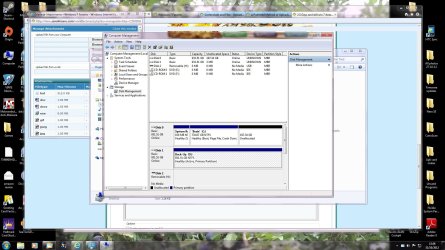

 Still cannot use the new HD as backup, no size registered in Backup/Control Panel. About to do Diskpart on the new disk.
 I looked into Disk Manager first, and low and behold 2 disks Device Type 'UNKNOWN' Well thats me beaten. There is someone out there that doesn't like me
  Checked Disk Manager but both disks are still showing unknown. I think this could be the BIOS? When going through bios setup, to load that CD, there is a provision: 'Asus Express Gate'. Reading the motherboard manual, "Asus Express gate does not support SATA 6Gb/s devices. Please visit


