2 Gb RAM(704 Mb usable)

ghostrider19

New member
Local time
7:33 PM
Messages
3
Hello
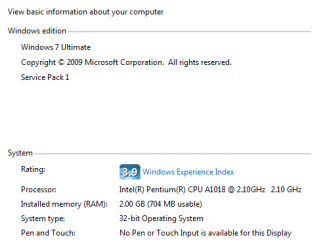
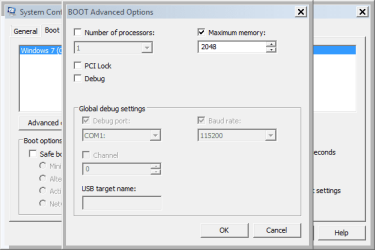
My laptop showing only 704 mb RAM (windows 7) and showing 710 mb ram with windows 8.1 (my friend hard-disk we have same laptop) I checked my ram on my friend lap its working normal and I checked his ram on my lap still it's giving same problem same time on laptop memtest diagnostic showing 1.7 gb usable (normal for my lap before this problem) I changed advance option to on msconfig still no difference :cry:
 

Attachments

  • Capture.PNG
    Capture.PNG
    6.3 KB · Views: 57
  • Capture2.PNG
    Capture2.PNG
    7.8 KB · Views: 57

My Computer My Computer

Computer type
Laptop
Computer Manufacturer/Model Number
Kenobi b490
OS
Windows 7 ultimate x84,Windows 8.1 pro
CPU
Intel(R) Pentium(R) CPU [email protected],2100Mhz,2 Core(s)
Memory
2Gb RAM
Graphics Card(s)
Intel HD Graphics
Hard Drives
290gn hdd
Antivirus
Avast
Browser
Chrome
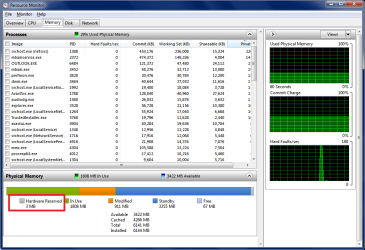
It's probably Hardware Reserved using a lot of RAM.
The only way i know of to change Hardware Reserved is to tweak settings in BIOS.

In Task Manager / Performance tab, click on Resource Monitor.
Look at the Resource Monitor / Memory tab.

If you want to, post a screen print of the Resource Monitor / Memory tab.
http://www.sevenforums.com/tutorials/9733-screenshots-files-upload-post-seven-forums.html

Here is an example of the Resource Monitor Memory tab.

ResourceMonitorRAM.png
 

My Computer My Computer

Computer type
PC/Desktop
Computer Manufacturer/Model Number
home built
OS
Multi-Boot W7_Pro_x64 W8.1_Pro_x64 W10_Pro_x64 +Linux_VMs +Chromium_VM
CPU
AMD Athlon II x4 620
Motherboard
Gigabyte GA-MA785G-UD3H
Memory
6GB GSkill DDR2 800
Graphics Card(s)
AMD 4670 GPU + AMD 4200 IGP
Sound Card
on board Realtek ALC889A
Monitor(s) Displays
RCA 40" LCD TV, Insignia 32" LCD TV, HP 15" LCD monitor
Screen Resolution
1680 x 1050
Hard Drives
OCZ Vertex 3 120GB,
Samsung F3 1TB (3),
Several others - WD, Seagate, Hitachi, ...
PSU
Corsair 500 W
Case
Rosewill mid tower
Cooling
CM 90mm rifle
Keyboard
Gyration wireless, Logitech wireless, Dell USB wired
Mouse
Gyration wireless, Logitech wireless, V7 USB wired
Internet Speed
Spectrum - 100Mbps D / 10Mbps U
Antivirus
Avast, MBAM3, EMET, WinPatrol
Browser
Pale Moon, Firefox, IE
Other Info
2 multi-boot PC's
Mainly HTPC/Office/Gen purpose (no gaming).
Trendnet USB KVM.
LG DVD burner/Blue Ray Player.
Tray system for removable SATA backup drives.

Not currently OCd, under-volted.
I use Hybrid sleep, rarely re-boot or shutdown.

Hauppauge HD-PVR, Avermedia PCIe TV Tuner, Hauppauge PCI TV Tuner.
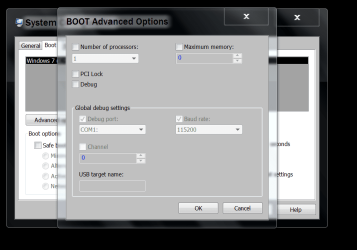
In Boot Advance Options.
Remove the check mark in max. memory and reboot.
Here is a picture from the computer I'm on now.

Windows 7 doing a little bit of nothing will use close to 2 gb of ram.
Windows 7 works poorly unless it has 4 gb. of ram.


TEST.PNG
 

My Computer My Computer

Computer type
PC/Desktop
Computer Manufacturer/Model Number
Home made Desktop
OS
Windows 10 Pro. 64/ version 1709 Windows 7 Pro/64
CPU
Intel i7-6800K @ 4.3
Motherboard
ASUS X-99 Deluxe II
Memory
Corsair Platinum 16 gig @2400
Graphics Card(s)
EVGA GTX 1070 OC
Monitor(s) Displays
Asus 27" LED LCD/VE278Q
Screen Resolution
1920-1080 or 1280-720 HDMI
Hard Drives
INTEL SSD 730-240 Gb Sata 3.0/
PSU
EVGA Platium 1200W
Case
Phanteks Luxe Tempered Glass 8 fans/ one radiator
Cooling
XSPC/ Water Cooled CPU
Keyboard
Das 4 Professional
Mouse
Logitech M705/MX Anywhere 2-S
Internet Speed
100 mbits
Antivirus
Microsoft Security Essentials/ Malwarebytes Premium 3.0/ SAS
Browser
I.E. 11 default/Firefox/ ISP Time Warner Cable/Spectrum
Other Info
LG BluRay Burner/
Sound system-KLipsch-THX/
Icy Dock ssd Hot Swap bays.
Mhhh... not really, Layback. I've installed W7 and clean installs normally use over 400 to 600 MB RAM, the worst scenario is going up to 800 MB if you leave some extra services and programs to run on startup. Even more, I've seen Windows 7 systems working with 1 GB, and being usable (not as fast as having 2 GB minimum, but works) with office, browsing and light stuff, it just depends on how you install the OS and what services you disable to free up memory (logical choices, some services cannot be disabled unless you want yo brick Windows XD).

Those results in System Properties for ghostrider19 are just abnormal. he has 2 GB and just 702 usable, that only mean two things:

  • DavidE suggestion might aply, because the motherboard might be configured to NOT use memory hole remapping, which enables MoBos to map more than 2 GB of RAM for modern OSes (mine has that option, if enabled, you can see the whole 4 GB in system properties it has installed) If your MoBo has the option, you should totally enable memory hole remapping, so your system can adress more than 2 GB for OSes and hardware.
  • If memory hole remapping (or similar configuration) is enabled in BIOS and this problem persists, I suspect there is a faulty RAM module... I would try checking one by one, which one is recognized fully, or if they are same speed. I don't know if the DDR2 rule of "same size for avoiding problems" till persist with more modern systems though...
It's the best I got for this case...
 

My Computer My Computer

Computer type
PC/Desktop
Computer Manufacturer/Model Number
Assembled Desktop PC
OS
Microsoft Windows 7 Home Premium SP1 64-bit Build 7600
CPU
AMD Athlon 64 X2 5200+ Dual Core CPU @ 2.7 Ghz (Brisbane)
Motherboard
PCChips A13G+ v3.0
Memory
2x2 GB DDR2 PC-5300 (667 Mhz) Kingston ValueRAM
Graphics Card(s)
XFX ATI Radeon HD 4350 GPU (512 MB + 512 MB HM)
Sound Card
Realtek High Definition Audio Driver ALC660 @ MCP61S
Monitor(s) Displays
HP S2031 20" LED HD Widescreen Display Monitor
Screen Resolution
1600 x 900 px
Hard Drives
Maxtor Diamond Max 10 (160 GB, 7200 RPM, SATA-II Hard Disk)
Western Digital Scorpion Blue (250 GB, 5400 RPM, SATA-II External Hard Disk - Personal Data)
Toshiba MQ01ABD050 (500 GB, 5400 RPM, SATA-II External Hard Disk - Software & ISOs)
PSU
Pixxo Transformer 850W 80+ Certification PSU
Case
Compaq 5BW353 Case
Cooling
Many solutions, see other info...
Keyboard
Green Leaf (Mitzu) Standard Keyboard
Mouse
Microsoft USB Lasser Pointing Device
Internet Speed
10 MB
Antivirus
Avast Antivirus Free
Browser
Firefox, Chrome, Internet Explorer
Other Info
Windows Experience Index Result: 3.8 of 7.9.

Cooling solutions:
- AVC @ 2000/5000 RPM Copper Heatpipes (For Athlon 64 X2 6000+ CPU used in an Athlon 64 X2 5200+)
- Rear Fan 80 mm @ 2700 RPM for heat extraction
- Manhatan Chipset Cooler @ 4700/7200 RPM (For nVidia Chipset in MoBo)
- Foxconn @ 2500 RPM (Old Pentium III heatsink fan) in XFX ATI Radeon HD 4350
I don't think it's bad RAM, in post #1 the OP swapped RAM with another laptop, and didn't have RAM problems.
It might be a bad RAM slot on the OP laptop.
The OP has 1 post and not replied to any help so far, so this thread may be a non-issue.
 

My Computer My Computer

Computer type
PC/Desktop
Computer Manufacturer/Model Number
home built
OS
Multi-Boot W7_Pro_x64 W8.1_Pro_x64 W10_Pro_x64 +Linux_VMs +Chromium_VM
CPU
AMD Athlon II x4 620
Motherboard
Gigabyte GA-MA785G-UD3H
Memory
6GB GSkill DDR2 800
Graphics Card(s)
AMD 4670 GPU + AMD 4200 IGP
Sound Card
on board Realtek ALC889A
Monitor(s) Displays
RCA 40" LCD TV, Insignia 32" LCD TV, HP 15" LCD monitor
Screen Resolution
1680 x 1050
Hard Drives
OCZ Vertex 3 120GB,
Samsung F3 1TB (3),
Several others - WD, Seagate, Hitachi, ...
PSU
Corsair 500 W
Case
Rosewill mid tower
Cooling
CM 90mm rifle
Keyboard
Gyration wireless, Logitech wireless, Dell USB wired
Mouse
Gyration wireless, Logitech wireless, V7 USB wired
Internet Speed
Spectrum - 100Mbps D / 10Mbps U
Antivirus
Avast, MBAM3, EMET, WinPatrol
Browser
Pale Moon, Firefox, IE
Other Info
2 multi-boot PC's
Mainly HTPC/Office/Gen purpose (no gaming).
Trendnet USB KVM.
LG DVD burner/Blue Ray Player.
Tray system for removable SATA backup drives.

Not currently OCd, under-volted.
I use Hybrid sleep, rarely re-boot or shutdown.

Hauppauge HD-PVR, Avermedia PCIe TV Tuner, Hauppauge PCI TV Tuner.
Hi thanks all I tried to solve issue from bios but can't find memory allocation setting or any similar setting on lenovo memory diagnostic memtest shows 1.7 gb ram but memtest ISO also shows 704 mb ram
 

My Computer My Computer

Computer type
Laptop
Computer Manufacturer/Model Number
Kenobi b490
OS
Windows 7 ultimate x84,Windows 8.1 pro
CPU
Intel(R) Pentium(R) CPU [email protected],2100Mhz,2 Core(s)
Memory
2Gb RAM
Graphics Card(s)
Intel HD Graphics
Hard Drives
290gn hdd
Antivirus
Avast
Browser
Chrome
You need to max out your memory and install 64 bit windows if your cpu supports it, your laptop is using memory to help your video, it`s totally normal as already explained.


Add more memory to your laptop, max it out :) 2 GB is nothing :(

If you look at Resource Monitor on your pC, as David has shown you in his reply, it will show you everything about your memory and how it`s being used.

Example of mine after clearing out the Standby memory cache
 

Attachments

  • Capture.JPG
    Capture.JPG
    86.4 KB · Views: 0

My Computer My Computer

Computer type
PC/Desktop
Computer Manufacturer/Model Number
Skylake Special #666
OS
Windows 10 Pro x64
CPU
Intel Core i7 6700K
Motherboard
Asus Sabertooth Z170 Mark 1
Memory
GSkill TridentZ RGB 16GB 3600 16-16-16-36
Graphics Card(s)
EVGA GTX 980 Ti SC x2
Sound Card
Realtek High Definition
Monitor(s) Displays
AOC G2460PG
Screen Resolution
1920 x 1080 144Hz
Hard Drives
Samsung 860 Pro 256GB, Seagate Barracuda 4TB x2
PSU
EVGA 1000 P2, EVGA White Custom Braided Cables
Case
Corsair Vengeance C70 Gunmetal Black
Cooling
Corsair H100i v2, Corsair ML120 x2, Thermal Grizzly Kryonaut
Keyboard
Logitech G910 Orion Spectrum
Mouse
Logitech G700s
Internet Speed
Verizon Fios Quantum Gateway 75/75
Antivirus
Windows Defender, Malwarebytes Free 3.8.3
Browser
Chrome
Other Info
Corsair SP120 x4, LG Blu-ray Drive, Durabrand HT-395 100 Watt Dolby Digital Amp, Corsair H2100 Wireless 7.1 Headset
Tried all methods but not working seems like motherboard slots damaged think.btw ty
 

My Computer My Computer

Computer type
Laptop
Computer Manufacturer/Model Number
Kenobi b490
OS
Windows 7 ultimate x84,Windows 8.1 pro
CPU
Intel(R) Pentium(R) CPU [email protected],2100Mhz,2 Core(s)
Memory
2Gb RAM
Graphics Card(s)
Intel HD Graphics
Hard Drives
290gn hdd
Antivirus
Avast
Browser
Chrome
Did you read my post #3 and comply?
 

My Computer My Computer

Computer type
PC/Desktop
Computer Manufacturer/Model Number
Home made Desktop
OS
Windows 10 Pro. 64/ version 1709 Windows 7 Pro/64
CPU
Intel i7-6800K @ 4.3
Motherboard
ASUS X-99 Deluxe II
Memory
Corsair Platinum 16 gig @2400
Graphics Card(s)
EVGA GTX 1070 OC
Monitor(s) Displays
Asus 27" LED LCD/VE278Q
Screen Resolution
1920-1080 or 1280-720 HDMI
Hard Drives
INTEL SSD 730-240 Gb Sata 3.0/
PSU
EVGA Platium 1200W
Case
Phanteks Luxe Tempered Glass 8 fans/ one radiator
Cooling
XSPC/ Water Cooled CPU
Keyboard
Das 4 Professional
Mouse
Logitech M705/MX Anywhere 2-S
Internet Speed
100 mbits
Antivirus
Microsoft Security Essentials/ Malwarebytes Premium 3.0/ SAS
Browser
I.E. 11 default/Firefox/ ISP Time Warner Cable/Spectrum
Other Info
LG BluRay Burner/
Sound system-KLipsch-THX/
Icy Dock ssd Hot Swap bays.
It's actually unusual. And my computer had 1GB of ram, it runs fine but just don't expect Facebook to run smoothly with it.
 

My Computer My Computer

Computer type
PC/Desktop
Computer Manufacturer/Model Number
ASUS X550ZE
OS
Windows 7 Home Premium 64-BIT
CPU
AMD A8 7200P
Motherboard
N/A
Memory
8GB 1600mhz
Graphics Card(s)
Radeon R5 (APU) + Radeon R5 M230 2GB Dual Graphics
Sound Card
Realtek ALC269 with SonicMaster
Monitor(s) Displays
Laptop Display
Screen Resolution
1920 x 1080 @60hz
Hard Drives
WDC WD50 00LPVX-80V0TT0 (500GB)
PSU
Laptop Charger
Mouse
ARMAGGEDON TEXTRON SCORPION 7
Internet Speed
100 mbps DOWN / 50 mbps UP
Antivirus
Windows Defender
Browser
Mozzila FireFox, Valve Steam in-game internet browser
It all depends what one considers running fine.

Windows 7/32 runs it's best with 4 gigs of ram.
Windows 7/64 runs best with 8 gig of ram or more. Depending on the load put on the computer.
 

My Computer My Computer

Computer type
PC/Desktop
Computer Manufacturer/Model Number
Home made Desktop
OS
Windows 10 Pro. 64/ version 1709 Windows 7 Pro/64
CPU
Intel i7-6800K @ 4.3
Motherboard
ASUS X-99 Deluxe II
Memory
Corsair Platinum 16 gig @2400
Graphics Card(s)
EVGA GTX 1070 OC
Monitor(s) Displays
Asus 27" LED LCD/VE278Q
Screen Resolution
1920-1080 or 1280-720 HDMI
Hard Drives
INTEL SSD 730-240 Gb Sata 3.0/
PSU
EVGA Platium 1200W
Case
Phanteks Luxe Tempered Glass 8 fans/ one radiator
Cooling
XSPC/ Water Cooled CPU
Keyboard
Das 4 Professional
Mouse
Logitech M705/MX Anywhere 2-S
Internet Speed
100 mbits
Antivirus
Microsoft Security Essentials/ Malwarebytes Premium 3.0/ SAS
Browser
I.E. 11 default/Firefox/ ISP Time Warner Cable/Spectrum
Other Info
LG BluRay Burner/
Sound system-KLipsch-THX/
Icy Dock ssd Hot Swap bays.
Back
Top