2 Minecraft Icons in Taskbar

Nathan02

New member
Member
Local time
9:13 PM
Messages
54
I have Minecraft pinned to my taskbar. When I launch it up, another icon appears. The original one is still on the taskbar, so there are 2 Minecraft icons.

Before launching up Minecraft:

ekfV51s.png


After launching up Minecraft:

eMwT2fF.png


How do I fix this and make it so that it only has 1 Minecraft icon in the taskbar?
Thank you :)
 

My Computer

OS
Windows 7 Home Premium 64-bit

My Computer

Computer type
PC/Desktop
Computer Manufacturer/Model Number
Dude Build
OS
Windows 10 Pro X64
CPU
Intel(R) Core(TM) i5-3570K CPU OC@ 4.5GHZ Turbo
Motherboard
MSI Z77A-G45 Gaming
Memory
8.00 GB DDR3 1600Mhz
Graphics Card(s)
MSI Gaming X GTX 1070
Sound Card
Realtek High Definition
Monitor(s) Displays
Dell S23O9W, HP L1710
Screen Resolution
DELL-1920 x 1080 HP-1280 x1024
Hard Drives
Crucial m4 256 SSD, WD 7200RPM 500GB WD 1TB
PSU
Seasonic X650 GOLD
Case
Zalman Z12
Cooling
Antec Kuhler 920
Keyboard
Logitech
Mouse
MSI DS100 Interceptor
Internet Speed
50 down and 5 up
Antivirus
MSE
Browser
Chrome, IE 11
Other Info
Logitech X-620 Speakers
Nathan02,

Review this thread

:ar: 2 Minecrafts

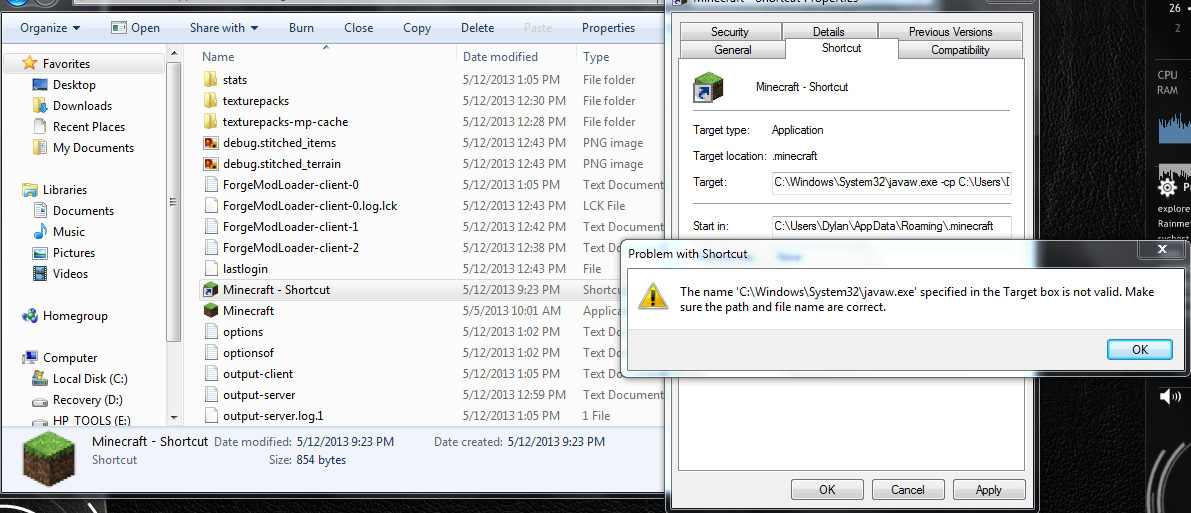
I'm doing Ribose's solution (from the link you gave me), and I get a "The file javaw cannot be found" error after pasting in javaw -cp C:\Users\Dylan\Desktop\minecraft.jar\minecraft.jar net.minecraft.LauncherFrame.
 

My Computer

OS
Windows 7 Home Premium 64-bit
try unpinning the icon on the left. relaunch after the steps in this youtube.


Got on team speak with 2 mates who play mine craft and it worked for them.

Good Luck
 
Last edited:

My Computer

Computer type
PC/Desktop
Computer Manufacturer/Model Number
Dude Build
OS
Windows 10 Pro X64
CPU
Intel(R) Core(TM) i5-3570K CPU OC@ 4.5GHZ Turbo
Motherboard
MSI Z77A-G45 Gaming
Memory
8.00 GB DDR3 1600Mhz
Graphics Card(s)
MSI Gaming X GTX 1070
Sound Card
Realtek High Definition
Monitor(s) Displays
Dell S23O9W, HP L1710
Screen Resolution
DELL-1920 x 1080 HP-1280 x1024
Hard Drives
Crucial m4 256 SSD, WD 7200RPM 500GB WD 1TB
PSU
Seasonic X650 GOLD
Case
Zalman Z12
Cooling
Antec Kuhler 920
Keyboard
Logitech
Mouse
MSI DS100 Interceptor
Internet Speed
50 down and 5 up
Antivirus
MSE
Browser
Chrome, IE 11
Other Info
Logitech X-620 Speakers
Try this remove the icon from quick launch than launch the game and right click the icon to select pin this program to task bar than close and click the icon you just made and see if you still get the same problem:confused:

I was just thinking. I bet we could script the shortcut if anything else. It is java based isn't it. if it is let us know I will try to come up with something.
 

My Computer

Computer Manufacturer/Model Number
Acer 5750Z-4885
OS
Windows 7 Ultimate x64
CPU
Intel Pentium B960 / 2.2 GHz
Motherboard
Acer JE50_HR Base Board Version
Memory
3948 Megabytes Usable Installed Memory 4 GB ( 2 x 2 GB )
Graphics Card(s)
Intel HD Graphics Dynamic Video Memory Technology 5.0
Sound Card
Stereo speakers , Microphone Dolby Advanced Audio v2, High D
Monitor(s) Displays
Generic PnP Monitor (15.3"vis, January 2009)
Hard Drives
WD blue c: (NTFS on drive 0) 320.07 GB 283.50 GB free
Case
Acer 5750Z
Cooling
Internal
ranjay91

watch the video in post#4
 

My Computer

Computer type
PC/Desktop
Computer Manufacturer/Model Number
Dude Build
OS
Windows 10 Pro X64
CPU
Intel(R) Core(TM) i5-3570K CPU OC@ 4.5GHZ Turbo
Motherboard
MSI Z77A-G45 Gaming
Memory
8.00 GB DDR3 1600Mhz
Graphics Card(s)
MSI Gaming X GTX 1070
Sound Card
Realtek High Definition
Monitor(s) Displays
Dell S23O9W, HP L1710
Screen Resolution
DELL-1920 x 1080 HP-1280 x1024
Hard Drives
Crucial m4 256 SSD, WD 7200RPM 500GB WD 1TB
PSU
Seasonic X650 GOLD
Case
Zalman Z12
Cooling
Antec Kuhler 920
Keyboard
Logitech
Mouse
MSI DS100 Interceptor
Internet Speed
50 down and 5 up
Antivirus
MSE
Browser
Chrome, IE 11
Other Info
Logitech X-620 Speakers
try unpinning the icon on the left. relaunch after the steps in this youtube.


Got on team speak with 2 mates who play mine craft and it worked for them.

Good Luck

I tried that, and I got an error...again :cry:

207rl2Z.png
 

My Computer

OS
Windows 7 Home Premium 64-bit
Try this remove the icon from quick launch than launch the game and right click the icon to select pin this program to task bar than close and click the icon you just made and see if you still get the same problem:confused:

I was just thinking. I bet we could script the shortcut if anything else. It is java based isn't it. if it is let us know I will try to come up with something.

Tried that, but it didn't work.
Minecraft is java based.
 

My Computer

OS
Windows 7 Home Premium 64-bit
Try this remove the icon from quick launch than launch the game and right click the icon to select pin this program to task bar than close and click the icon you just made and see if you still get the same problem:confused:

I was just thinking. I bet we could script the shortcut if anything else. It is java based isn't it. if it is let us know I will try to come up with something.

Tried that, but it didn't work.
Minecraft is java based.

well I have to ask, have you updated your java?
 

My Computer

Computer type
PC/Desktop
Computer Manufacturer/Model Number
Dude Build
OS
Windows 10 Pro X64
CPU
Intel(R) Core(TM) i5-3570K CPU OC@ 4.5GHZ Turbo
Motherboard
MSI Z77A-G45 Gaming
Memory
8.00 GB DDR3 1600Mhz
Graphics Card(s)
MSI Gaming X GTX 1070
Sound Card
Realtek High Definition
Monitor(s) Displays
Dell S23O9W, HP L1710
Screen Resolution
DELL-1920 x 1080 HP-1280 x1024
Hard Drives
Crucial m4 256 SSD, WD 7200RPM 500GB WD 1TB
PSU
Seasonic X650 GOLD
Case
Zalman Z12
Cooling
Antec Kuhler 920
Keyboard
Logitech
Mouse
MSI DS100 Interceptor
Internet Speed
50 down and 5 up
Antivirus
MSE
Browser
Chrome, IE 11
Other Info
Logitech X-620 Speakers
Try this remove the icon from quick launch than launch the game and right click the icon to select pin this program to task bar than close and click the icon you just made and see if you still get the same problem:confused:

I was just thinking. I bet we could script the shortcut if anything else. It is java based isn't it. if it is let us know I will try to come up with something.

Tried that, but it didn't work.
Minecraft is java based.

well I have to ask, have you updated your java?

Yep, just re-installed Java.
 

My Computer

OS
Windows 7 Home Premium 64-bit
What I was talking about is way different than the video above> I made an example with my media player. Of corse you would launch from the program directory rather than desktop like i did. If that doesn't work I will see what I can do with target scripting or a registry hack
 

My Computer

Computer Manufacturer/Model Number
Acer 5750Z-4885
OS
Windows 7 Ultimate x64
CPU
Intel Pentium B960 / 2.2 GHz
Motherboard
Acer JE50_HR Base Board Version
Memory
3948 Megabytes Usable Installed Memory 4 GB ( 2 x 2 GB )
Graphics Card(s)
Intel HD Graphics Dynamic Video Memory Technology 5.0
Sound Card
Stereo speakers , Microphone Dolby Advanced Audio v2, High D
Monitor(s) Displays
Generic PnP Monitor (15.3"vis, January 2009)
Hard Drives
WD blue c: (NTFS on drive 0) 320.07 GB 283.50 GB free
Case
Acer 5750Z
Cooling
Internal
I just tried it and no luck so I have Decompiled java and I am going to try to tell java not to add the icon to the task bar in the first place. it is definitely java that is doing it. I opened it up and selected pin to task bar and once mine-craft is closed it reverts to the java icon than I open it back up via the first QL and a new instance opens up so I'm going to create a permanent fix for everyone this is kind of retard that oracle would have told java to add an icon to the QL area anyways java has always been garbage
 

My Computer

Computer Manufacturer/Model Number
Acer 5750Z-4885
OS
Windows 7 Ultimate x64
CPU
Intel Pentium B960 / 2.2 GHz
Motherboard
Acer JE50_HR Base Board Version
Memory
3948 Megabytes Usable Installed Memory 4 GB ( 2 x 2 GB )
Graphics Card(s)
Intel HD Graphics Dynamic Video Memory Technology 5.0
Sound Card
Stereo speakers , Microphone Dolby Advanced Audio v2, High D
Monitor(s) Displays
Generic PnP Monitor (15.3"vis, January 2009)
Hard Drives
WD blue c: (NTFS on drive 0) 320.07 GB 283.50 GB free
Case
Acer 5750Z
Cooling
Internal
Back
Top