
2 monitors not showing display

determined

Good Lookin'
Member
Local time
3:56 PM
Messages
47
Hi Peeps,

I have recently installed windows 7 now for a while. Before 7 I had vista and then xp, both which I used dual monitors.

Since switching to windows 7, dual display does not work any more, I have two monitors which I tried with the addtional main display, both of them power up with the light displayed on the monitor, but there is no input detected by the monitors.

I have swapped my graphics card now twice at pcworld 9800GT pci-e, so I know its not the graphics card.

Monitors I am using have VGA connetions but have a adapter to fit into the dvi port.

One mointor I have tried is this one Octigen-Welcome to Octigen

The other one is a stock flat screen I got from packard bell I have no link for that one.

I have no Idea what I am not doing right, help, something in windows which is not working?
 

My Computer My Computer

OS
windows 7
CPU
Q6600
Motherboard
ASROCK GLAN 1333
Memory
4 GIG
Graphics Card(s)
9800 GT
Sound Card
CREATIVE SOUND BLASTER 24BIT
Monitor(s) Displays
X2
Hard Drives
500 SATA
250 IDE
PSU
650W SUPPLY
Case
CRAPPY
Cooling
TWO FANS ONE ON SIDE AND ONE AT REAR
Hello,

This is symptomatic of driver issue. Go to the GFX card manufacturer's site and download the latest drivers. If this does not work, there are a couple other things we can try.

Hope this helps,
~Jonathan
 

My Computer My Computer

Computer Manufacturer/Model Number
Custom
OS
Windows 7 Professional x64
CPU
Intel i7 2600K OC'd @ 4620 MHz
Motherboard
Asus P8Z68-V Pro
Memory
16GB GSkill Sniper 2133 Mhz (4x4GB)
Graphics Card(s)
EVGA GeForce GTX 480 SuperClocked+
Sound Card
Realtek High Definition Audio
Monitor(s) Displays
2x Acer S273HLbmii 27"
Screen Resolution
2 x 1920x1080
Hard Drives
64GB Crucial M4 SSD

Storage: Hitachi 1TB 5400RPM, Samsung 1.5TB 5400RPM
PSU
Corsair HW Series 750w (modular)
Case
Cooler Master HAF 932 Advanced Blue Edition
Cooling
CM Hyper 212+ CPU cooler, 3x 230mm + 1x 140mm case fans
Keyboard
Logitech MK320 (wireless)
Mouse
Logitech MK320 (wireless)
Internet Speed
30 Mb/s : 2 Mb/s
its plug and play monitor... if it were that easy, id be on to it now
 

My Computer My Computer

OS
windows 7
CPU
Q6600
Motherboard
ASROCK GLAN 1333
Memory
4 GIG
Graphics Card(s)
9800 GT
Sound Card
CREATIVE SOUND BLASTER 24BIT
Monitor(s) Displays
X2
Hard Drives
500 SATA
250 IDE
PSU
650W SUPPLY
Case
CRAPPY
Cooling
TWO FANS ONE ON SIDE AND ONE AT REAR

My Computer My Computer

Computer type
PC/Desktop
Computer Manufacturer/Model Number
Self Built
OS
Windows 7 Ultimate 64bit
CPU
AMD Phenom Quad core 9950 black edition
Motherboard
Gigabyte
Memory
16Gb
Graphics Card(s)
2x XFX Radeon 5850
Sound Card
PCI Express X-Fi Titanium / Logitech G35
Monitor(s) Displays
2x HP 2410i
Screen Resolution
1920x1080
Hard Drives
2x 500Gb Seagate
1x 300Gb Seagate
1x 1Tb Seagate
2x 1Tb Hitatchi
PSU
Jean Tech Storm 700W
Case
Cooler Master COSMOS S
Cooling
Akasa Evo Blue Pro
Keyboard
Logitech G15
Mouse
Mad Catz M.M.O. 7
Internet Speed
12mb

My Computer My Computer

Computer Manufacturer/Model Number
Custom
OS
Windows 7 Professional x64
CPU
Intel i7 2600K OC'd @ 4620 MHz
Motherboard
Asus P8Z68-V Pro
Memory
16GB GSkill Sniper 2133 Mhz (4x4GB)
Graphics Card(s)
EVGA GeForce GTX 480 SuperClocked+
Sound Card
Realtek High Definition Audio
Monitor(s) Displays
2x Acer S273HLbmii 27"
Screen Resolution
2 x 1920x1080
Hard Drives
64GB Crucial M4 SSD

Storage: Hitachi 1TB 5400RPM, Samsung 1.5TB 5400RPM
PSU
Corsair HW Series 750w (modular)
Case
Cooler Master HAF 932 Advanced Blue Edition
Cooling
CM Hyper 212+ CPU cooler, 3x 230mm + 1x 140mm case fans
Keyboard
Logitech MK320 (wireless)
Mouse
Logitech MK320 (wireless)
Internet Speed
30 Mb/s : 2 Mb/s
Single Monitor

does it work ok with just one hooked up?

check the system tray and look to see if you have Nvidia icon there for video display I have seen that cause problems like this when you try to control the display through windows itself no go but with the software for the card it will work so check the settings for Nvidia twinview make sure it's on
 

My Computer My Computer

Computer Manufacturer/Model Number
Custom Built
OS
Windows 7 Ultimate 32 bit
CPU
AMD Athlon 64 X2 4200+ Overclocked to 3.0Ghz
Motherboard
Biostar TF560 A2+
Memory
2 Gigs of G.Skill DDR2 800
Graphics Card(s)
HIS ATI Radeon HD 2600 Pro With IceQ cooler
Sound Card
6.1 Channel Sound Blaster Live 24 Bit
Monitor(s) Displays
Dual 20.5 " LG Flatrons W2052TO
Screen Resolution
1152x864
Hard Drives
Dual 36 Gig 10,000 RPM Raptors
PSU
430 watt Seasonic 80%+ Dual 12v Rails 2x80mm fans
Case
CHIEFMAX YA-5X
Cooling
4-80mm case fans 1-140mm case fan freezer 64 Pro CPU cooler
Keyboard
Saitek Eclipse II
Mouse
A4Tech wireless battery free optical scroll mouse
Internet Speed
1.5 meg down 384 up
Other Info
Logisys LED fan/light controller and dual 16" LED sticks mounted inside top of case all fans are LED all lighting is blue
DVD RW and CD RW both and Memory card reader
I have a PNY 9800GT 1 GB.

I have been to the manufacturers website...

NVIDIA DRIVERS 195.62 WHQL

I am confused, the one that I bought is G-Force but also PNY, so how am I working out which driver I download, I feel that I have just installed the wrong one.

9800GT 512MB GDDR3 PCI EXPRESS.

So am I going to NVidia's site, or GForce, or PNY?

My newest monitor which is a 22" (just to brag) samsung works perfectly, it seems as if Windows is stuck on default setting for 1 monitor.
 

My Computer My Computer

OS
windows 7
CPU
Q6600
Motherboard
ASROCK GLAN 1333
Memory
4 GIG
Graphics Card(s)
9800 GT
Sound Card
CREATIVE SOUND BLASTER 24BIT
Monitor(s) Displays
X2
Hard Drives
500 SATA
250 IDE
PSU
650W SUPPLY
Case
CRAPPY
Cooling
TWO FANS ONE ON SIDE AND ONE AT REAR
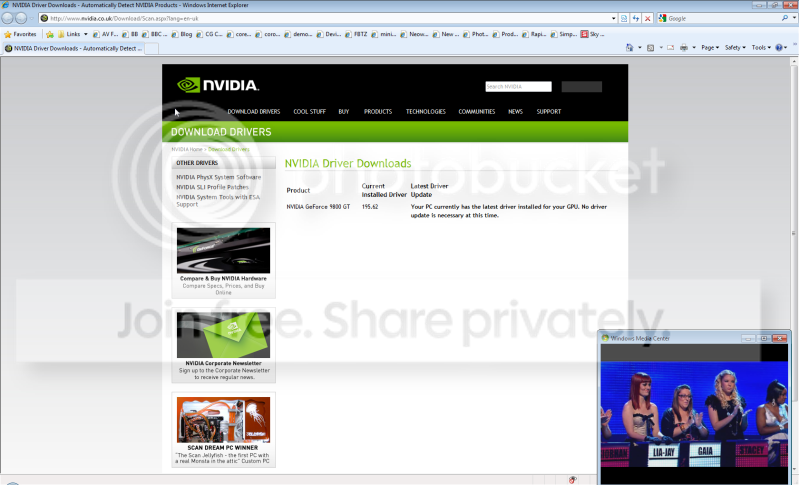
Okay i've updated my drivers, I've tried using the software to customise mutli display options, nothing works or triggers it at all.

I've tried going back throught the Windows way and customising the mutli displays, its not working.

I've tried to increase the refresh rate more than the monitor can actually handle and then try to move it back down, which doesn't work neither.

I am trying to find out what this nView does maybe that could be a solution.
 

My Computer My Computer

OS
windows 7
CPU
Q6600
Motherboard
ASROCK GLAN 1333
Memory
4 GIG
Graphics Card(s)
9800 GT
Sound Card
CREATIVE SOUND BLASTER 24BIT
Monitor(s) Displays
X2
Hard Drives
500 SATA
250 IDE
PSU
650W SUPPLY
Case
CRAPPY
Cooling
TWO FANS ONE ON SIDE AND ONE AT REAR
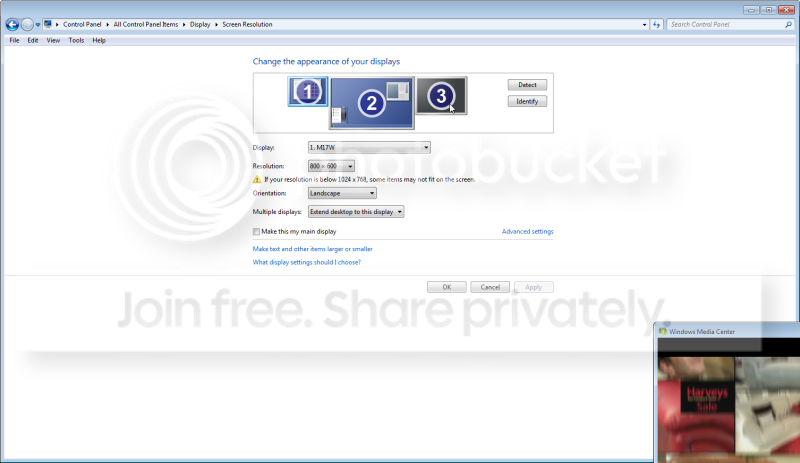
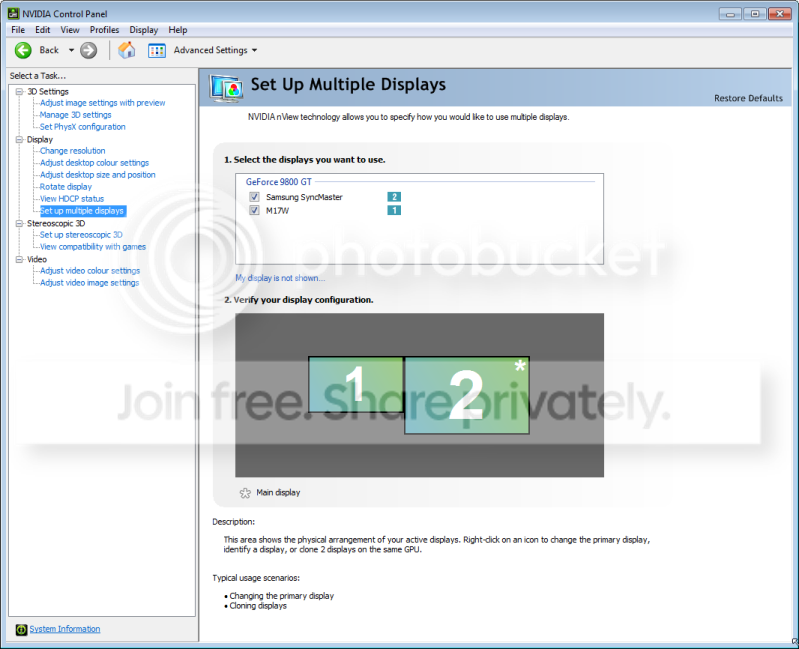
Nview

in Nview you have to enable multiple monitors
 

My Computer My Computer

Computer Manufacturer/Model Number
Custom Built
OS
Windows 7 Ultimate 32 bit
CPU
AMD Athlon 64 X2 4200+ Overclocked to 3.0Ghz
Motherboard
Biostar TF560 A2+
Memory
2 Gigs of G.Skill DDR2 800
Graphics Card(s)
HIS ATI Radeon HD 2600 Pro With IceQ cooler
Sound Card
6.1 Channel Sound Blaster Live 24 Bit
Monitor(s) Displays
Dual 20.5 " LG Flatrons W2052TO
Screen Resolution
1152x864
Hard Drives
Dual 36 Gig 10,000 RPM Raptors
PSU
430 watt Seasonic 80%+ Dual 12v Rails 2x80mm fans
Case
CHIEFMAX YA-5X
Cooling
4-80mm case fans 1-140mm case fan freezer 64 Pro CPU cooler
Keyboard
Saitek Eclipse II
Mouse
A4Tech wireless battery free optical scroll mouse
Internet Speed
1.5 meg down 384 up
Other Info
Logisys LED fan/light controller and dual 16" LED sticks mounted inside top of case all fans are LED all lighting is blue
DVD RW and CD RW both and Memory card reader

My Computer My Computer

Computer Manufacturer/Model Number
Custom Built
OS
Windows 7 Ultimate 32 bit
CPU
AMD Athlon 64 X2 4200+ Overclocked to 3.0Ghz
Motherboard
Biostar TF560 A2+
Memory
2 Gigs of G.Skill DDR2 800
Graphics Card(s)
HIS ATI Radeon HD 2600 Pro With IceQ cooler
Sound Card
6.1 Channel Sound Blaster Live 24 Bit
Monitor(s) Displays
Dual 20.5 " LG Flatrons W2052TO
Screen Resolution
1152x864
Hard Drives
Dual 36 Gig 10,000 RPM Raptors
PSU
430 watt Seasonic 80%+ Dual 12v Rails 2x80mm fans
Case
CHIEFMAX YA-5X
Cooling
4-80mm case fans 1-140mm case fan freezer 64 Pro CPU cooler
Keyboard
Saitek Eclipse II
Mouse
A4Tech wireless battery free optical scroll mouse
Internet Speed
1.5 meg down 384 up
Other Info
Logisys LED fan/light controller and dual 16" LED sticks mounted inside top of case all fans are LED all lighting is blue
DVD RW and CD RW both and Memory card reader
Resolution

what resolution are you trying to use you may have the resolution set to high try lowering it to 1024x768 until you get everything working
 

My Computer My Computer

Computer Manufacturer/Model Number
Custom Built
OS
Windows 7 Ultimate 32 bit
CPU
AMD Athlon 64 X2 4200+ Overclocked to 3.0Ghz
Motherboard
Biostar TF560 A2+
Memory
2 Gigs of G.Skill DDR2 800
Graphics Card(s)
HIS ATI Radeon HD 2600 Pro With IceQ cooler
Sound Card
6.1 Channel Sound Blaster Live 24 Bit
Monitor(s) Displays
Dual 20.5 " LG Flatrons W2052TO
Screen Resolution
1152x864
Hard Drives
Dual 36 Gig 10,000 RPM Raptors
PSU
430 watt Seasonic 80%+ Dual 12v Rails 2x80mm fans
Case
CHIEFMAX YA-5X
Cooling
4-80mm case fans 1-140mm case fan freezer 64 Pro CPU cooler
Keyboard
Saitek Eclipse II
Mouse
A4Tech wireless battery free optical scroll mouse
Internet Speed
1.5 meg down 384 up
Other Info
Logisys LED fan/light controller and dual 16" LED sticks mounted inside top of case all fans are LED all lighting is blue
DVD RW and CD RW both and Memory card reader
Dual Display

also something else that can happen is on a video card with with dual outputs is one of those outputs will usually be the default main output and if you are starting out with using the output that is really the secondary output as the main and then try to introduce a second display you will have issues like this so try to switch to using just one display but try switching the output then introduce the second display
 

My Computer My Computer

Computer Manufacturer/Model Number
Custom Built
OS
Windows 7 Ultimate 32 bit
CPU
AMD Athlon 64 X2 4200+ Overclocked to 3.0Ghz
Motherboard
Biostar TF560 A2+
Memory
2 Gigs of G.Skill DDR2 800
Graphics Card(s)
HIS ATI Radeon HD 2600 Pro With IceQ cooler
Sound Card
6.1 Channel Sound Blaster Live 24 Bit
Monitor(s) Displays
Dual 20.5 " LG Flatrons W2052TO
Screen Resolution
1152x864
Hard Drives
Dual 36 Gig 10,000 RPM Raptors
PSU
430 watt Seasonic 80%+ Dual 12v Rails 2x80mm fans
Case
CHIEFMAX YA-5X
Cooling
4-80mm case fans 1-140mm case fan freezer 64 Pro CPU cooler
Keyboard
Saitek Eclipse II
Mouse
A4Tech wireless battery free optical scroll mouse
Internet Speed
1.5 meg down 384 up
Other Info
Logisys LED fan/light controller and dual 16" LED sticks mounted inside top of case all fans are LED all lighting is blue
DVD RW and CD RW both and Memory card reader
The resolution is perfectly fine, I have put it above its capabilities, but also to its lowest capabilities, then back to normal.

I know the monitor works as I have the netbook accessing the monitor at the moment. I dont have enough time right now to look through everything in detail, when I get back i will view the tweakguide something I have used in the past for Call of Duty 2.

I appreciate your help very much so far
 

My Computer My Computer

OS
windows 7
CPU
Q6600
Motherboard
ASROCK GLAN 1333
Memory
4 GIG
Graphics Card(s)
9800 GT
Sound Card
CREATIVE SOUND BLASTER 24BIT
Monitor(s) Displays
X2
Hard Drives
500 SATA
250 IDE
PSU
650W SUPPLY
Case
CRAPPY
Cooling
TWO FANS ONE ON SIDE AND ONE AT REAR
sometimes i wish i could revert back to windows xp but then i'd loose windows media center, boooooooooooooooo
 

My Computer My Computer

OS
windows 7
CPU
Q6600
Motherboard
ASROCK GLAN 1333
Memory
4 GIG
Graphics Card(s)
9800 GT
Sound Card
CREATIVE SOUND BLASTER 24BIT
Monitor(s) Displays
X2
Hard Drives
500 SATA
250 IDE
PSU
650W SUPPLY
Case
CRAPPY
Cooling
TWO FANS ONE ON SIDE AND ONE AT REAR
100102-0002.png


well with a driver update nothing worked.

tried again with a automatic update, it didnt work.

100102-0003.png


i have no third monitor only two ... if i cud add another graphics card or perhaps a vga socket maybe i could add three i dont know... but thats the info i have
 

My Computer My Computer

OS
windows 7
CPU
Q6600
Motherboard
ASROCK GLAN 1333
Memory
4 GIG
Graphics Card(s)
9800 GT
Sound Card
CREATIVE SOUND BLASTER 24BIT
Monitor(s) Displays
X2
Hard Drives
500 SATA
250 IDE
PSU
650W SUPPLY
Case
CRAPPY
Cooling
TWO FANS ONE ON SIDE AND ONE AT REAR
Wrong Monitor

it looks like you have monitor 2 as the default monitor make monitor 1 the default monitor and extend the display onto monitor 2
 

My Computer My Computer

Computer Manufacturer/Model Number
Custom Built
OS
Windows 7 Ultimate 32 bit
CPU
AMD Athlon 64 X2 4200+ Overclocked to 3.0Ghz
Motherboard
Biostar TF560 A2+
Memory
2 Gigs of G.Skill DDR2 800
Graphics Card(s)
HIS ATI Radeon HD 2600 Pro With IceQ cooler
Sound Card
6.1 Channel Sound Blaster Live 24 Bit
Monitor(s) Displays
Dual 20.5 " LG Flatrons W2052TO
Screen Resolution
1152x864
Hard Drives
Dual 36 Gig 10,000 RPM Raptors
PSU
430 watt Seasonic 80%+ Dual 12v Rails 2x80mm fans
Case
CHIEFMAX YA-5X
Cooling
4-80mm case fans 1-140mm case fan freezer 64 Pro CPU cooler
Keyboard
Saitek Eclipse II
Mouse
A4Tech wireless battery free optical scroll mouse
Internet Speed
1.5 meg down 384 up
Other Info
Logisys LED fan/light controller and dual 16" LED sticks mounted inside top of case all fans are LED all lighting is blue
DVD RW and CD RW both and Memory card reader
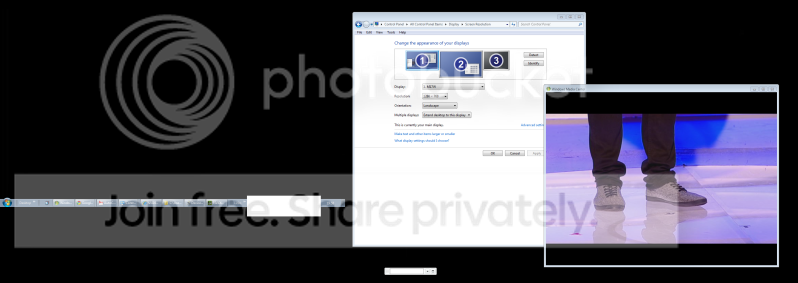
If i do this, the computer will shift my windows bar to the left hand screen, but the monitor doesn't flick on or anything... i could try a different monitor and i would experience the same problem... i will try it again just to be sure

100102-0004-1.png
 

My Computer My Computer

OS
windows 7
CPU
Q6600
Motherboard
ASROCK GLAN 1333
Memory
4 GIG
Graphics Card(s)
9800 GT
Sound Card
CREATIVE SOUND BLASTER 24BIT
Monitor(s) Displays
X2
Hard Drives
500 SATA
250 IDE
PSU
650W SUPPLY
Case
CRAPPY
Cooling
TWO FANS ONE ON SIDE AND ONE AT REAR
Untitled-2.png
 

My Computer My Computer

OS
windows 7
CPU
Q6600
Motherboard
ASROCK GLAN 1333
Memory
4 GIG
Graphics Card(s)
9800 GT
Sound Card
CREATIVE SOUND BLASTER 24BIT
Monitor(s) Displays
X2
Hard Drives
500 SATA
250 IDE
PSU
650W SUPPLY
Case
CRAPPY
Cooling
TWO FANS ONE ON SIDE AND ONE AT REAR
the monitor doesn't even display the bar to me... so it looks like its working but its just not switching or communicating with my hardware
 

My Computer My Computer

OS
windows 7
CPU
Q6600
Motherboard
ASROCK GLAN 1333
Memory
4 GIG
Graphics Card(s)
9800 GT
Sound Card
CREATIVE SOUND BLASTER 24BIT
Monitor(s) Displays
X2
Hard Drives
500 SATA
250 IDE
PSU
650W SUPPLY
Case
CRAPPY
Cooling
TWO FANS ONE ON SIDE AND ONE AT REAR
Back
Top