2 SSD - 2 OS - on 1 PC at same time, Possible?

Multiboot

New member
Local time
11:04 AM
Messages
2
Hello guys! New here, so i hope someone may answer my question. :p

So here is my question.
Is it possible to boot 2 OS from 2 SSD ( 1 OS on each ssd) on 1 PC at the same time? I got 2 x 27" monitors, so i thought i could have 1 os on each monitor.

I have tryed Virtual Machine from microsoft, but the problem there is that i need to install a new fresh windows 7 on it and i dont want that :(, i want it just to connect it direct to my old ssd. So i can have one monitor with my new ssd and one monitor with my old ssd.

So is this possible, or must i just give up hope :p?
Thanks for everyone who reply back!
 

My Computer My Computer

Computer type
PC/Desktop
OS
Win 7 Ulti 64X
Not possible, not without using a virtual machine.

The reason being that operating systems control the hardware on which they are running. They will not share this with another OS, even if it is the same version of Windows. That is just not in the nature of an operating system.
 

My Computer My Computer

Computer type
PC/Desktop
Computer Manufacturer/Model Number
HP
OS
Windows 7 Pro 64 bit
CPU
Xeon W3520
Memory
8 GB
Graphics Card(s)
Nvidia Geforce 210
Hey!
Bah... that it dident work :((
But is this possible then? Use a Virtual Machine to connect it direct to the old ssd? (without converting the ssd over to vhd file with disk2vhd)

Anyway thanks for reply back!
 

My Computer My Computer

Computer type
PC/Desktop
OS
Win 7 Ulti 64X
A class 1 hypervisor could do the trick. It is a more extreme version of virtual machine running on its own little OS.
Citrix released their own XenServer hypervisor for free, but my experience with hypervisors is limited, so you will have to read the manuals they provide to make it work.

Or search for other class 1 hypervisors.
 

My Computer My Computer

Computer type
PC/Desktop
Computer Manufacturer/Model Number
custom built
OS
Win 7 Pro 64-bit 7601
CPU
AMD Phenom 9650 QuadCore, revision DR-B3
Motherboard
ASUS M4A78
Memory
5 GB yes I run 2x 2GB and 1x 1GB, different brand, spank me.
Graphics Card(s)
NVIDIA GeForce 9800 GT 512 Mb, unknown manufacturer.
Sound Card
Crappy Realtek Integrated Audio
Monitor(s) Displays
Fujitsu Siemens P19-3P
Screen Resolution
1280 x 1024 x 32 bits @ 60 Hz Oh yeah, 4:3 rocks!
Hard Drives
(1) MAXTOR S TM3320613AS SATA Disk Device (2) STM35004 18AS SATA Disk Device (3) TOSHIBA USB 2.5"-HDD
PSU
whatever, around 450w
Case
Scavenged from old company PC, 10+ years old
Cooling
CPU fan, GPU fan, case fan, nothing fancy
Keyboard
Microsoft, PS/2, white.
Mouse
Optical, logitec.
Internet Speed
effective max speeds: 70-ish kB/s down 30-ish kB/s up
Antivirus
Avira, free edition.
Browser
Firefox with FXChrome to make it look like Google Chrome :P
Other Info
Was discarded by previous owner due to "horrible performance".
Was running Win Xp from a IDE drive. Yeah. Was a pain.
SATA II drive and Win7 and it zips away! Yay!
A class 1 hypervisor could do the trick. It is a more extreme version of virtual machine running on its own little OS.
Citrix released their own XenServer hypervisor for free, but my experience with hypervisors is limited, so you will have to read the manuals they provide to make it work.

Or search for other class 1 hypervisors.

Another quite good method (although it's essentially a Hypervisor) is to run VMWARE's FREE Esxi product -- however you will need to have a separate machine to act as a console for the virtual machines and Esxi is quite picky as to what hardware it will work on. If you DO get it to work it's brilliant as the OS overhead is absolutely TINY -- you could boot from a small USB for example.

It's also very picky on the network card(s) you use too --if it doesn't like your network card it won't boot --the INTEL PRO Nic cards though usually always work.

You can also use Hardware Pci passthru which means you can use some of the REAL hardware on your Virtual machines too.

Free VMware vSphere Hypervisor, Free Virtualization (ESXi)

I've had 6 VM's concurrently running using ESXI and I could have run at least another 12 or so. There's almost NO HOST OS overhead -- as I said the esxi hypervisor is TINY. !!

You need the separate machine to act as the "virtual console" for the various VM's -- access to the VM's is via a sort of "RDP" interface -- i.e a remote console - this is not unusual since this is how these VM's would behave in practice --you'd use a laptop say to logon to the VM at work or something like that. The Esxi Server could be half way round the planet for instance.

Another solution is to use VMware workstation -- these can run several VM's CONCURRENTLY on a single HOST machine in the BACKGROUND so users can log on to these VM's without even needing a logon / userid / account on the HOST. You also can start / stop these as System / start up tasks so the machine doesn't need to have a user logged on at all on to the HOST machine. Ensure you've plenty of Memory on the Host machine if you do this though. !!

(Note though VMware workstation is a PAID for commercial product -- however if you can afford it - well worth the money if you want to try this type of stuff out. You can't do this with the FREE VMWARE PLAYER unfortunately).

Cheers
jimbo
 

My Computer My Computer

Computer type
PC/Desktop
Computer Manufacturer/Model Number
Custom built, several laptops HP/ASUS
OS
Linux CENTOS 7 / various Windows OS'es and servers
CPU
Intel i7 Intel i5
Memory
8GB, 16GB
Graphics Card(s)
On Motherboard
Sound Card
Realtek HD audio
Monitor(s) Displays
Apple Cinema display, Samsung LCD
Screen Resolution
1920 X 1080
Hard Drives
4 X 1TB SATA
Mouse
Toshiba wireless laser
Internet Speed
> 20MB up
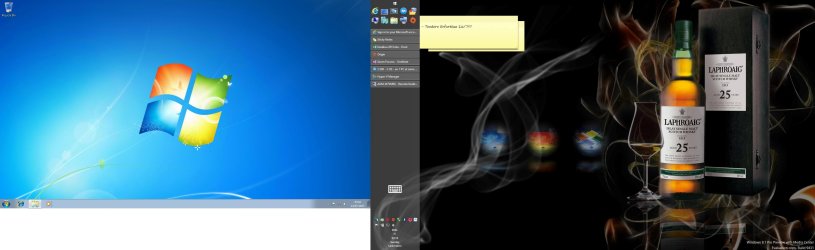
Any free virtualization platform will do, this can easily be done simply by installing the second OS on a virtual machine (with the vhd on the second SSD) running on Virtual PC, VirtualBox or VMware Player on fullscreen on secondary display while the host is using the primary display.

This is in fact how I run Windows 7; I have Windows 8 Pro host using display 1, running Windows 7 on a vm on full screen on display 2.

Although my vm runs on Hyper-V, it does not have to be a hypervisor. Really, Virtual PC, VirtualBox and VMware Player can easily do the same.

Screenshot (26).jpg

Display 1 on the right the Windows 8 Pro host, display 2 on the left the Windows 7 Professional guest, vhd stored on its own HDD. Seamless; clicking mouse in respective display captures mouse and keyboard functions for that OS.

Kari
 

My Computer My Computer

Computer type
Laptop
Computer Manufacturer/Model Number
HP ENVY 17-1150eg
OS
Windows 10 Pro x64 EN-GB
CPU
1.6 GHz Intel Core i7-720QM Processor
Memory
6 GB
Graphics Card(s)
ATI Mobility Radeon HD 5850 Graphics
Sound Card
Beats sound system with integrated subwoofer
Monitor(s) Displays
17" laptop display, 22" LED and 32" Full HD TV through HDMI
Screen Resolution
1600*900 (1), 1920*1080 (2&3)
Hard Drives
Internal: 2 x 500 GB SATA Hard Disk Drive 7200 rpm
External: 2TB for backups, 3TB USB3 network drive for media
Cooling
As Envy runs a bit warm, I have it on a Cooler Master pad
Keyboard
Logitech diNovo Media Desktop Laser (bluetooth)
Mouse
Logitech Performance Mouse MX
Internet Speed
50/10 Mbps VDSL
Antivirus
Windows Defender 4.3.9431.0
Browser
Maxthon 3.5.2., IE11
Hi there
The main problem with vmplayer is that you can't run the VM's in the background - which means that you have to have at least ONE user active on the host to start the VM's.

As background processes these can be started as service when the system boots and be shut down if you shut down the host so nobody needs to be logged on to the HOST at all - handy when running remotely.

Now I'm not quite sure what the OP wants -- if he just wants to run more than one VM concurrently and he's the ONLY user then that's fine as you just switch from VM to VM like any other windows task.

However once you start thinking about multiple users or want to access these VM's remotely then running them as Background services IMO makes a lot more sense.

I'm lucky as I got VMWARE workstation through work via a site license so I didn't have to pay for it.

Esxi is also another FREE interesting solution providing you've got enough patience to set it up and have a spare machine say a laptop to use as your VM console. Having no (or very minimal -- Esxi is TINY and boots up in about 10 secs flat even from a non SSD device) overhead of a HOST OS is definitely a great way to go if you want to do a lot of work on Virtual machines.

Having tried a lot of alternatives I'm actually going back to Esxi for all my VM's -- I don't think I can legally keep the VMware workstation software once I've finished my contract anyway although I might be tempted to purchase my own copy.

BTW for training VMware workstation has a very interesting feature - you can define the VM you are using so that the actual virtual disks never get updated - after the users session the updates are wiped so the next user can use the "pristine" VM for his / her session. This is a great feature if you are giving training courses for all sorts of software / applications. I actually use this feature when giving PHOTOSHOP classes -- I have 4 VM's running and teach 4 students at a time -- and they all get their individual machine to work on. - By taking Snapshots also you can restore the individuals VM for their next session -- hands on experience is far better for the students too.

Cheers
jimbo
 

My Computer My Computer

Computer type
PC/Desktop
Computer Manufacturer/Model Number
Custom built, several laptops HP/ASUS
OS
Linux CENTOS 7 / various Windows OS'es and servers
CPU
Intel i7 Intel i5
Memory
8GB, 16GB
Graphics Card(s)
On Motherboard
Sound Card
Realtek HD audio
Monitor(s) Displays
Apple Cinema display, Samsung LCD
Screen Resolution
1920 X 1080
Hard Drives
4 X 1TB SATA
Mouse
Toshiba wireless laser
Internet Speed
> 20MB up
I think that a hypervisor allows you to route different keyboard and mice to a different OS/VM, which I think a normal virtual machine cannot do.

Or maybe not, maybe you just need to add them and link them to the virtual machine. Virtualbox should be able to do that.

hmmm, off to do some tests.
 

My Computer My Computer

Computer type
PC/Desktop
Computer Manufacturer/Model Number
custom built
OS
Win 7 Pro 64-bit 7601
CPU
AMD Phenom 9650 QuadCore, revision DR-B3
Motherboard
ASUS M4A78
Memory
5 GB yes I run 2x 2GB and 1x 1GB, different brand, spank me.
Graphics Card(s)
NVIDIA GeForce 9800 GT 512 Mb, unknown manufacturer.
Sound Card
Crappy Realtek Integrated Audio
Monitor(s) Displays
Fujitsu Siemens P19-3P
Screen Resolution
1280 x 1024 x 32 bits @ 60 Hz Oh yeah, 4:3 rocks!
Hard Drives
(1) MAXTOR S TM3320613AS SATA Disk Device (2) STM35004 18AS SATA Disk Device (3) TOSHIBA USB 2.5"-HDD
PSU
whatever, around 450w
Case
Scavenged from old company PC, 10+ years old
Cooling
CPU fan, GPU fan, case fan, nothing fancy
Keyboard
Microsoft, PS/2, white.
Mouse
Optical, logitec.
Internet Speed
effective max speeds: 70-ish kB/s down 30-ish kB/s up
Antivirus
Avira, free edition.
Browser
Firefox with FXChrome to make it look like Google Chrome :P
Other Info
Was discarded by previous owner due to "horrible performance".
Was running Win Xp from a IDE drive. Yeah. Was a pain.
SATA II drive and Win7 and it zips away! Yay!
I think that a hypervisor allows you to route different keyboard and mice to a different OS/VM, which I think a normal virtual machine cannot do.

Or maybe not, maybe you just need to add them and link them to the virtual machine. Virtualbox should be able to do that.

hmmm, off to do some tests.

Hi there
Even on VBOX you can access a VM with a different keyboard / mouse / monitor if you want -- just access your VM from a remote machine via RDP (if Windows) or VNC (if Linux) -- these days RDP will supply FULL screen properties such as showing the desktop background themes just like a LOCAL machine too for the remote virtual machine. If using RDP though ensure you are either on a LAN or you have a fast internet connection.

Now on the SAME machine this could be a problem -- you could certainly attach a USB keyboard and Mouse to the VM (attach ONLY to the VM - and DO NOT have this keyboard and mouse plugged in until AFTER you've powered on the VM and you are ON the VM) but you'd have to inhibit keyboard controls from the main computer -- and since the VM software (VBOX) in your case is set up to intercept certain keyboard combinations then this could be tricky - especially switching from full screen to windowed mode or back again.

There's no problem in using multiple keyboards and mice on the same machine - but what they DO could be interesting -- please post back your experiences on this. - I would go for the RDP solution - but again this really needs a separate client machine like a spare laptop.

Cheers
jimbo
 

My Computer My Computer

Computer type
PC/Desktop
Computer Manufacturer/Model Number
Custom built, several laptops HP/ASUS
OS
Linux CENTOS 7 / various Windows OS'es and servers
CPU
Intel i7 Intel i5
Memory
8GB, 16GB
Graphics Card(s)
On Motherboard
Sound Card
Realtek HD audio
Monitor(s) Displays
Apple Cinema display, Samsung LCD
Screen Resolution
1920 X 1080
Hard Drives
4 X 1TB SATA
Mouse
Toshiba wireless laser
Internet Speed
> 20MB up
It's very clear that we read the OP's question differently. As I read it, the OP was searching a simple solution to run two operating systems from two SSDs simultaneously on one computer using two displays, one for each OS. As it is practically impossible to one person to use two mice and keyboards simultaneously, I read "between the lines" that the OP would still be using only one mouse and keyboard. Also, OP did not mention anything about running one OS "in the background" without booting the other; instead the original post gives impression he wants to always boot to these two OSs when the PC is started.

In my opinion OP asks a simple question and I gave him / her a valid and simple answer.

Second try:

A computer can boot to and run only one OS at the time. If you want to run two operating systems simultaneously on one PC, the second one must be installed as a virtual machine. This vm can be stored on your secondary SSD if you want to.

All basic virtualization platforms as for instance Microsoft Virtual PC, Oracle VirtualBox or VMware Player can then produce what you are looking for, to let you run two operating systems simultaneously on one computer in respective displays. You can run your host system on display 1 and set the guest vm to run on full screen on display 2. Now simply move mouse to either display to use the respective OS, using the same mouse and keyboard on both machines. There's absolutely no need for secondary mouse and keyboard.

The guest can be any OS you want to, be it another Windows, Linux, Solaris Unix or whatever.

How do you create your vm is of course your business. You can not use an OS installation on HDD or SSD as it is, it must first be converted to a virtual machine. Easiest would be to install the OS on vm from scratch, doing a clean install.

This is your only alternative to run two operating systems simultaneously on one PC.

Kari
 

My Computer My Computer

Computer type
Laptop
Computer Manufacturer/Model Number
HP ENVY 17-1150eg
OS
Windows 10 Pro x64 EN-GB
CPU
1.6 GHz Intel Core i7-720QM Processor
Memory
6 GB
Graphics Card(s)
ATI Mobility Radeon HD 5850 Graphics
Sound Card
Beats sound system with integrated subwoofer
Monitor(s) Displays
17" laptop display, 22" LED and 32" Full HD TV through HDMI
Screen Resolution
1600*900 (1), 1920*1080 (2&3)
Hard Drives
Internal: 2 x 500 GB SATA Hard Disk Drive 7200 rpm
External: 2TB for backups, 3TB USB3 network drive for media
Cooling
As Envy runs a bit warm, I have it on a Cooler Master pad
Keyboard
Logitech diNovo Media Desktop Laser (bluetooth)
Mouse
Logitech Performance Mouse MX
Internet Speed
50/10 Mbps VDSL
Antivirus
Windows Defender 4.3.9431.0
Browser
Maxthon 3.5.2., IE11
It doesn`t matter how many operating systems you have on a pc, it`s gonna show up on both monitors, there`s no getting around that, and what would be the point ?
 

My Computer My Computer

Computer type
PC/Desktop
Computer Manufacturer/Model Number
Skylake Special #666
OS
Windows 10 Pro x64
CPU
Intel Core i7 6700K
Motherboard
Asus Sabertooth Z170 Mark 1
Memory
GSkill TridentZ RGB 16GB 3600 16-16-16-36
Graphics Card(s)
EVGA GTX 980 Ti SC x2
Sound Card
Realtek High Definition
Monitor(s) Displays
AOC G2460PG
Screen Resolution
1920 x 1080 144Hz
Hard Drives
Samsung 860 Pro 256GB, Seagate Barracuda 4TB x2
PSU
EVGA 1000 P2, EVGA White Custom Braided Cables
Case
Corsair Vengeance C70 Gunmetal Black
Cooling
Corsair H100i v2, Corsair ML120 x2, Thermal Grizzly Kryonaut
Keyboard
Logitech G910 Orion Spectrum
Mouse
Logitech G700s
Internet Speed
Verizon Fios Quantum Gateway 75/75
Antivirus
Windows Defender, Malwarebytes Free 3.8.3
Browser
Chrome
Other Info
Corsair SP120 x4, LG Blu-ray Drive, Durabrand HT-395 100 Watt Dolby Digital Amp, Corsair H2100 Wireless 7.1 Headset
It doesn`t matter how many operating systems you have on a pc, it`s gonna show up on both monitors, there`s no getting around that
...

What do mean with "Show up on both monitors, there's no getting around that"?

It's no rocket science. Boot to your host OS using extended dual display system. Launch vm, make it full screen on secondary display. Ergo, you have two operating systems running simultaneously, host using the primary display and guest vm the secondary display.

... and what would be the point ?

The point? It's ideal for someone who needs for instance to run two different versions of Windows. A dual boot system is OK but for instance if I want to / need to do something with Seven, I would need to shut down the main OS Windows 8 I am using, and reboot to Seven, repeating this when done with Seven to return to Eight.

That's totally unnecessary as I can simply run both Seven and Eight at the same time, as told in my first post in this thread.

Kari
 

My Computer My Computer

Computer type
Laptop
Computer Manufacturer/Model Number
HP ENVY 17-1150eg
OS
Windows 10 Pro x64 EN-GB
CPU
1.6 GHz Intel Core i7-720QM Processor
Memory
6 GB
Graphics Card(s)
ATI Mobility Radeon HD 5850 Graphics
Sound Card
Beats sound system with integrated subwoofer
Monitor(s) Displays
17" laptop display, 22" LED and 32" Full HD TV through HDMI
Screen Resolution
1600*900 (1), 1920*1080 (2&3)
Hard Drives
Internal: 2 x 500 GB SATA Hard Disk Drive 7200 rpm
External: 2TB for backups, 3TB USB3 network drive for media
Cooling
As Envy runs a bit warm, I have it on a Cooler Master pad
Keyboard
Logitech diNovo Media Desktop Laser (bluetooth)
Mouse
Logitech Performance Mouse MX
Internet Speed
50/10 Mbps VDSL
Antivirus
Windows Defender 4.3.9431.0
Browser
Maxthon 3.5.2., IE11
I was talking about booting each OS on each of the 2 ssd`s not a VM.

Even with a VM, you`re still technically only booting 1 OS, at least that`s how I look at it, and that`s what I meant.

The way I read it, he wanted to run 2 totally seperate bootable OS`s ( not a VM ) and have each show up on a different monitor at the same time, impossible, me thinks.
 
Last edited:

My Computer My Computer

Computer type
PC/Desktop
Computer Manufacturer/Model Number
Skylake Special #666
OS
Windows 10 Pro x64
CPU
Intel Core i7 6700K
Motherboard
Asus Sabertooth Z170 Mark 1
Memory
GSkill TridentZ RGB 16GB 3600 16-16-16-36
Graphics Card(s)
EVGA GTX 980 Ti SC x2
Sound Card
Realtek High Definition
Monitor(s) Displays
AOC G2460PG
Screen Resolution
1920 x 1080 144Hz
Hard Drives
Samsung 860 Pro 256GB, Seagate Barracuda 4TB x2
PSU
EVGA 1000 P2, EVGA White Custom Braided Cables
Case
Corsair Vengeance C70 Gunmetal Black
Cooling
Corsair H100i v2, Corsair ML120 x2, Thermal Grizzly Kryonaut
Keyboard
Logitech G910 Orion Spectrum
Mouse
Logitech G700s
Internet Speed
Verizon Fios Quantum Gateway 75/75
Antivirus
Windows Defender, Malwarebytes Free 3.8.3
Browser
Chrome
Other Info
Corsair SP120 x4, LG Blu-ray Drive, Durabrand HT-395 100 Watt Dolby Digital Amp, Corsair H2100 Wireless 7.1 Headset
Hi there
So you want TWO Os'es (and not Virtual machines) to be running at the same time from a SINGLE computer.

Sorry mate but can't be done -- the only way this is "Sort" of possible is on things like IBM mainframes where the hardware can be split physically to provide two or more operating environments (SYSPLEX)

IBM System z - Parallel Sysplex

But we are a long way from that type of environment in the PC world.

And please note as far as VM's are concerned -- each VM is booted as a SEPARATE machine where depending on your HOST machine environment you can have from 1 - n active concurrently where n is any reasonable number.


Another reason why doing this isn't a good idea even if it WERE possible -- you'd need totally separate licences for each "Physical OS".

Often with VM's you can "Clone" a machine so it's identical "Virtual" hardware and in theory won't therefore require or demand new activations.

As I posted previously I often give Photoshop courses to up to 4 students at a time. For the next set of students I revert the VM's back to "pristine Virginal State". I only therefore need my 4 Windows licenses for the students and the Photoshop licenses of course.

I might have 10 or 12 students at various stages on the course (only 4 at a time) but by using VM's each student always has his / her OWN machine to run on at the level they are at on the course and I only need the 4 licenses.


Cheers
jimbo
 

My Computer My Computer

Computer type
PC/Desktop
Computer Manufacturer/Model Number
Custom built, several laptops HP/ASUS
OS
Linux CENTOS 7 / various Windows OS'es and servers
CPU
Intel i7 Intel i5
Memory
8GB, 16GB
Graphics Card(s)
On Motherboard
Sound Card
Realtek HD audio
Monitor(s) Displays
Apple Cinema display, Samsung LCD
Screen Resolution
1920 X 1080
Hard Drives
4 X 1TB SATA
Mouse
Toshiba wireless laser
Internet Speed
> 20MB up
Back
Top