
Solved 2 SSDs, one volume for games?

charkzilla20

New member
Member
Local time
12:59 AM
Messages
78
Hi everyone.
So currently, I use a 128gb Samsung 840 Pro for a C drive, and an 120gb 840 Evo for large games.
I would like to purchase a larger SSD for a C drive (maybe 256 or 512) when windows 10 becomes available, and turn the remaining two SSDs into a single volume for games. I know the concept behind Raid arrays, but I've heard some debate about whether or not it's beneficial to use SSDs in an array. I'm wondering if raid 0 ssds would have any visible benefits for loading large games (arma, battlefield, skyrim, etc), and if so, how to set it up.
And if not, is there a way I could simply extend the volume over the 2 drives so I can have a theoretical 248gb drive?
Thanks :)
 

My Computer

Computer type
PC/Desktop
Computer Manufacturer/Model Number
I made her myself :)
OS
Windows 7 Professional
CPU
Intel i5-4670k
Motherboard
Asus Z87-Pro
Memory
G.SKILL Ripjaws X Series 16GB 1600mhz (F3-1600C9D-16GXM)
Graphics Card(s)
EVGA GTX770 SC ACX 2gb
Monitor(s) Displays
Acer H236HLbid 23" ips 5ms GTG
Screen Resolution
1080p
Hard Drives
-128gb Samsung 840 Pro (C drive with OS)
-1tb WD Black 7200rpm 64mb WD1002FAEX (music, programs, files, etc.)
-120gb Samsung 840 evo (games)
PSU
SeaSonic M12II 750watt
Case
Coolermaster HAF 922 all black, usb 3.0
Cooling
CPU: CM hyper 212 evo with push-pull Cougar Vortex fans
Keyboard
CM Storm QuickFire TK (brown switch mechanical)
Mouse
perixx mx-2000
Internet Speed
21Mb/s down, 2Mb/s up (on a good day)
Antivirus
Malwarebytes and Microsoft Security Essentials
Browser
Chrome
Other Info
Fans on case: front 200mm in, top 200mm out, x2 side 120mm in (cougar vortex), rear 120mm out

I've never seen my cpu go above 40c and my card above 60c even with intense games or benchmarks
I don't overclock anything, as I rely on this machine too much for other things to risk it getting fried.
RAID with SSDs have the problem of trim not working on some controllers.

SSD is already fast enough so you will probably won't see much improvement for game load times. And probably increase access time doing so.

What's wrong with 2 drives showing in Explorer? :) If you still want to have only 1 of them visible, you can create a folder in one of the SSDs and mount the other SSD to that folder (done through Disk Management).
 

My Computer

Computer type
PC/Desktop
Computer Manufacturer/Model Number
Custom Build
OS
Windows 7 Ultimate x64 SP1
CPU
AMD Phenom 2 1090T
Motherboard
Gigabyte GA-890FXA-UD5
Memory
2x8GB Kingston HyperX Fury Black 1600Mhz Unganged
Graphics Card(s)
MSI GTX 970 Gaming 4G
Sound Card
Realtek On-Board HD 7.1 Audio / Logitech G35
Monitor(s) Displays
3xAcer GD245HQ
Screen Resolution
1920x1080
Hard Drives
Samsung 850 Pro 512GB SSD - OS /
WD Caviar Black SATA 3 - 1 TBx2 - Dynamic RAID 0 /
WD Caviar Green SATA 2 - 640GBx2 - Dynamic RAID 0 /
WD Caviar Green SATA 2 - 640GB - Internal Backup /
Seagate Barracude SATA 3 - 3TB - External Backup/ Sync
PSU
HighPower 1000W
Case
Cooler Master HAF 932
Cooling
Noctua NH-D14
Keyboard
Logitech G19
Mouse
Logitech G500
Internet Speed
100/4 Mbit Cable (100GB quota)
Antivirus
ZoneAlarm Extreme Security / MBAM Pro / MBAE Free / SAS Free
Browser
IE 11 - Firefox - Chrome
Other Info
Logitech F710/ G27/ G940/ Z5500 // TrackIR 5 // Nvidia 3D Surround Vision
RAID with SSDs have the problem of trim not working on some controllers.

SSD is already fast enough so you will probably won't see much improvement for game load times. And probably increase access time doing so.

What's wrong with 2 drives showing in Explorer? :) If you still want to have only 1 of them visible, you can create a folder in one of the SSDs and mount the other SSD to that folder (done through Disk Management).

ok maybe not for speed.

i don't want to have 2 different drives visible, i'd rather have them be a combined volume
 

My Computer

Computer type
PC/Desktop
Computer Manufacturer/Model Number
I made her myself :)
OS
Windows 7 Professional
CPU
Intel i5-4670k
Motherboard
Asus Z87-Pro
Memory
G.SKILL Ripjaws X Series 16GB 1600mhz (F3-1600C9D-16GXM)
Graphics Card(s)
EVGA GTX770 SC ACX 2gb
Monitor(s) Displays
Acer H236HLbid 23" ips 5ms GTG
Screen Resolution
1080p
Hard Drives
-128gb Samsung 840 Pro (C drive with OS)
-1tb WD Black 7200rpm 64mb WD1002FAEX (music, programs, files, etc.)
-120gb Samsung 840 evo (games)
PSU
SeaSonic M12II 750watt
Case
Coolermaster HAF 922 all black, usb 3.0
Cooling
CPU: CM hyper 212 evo with push-pull Cougar Vortex fans
Keyboard
CM Storm QuickFire TK (brown switch mechanical)
Mouse
perixx mx-2000
Internet Speed
21Mb/s down, 2Mb/s up (on a good day)
Antivirus
Malwarebytes and Microsoft Security Essentials
Browser
Chrome
Other Info
Fans on case: front 200mm in, top 200mm out, x2 side 120mm in (cougar vortex), rear 120mm out

I've never seen my cpu go above 40c and my card above 60c even with intense games or benchmarks
I don't overclock anything, as I rely on this machine too much for other things to risk it getting fried.
You would have 2 options:
- fake-hardware RAID from BIOS/IRST software (RAID0)
- software RAID from Disk Management (striping or spanning) striping is RAID0, spanning is just getting 1 large space.

As far as I can see, if you are using IRST drivers RAID supports TRIM. Software raid also supports TRIM.

I guess when the time comes, you can test it yourself. Start one of the larger games and note how long it takes to load into the game. And then setup a RAID and do the same test.
 

My Computer

Computer type
PC/Desktop
Computer Manufacturer/Model Number
Custom Build
OS
Windows 7 Ultimate x64 SP1
CPU
AMD Phenom 2 1090T
Motherboard
Gigabyte GA-890FXA-UD5
Memory
2x8GB Kingston HyperX Fury Black 1600Mhz Unganged
Graphics Card(s)
MSI GTX 970 Gaming 4G
Sound Card
Realtek On-Board HD 7.1 Audio / Logitech G35
Monitor(s) Displays
3xAcer GD245HQ
Screen Resolution
1920x1080
Hard Drives
Samsung 850 Pro 512GB SSD - OS /
WD Caviar Black SATA 3 - 1 TBx2 - Dynamic RAID 0 /
WD Caviar Green SATA 2 - 640GBx2 - Dynamic RAID 0 /
WD Caviar Green SATA 2 - 640GB - Internal Backup /
Seagate Barracude SATA 3 - 3TB - External Backup/ Sync
PSU
HighPower 1000W
Case
Cooler Master HAF 932
Cooling
Noctua NH-D14
Keyboard
Logitech G19
Mouse
Logitech G500
Internet Speed
100/4 Mbit Cable (100GB quota)
Antivirus
ZoneAlarm Extreme Security / MBAM Pro / MBAE Free / SAS Free
Browser
IE 11 - Firefox - Chrome
Other Info
Logitech F710/ G27/ G940/ Z5500 // TrackIR 5 // Nvidia 3D Surround Vision
You would have 2 options:
- fake-hardware RAID from BIOS/IRST software (RAID0)
- software RAID from Disk Management (striping or spanning) striping is RAID0, spanning is just getting 1 large space.

As far as I can see, if you are using IRST drivers RAID supports TRIM. Software raid also supports TRIM.

I guess when the time comes, you can test it yourself. Start one of the larger games and note how long it takes to load into the game. And then setup a RAID and do the same test.

ok i'll try them. Thanks :)
 

My Computer

Computer type
PC/Desktop
Computer Manufacturer/Model Number
I made her myself :)
OS
Windows 7 Professional
CPU
Intel i5-4670k
Motherboard
Asus Z87-Pro
Memory
G.SKILL Ripjaws X Series 16GB 1600mhz (F3-1600C9D-16GXM)
Graphics Card(s)
EVGA GTX770 SC ACX 2gb
Monitor(s) Displays
Acer H236HLbid 23" ips 5ms GTG
Screen Resolution
1080p
Hard Drives
-128gb Samsung 840 Pro (C drive with OS)
-1tb WD Black 7200rpm 64mb WD1002FAEX (music, programs, files, etc.)
-120gb Samsung 840 evo (games)
PSU
SeaSonic M12II 750watt
Case
Coolermaster HAF 922 all black, usb 3.0
Cooling
CPU: CM hyper 212 evo with push-pull Cougar Vortex fans
Keyboard
CM Storm QuickFire TK (brown switch mechanical)
Mouse
perixx mx-2000
Internet Speed
21Mb/s down, 2Mb/s up (on a good day)
Antivirus
Malwarebytes and Microsoft Security Essentials
Browser
Chrome
Other Info
Fans on case: front 200mm in, top 200mm out, x2 side 120mm in (cougar vortex), rear 120mm out

I've never seen my cpu go above 40c and my card above 60c even with intense games or benchmarks
I don't overclock anything, as I rely on this machine too much for other things to risk it getting fried.
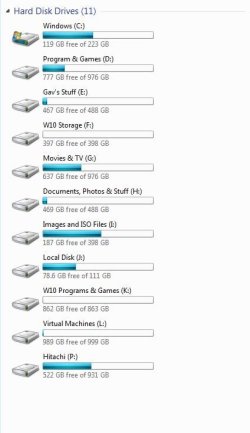
Nothing wrong with having a couple of drives showing :p
Capture.JPG
 

My Computer

Computer type
PC/Desktop
Computer Manufacturer/Model Number
Custom Build
OS
W7 Pro x64 SP1 | W10 Pro IP x64 | W8.1 Pro x64 VM | Linux Mint VM
CPU
i7-4790k @ 4GHz (4.4GHz Boost)
Motherboard
ASUS Sabertooth Z87 (BIOS Rev 2004)
Memory
16GB DDR3 Kingston HyperX Fury @ 1600MHz CL 9-9-9-27
Graphics Card(s)
EVGA GTX 980 Classified
Sound Card
Realtek Onboard
Monitor(s) Displays
Samsung S27D390
Screen Resolution
1920 x 1080
Hard Drives
240GB Intel 520 Series SSD |
Samsung 850 EVO 120GB SSD |
2TB WD Caviar Black |
2TB WD Caviar Green
PSU
Corsair HX850-80 Gold Modular
Case
Cooler Master Silencio 650
Cooling
Corsair H80i w/2 x Corsair SP120 | 2 x 120mm Noctua NF-S12B
Keyboard
Microsoft Sidewinder X4
Mouse
Gigabyte M6900 optical
Internet Speed
152mb
Antivirus
F-Secure
Browser
Firefox 38.0
Other Info
Backup Rig: Win 7 Pro 64-bit | AMD A10-5800k | ASUS F2A85-V Pro | 8GB Samsung DDR3 @1600MHz | 120GB Toshiba SDD | 2TB Seagate HDD | Cooler Master Silencio 550

My Computer

Computer type
PC/Desktop
Computer Manufacturer/Model Number
Custom Build
OS
OpenBSD 6.8
CPU
AMD A10-7850K APU @ 4300MHz
Motherboard
ASRock FM2A58M-VG3+ R2.0
Memory
8GB G-Skill Ripjaws @ 2133MHz
Graphics Card(s)
I have an APU
Monitor(s) Displays
LG 24M35
Screen Resolution
1920x1080@74Hz
Hard Drives
931GB Seagate ST31000524NS 45W8867 59Y1812IBM
PSU
Cooler Master 750W
Case
Bitfenix NOVA
Cooling
120mm fan
Keyboard
Microsoft Digital Media Keyboard 1.0A
Mouse
Logitech G403
Internet Speed
40Mbps
Browser
Firefox
Other Info
Headset: Audio-Technica M50X
They're all pretty much explained on the screenshot except for J: which is my Windows 10 SSD.
 

My Computer

Computer type
PC/Desktop
Computer Manufacturer/Model Number
Custom Build
OS
W7 Pro x64 SP1 | W10 Pro IP x64 | W8.1 Pro x64 VM | Linux Mint VM
CPU
i7-4790k @ 4GHz (4.4GHz Boost)
Motherboard
ASUS Sabertooth Z87 (BIOS Rev 2004)
Memory
16GB DDR3 Kingston HyperX Fury @ 1600MHz CL 9-9-9-27
Graphics Card(s)
EVGA GTX 980 Classified
Sound Card
Realtek Onboard
Monitor(s) Displays
Samsung S27D390
Screen Resolution
1920 x 1080
Hard Drives
240GB Intel 520 Series SSD |
Samsung 850 EVO 120GB SSD |
2TB WD Caviar Black |
2TB WD Caviar Green
PSU
Corsair HX850-80 Gold Modular
Case
Cooler Master Silencio 650
Cooling
Corsair H80i w/2 x Corsair SP120 | 2 x 120mm Noctua NF-S12B
Keyboard
Microsoft Sidewinder X4
Mouse
Gigabyte M6900 optical
Internet Speed
152mb
Antivirus
F-Secure
Browser
Firefox 38.0
Other Info
Backup Rig: Win 7 Pro 64-bit | AMD A10-5800k | ASUS F2A85-V Pro | 8GB Samsung DDR3 @1600MHz | 120GB Toshiba SDD | 2TB Seagate HDD | Cooler Master Silencio 550
Nothing wrong with having a couple of drives showing :p

lonely 10 gigs of virtual machine on drive L :(
lol

I thought that an SSD benefited from not being entirely full... That's why I was considering a raid array, instead of filling up both individually. And when dealing with games sometimes 25gb+, having a unified volume/raid is helpful to cram them in.
 

My Computer

Computer type
PC/Desktop
Computer Manufacturer/Model Number
I made her myself :)
OS
Windows 7 Professional
CPU
Intel i5-4670k
Motherboard
Asus Z87-Pro
Memory
G.SKILL Ripjaws X Series 16GB 1600mhz (F3-1600C9D-16GXM)
Graphics Card(s)
EVGA GTX770 SC ACX 2gb
Monitor(s) Displays
Acer H236HLbid 23" ips 5ms GTG
Screen Resolution
1080p
Hard Drives
-128gb Samsung 840 Pro (C drive with OS)
-1tb WD Black 7200rpm 64mb WD1002FAEX (music, programs, files, etc.)
-120gb Samsung 840 evo (games)
PSU
SeaSonic M12II 750watt
Case
Coolermaster HAF 922 all black, usb 3.0
Cooling
CPU: CM hyper 212 evo with push-pull Cougar Vortex fans
Keyboard
CM Storm QuickFire TK (brown switch mechanical)
Mouse
perixx mx-2000
Internet Speed
21Mb/s down, 2Mb/s up (on a good day)
Antivirus
Malwarebytes and Microsoft Security Essentials
Browser
Chrome
Other Info
Fans on case: front 200mm in, top 200mm out, x2 side 120mm in (cougar vortex), rear 120mm out

I've never seen my cpu go above 40c and my card above 60c even with intense games or benchmarks
I don't overclock anything, as I rely on this machine too much for other things to risk it getting fried.
It will still degrade performance, best to have 25% free space (either as free space or Over Provisioning) on each drive individually. Garbage collection and wear leveling is a drive feature.

6 Things You Shouldn
 

My Computer

Computer type
PC/Desktop
Computer Manufacturer/Model Number
Custom Build
OS
Windows 7 Ultimate x64 SP1
CPU
AMD Phenom 2 1090T
Motherboard
Gigabyte GA-890FXA-UD5
Memory
2x8GB Kingston HyperX Fury Black 1600Mhz Unganged
Graphics Card(s)
MSI GTX 970 Gaming 4G
Sound Card
Realtek On-Board HD 7.1 Audio / Logitech G35
Monitor(s) Displays
3xAcer GD245HQ
Screen Resolution
1920x1080
Hard Drives
Samsung 850 Pro 512GB SSD - OS /
WD Caviar Black SATA 3 - 1 TBx2 - Dynamic RAID 0 /
WD Caviar Green SATA 2 - 640GBx2 - Dynamic RAID 0 /
WD Caviar Green SATA 2 - 640GB - Internal Backup /
Seagate Barracude SATA 3 - 3TB - External Backup/ Sync
PSU
HighPower 1000W
Case
Cooler Master HAF 932
Cooling
Noctua NH-D14
Keyboard
Logitech G19
Mouse
Logitech G500
Internet Speed
100/4 Mbit Cable (100GB quota)
Antivirus
ZoneAlarm Extreme Security / MBAM Pro / MBAE Free / SAS Free
Browser
IE 11 - Firefox - Chrome
Other Info
Logitech F710/ G27/ G940/ Z5500 // TrackIR 5 // Nvidia 3D Surround Vision
Back
Top