Solved 2 system reserved partitions

Dr Future

New member
Local time
4:03 PM
Messages
12
Hi all,

So this is my first foray into both the world of PC building and this forum and i need help with this issue after getting confused by other threads in this forum.

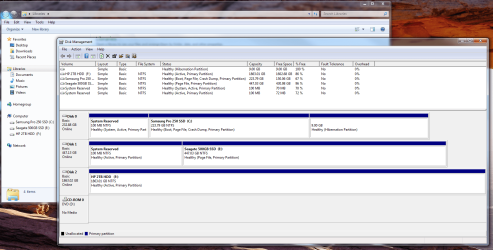
I first thought there might be an issue when in my libraries i had a "system reserved" drive assigned to the (D): drive, so i went into disk management to remove the assigned drive and spotted there being 2 system reserved partitions, one on each of the SSD's...
Untitled.png
qohA1wJ
qohA1wJ

i put the 500gb Seagate SSD in after buying it off a friend (who said it had been wiped) and slotted this into my system to eventually store games on, with the 250 Samsung drive housing only windows 7, and the 2TB HDD for docs etc.

basically all i want to know is is this a big issue and secondly, how has this problem occurred? and finally,
how do i fix this? i presume i have to remove the SR partition from the 500GB Seagate SSD if i want to boot off the Samsung

i should also say that because this is a new build there is nothing on the PC to lose, and also i don't have the key/ install disk for windows to hand

cheers in advance, and please ELI5!
 

My Computer My Computer

At a glance

Windows 7 Professional 64-bitIntel i7 4770Corsair Vengence 16GB DDR3MSI GTX 970
Computer type
PC/Desktop
Computer Manufacturer/Model Number
Custom
OS
Windows 7 Professional 64-bit
CPU
Intel i7 4770
Motherboard
MSI z97 Gaming 5
Memory
Corsair Vengence 16GB DDR3
Graphics Card(s)
MSI GTX 970
Hard Drives
Samsung 250GB SSD
Seagate 500GB SSD
HP 2TB HDD

My Computer My Computer

At a glance

Win-7-Pro64bit 7-H-Prem-64biti7-5930K 2nd i9-9940x both water blocked VRM'...Trident-z 3200C14 2nd Trident-z 3600C16EVGA 1080ti ftw3 2nd Titan Xp both water blocked
Computer type
PC/Desktop
Computer Manufacturer/Model Number
Custom assembled by me :}
OS
Win-7-Pro64bit 7-H-Prem-64bit
CPU
i7-5930K 2nd i9-9940x both water blocked VRM's too
Motherboard
ASUS SABERTOOTH X99 2nd ASUS x299 Apex
Memory
Trident-z 3200C14 2nd Trident-z 3600C16
Graphics Card(s)
EVGA 1080ti ftw3 2nd Titan Xp both water blocked
Sound Card
Built-in Realtek
Monitor(s) Displays
1-AOC G2460PG 24"G-Sync 144Hz/ 2nd 1-ASUS VG248QE 24" 144Hz
Screen Resolution
1920 x 1080 144Hz
Hard Drives
2-Samsung M.2 Evo & Evo Plus
2-Samsung 850 EVO 500GB SSD's/ 3-2.5 W.D. Black 1tb-&3-1tb/3-3.5 WD Black 1tb hdd's
PSU
EVGA SuperNOVA 1000-P2 2nd 1200-P2
Case
2-Corsair Obsidian Series 450D Black ATX Mid Tower
Cooling
Custom water loops
Keyboard
Logitech G710+/ 2nd Logitech G910
Mouse
2-RedDragon M901 Perdition 16400 dpi Gaming mouse = wired
Internet Speed
Comcast Ping 19ms 89.31mbps download speed 6.12mbps upload
Antivirus
Malwarebytes Pro/ Superantispyware Pro
Browser
FireFox & Pale moon
Other Info
2nd ASUS X299 Apex/Intel i9-9940x with Custom water loop/7H-Prem-x64/Corsair 450D case/Ram Trident-z 3600C16 4x8gb / Samsung970Evo plus 500gb SSD/Dual ssd EZ swap evo/PSU EVGA SuperNova 1200w-P2 80+Platinum/GPU Titan Xp /8-ML-140 on push-pull on 2-280GTX rads
Hi,
Looks as though the seller only wiped the c drive :/
http://www.sevenforums.com/tutorials/52129-disk-clean-clean-all-diskpart-command.html

Personally I would remove disk 1 and see if windows still boots okay and report back.

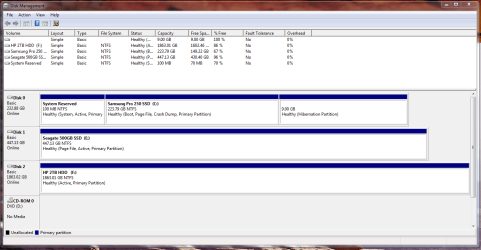
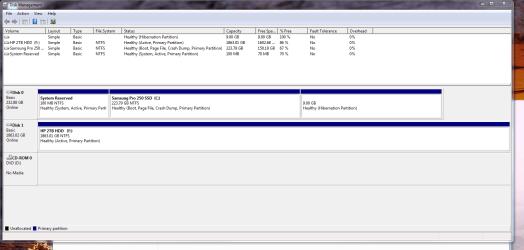
Ok so I removed the new SSD (aka disk 1 / E drive) and it booted from the C drive no problem, disk management now looks like this...

Untitled2.png

(which doesn't look out of the ordinary to me, unless I'm mistaken :))

so should i plug the SSD back in to disk 1 and run a wipe you linked to on that?
 

My Computer My Computer

At a glance

Windows 7 Professional 64-bitIntel i7 4770Corsair Vengence 16GB DDR3MSI GTX 970
Computer type
PC/Desktop
Computer Manufacturer/Model Number
Custom
OS
Windows 7 Professional 64-bit
CPU
Intel i7 4770
Motherboard
MSI z97 Gaming 5
Memory
Corsair Vengence 16GB DDR3
Graphics Card(s)
MSI GTX 970
Hard Drives
Samsung 250GB SSD
Seagate 500GB SSD
HP 2TB HDD
should i run clean or clean all on the problem SSD?
 

My Computer My Computer

At a glance

Windows 7 Professional 64-bitIntel i7 4770Corsair Vengence 16GB DDR3MSI GTX 970
Computer type
PC/Desktop
Computer Manufacturer/Model Number
Custom
OS
Windows 7 Professional 64-bit
CPU
Intel i7 4770
Motherboard
MSI z97 Gaming 5
Memory
Corsair Vengence 16GB DDR3
Graphics Card(s)
MSI GTX 970
Hard Drives
Samsung 250GB SSD
Seagate 500GB SSD
HP 2TB HDD
Windows might not let you delete the System Reserved Partition on that drive, it needs to be marked in active 1st.

You don`t have to use Disk Part, just try using Disk Management first so you can see what you`re doing. If you are not familiar with Disk Part you could do serious damage.

You only need to run the clean command.

I would just use Partition Wizard :)

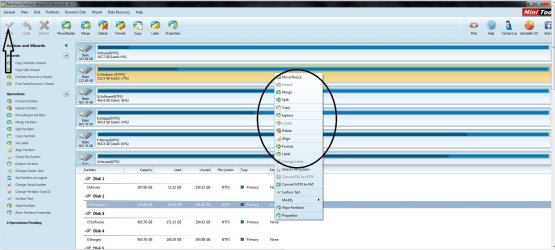
Install it and do whatever you want to that ssd. Delete the entire ssd down to unallocated space, then create, align and format a Primary partition out of the entire ssd if it`s just going to be used for storage.

Partition Wizard does it all :D

Best Professional Partition Manager | MiniTool Partition Wizard Pro
 

My Computer My Computer

At a glance

Windows 10 Pro x64Intel Core i7 6700KGSkill TridentZ RGB 16GB 3600 16-16-16-36EVGA GTX 980 Ti SC x2
Computer type
PC/Desktop
Computer Manufacturer/Model Number
Skylake Special #666
OS
Windows 10 Pro x64
CPU
Intel Core i7 6700K
Motherboard
Asus Sabertooth Z170 Mark 1
Memory
GSkill TridentZ RGB 16GB 3600 16-16-16-36
Graphics Card(s)
EVGA GTX 980 Ti SC x2
Sound Card
Realtek High Definition
Monitor(s) Displays
AOC G2460PG
Screen Resolution
1920 x 1080 144Hz
Hard Drives
Samsung 860 Pro 256GB, Seagate Barracuda 4TB x2
PSU
EVGA 1000 P2, EVGA White Custom Braided Cables
Case
Corsair Vengeance C70 Gunmetal Black
Cooling
Corsair H100i v2, Corsair ML120 x2, Thermal Grizzly Kryonaut
Keyboard
Logitech G910 Orion Spectrum
Mouse
Logitech G700s
Internet Speed
Verizon Fios Quantum Gateway 75/75
Antivirus
Windows Defender, Malwarebytes Free 3.8.3
Browser
Chrome
Other Info
Corsair SP120 x4, LG Blu-ray Drive, Durabrand HT-395 100 Watt Dolby Digital Amp, Corsair H2100 Wireless 7.1 Headset
Windows might not let you delete the System Reserved Partition on that drive, it needs to be marked in active 1st.

You don`t have to use Disk Part, just try using Disk Management first so you can see what you`re doing. If you are not familiar with Disk Part you could do serious damage.

You only need to run the clean command.

I would just use Partition Wizard :)

Install it and do whatever you want to that ssd. Delete the entire ssd down to unallocated space, then create, align and format a Primary partition out of the entire ssd if it`s just going to be used for storage.

Partition Wizard does it all :D

Best Professional Partition Manager | MiniTool Partition Wizard Pro

ok so i powered down and plugged the SSD back in, in disk management there is no option to mark the extra system reserved partition as inactive. or is that no longer necessary if i'm going to run the partition wizard?
 

My Computer My Computer

At a glance

Windows 7 Professional 64-bitIntel i7 4770Corsair Vengence 16GB DDR3MSI GTX 970
Computer type
PC/Desktop
Computer Manufacturer/Model Number
Custom
OS
Windows 7 Professional 64-bit
CPU
Intel i7 4770
Motherboard
MSI z97 Gaming 5
Memory
Corsair Vengence 16GB DDR3
Graphics Card(s)
MSI GTX 970
Hard Drives
Samsung 250GB SSD
Seagate 500GB SSD
HP 2TB HDD
would deleting the volume in disk management do anything?
 

My Computer My Computer

At a glance

Windows 7 Professional 64-bitIntel i7 4770Corsair Vengence 16GB DDR3MSI GTX 970
Computer type
PC/Desktop
Computer Manufacturer/Model Number
Custom
OS
Windows 7 Professional 64-bit
CPU
Intel i7 4770
Motherboard
MSI z97 Gaming 5
Memory
Corsair Vengence 16GB DDR3
Graphics Card(s)
MSI GTX 970
Hard Drives
Samsung 250GB SSD
Seagate 500GB SSD
HP 2TB HDD
ok so i downloaded the partition wizard, the free one as the one you linked me AddRAM wouldnt let me execute any changes, and the system reserved partition is gone! however now in disk management it has the new ssd listed as healthy (page file, active, primary partition) is that right? what does page file mean?

thanks for your help!
 

My Computer My Computer

At a glance

Windows 7 Professional 64-bitIntel i7 4770Corsair Vengence 16GB DDR3MSI GTX 970
Computer type
PC/Desktop
Computer Manufacturer/Model Number
Custom
OS
Windows 7 Professional 64-bit
CPU
Intel i7 4770
Motherboard
MSI z97 Gaming 5
Memory
Corsair Vengence 16GB DDR3
Graphics Card(s)
MSI GTX 970
Hard Drives
Samsung 250GB SSD
Seagate 500GB SSD
HP 2TB HDD
Please post a new shot of Disk Management.
 

My Computer My Computer

At a glance

Windows 10 Pro x64Intel Core i7 6700KGSkill TridentZ RGB 16GB 3600 16-16-16-36EVGA GTX 980 Ti SC x2
Computer type
PC/Desktop
Computer Manufacturer/Model Number
Skylake Special #666
OS
Windows 10 Pro x64
CPU
Intel Core i7 6700K
Motherboard
Asus Sabertooth Z170 Mark 1
Memory
GSkill TridentZ RGB 16GB 3600 16-16-16-36
Graphics Card(s)
EVGA GTX 980 Ti SC x2
Sound Card
Realtek High Definition
Monitor(s) Displays
AOC G2460PG
Screen Resolution
1920 x 1080 144Hz
Hard Drives
Samsung 860 Pro 256GB, Seagate Barracuda 4TB x2
PSU
EVGA 1000 P2, EVGA White Custom Braided Cables
Case
Corsair Vengeance C70 Gunmetal Black
Cooling
Corsair H100i v2, Corsair ML120 x2, Thermal Grizzly Kryonaut
Keyboard
Logitech G910 Orion Spectrum
Mouse
Logitech G700s
Internet Speed
Verizon Fios Quantum Gateway 75/75
Antivirus
Windows Defender, Malwarebytes Free 3.8.3
Browser
Chrome
Other Info
Corsair SP120 x4, LG Blu-ray Drive, Durabrand HT-395 100 Watt Dolby Digital Amp, Corsair H2100 Wireless 7.1 Headset
ok so i downloaded the partition wizard, the free one as the one you linked me AddRAM wouldnt let me execute any changes, and the system reserved partition is gone! however now in disk management it has the new ssd listed as healthy (page file, active, primary partition) is that right? what does page file mean?

thanks for your help!

What do you mean it wouldn`t let you execute any changes ? Did you clcik Apply up in the top left corner after choosing the options you wanted to do ?
 

Attachments

  • Capture1.JPG
    Capture1.JPG
    176.8 KB · Views: 1

My Computer My Computer

At a glance

Windows 10 Pro x64Intel Core i7 6700KGSkill TridentZ RGB 16GB 3600 16-16-16-36EVGA GTX 980 Ti SC x2
Computer type
PC/Desktop
Computer Manufacturer/Model Number
Skylake Special #666
OS
Windows 10 Pro x64
CPU
Intel Core i7 6700K
Motherboard
Asus Sabertooth Z170 Mark 1
Memory
GSkill TridentZ RGB 16GB 3600 16-16-16-36
Graphics Card(s)
EVGA GTX 980 Ti SC x2
Sound Card
Realtek High Definition
Monitor(s) Displays
AOC G2460PG
Screen Resolution
1920 x 1080 144Hz
Hard Drives
Samsung 860 Pro 256GB, Seagate Barracuda 4TB x2
PSU
EVGA 1000 P2, EVGA White Custom Braided Cables
Case
Corsair Vengeance C70 Gunmetal Black
Cooling
Corsair H100i v2, Corsair ML120 x2, Thermal Grizzly Kryonaut
Keyboard
Logitech G910 Orion Spectrum
Mouse
Logitech G700s
Internet Speed
Verizon Fios Quantum Gateway 75/75
Antivirus
Windows Defender, Malwarebytes Free 3.8.3
Browser
Chrome
Other Info
Corsair SP120 x4, LG Blu-ray Drive, Durabrand HT-395 100 Watt Dolby Digital Amp, Corsair H2100 Wireless 7.1 Headset
ok so i downloaded the partition wizard, the free one as the one you linked me AddRAM wouldnt let me execute any changes, and the system reserved partition is gone! however now in disk management it has the new ssd listed as healthy (page file, active, primary partition) is that right? what does page file mean?

thanks for your help!

A page file is part of a hard drive that acts as memory, yours is on the wrong drive, it belongs on the C drive, and with 16 GB of memory you really don`t even need a Page File, but it should at least be shrunk down to a Minimum of 2 GB and a Maximum of 4 GB, ask if you don`t know how to change that.

I told you the entire 500 GB SSD has to be deleted to unallocated space, then you create a primary partition out of the entire 500 GB SSD, then align and format the partition, all this can be done with Partition Wizard.
 

My Computer My Computer

At a glance

Windows 10 Pro x64Intel Core i7 6700KGSkill TridentZ RGB 16GB 3600 16-16-16-36EVGA GTX 980 Ti SC x2
Computer type
PC/Desktop
Computer Manufacturer/Model Number
Skylake Special #666
OS
Windows 10 Pro x64
CPU
Intel Core i7 6700K
Motherboard
Asus Sabertooth Z170 Mark 1
Memory
GSkill TridentZ RGB 16GB 3600 16-16-16-36
Graphics Card(s)
EVGA GTX 980 Ti SC x2
Sound Card
Realtek High Definition
Monitor(s) Displays
AOC G2460PG
Screen Resolution
1920 x 1080 144Hz
Hard Drives
Samsung 860 Pro 256GB, Seagate Barracuda 4TB x2
PSU
EVGA 1000 P2, EVGA White Custom Braided Cables
Case
Corsair Vengeance C70 Gunmetal Black
Cooling
Corsair H100i v2, Corsair ML120 x2, Thermal Grizzly Kryonaut
Keyboard
Logitech G910 Orion Spectrum
Mouse
Logitech G700s
Internet Speed
Verizon Fios Quantum Gateway 75/75
Antivirus
Windows Defender, Malwarebytes Free 3.8.3
Browser
Chrome
Other Info
Corsair SP120 x4, LG Blu-ray Drive, Durabrand HT-395 100 Watt Dolby Digital Amp, Corsair H2100 Wireless 7.1 Headset
Please read posts 9,10, and 11 before you re post again, and please post a new shot of Disk Management.
 

My Computer My Computer

At a glance

Windows 10 Pro x64Intel Core i7 6700KGSkill TridentZ RGB 16GB 3600 16-16-16-36EVGA GTX 980 Ti SC x2
Computer type
PC/Desktop
Computer Manufacturer/Model Number
Skylake Special #666
OS
Windows 10 Pro x64
CPU
Intel Core i7 6700K
Motherboard
Asus Sabertooth Z170 Mark 1
Memory
GSkill TridentZ RGB 16GB 3600 16-16-16-36
Graphics Card(s)
EVGA GTX 980 Ti SC x2
Sound Card
Realtek High Definition
Monitor(s) Displays
AOC G2460PG
Screen Resolution
1920 x 1080 144Hz
Hard Drives
Samsung 860 Pro 256GB, Seagate Barracuda 4TB x2
PSU
EVGA 1000 P2, EVGA White Custom Braided Cables
Case
Corsair Vengeance C70 Gunmetal Black
Cooling
Corsair H100i v2, Corsair ML120 x2, Thermal Grizzly Kryonaut
Keyboard
Logitech G910 Orion Spectrum
Mouse
Logitech G700s
Internet Speed
Verizon Fios Quantum Gateway 75/75
Antivirus
Windows Defender, Malwarebytes Free 3.8.3
Browser
Chrome
Other Info
Corsair SP120 x4, LG Blu-ray Drive, Durabrand HT-395 100 Watt Dolby Digital Amp, Corsair H2100 Wireless 7.1 Headset
ok so i downloaded the partition wizard, the free one as the one you linked me AddRAM wouldnt let me execute any changes, and the system reserved partition is gone! however now in disk management it has the new ssd listed as healthy (page file, active, primary partition) is that right? what does page file mean?

thanks for your help!

What do you mean it wouldn`t let you execute any changes ? Did you clcik Apply up in the top left corner after choosing the options you wanted to do ?

when i clicked apply it just said i had to purchase the full version to apply changes
 

My Computer My Computer

At a glance

Windows 7 Professional 64-bitIntel i7 4770Corsair Vengence 16GB DDR3MSI GTX 970
Computer type
PC/Desktop
Computer Manufacturer/Model Number
Custom
OS
Windows 7 Professional 64-bit
CPU
Intel i7 4770
Motherboard
MSI z97 Gaming 5
Memory
Corsair Vengence 16GB DDR3
Graphics Card(s)
MSI GTX 970
Hard Drives
Samsung 250GB SSD
Seagate 500GB SSD
HP 2TB HDD
ok so i downloaded the partition wizard, the free one as the one you linked me AddRAM wouldnt let me execute any changes, and the system reserved partition is gone! however now in disk management it has the new ssd listed as healthy (page file, active, primary partition) is that right? what does page file mean?

thanks for your help!

A page file is part of a hard drive that acts as memory, yours is on the wrong drive, it belongs on the C drive, and with 16 GB of memory you really don`t even need a Page File, but it should at least be shrunk down to a Minimum of 2 GB and a Maximum of 4 GB, ask if you don`t know how to change that.

I told you the entire 500 GB SSD has to be deleted to unallocated space, then you create a primary partition out of the entire 500 GB SSD, then align and format the partition, all this can be done with Partition Wizard.

yeah i don't know how big the page file is or how to change it, anyway heres the disk management now
Untitled3.png

i follow your instructions and deleted the whole drive then reallocated the space, created primary etc
 

My Computer My Computer

At a glance

Windows 7 Professional 64-bitIntel i7 4770Corsair Vengence 16GB DDR3MSI GTX 970
Computer type
PC/Desktop
Computer Manufacturer/Model Number
Custom
OS
Windows 7 Professional 64-bit
CPU
Intel i7 4770
Motherboard
MSI z97 Gaming 5
Memory
Corsair Vengence 16GB DDR3
Graphics Card(s)
MSI GTX 970
Hard Drives
Samsung 250GB SSD
Seagate 500GB SSD
HP 2TB HDD
Hi,
Looks better :)
 

My Computer My Computer

At a glance

Win-7-Pro64bit 7-H-Prem-64biti7-5930K 2nd i9-9940x both water blocked VRM'...Trident-z 3200C14 2nd Trident-z 3600C16EVGA 1080ti ftw3 2nd Titan Xp both water blocked
Computer type
PC/Desktop
Computer Manufacturer/Model Number
Custom assembled by me :}
OS
Win-7-Pro64bit 7-H-Prem-64bit
CPU
i7-5930K 2nd i9-9940x both water blocked VRM's too
Motherboard
ASUS SABERTOOTH X99 2nd ASUS x299 Apex
Memory
Trident-z 3200C14 2nd Trident-z 3600C16
Graphics Card(s)
EVGA 1080ti ftw3 2nd Titan Xp both water blocked
Sound Card
Built-in Realtek
Monitor(s) Displays
1-AOC G2460PG 24"G-Sync 144Hz/ 2nd 1-ASUS VG248QE 24" 144Hz
Screen Resolution
1920 x 1080 144Hz
Hard Drives
2-Samsung M.2 Evo & Evo Plus
2-Samsung 850 EVO 500GB SSD's/ 3-2.5 W.D. Black 1tb-&3-1tb/3-3.5 WD Black 1tb hdd's
PSU
EVGA SuperNOVA 1000-P2 2nd 1200-P2
Case
2-Corsair Obsidian Series 450D Black ATX Mid Tower
Cooling
Custom water loops
Keyboard
Logitech G710+/ 2nd Logitech G910
Mouse
2-RedDragon M901 Perdition 16400 dpi Gaming mouse = wired
Internet Speed
Comcast Ping 19ms 89.31mbps download speed 6.12mbps upload
Antivirus
Malwarebytes Pro/ Superantispyware Pro
Browser
FireFox & Pale moon
Other Info
2nd ASUS X299 Apex/Intel i9-9940x with Custom water loop/7H-Prem-x64/Corsair 450D case/Ram Trident-z 3600C16 4x8gb / Samsung970Evo plus 500gb SSD/Dual ssd EZ swap evo/PSU EVGA SuperNova 1200w-P2 80+Platinum/GPU Titan Xp /8-ML-140 on push-pull on 2-280GTX rads
Just curious.

What is on disk 1 and 2 that they need to be active?
 

My Computer My Computer

At a glance

Windows 10 Pro. 64/ version 1709 Windows 7 Pr...Intel i7-6800K @ 4.3Corsair Platinum 16 gig @2400EVGA GTX 1070 OC
Computer type
PC/Desktop
Computer Manufacturer/Model Number
Home made Desktop
OS
Windows 10 Pro. 64/ version 1709 Windows 7 Pro/64
CPU
Intel i7-6800K @ 4.3
Motherboard
ASUS X-99 Deluxe II
Memory
Corsair Platinum 16 gig @2400
Graphics Card(s)
EVGA GTX 1070 OC
Monitor(s) Displays
Asus 27" LED LCD/VE278Q
Screen Resolution
1920-1080 or 1280-720 HDMI
Hard Drives
INTEL SSD 730-240 Gb Sata 3.0/
PSU
EVGA Platium 1200W
Case
Phanteks Luxe Tempered Glass 8 fans/ one radiator
Cooling
XSPC/ Water Cooled CPU
Keyboard
Das 4 Professional
Mouse
Logitech M705/MX Anywhere 2-S
Internet Speed
100 mbits
Antivirus
Microsoft Security Essentials/ Malwarebytes Premium 3.0/ SAS
Browser
I.E. 11 default/Firefox/ ISP Time Warner Cable/Spectrum
Other Info
LG BluRay Burner/
Sound system-KLipsch-THX/
Icy Dock ssd Hot Swap bays.

My Computer My Computer

At a glance

Windows 7 Professional 64-bitIntel i7 4770Corsair Vengence 16GB DDR3MSI GTX 970
Computer type
PC/Desktop
Computer Manufacturer/Model Number
Custom
OS
Windows 7 Professional 64-bit
CPU
Intel i7 4770
Motherboard
MSI z97 Gaming 5
Memory
Corsair Vengence 16GB DDR3
Graphics Card(s)
MSI GTX 970
Hard Drives
Samsung 250GB SSD
Seagate 500GB SSD
HP 2TB HDD
You did not delete the 500 GB SSD down to unallocated space yet, you couldn`t have, it`s still marked Active and it still has a Page File on it.

Only Disk 0 should be marked Active.

Did you download the Free Home Version of Partition Wizard ? Sounds like you downloaded and installed a Pro Trial, there should be no reason PW won`t do all those things.

Best Free Partition Manager for Windows | MiniTool Partition Free

Right click on Disk 1 and Disk 2 in Disk Management and see if it will let you set them inactive, let us know what happens.

http://www.sevenforums.com/tutorials/197157-partition-mark-inactive.html
 

My Computer My Computer

At a glance

Windows 10 Pro x64Intel Core i7 6700KGSkill TridentZ RGB 16GB 3600 16-16-16-36EVGA GTX 980 Ti SC x2
Computer type
PC/Desktop
Computer Manufacturer/Model Number
Skylake Special #666
OS
Windows 10 Pro x64
CPU
Intel Core i7 6700K
Motherboard
Asus Sabertooth Z170 Mark 1
Memory
GSkill TridentZ RGB 16GB 3600 16-16-16-36
Graphics Card(s)
EVGA GTX 980 Ti SC x2
Sound Card
Realtek High Definition
Monitor(s) Displays
AOC G2460PG
Screen Resolution
1920 x 1080 144Hz
Hard Drives
Samsung 860 Pro 256GB, Seagate Barracuda 4TB x2
PSU
EVGA 1000 P2, EVGA White Custom Braided Cables
Case
Corsair Vengeance C70 Gunmetal Black
Cooling
Corsair H100i v2, Corsair ML120 x2, Thermal Grizzly Kryonaut
Keyboard
Logitech G910 Orion Spectrum
Mouse
Logitech G700s
Internet Speed
Verizon Fios Quantum Gateway 75/75
Antivirus
Windows Defender, Malwarebytes Free 3.8.3
Browser
Chrome
Other Info
Corsair SP120 x4, LG Blu-ray Drive, Durabrand HT-395 100 Watt Dolby Digital Amp, Corsair H2100 Wireless 7.1 Headset
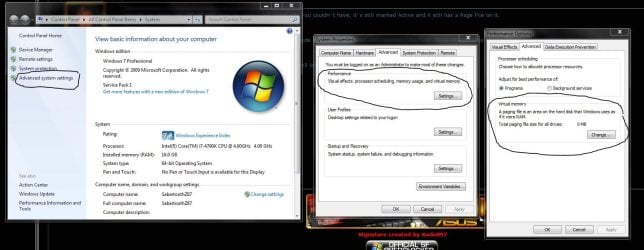
This is how you change your page file, as you can see, I don`t use one.
 

Attachments

  • Capture2.JPG
    Capture2.JPG
    125.7 KB · Views: 2

My Computer My Computer

At a glance

Windows 10 Pro x64Intel Core i7 6700KGSkill TridentZ RGB 16GB 3600 16-16-16-36EVGA GTX 980 Ti SC x2
Computer type
PC/Desktop
Computer Manufacturer/Model Number
Skylake Special #666
OS
Windows 10 Pro x64
CPU
Intel Core i7 6700K
Motherboard
Asus Sabertooth Z170 Mark 1
Memory
GSkill TridentZ RGB 16GB 3600 16-16-16-36
Graphics Card(s)
EVGA GTX 980 Ti SC x2
Sound Card
Realtek High Definition
Monitor(s) Displays
AOC G2460PG
Screen Resolution
1920 x 1080 144Hz
Hard Drives
Samsung 860 Pro 256GB, Seagate Barracuda 4TB x2
PSU
EVGA 1000 P2, EVGA White Custom Braided Cables
Case
Corsair Vengeance C70 Gunmetal Black
Cooling
Corsair H100i v2, Corsair ML120 x2, Thermal Grizzly Kryonaut
Keyboard
Logitech G910 Orion Spectrum
Mouse
Logitech G700s
Internet Speed
Verizon Fios Quantum Gateway 75/75
Antivirus
Windows Defender, Malwarebytes Free 3.8.3
Browser
Chrome
Other Info
Corsair SP120 x4, LG Blu-ray Drive, Durabrand HT-395 100 Watt Dolby Digital Amp, Corsair H2100 Wireless 7.1 Headset
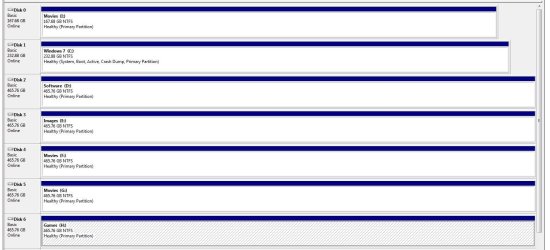
This is how your Disk Management should end up, disregard Disk 0 in this example, my ASMedia sata controllers are the primary controllers on this board and that`s just where the Intel SSD ends up, but just ignore it.

Look at Drives 2 through 6, that`s exactly how your Drives 1 and 2 should look. No Page File and Not marked Active.

http://www.sevenforums.com/tutorials/197157-partition-mark-inactive.html
 

Attachments

  • Capture3.JPG
    Capture3.JPG
    109.7 KB · Views: 4

My Computer My Computer

At a glance

Windows 10 Pro x64Intel Core i7 6700KGSkill TridentZ RGB 16GB 3600 16-16-16-36EVGA GTX 980 Ti SC x2
Computer type
PC/Desktop
Computer Manufacturer/Model Number
Skylake Special #666
OS
Windows 10 Pro x64
CPU
Intel Core i7 6700K
Motherboard
Asus Sabertooth Z170 Mark 1
Memory
GSkill TridentZ RGB 16GB 3600 16-16-16-36
Graphics Card(s)
EVGA GTX 980 Ti SC x2
Sound Card
Realtek High Definition
Monitor(s) Displays
AOC G2460PG
Screen Resolution
1920 x 1080 144Hz
Hard Drives
Samsung 860 Pro 256GB, Seagate Barracuda 4TB x2
PSU
EVGA 1000 P2, EVGA White Custom Braided Cables
Case
Corsair Vengeance C70 Gunmetal Black
Cooling
Corsair H100i v2, Corsair ML120 x2, Thermal Grizzly Kryonaut
Keyboard
Logitech G910 Orion Spectrum
Mouse
Logitech G700s
Internet Speed
Verizon Fios Quantum Gateway 75/75
Antivirus
Windows Defender, Malwarebytes Free 3.8.3
Browser
Chrome
Other Info
Corsair SP120 x4, LG Blu-ray Drive, Durabrand HT-395 100 Watt Dolby Digital Amp, Corsair H2100 Wireless 7.1 Headset
Back
Top