Solved Can the system reserved partition come after OS?

adrius

New member
Local time
10:10 AM
Messages
8
When I installed W7 I left two drives attatched, one of them has the system reserved partition and I wanted to move it to my SSD. Im hesitant however as I don't know if I would have to use a tool to move the OS partition on the drive to be after SYS RES or if I could just reduce the space for windows and put it after.
 

My Computer My Computer

At a glance

Windows 7 Professional 64-bit SP1Intel Core i5 6600K @ 3.50GHz32.0GB Dual-Channel DDR3 @ 798MHz (11-11-11-28)4095MB NVIDIA GeForce GTX 1050 Ti (MSI)
Computer type
PC/Desktop
OS
Windows 7 Professional 64-bit SP1
CPU
Intel Core i5 6600K @ 3.50GHz
Motherboard
ASUSTeK COMPUTER INC. H170-PLUS D3 (LGA1151)
Memory
32.0GB Dual-Channel DDR3 @ 798MHz (11-11-11-28)
Graphics Card(s)
4095MB NVIDIA GeForce GTX 1050 Ti (MSI)
Antivirus
Malwarebytes Pro
Browser
Firefox
easyBCD, or even better, windows install DVD's startup repair can fix this, however, have no ext HDs attached during the process.
 

My Computer My Computer

At a glance

Windows 7 Professional 64-bitDesktop i5; Acers i5 & i7desktop 16GB; 1 Acer 8GB & 1 Acer 16GB
Computer type
PC/Desktop
Computer Manufacturer/Model Number
Antec desktop; Acer Aspire laptops
OS
Windows 7 Professional 64-bit
CPU
Desktop i5; Acers i5 & i7
Memory
desktop 16GB; 1 Acer 8GB & 1 Acer 16GB
Hard Drives
1TB split into 2 equal partitions [OS and data] usable by RJS
Internet Speed
AT&T DSL
Browser
FF, GChrome, msIE
Other Info
Windows 7 Firewall, Emsisoft AM/AV, MSE [scan-only], SpywareBlaster, Ruiware/BillP combine
As I understood, the OS is on the SSD and the boot loader is on the HDD.
First question:
Is your disks Legacy-MBR or UEFI-GPT?
To find out, open disk manager. On top menu - View - Top - Disk list. On the right column (partition style) it will be GPT or MBR.
If your SSD is Legacy-MBR it's quite simple, all you have to do is to set the Windows partition as Active using Disk manager. Then shutdown detach the HDD and leave on only the SSD. Try to boot.
 

My Computers My Computers

  • At a glance

    Windows 7 HP 64i5 6600K - 800MHz to 4200MHz4+4G GSkill DDR4 3000IG - Intel 530
    Computer type
    PC/Desktop
    Computer Manufacturer/Model Number
    custom build
    OS
    Windows 7 HP 64
    CPU
    i5 6600K - 800MHz to 4200MHz
    Motherboard
    GA-Z170-HD3P
    Memory
    4+4G GSkill DDR4 3000
    Graphics Card(s)
    IG - Intel 530
    Monitor(s) Displays
    Samsung 226BW
    Screen Resolution
    1680x1050
    Hard Drives
    (1) -1 SM951 – 128GB M.2 AHCI PCIe SSD drive for Windows 7 and Lubuntu
    (2) -1 WD SATA 3 - 1T for Data
    (3) -1 WD SATA 3 - 1T for backup
    PSU
    Thermaltake 450W TR2 gold
    Keyboard
    Old and good Chicony mechanical keyboard
    Mouse
    Logitech mX performance - 9 buttons (had to disable some)
    Internet Speed
    500Mb/s
    Browser
    Firefox 64
    Other Info
    TinyWall firewall
  • At a glance

    Windows 7 Proi7-4500U 800MHz to 3.0GHz(4+4)G DDR3 1600IG intel 4400 + NVIDIA GeForce GT 745M
    Computer type
    Laptop
    System Manufacturer/Model Number
    Asus Q550LF
    OS
    Windows 7 Pro
    CPU
    i7-4500U 800MHz to 3.0GHz
    Motherboard
    Asus Q550LF
    Memory
    (4+4)G DDR3 1600
    Graphics Card(s)
    IG intel 4400 + NVIDIA GeForce GT 745M
    Sound Card
    Realtek
    Monitor(s) Displays
    LG Display LP156WF4-SPH1
    Screen Resolution
    1920 x 1080
    Hard Drives
    BX500 120G SSD for Windows and programs +
    1T HDD for data
    Internet Speed
    500 Mb/s
    Browser
    Firefox
    Other Info
    TinyWall firewall
mh7, thanks for that info, I'll try to remember mbr and gpt :)
 

My Computer My Computer

At a glance

Windows 7 Professional 64-bitDesktop i5; Acers i5 & i7desktop 16GB; 1 Acer 8GB & 1 Acer 16GB
Computer type
PC/Desktop
Computer Manufacturer/Model Number
Antec desktop; Acer Aspire laptops
OS
Windows 7 Professional 64-bit
CPU
Desktop i5; Acers i5 & i7
Memory
desktop 16GB; 1 Acer 8GB & 1 Acer 16GB
Hard Drives
1TB split into 2 equal partitions [OS and data] usable by RJS
Internet Speed
AT&T DSL
Browser
FF, GChrome, msIE
Other Info
Windows 7 Firewall, Emsisoft AM/AV, MSE [scan-only], SpywareBlaster, Ruiware/BillP combine
You will also need to create the boot critical files on the ssd active partition. Use bcdboot command for that.


If your SSD is Legacy-MBR it's quite simple, all you have to do is to set the Windows partition as Active using Disk manager. Then shutdown detach the HDD and leave on only the SSD. Try to boot.
 

My Computers My Computers

  • At a glance

    7 X64i5 84002x8gb 3200mhz
    Computer type
    PC/Desktop
    OS
    7 X64
    CPU
    i5 8400
    Motherboard
    gigabyte b365m ds3h
    Memory
    2x8gb 3200mhz
    Hard Drives
    various
    PSU
    pure power 11 400w cm
    Case
    Coolermaster
    Cooling
    cryorig m9i
  • At a glance

    7x64g54008gb ddr4 2400
    Computer type
    PC/Desktop
    OS
    7x64
    CPU
    g5400
    Motherboard
    ga b365m ds3h
    Memory
    8gb ddr4 2400
    PSU
    xfx pro 450w
As I understood, the OS is on the SSD and the boot loader is on the HDD.
First question:
Is your disks Legacy-MBR or UEFI-GPT?
To find out, open disk manager. On top menu - View - Top - Disk list. On the right column (partition style) it will be GPT or MBR.
If your SSD is Legacy-MBR it's quite simple, all you have to do is to set the Windows partition as Active using Disk manager. Then shutdown detach the HDD and leave on only the SSD. Try to boot.
Both disks are GPT
 

My Computer My Computer

At a glance

Windows 7 Professional 64-bit SP1Intel Core i5 6600K @ 3.50GHz32.0GB Dual-Channel DDR3 @ 798MHz (11-11-11-28)4095MB NVIDIA GeForce GTX 1050 Ti (MSI)
Computer type
PC/Desktop
OS
Windows 7 Professional 64-bit SP1
CPU
Intel Core i5 6600K @ 3.50GHz
Motherboard
ASUSTeK COMPUTER INC. H170-PLUS D3 (LGA1151)
Memory
32.0GB Dual-Channel DDR3 @ 798MHz (11-11-11-28)
Graphics Card(s)
4095MB NVIDIA GeForce GTX 1050 Ti (MSI)
Antivirus
Malwarebytes Pro
Browser
Firefox
Boot windows with both disks, open Disk manager (C:\Windows\System32\diskmgmt.msc), Expand the window and the columns so we can read them. With the snipping tool take a snapshot of the hole window and save the image to your disk.
On the Quick reply, hit the paper clip (top right menu) Browse to your image file - upload.
 

My Computers My Computers

  • At a glance

    Windows 7 HP 64i5 6600K - 800MHz to 4200MHz4+4G GSkill DDR4 3000IG - Intel 530
    Computer type
    PC/Desktop
    Computer Manufacturer/Model Number
    custom build
    OS
    Windows 7 HP 64
    CPU
    i5 6600K - 800MHz to 4200MHz
    Motherboard
    GA-Z170-HD3P
    Memory
    4+4G GSkill DDR4 3000
    Graphics Card(s)
    IG - Intel 530
    Monitor(s) Displays
    Samsung 226BW
    Screen Resolution
    1680x1050
    Hard Drives
    (1) -1 SM951 – 128GB M.2 AHCI PCIe SSD drive for Windows 7 and Lubuntu
    (2) -1 WD SATA 3 - 1T for Data
    (3) -1 WD SATA 3 - 1T for backup
    PSU
    Thermaltake 450W TR2 gold
    Keyboard
    Old and good Chicony mechanical keyboard
    Mouse
    Logitech mX performance - 9 buttons (had to disable some)
    Internet Speed
    500Mb/s
    Browser
    Firefox 64
    Other Info
    TinyWall firewall
  • At a glance

    Windows 7 Proi7-4500U 800MHz to 3.0GHz(4+4)G DDR3 1600IG intel 4400 + NVIDIA GeForce GT 745M
    Computer type
    Laptop
    System Manufacturer/Model Number
    Asus Q550LF
    OS
    Windows 7 Pro
    CPU
    i7-4500U 800MHz to 3.0GHz
    Motherboard
    Asus Q550LF
    Memory
    (4+4)G DDR3 1600
    Graphics Card(s)
    IG intel 4400 + NVIDIA GeForce GT 745M
    Sound Card
    Realtek
    Monitor(s) Displays
    LG Display LP156WF4-SPH1
    Screen Resolution
    1920 x 1080
    Hard Drives
    BX500 120G SSD for Windows and programs +
    1T HDD for data
    Internet Speed
    500 Mb/s
    Browser
    Firefox
    Other Info
    TinyWall firewall
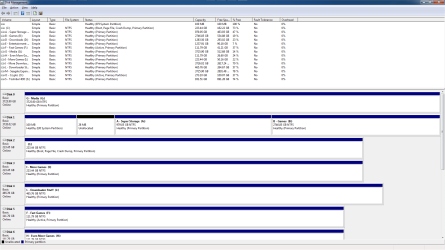
Disks as requested
 

Attachments

  • disks.png
    disks.png
    50.4 KB · Views: 6

My Computer My Computer

At a glance

Windows 7 Professional 64-bit SP1Intel Core i5 6600K @ 3.50GHz32.0GB Dual-Channel DDR3 @ 798MHz (11-11-11-28)4095MB NVIDIA GeForce GTX 1050 Ti (MSI)
Computer type
PC/Desktop
OS
Windows 7 Professional 64-bit SP1
CPU
Intel Core i5 6600K @ 3.50GHz
Motherboard
ASUSTeK COMPUTER INC. H170-PLUS D3 (LGA1151)
Memory
32.0GB Dual-Channel DDR3 @ 798MHz (11-11-11-28)
Graphics Card(s)
4095MB NVIDIA GeForce GTX 1050 Ti (MSI)
Antivirus
Malwarebytes Pro
Browser
Firefox
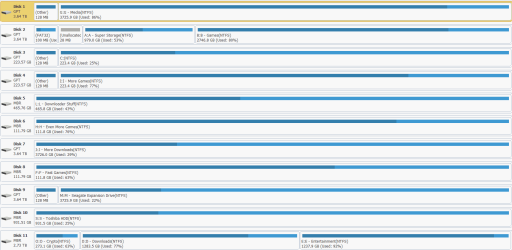
Your boot loader is on the first partition on disk 1 (Fat32 - EFI) and your OS is on disk 2, C: partition.
The boot loader should also be on disk 2.

I never moved a EFI partition from one disk to the other, but this is what you can try as it's not a destructive task.
If you don't have, install pw11-free to do the following tasks:

- Disk 5 (F:) is Active, so it one day it was a boot able disk and now it's only a data disk. Set it non active.
- Shrink your C: partition (disk 2) in 100M. It will create an unallocated 100M space
- Copy EFI partition from disk 1 to the unallocated 100M space on disk 2.
- Detach all disks (power cable) except disk 2.
- Boot the installation disk as UEFI and do a boot repair.
- See if it boots (without disk 1)
Report
 

My Computers My Computers

  • At a glance

    Windows 7 HP 64i5 6600K - 800MHz to 4200MHz4+4G GSkill DDR4 3000IG - Intel 530
    Computer type
    PC/Desktop
    Computer Manufacturer/Model Number
    custom build
    OS
    Windows 7 HP 64
    CPU
    i5 6600K - 800MHz to 4200MHz
    Motherboard
    GA-Z170-HD3P
    Memory
    4+4G GSkill DDR4 3000
    Graphics Card(s)
    IG - Intel 530
    Monitor(s) Displays
    Samsung 226BW
    Screen Resolution
    1680x1050
    Hard Drives
    (1) -1 SM951 – 128GB M.2 AHCI PCIe SSD drive for Windows 7 and Lubuntu
    (2) -1 WD SATA 3 - 1T for Data
    (3) -1 WD SATA 3 - 1T for backup
    PSU
    Thermaltake 450W TR2 gold
    Keyboard
    Old and good Chicony mechanical keyboard
    Mouse
    Logitech mX performance - 9 buttons (had to disable some)
    Internet Speed
    500Mb/s
    Browser
    Firefox 64
    Other Info
    TinyWall firewall
  • At a glance

    Windows 7 Proi7-4500U 800MHz to 3.0GHz(4+4)G DDR3 1600IG intel 4400 + NVIDIA GeForce GT 745M
    Computer type
    Laptop
    System Manufacturer/Model Number
    Asus Q550LF
    OS
    Windows 7 Pro
    CPU
    i7-4500U 800MHz to 3.0GHz
    Motherboard
    Asus Q550LF
    Memory
    (4+4)G DDR3 1600
    Graphics Card(s)
    IG intel 4400 + NVIDIA GeForce GT 745M
    Sound Card
    Realtek
    Monitor(s) Displays
    LG Display LP156WF4-SPH1
    Screen Resolution
    1920 x 1080
    Hard Drives
    BX500 120G SSD for Windows and programs +
    1T HDD for data
    Internet Speed
    500 Mb/s
    Browser
    Firefox
    Other Info
    TinyWall firewall
This is one of those situations where Macrium Reflect Rescue Media (bootable USB stick) comes in real handy.

Follow Megahertz07's steps 2-3-4:
- Shrink your C: partition (disk 2) in 100M. It will create an unallocated 100M space
- Copy EFI partition from disk 1 to the unallocated 100M space on disk 2.
- Detach all disks (power cable) except disk 2.

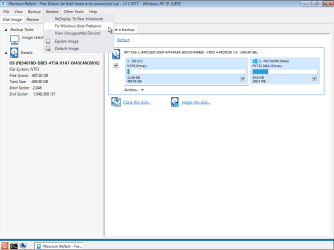
Then you'd boot from the Macrium USB stick, use it's "Fix Windows Boot Problems" function, and reboot. That's it.

It's quite likely even Windows Disk Management will be able to shrink the partition a measly 100 MB, but if it has trouble you may need to resort to a real partition manager like Megahert07's "MiniTool Partition Wizard" suggestion.

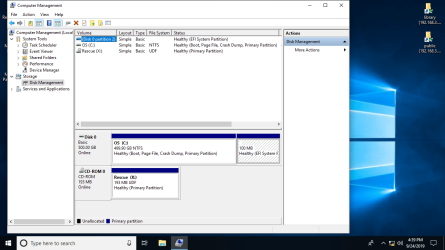
Here's some screenshots from an experiment I just did:
 

Attachments

  • Image2.png
    Image2.png
    19.7 KB · Views: 3
  • Image1.png
    Image1.png
    73.1 KB · Views: 1

My Computer My Computer

At a glance

Windows 7/8.1/10 multibootIntel Core i7-770048GB (2x16GB Crucial DDR4-3200 + 2x8GB Hynix ...Intel HD630 + AMD Radeon R7 450 PCIe
Computer type
PC/Desktop
Computer Manufacturer/Model Number
Dell Optiplex 7050
OS
Windows 7/8.1/10 multiboot
CPU
Intel Core i7-7700
Motherboard
Dell, Intel Q270 chipset
Memory
48GB (2x16GB Crucial DDR4-3200 + 2x8GB Hynix DDR4-2400)
Graphics Card(s)
Intel HD630 + AMD Radeon R7 450 PCIe
Monitor(s) Displays
Asus VC279 (27")
Screen Resolution
1920x1080
Hard Drives
Toshiba M.2 NVMe (256GB),
Samsung 960 Evo (500GB),
WD Red Plus 80EFBX (8TB)
Hi All,
Greets,
The things are really critical & lack of knowledge about UEFI + GPT is coming crucial.

I would suggest :

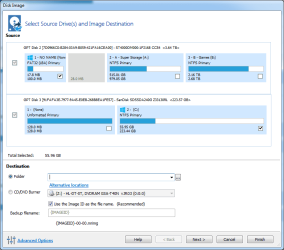
(1) Install dg1261's Macrium on current installation. Make a System Image with all the disks connected & also make a Macrium Rescue Disk.

Macrium Reflect Free

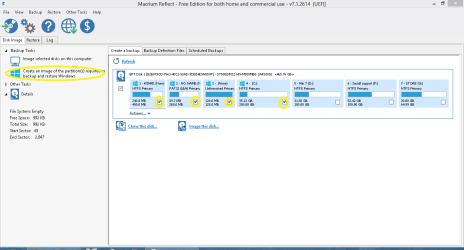
If you can share a screenshot of what is selected automatically by Macrium Reflect when you proceed for System Image, will be very helpful.

Macrium System Restore.PNG

(2) You are having too many disks that your screen shots are not showing all the disks. Scroll & Share!

(3) I would advise you to take disk screenshots with Megahertz07's Partition Wizard (free ) The things will change from the in-built Disk Management. Some more partitions will show.
( A portable version is listed here : Minitool Partition wizard portable )

(4) Have a look here as well : Default Configuration: Windows RE Tools, System, MSR, and Windows Partitions

Let us know.

Thanks & Regards. ...
 

My Computer My Computer

At a glance

Windows 7 Ultimate x32 With Sp1 + Vista Ultim...Intel Mobile Core 2 Duo T5750 @ 2.00GHz Merom...2.00GB Dual-Channel DDR2 @ 332MHz (5-5-5-15)Mobile Intel(R) 965 Express Chipset Family
Computer type
Laptop
Computer Manufacturer/Model Number
hp compaq presario c795VU notebook pc
OS
Windows 7 Ultimate x32 With Sp1 + Vista Ultimate x32 with Sp1 & Sp2 !!
CPU
Intel Mobile Core 2 Duo T5750 @ 2.00GHz Merom 65nm Technolog
Motherboard
Hewlett-Packard 30D9 (CPU)
Memory
2.00GB Dual-Channel DDR2 @ 332MHz (5-5-5-15)
Graphics Card(s)
Mobile Intel(R) 965 Express Chipset Family
Sound Card
High Definition Audio Device
Monitor(s) Displays
LP154WX4-TLCB on Mobile Intel 965 Express Chipset Family
Screen Resolution
1280x800 @ 60Hz
Hard Drives
149GB Western Digital WDC WD1600BEVS-60VAT0 ATA Device (SATA)
Keyboard
Standard 101/102-Key or Microsoft Natural PS/2 Key + HP QLB
Mouse
ALPS pointing device
Antivirus
Kaspersky AV 2017(Win 7) & AVG AntiVirus Free 2016 (VISTA)
Browser
google chrome
Defaults from Reflect and disks from Partition Wizard


Edit - Attempted to use the Macrium bootable disk, mouse and keyboard aren't powered while thats being used though so its unusable.


Edit 2 - Tried the windows disk repair as suggested by mega, fixed it. Ty.
 

Attachments

  • Capture.PNG
    Capture.PNG
    22.9 KB · Views: 3
  • Untitled.png
    Untitled.png
    20.1 KB · Views: 0
Last edited:

My Computer My Computer

At a glance

Windows 7 Professional 64-bit SP1Intel Core i5 6600K @ 3.50GHz32.0GB Dual-Channel DDR3 @ 798MHz (11-11-11-28)4095MB NVIDIA GeForce GTX 1050 Ti (MSI)
Computer type
PC/Desktop
OS
Windows 7 Professional 64-bit SP1
CPU
Intel Core i5 6600K @ 3.50GHz
Motherboard
ASUSTeK COMPUTER INC. H170-PLUS D3 (LGA1151)
Memory
32.0GB Dual-Channel DDR3 @ 798MHz (11-11-11-28)
Graphics Card(s)
4095MB NVIDIA GeForce GTX 1050 Ti (MSI)
Antivirus
Malwarebytes Pro
Browser
Firefox
adrius & Megahertz07 : Congrats!

And yes If you can share the final disk snapshot from partition wizard ? It will be helpful for me to understand the things better.

Thanks & Regards. ...

((( Just To Mention :

It is still possible that the boot data is not being picked from Disk 3 ( The Real OS Drive ) in first place!

)))
 
Last edited:

My Computer My Computer

At a glance

Windows 7 Ultimate x32 With Sp1 + Vista Ultim...Intel Mobile Core 2 Duo T5750 @ 2.00GHz Merom...2.00GB Dual-Channel DDR2 @ 332MHz (5-5-5-15)Mobile Intel(R) 965 Express Chipset Family
Computer type
Laptop
Computer Manufacturer/Model Number
hp compaq presario c795VU notebook pc
OS
Windows 7 Ultimate x32 With Sp1 + Vista Ultimate x32 with Sp1 & Sp2 !!
CPU
Intel Mobile Core 2 Duo T5750 @ 2.00GHz Merom 65nm Technolog
Motherboard
Hewlett-Packard 30D9 (CPU)
Memory
2.00GB Dual-Channel DDR2 @ 332MHz (5-5-5-15)
Graphics Card(s)
Mobile Intel(R) 965 Express Chipset Family
Sound Card
High Definition Audio Device
Monitor(s) Displays
LP154WX4-TLCB on Mobile Intel 965 Express Chipset Family
Screen Resolution
1280x800 @ 60Hz
Hard Drives
149GB Western Digital WDC WD1600BEVS-60VAT0 ATA Device (SATA)
Keyboard
Standard 101/102-Key or Microsoft Natural PS/2 Key + HP QLB
Mouse
ALPS pointing device
Antivirus
Kaspersky AV 2017(Win 7) & AVG AntiVirus Free 2016 (VISTA)
Browser
google chrome
Back
Top