2 Task Managers Running

Rain08

New member
Member
VIP
Local time
8:18 PM
Messages
265
Location
Manila, Philippines
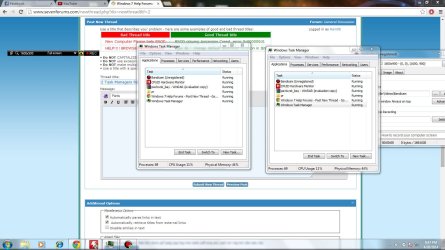
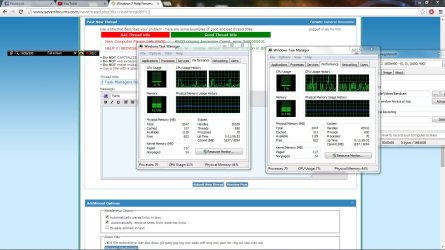
So for some reason two task managers decided to run. Every time I start a PC, I always start TM, HWMonitor and Bandicam. It happened when I was manually ending the process of "prbf2.exe" since it takes a long time to close by itself because I only have 2 GB of RAM. What I did is (TM was still open) do the ctrl+alt+delete and clicked Start Task Manager. After doing it, I manually ended the process and after going to the desktop, I then saw both TM running. The graph under the Performance tab isn't synced with one another; they're also not reading each others usage immediately. I noticed this when I was pressing F5 and that causes some CPU usage for TM.
 

Attachments
  • bandicam 2014-04-26 20-48-40-454.jpg
    bandicam 2014-04-26 20-48-40-454.jpg
    175.3 KB · Views: 3
  • bandicam 2014-04-26 20-47-39-601.jpg
    bandicam 2014-04-26 20-47-39-601.jpg
    168.4 KB · Views: 4
  • bandicam 2014-04-26 20-47-25-191.jpg
    bandicam 2014-04-26 20-47-25-191.jpg
    155.1 KB · Views: 2

My Computer

Computer type
PC/Desktop
Computer Manufacturer/Model Number
Built
OS
Windows 7 Professional 64-bit (6.1, Build 7601)
CPU
Intel Pentium G3258 @ 3.80 GHz (OC'd)
Motherboard
Gigabyte Z97-HD3
Memory
Team Elite 4 GB DDR3 1600 MHz
Graphics Card(s)
Palit GTX 1060 6 GB Super JetStream
Monitor(s) Displays
HP x20 LED Series Wide LCD Monitor
Screen Resolution
1600x900 pixels
Hard Drives
Western Digital Caviar Blue WD10EZRZ 1TB @ 7200 RPM,
Western Digital 3200BEV External HDD 298.09 GB, WD Elements WDBUZG0010BBK-05 External HDD 1TB
PSU
Seasonic G-550 550W 80+ Gold
Keyboard
Corsair K70 Rapidfire RGB
Mouse
Logitech G300S and G502
Internet Speed
2.00 Mbps
Antivirus
MSE, MBAM, MBAE
Browser
IE, Google Chrome, FF, Safari.
Other Info
Old PC:
HP Pavilion P6640D, Windows 7 Ultimate 32-bit (6.1, Build 7601), Intel Pentium Dual Core CPU E6700 @ 3.20 GHz, Foxconn 2A8C, Kingmax 2 GB DDR3 1066 MHz, Palit NVIDIA GeForce GT 610 2048 MB, Western Digital WD Blue WD5000AAKX 500 GB @ 7200 RPM, Seagate Barracuda ST3320418AS 320 GB @ 7200 RPM (former drive), Bestec ATX-250-12Z 250 Watts
Are you manually starting the three programs or do they start automatically when you start your PC?
 

My Computer

Computer type
PC/Desktop
Computer Manufacturer/Model Number
Custom Build
OS
Windows 7 Home Premium 32-Bit - Build 7600 SP1
CPU
Intel Core i3-2120 3.30Ghz
Motherboard
Asus P8Z68-V LX Intel Z68 Socket H2 ATX
Memory
Kingston 4 GB DDR3 1333 mhz
Graphics Card(s)
AMD Radeon HD6670
Sound Card
Sound Blaster Audigy SE 24-Bit
Monitor(s) Displays
Asus VE228
Screen Resolution
1440 X 900
Hard Drives
OCZ Vertex 3 120 GB Sata 3 SSD ==
Kingston SH103/S3 120 G Hyper X 120 GB SSD ==
Western Digital 500 GB Caviar Green 7200 RPM ==
PSU
Corsair CX600M == 600 Watt
Case
NZXT Apollo - Silver with Clear Side Panel
Cooling
Three 120 mm Fans
Keyboard
Microsoft Natural 4000
Mouse
Microsoft Custom Optical 3000
Internet Speed
AT&T Fiber Optic Wireless Network
Antivirus
Microsoft Security Essentials
Browser
Chrome
Other Info
120 mm Blue LED Fan -- Three Blue LED Lazer Light Sticks
Are you manually starting the three programs or do they start automatically when you start your PC?

I start those three programs manually. The only thing that starts automatically is Rainmeter, Rocketdock and uTorrent. The notifications also say that 2 TM's are running.
 

My Computer

Computer type
PC/Desktop
Computer Manufacturer/Model Number
Built
OS
Windows 7 Professional 64-bit (6.1, Build 7601)
CPU
Intel Pentium G3258 @ 3.80 GHz (OC'd)
Motherboard
Gigabyte Z97-HD3
Memory
Team Elite 4 GB DDR3 1600 MHz
Graphics Card(s)
Palit GTX 1060 6 GB Super JetStream
Monitor(s) Displays
HP x20 LED Series Wide LCD Monitor
Screen Resolution
1600x900 pixels
Hard Drives
Western Digital Caviar Blue WD10EZRZ 1TB @ 7200 RPM,
Western Digital 3200BEV External HDD 298.09 GB, WD Elements WDBUZG0010BBK-05 External HDD 1TB
PSU
Seasonic G-550 550W 80+ Gold
Keyboard
Corsair K70 Rapidfire RGB
Mouse
Logitech G300S and G502
Internet Speed
2.00 Mbps
Antivirus
MSE, MBAM, MBAE
Browser
IE, Google Chrome, FF, Safari.
Other Info
Old PC:
HP Pavilion P6640D, Windows 7 Ultimate 32-bit (6.1, Build 7601), Intel Pentium Dual Core CPU E6700 @ 3.20 GHz, Foxconn 2A8C, Kingmax 2 GB DDR3 1066 MHz, Palit NVIDIA GeForce GT 610 2048 MB, Western Digital WD Blue WD5000AAKX 500 GB @ 7200 RPM, Seagate Barracuda ST3320418AS 320 GB @ 7200 RPM (former drive), Bestec ATX-250-12Z 250 Watts
When you hit ctrl, alt, delete does a menu come up with "Start Task Manager" on it? One click on it will start the TM. == Why are you running TM? The only time I use it is when a program is Not Responding. I then use TM to close the program. Why do you use it when you start?
 

My Computer

Computer type
PC/Desktop
Computer Manufacturer/Model Number
Custom Build
OS
Windows 7 Home Premium 32-Bit - Build 7600 SP1
CPU
Intel Core i3-2120 3.30Ghz
Motherboard
Asus P8Z68-V LX Intel Z68 Socket H2 ATX
Memory
Kingston 4 GB DDR3 1333 mhz
Graphics Card(s)
AMD Radeon HD6670
Sound Card
Sound Blaster Audigy SE 24-Bit
Monitor(s) Displays
Asus VE228
Screen Resolution
1440 X 900
Hard Drives
OCZ Vertex 3 120 GB Sata 3 SSD ==
Kingston SH103/S3 120 G Hyper X 120 GB SSD ==
Western Digital 500 GB Caviar Green 7200 RPM ==
PSU
Corsair CX600M == 600 Watt
Case
NZXT Apollo - Silver with Clear Side Panel
Cooling
Three 120 mm Fans
Keyboard
Microsoft Natural 4000
Mouse
Microsoft Custom Optical 3000
Internet Speed
AT&T Fiber Optic Wireless Network
Antivirus
Microsoft Security Essentials
Browser
Chrome
Other Info
120 mm Blue LED Fan -- Three Blue LED Lazer Light Sticks
By design only one instance of Task Manager can run at a time. There are a number of ways that this can be prevented but under certain rare conditions this could go wrong. I don't know the specifics because Microsoft does not document the internal operation of it's utilities.

Other than that I see nothing unusual. Aside from the CPU graphs and numbers both show identical values. There is no synchronization between them as neither has knowledge the other exists, or even that they can exist. The graph data comes from snapshots of CPU usage taken at regular intervals. But as the data is constantly changing and the timing of the snapshots is different the graphs can look quite different. I have seen this with other utilities.

The 2 instances are reversed in the process listing but that is easily explained. When process names are identical sorting is done by process PID, which is not shown by default.
 

My Computer

Computer type
PC/Desktop
Computer Manufacturer/Model Number
HP
OS
Windows 7 Pro 64 bit
CPU
Xeon W3520
Memory
8 GB
Graphics Card(s)
Nvidia Geforce 210
When you hit ctrl, alt, delete does a menu come up with "Start Task Manager" on it? One click on it will start the TM. == Why are you running TM? The only time I use it is when a program is Not Responding. I then use TM to close the program. Why do you use it when you start?

Yes, a menu comes up. Is it the that let's you choose: Lock this computer, Switch User, Log Off, Change a password, Start Task Manager? That's the one that appears. And yes, one click on Start TM will start it. I have it open since I want to monitor the RAM usage of the programs plus the usage of the network. I also already have it running since if a program uses too much RAM, the menu takes a while to open.

Edit:
By design only one instance of Task Manager can run at a time. There are a number of ways that this can be prevented but under certain rare conditions this could go wrong. I don't know the specifics because Microsoft does not document the internal operation of it's utilities.

Other than that I see nothing unusual. Aside from the CPU graphs and numbers both show identical values. There is no synchronization between them as neither has knowledge the other exists, or even that they can exist. The graph data comes from snapshots of CPU usage taken at regular intervals. But as the data is constantly changing and the timing of the snapshots is different the graphs can look quite different. I have seen this with other utilities.

The 2 instances are reversed in the process listing but that is easily explained. When process names are identical sorting is done by process PID, which is not shown by default.

About that PID, I've noticed that they're both different; one is around at 1000~1500 and the other is at 4000~4300. Unfortunately, I accidentally clicked "Show processes from all users" then one of the TM closed before I can take a screenshot.
 

My Computer

Computer type
PC/Desktop
Computer Manufacturer/Model Number
Built
OS
Windows 7 Professional 64-bit (6.1, Build 7601)
CPU
Intel Pentium G3258 @ 3.80 GHz (OC'd)
Motherboard
Gigabyte Z97-HD3
Memory
Team Elite 4 GB DDR3 1600 MHz
Graphics Card(s)
Palit GTX 1060 6 GB Super JetStream
Monitor(s) Displays
HP x20 LED Series Wide LCD Monitor
Screen Resolution
1600x900 pixels
Hard Drives
Western Digital Caviar Blue WD10EZRZ 1TB @ 7200 RPM,
Western Digital 3200BEV External HDD 298.09 GB, WD Elements WDBUZG0010BBK-05 External HDD 1TB
PSU
Seasonic G-550 550W 80+ Gold
Keyboard
Corsair K70 Rapidfire RGB
Mouse
Logitech G300S and G502
Internet Speed
2.00 Mbps
Antivirus
MSE, MBAM, MBAE
Browser
IE, Google Chrome, FF, Safari.
Other Info
Old PC:
HP Pavilion P6640D, Windows 7 Ultimate 32-bit (6.1, Build 7601), Intel Pentium Dual Core CPU E6700 @ 3.20 GHz, Foxconn 2A8C, Kingmax 2 GB DDR3 1066 MHz, Palit NVIDIA GeForce GT 610 2048 MB, Western Digital WD Blue WD5000AAKX 500 GB @ 7200 RPM, Seagate Barracuda ST3320418AS 320 GB @ 7200 RPM (former drive), Bestec ATX-250-12Z 250 Watts
The PID is an arbitrary number used to uniquely identify a process and assigned when it starts. After a process terminates it's PID will eventually be recycled and assigned to another process. I have occasionally seen a PID over 10,000 and apparently has exceed 300,000 on a busy server.
 

My Computer

Computer type
PC/Desktop
Computer Manufacturer/Model Number
HP
OS
Windows 7 Pro 64 bit
CPU
Xeon W3520
Memory
8 GB
Graphics Card(s)
Nvidia Geforce 210
Back
Top