
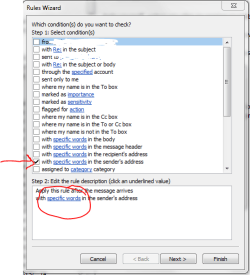
Trying to write rules for some spam emails. Under creating rules, I only see one option to choose "from" and no where to write in the name. i.e. Email from "[email protected]" is listed only as John.A.Doe in the From section.
Used to be able to write in what you want, can't find out how to do it in 2010.
Under "junk" I chose to block sender, still ends up in Junk folder.
I also tried Right Click, rules..Always move messages from John.A.Doe and I chose to delete them, however goes to junk mail rather than delete folder.
I think this is because it is listed as John.A.Doe rather than "..shop.johndoe.com"?? Tx
Used to be able to write in what you want, can't find out how to do it in 2010.
Under "junk" I chose to block sender, still ends up in Junk folder.
I also tried Right Click, rules..Always move messages from John.A.Doe and I chose to delete them, however goes to junk mail rather than delete folder.
I think this is because it is listed as John.A.Doe rather than "..shop.johndoe.com"?? Tx
My Computer
At a glance
Windows 7 Professional X64 Service Pack 1AMD Phenom II X4 955 3.20GHz8GGX550 Ti
- Computer type
- PC/Desktop
- Computer Manufacturer/Model Number
- Self Build
- OS
- Windows 7 Professional X64 Service Pack 1
- CPU
- AMD Phenom II X4 955 3.20GHz
- Motherboard
- Gigabyte GA-MA790X-UD4P
- Memory
- 8G
- Graphics Card(s)
- GX550 Ti
- Sound Card
- On board
- Monitor(s) Displays
- Asus VW246H & Syncmaster 2243swx
- Screen Resolution
- 1920x1080 & 1920x1080
- Hard Drives
- M4-CT128 SSD2, Samsung 840 256GB, 1 WDC 1TB
- PSU
- Corsair TX750W-V2
- Case
- Antec
- Cooling
- 2 120mm fan
- Keyboard
- Microsoft Wireless 3050
- Mouse
- Microsoft Wireless 5000
- Internet Speed
- 72/6Mbs (Cable)
- Other Info
- Asus AC1900 router, 8 port Trendnet Switch - Logitech Webcam Pro 9000



 TX for your reply.


