2203 Error

posermobile89

New member
Local time
4:28 AM
Messages
12
Ive been running windows 7 for about a week, little more now. and I love it. but ive noticed, recently when ever i try to install something, i get a 2203 error. I did a google search for a solution, and a brief search on here for an answer, and really did not find anything (although i didnt spend a copious amount of time looking). any help or pointer would be greatly appreciated.

Programs that have tried to been installed but gotten errors:
Open office
iso recorder
java
(prolly some other minor ones i forget)
 

My Computer

Computer Manufacturer/Model Number
Dell Inspiron 518
OS
Windows 7 Ultimate
CPU
Intel Core 2 Duo E7200, 2.53 Ghz
Motherboard
Dell Inspiron 518, Chipset: Intel Bearlak G33
Memory
2 GB DDR2 800 Mhz
Graphics Card(s)
ATi Radeon 2400 Pro PCIE 128 MB
Sound Card
Onboard 5.1 Surround Sound
Monitor(s) Displays
24" Acer p241W with HDMI, DVI, and VGA
Screen Resolution
1920*1200
Hard Drives
Seagate SATA 250 GB 7200 RPM
Cooling
Standard Air Cooling
Internet Speed
10 Mb DL
Can you post a screenshot of the error?
 

My Computer

Computer type
PC/Desktop
Computer Manufacturer/Model Number
LENOVO K450 @3.0GHZ
OS
64-bit Windows 8.1 Pro
CPU
Core(TM) i5 CPU 4330 Haswell @ 3.20GHz
Motherboard
LENOVO
Memory
12.00 GB
Graphics Card(s)
Intel(R) HD Graphics
Sound Card
Intel HD integtrated
Monitor(s) Displays
HP 25' ISP Monitor
Screen Resolution
1900/1020
Hard Drives
(1) ST1000DM003-1CH162 (2) Generic STORAGE DEVICE USB Device (3) Generic STORAGE DEVICE USB Device
Internet Speed
100mb down/10mb up
Ive been running windows 7 for about a week, little more now. and I love it. but ive noticed, recently when ever i try to install something, i get a 2203 error. I did a google search for a solution, and a brief search on here for an answer, and really did not find anything (although i didnt spend a copious amount of time looking). any help or pointer would be greatly appreciated.

Programs that have tried to been installed but gotten errors:
Open office
iso recorder
java
(prolly some other minor ones i forget)

Poser

Hi and welcome ot seven forums

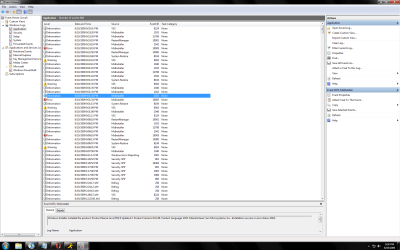
Could you go into event viewer (type event viewer in search) and see what relevent errors are listed in the app tab. If any could you take a screen shot and upload it to us.

Ken
 

My Computer

Computer Manufacturer/Model Number
HP Pavillion dv-7 1005 Tx
OS
Win 8 Release candidate 8400
CPU
[email protected]
Memory
4 gigs
Graphics Card(s)
Nvidia 9600M
Sound Card
HD built-in
Monitor(s) Displays
17" Wxga
Screen Resolution
1440x900
Cooling
none
Internet Speed
45Mb down 5Mb up
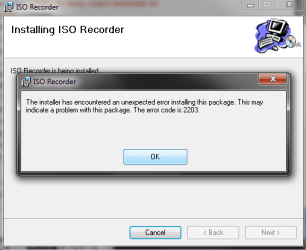
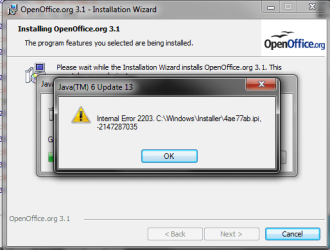
Yes i can. I took thee screenshots, one of iso recorder trying to install, one of open office trying to install, and one of the event viewer.

(I hope i upload them right...)
 

Attachments

  • event viewer.png
    event viewer.png
    91 KB · Views: 242
  • iso recorder.png
    iso recorder.png
    15.5 KB · Views: 217
  • open office.png
    open office.png
    20.9 KB · Views: 148

My Computer

Computer Manufacturer/Model Number
Dell Inspiron 518
OS
Windows 7 Ultimate
CPU
Intel Core 2 Duo E7200, 2.53 Ghz
Motherboard
Dell Inspiron 518, Chipset: Intel Bearlak G33
Memory
2 GB DDR2 800 Mhz
Graphics Card(s)
ATi Radeon 2400 Pro PCIE 128 MB
Sound Card
Onboard 5.1 Surround Sound
Monitor(s) Displays
24" Acer p241W with HDMI, DVI, and VGA
Screen Resolution
1920*1200
Hard Drives
Seagate SATA 250 GB 7200 RPM
Cooling
Standard Air Cooling
Internet Speed
10 Mb DL
So nobody has had this error or has a solution to it?
 

My Computer

Computer Manufacturer/Model Number
Dell Inspiron 518
OS
Windows 7 Ultimate
CPU
Intel Core 2 Duo E7200, 2.53 Ghz
Motherboard
Dell Inspiron 518, Chipset: Intel Bearlak G33
Memory
2 GB DDR2 800 Mhz
Graphics Card(s)
ATi Radeon 2400 Pro PCIE 128 MB
Sound Card
Onboard 5.1 Surround Sound
Monitor(s) Displays
24" Acer p241W with HDMI, DVI, and VGA
Screen Resolution
1920*1200
Hard Drives
Seagate SATA 250 GB 7200 RPM
Cooling
Standard Air Cooling
Internet Speed
10 Mb DL
Im with poser here, im gettin the same issue, same exact error. Be nice if someone could post any possible way to solve. Poser, if its not to much trouble, reinstalling windows 7 would probably fix your issue, I would do so, but I've already put a lot of stuff on the partition.

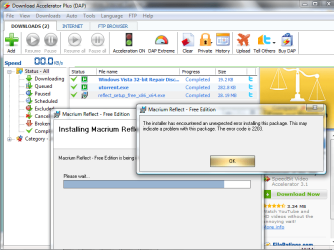
I tried installing windows installer, hopin to solve my installing errors, got even more errors instead, yay! Attaching a screen shot.
 

Attachments

  • error message.jpg
    error message.jpg
    14.8 KB · Views: 41

My Computer

OS
Windows XP
Well I fixed my issue by re-installing...so if anyone else has this error, sorry, I have no other solution than to re-install windows 7
 

My Computer

Computer Manufacturer/Model Number
Dell Inspiron 518
OS
Windows 7 Ultimate
CPU
Intel Core 2 Duo E7200, 2.53 Ghz
Motherboard
Dell Inspiron 518, Chipset: Intel Bearlak G33
Memory
2 GB DDR2 800 Mhz
Graphics Card(s)
ATi Radeon 2400 Pro PCIE 128 MB
Sound Card
Onboard 5.1 Surround Sound
Monitor(s) Displays
24" Acer p241W with HDMI, DVI, and VGA
Screen Resolution
1920*1200
Hard Drives
Seagate SATA 250 GB 7200 RPM
Cooling
Standard Air Cooling
Internet Speed
10 Mb DL
I'm getting the Error Code 2203 as well.

My research shows it's something in the Installer Permissions is not set correctly and/or corrupted.

Anyone know how to resolve this issue ??
 

Attachments

  • Error_2203.png
    Error_2203.png
    52.3 KB · Views: 194

My Computer

Computer Manufacturer/Model Number
Dell 530
OS
Windows 7 Ultimate
CPU
Pentium 2.5 Ghz Intel Dual Core E5200
Memory
4GB DDR2
I believe the 2203 error means that the Windows Installer doesn't have the appropriate system permissions needed to write to the folder 'c:\windows\installer\'.

Try going into your Windows folder on your system drive and right-clicking on the folder named 'Installer' and go to 'Properties',
(if you cant see any of the folders, see this tutorial here to unhide them.)

From the Properties dialog click on the 'Security' tab at the top of the dialog,
In the list in the top-half of the dialog, click on 'System' and look at the bottom-halfs list and check everything is ticked for 'Allow' except for the 'Special Permissions'.
InstallerSec1.jpg


If they are not ticked like I said above, click the 'Edit' button and select 'System' again in the new dialog that pops up and then tick them all in the bottom part under 'Allow' (Special Permissions' will be greyed out/disabled, this is normal).
Click 'Apply' and agree to the message that will popup.


If the folder 'C:\windows\Installer\' doesn't help, try it on the 'Local' folder under the users folder in your system drive for your username which is at: 'C:\Users\[YOUR USERNAME HERE]\AppData\Local\'


I hope this helps you guys out.
 

My Computer

Computer Manufacturer/Model Number
Self Built
OS
XP Pro SP3 x86/Vista SP2 x64/Win7 x64 Triple-boot
CPU
AMD64 X2 AM2 5000+
Motherboard
Asus MSN-X Plus
Memory
Corsair TWX 2Gb (2x1Gb) DDR2 800Mhz
Graphics Card(s)
PCI-X 2.0 Inno3D (NVidia) 9500GT 1Gb DDR2
Sound Card
Onboard Realtec ALC662-GR
Monitor(s) Displays
Relisys 17' CRT (model unknown)
Screen Resolution
1024x768
Hard Drives
750Gb Samsung 7200-3Gb/s 32Mb Cache SATA
PSU
500W
Cooling
Standard AMD CPU Fan, One side, front and rear case fan.
Keyboard
Microsoft Multimedia Keyboard
Mouse
Samsung Optical
Internet Speed
10M
I believe the 2203 error means that the Windows Installer doesn't have the appropriate system permissions needed to write to the folder 'c:\windows\installer\'.
Ok, I believe you're on the right track.

However, I did all the above steps and still have the same issue.

In another related thread (somewhere in this forum), another member suggested I log in as the Administrator and see what happens.

When loggin as the Administrator, ANY program that is LINKED to another Profile has the above issue!

NOW, when I tried to download and install a Program selecting to have the Adminstrator the ONLY PROFILE to use the Program (NOT EVERYONE), the Program INSTALL PERFECTLY.

Now, how we get the broken Profile fixed is the issue here. ???????
 

My Computer

Computer Manufacturer/Model Number
Dell 530
OS
Windows 7 Ultimate
CPU
Pentium 2.5 Ghz Intel Dual Core E5200
Memory
4GB DDR2
I believe the 2203 error means that the Windows Installer doesn't have the appropriate system permissions needed to write to the folder 'c:\windows\installer\'.
Ok, I believe you're on the right track.

However, I did all the above steps and still have the same issue.

In another related thread (somewhere in this forum), another member suggested I log in as the Administrator and see what happens.

When loggin as the Administrator, ANY program that is LINKED to another Profile has the above issue!

NOW, when I tried to download and install a Program selecting to have the Adminstrator the ONLY PROFILE to use the Program (NOT EVERYONE), the Program INSTALL PERFECTLY.

Now, how we get the broken Profile fixed is the issue here. ???????

OK, So what other users are listed in your 'Security' tabs list? (the list in my screenshot in my earlier post) ..maybe do the same for each user.

Some say they have fixed this issue by selecting the 'Everyone' security profile and ticking everything, I wouldn't do it for Everyone though because you would be opening the folder up to the whole internet. ('Everyone' is just that, not just everyone in the list!)

So say for example, your partners name is listed in that list, tick all the allows for your partners name etc..


Also, I've done some digging around on the web and found this info regarding the problem:
I recently encountered Windows installer error 2203 whenever I tried to install a .msi file.

The problem was that whenever the machine was restarted the %TMP% and %TEMP% variables where set to C:\Temp. I could not figure out why (searched registry etc..)

My Resolution:
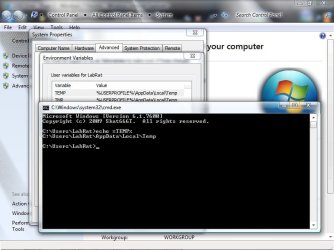
Open cmd, type echo %TEMP%
Compare the result with the setting under My Computer
Right click My Computer -> Properties -> Advanced -> Environment variables -> User variables
Change the latter to match the first
Don't know if it could be part of your problem but I figured it's worth mentioning!
The site that this info is from is found here.
 
Last edited:

My Computer

Computer Manufacturer/Model Number
Self Built
OS
XP Pro SP3 x86/Vista SP2 x64/Win7 x64 Triple-boot
CPU
AMD64 X2 AM2 5000+
Motherboard
Asus MSN-X Plus
Memory
Corsair TWX 2Gb (2x1Gb) DDR2 800Mhz
Graphics Card(s)
PCI-X 2.0 Inno3D (NVidia) 9500GT 1Gb DDR2
Sound Card
Onboard Realtec ALC662-GR
Monitor(s) Displays
Relisys 17' CRT (model unknown)
Screen Resolution
1024x768
Hard Drives
750Gb Samsung 7200-3Gb/s 32Mb Cache SATA
PSU
500W
Cooling
Standard AMD CPU Fan, One side, front and rear case fan.
Keyboard
Microsoft Multimedia Keyboard
Mouse
Samsung Optical
Internet Speed
10M
The problem was that whenever the machine was restarted the %TMP% and %TEMP% variables where set to C:\Temp. I could not figure out why (searched registry etc..)

My Resolution:
Open cmd, type echo %TEMP%
Compare the result with the setting under My Computer
Right click My Computer -> Properties -> Advanced -> Environment variables -> User variables
Change the latter to match the first

Don't know if it could be part of your problem but I figured it's worth mentioning!
The site that this info is from is found here.
Did all the above. Still not working...
 

Attachments

  • Temp.jpg
    Temp.jpg
    55.2 KB · Views: 132

My Computer

Computer Manufacturer/Model Number
Dell 530
OS
Windows 7 Ultimate
CPU
Pentium 2.5 Ghz Intel Dual Core E5200
Memory
4GB DDR2
I am damn sure its a problem with the Windows Installer , upgrade the Windows Installer to Version 4.5
 

My Computer

Computer Manufacturer/Model Number
Microsoft
OS
Windows 7 and MAC
Graphics Card(s)
NVIDIA 9200 GT
Sound Card
NvIdiA
I am damn sure its a problem with the Windows Installer , upgrade the Windows Installer to Version 4.5
My Windows Updates WILL download, but will NOT Install. So that's a real problem.

Is this Compatible with Windows 7 ????

http://www.microsoft.com/downloads/...6f-60b6-4412-95b9-54d056d6f9f4&displaylang=en

Instructions

Download the file that is appropriate for your operating system version and platform.

For Windows Vista, Windows Vista Service Pack 1 and Windows Server 2008:
x86 Platform: Windows6.0-KB942288-v2-x86.msu
x64 Platform: Windows6.0-KB942288-v2-x64.msu
IA64 Platform: Windows6.0-KB942288-v2-ia64.msu

For Windows XP Service Pack 2 and Windows XP Service Pack 3 (32-bit platforms):
x86 Platform: WindowsXP-KB942288-v3-x86.exe

For Windows Server 2003 Service Pack 1, Windows Server 2003 Service Pack 2 and Windows XP 64-bit Editions:
x86 Platform: WindowsServer2003-KB942288-v4-x86.exe
x64 Platform: WindowsServer2003-KB942288-v4-x64.exe
IA64 Platform: WindowsServer2003-KB942288-v4-ia64.exe
 

My Computer

Computer Manufacturer/Model Number
Dell 530
OS
Windows 7 Ultimate
CPU
Pentium 2.5 Ghz Intel Dual Core E5200
Memory
4GB DDR2
Blocked Installs

At leas twice I have had to take ownership of different directorys to get an install to work correctly. The aforementioned security tab would be a good place to start.
 

My Computer

Computer Manufacturer/Model Number
BGC (Bob's Garage Crew)
OS
win 7 X64 Ultimate SP1
CPU
I3770K
Motherboard
Asus P8Z77-V Deluxe
Memory
G Skill F3-14900CL9-4GBXL x 4
Graphics Card(s)
NVIDIA GeForce GTX670 + Intel 4000
Sound Card
Realtek HD 5.1 (MOB)
Monitor(s) Displays
Asus VW224T (1)
Screen Resolution
1920 x 1080
Hard Drives
SATA Corsair Force GT 2.5" 180GB (System) Sata 3
OCZ Vertex3 120GB
OCZ Vertex 2 120GB 2.5" SATA II
ST31000524AS 1000.2GB
WD15EARS (External)
PSU
CoolerMaster 1000 Watt
Case
CoolerMaster HAF X
Cooling
CPU -- CoolerMaster 520N
Keyboard
MS Wireless 3000 V2
Mouse
MS Wireless 3000 V2
Internet Speed
Cable
Antivirus
Norton Internet Security
Browser
IE9
Other Info
AMI Bios 1805
OC'd 3%
Go to registry and then go to Hkey Local Machine and then Software-> Microsoft, give it fuill permissions and then try
 

My Computer

Computer Manufacturer/Model Number
Microsoft
OS
Windows 7 and MAC
Graphics Card(s)
NVIDIA 9200 GT
Sound Card
NvIdiA
yes Windows Installer 4.5 is compatible with WIndows 7 64-BIT
 

My Computer

Computer Manufacturer/Model Number
Microsoft
OS
Windows 7 and MAC
Graphics Card(s)
NVIDIA 9200 GT
Sound Card
NvIdiA
what have you done so far.... have you tried the steps that i told you!!!!!!!!!
 

My Computer

Computer Manufacturer/Model Number
Microsoft
OS
Windows 7 and MAC
Graphics Card(s)
NVIDIA 9200 GT
Sound Card
NvIdiA
what have you done so far.... have you tried the steps that i told you!!!!!!!!!
Why are you yelling ?

I've posted above the steps I had taken already.

I did go back and review the steps I took (Under the Security Tab), I believe I have the issue fixed.

I need to download and install some more programs to verify it's fixed.

If it's still not working I will download and Install Windows Installer 4.5 and go from there.

Actually, I guess it would NOT hurt to do so now.
 

My Computer

Computer Manufacturer/Model Number
Dell 530
OS
Windows 7 Ultimate
CPU
Pentium 2.5 Ghz Intel Dual Core E5200
Memory
4GB DDR2
yes Windows Installer 4.5 is compatible with WIndows 7 64-BIT
I don't have the 64-bit version.

Which one do I download for 32-bit Windows 7 ?
 

My Computer

Computer Manufacturer/Model Number
Dell 530
OS
Windows 7 Ultimate
CPU
Pentium 2.5 Ghz Intel Dual Core E5200
Memory
4GB DDR2
Back
Top