24" samsung HDMI and sound

KauaiDave

New member
Local time
11:30 AM
Messages
2
The sound was working on my SAMSUNG and I was trying to temporarily disable it, so I would not distrub my housemates.... So I clicked "disable" on the control panel Sounds gaget, thinking this would temporarily turn it off, like it does within the Networks gaget (I turn off wireless at work, and network port at home).

Well it did not temporarily disable it, it deleted it from the system. I have managed to get it to see the HDMI TV at 1080p resolution, but sounds
don't work on the TV since I clicked disable.

I have tried every setting on the control panel, such as sound devices, graphics, displays, tried the "find a device" all to no avail. How do I enable the sound for the samsung?

TIA, Rhino
 

My Computer My Computer

At a glance

Windows 7dual AMD4 GBATI
Computer Manufacturer/Model Number
HP Pav. dvd-1220us
OS
Windows 7
CPU
dual AMD
Motherboard
HP
Memory
4 GB
Graphics Card(s)
ATI
Sound Card
IDT high def
Monitor(s) Displays
LCD & HDMI 1080p
Hard Drives
Hatachi & 1.5 TB Seagate
PSU
unknown
Case
notebook
Cooling
fan
I would try to reinstall the driver for the Samsung, assuming there is one. There might also be a separate driver for the Samsung's sound.
 

My Computer My Computer

At a glance

Windows 7 Ultimate x64 (Retail)i7-Q 7206 GBnVidia GeForce GT 230M (1GB)
Computer Manufacturer/Model Number
HP DV8t quad
OS
Windows 7 Ultimate x64 (Retail)
CPU
i7-Q 720
Motherboard
Motherboard Chipset Intel Ibex Peak-M PM55, Intel Lynnfield
Memory
6 GB
Graphics Card(s)
nVidia GeForce GT 230M (1GB)
Sound Card
IDT High Definition Audio CODEC
Monitor(s) Displays
18.4 inch HP Infinity FHD (Samsung 184HT03-001)
Screen Resolution
1920 x 1080
Hard Drives
Hitachi 500GB 7200 rpm (x2)
Seagate FreeAgent 1.5 TB External USB (x2)
Thermaltake BlacX eSATA/USB 2.0 3.5/2.5 HD dock
Cooling
Zalman NC-2000 notebook cooling pad
Keyboard
laptop
Mouse
Logitech VX Revolution
Other Info
Backup Unit: Lenovo T61p
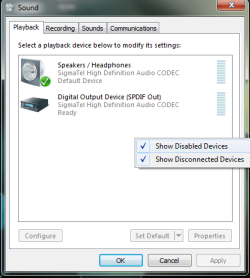
Do you have the control showing Disabled Devices?
Right-Click in the Device box > Show Disabled Devices.

But you know...why didn't you just mute?
 

Attachments

  • sound-panel.png
    sound-panel.png
    16.1 KB · Views: 24

My Computer My Computer

At a glance

Windows 10 Pro (x64)Intel Core i7-3930K (3.2GHz - 4.5GHz)4x Samsung 4GB PC3-12800 DDR3 (16GB 1600MHz)Nvidia Geforce GTX 690
Computer type
PC/Desktop
Computer Manufacturer/Model Number
Alienware Aurora ALX R4
OS
Windows 10 Pro (x64)
CPU
Intel Core i7-3930K (3.2GHz - 4.5GHz)
Motherboard
Alienware Aurora-R4 x79
Memory
4x Samsung 4GB PC3-12800 DDR3 (16GB 1600MHz)
Graphics Card(s)
Nvidia Geforce GTX 690
Sound Card
SteelSeries Siberia Elite
Monitor(s) Displays
Dell UltraSharp U3011
Screen Resolution
2560x1600
Hard Drives
Samsung 850 Pro 256 GB, Seagate 1TB Desktop Hybrid HDD, 2x Western Digital 4TB Green HDD
PSU
875W Some Dell PSU <.<
Case
Alienware Aurora ALX
Cooling
Custom Liquid Cooling (EK CPU & GPU blocks) dual EK 480RAD
Keyboard
Logitech G710+ Mechanical
Mouse
Logitech G700s
Internet Speed
Verizon Fios (50 mbps average)
Other Info
Server: Intel NUC D54250WYK: i5-4250U, 16GB, 256 GB mSATA, Windows Server 2012 R2
HP notebook, Windows 7, HDMI TV

I installed the proper driver for the SAMSUNG SyncMaster T240HD and it still doesn't show up in the choices (in the View logicearth posted.


logicearth>>Right-Click in the Device box > Show Disabled Devices.


Then I tried logicearth's suggestion, or rather I looked everywhere for a
Disabled Devices box and couldn't find same, can you tell me exactly how
to find it? I think I have clicked on every possible button in every view.
Not sure if it's under one of the device boxes in control panel or in device
manager, but I checked the right click in both.

Why did I disable it? Probably ADD

Thanks, Rhino
 

My Computer My Computer

At a glance

Windows 7dual AMD4 GBATI
Computer Manufacturer/Model Number
HP Pav. dvd-1220us
OS
Windows 7
CPU
dual AMD
Motherboard
HP
Memory
4 GB
Graphics Card(s)
ATI
Sound Card
IDT high def
Monitor(s) Displays
LCD & HDMI 1080p
Hard Drives
Hatachi & 1.5 TB Seagate
PSU
unknown
Case
notebook
Cooling
fan
Hi, uninstall it from your PC through the Device Manager, and then reinstall it and see if that helps.
 

My Computer My Computer

At a glance

Vista Ult64, Win7600Intel Core 2 Quad Q6600 @ 2400 MHz 64bit OS4096 MB DDR3-SDRAMATI Radeon HD 3870 Series x2 Crossfired
Computer Manufacturer/Model Number
Self Build 64bit
OS
Vista Ult64, Win7600
CPU
Intel Core 2 Quad Q6600 @ 2400 MHz 64bit OS
Motherboard
Asus P5E3 Deluxe WiFi @p 64 bit OS
Memory
4096 MB DDR3-SDRAM
Graphics Card(s)
ATI Radeon HD 3870 Series x2 Crossfired
Sound Card
Realtek on board
Monitor(s) Displays
Samsung SyncMaster - 23 inches
Screen Resolution
1680x1050 pixels at 60 Hz in True Colors
Hard Drives
Hitachi (250 GB)/Samsung 750 GB. /Barracuda 160 GB.
My Book 1 TB external..
PSU
Cooler Master 1000w
Case
Cooler Master Cosmos 1000.
Cooling
Fans and fresh air,
Keyboard
Wireless
Mouse
Wireless
Internet Speed
Never fast enough
Other Info
I use a Magnum.
Back
Top