HI
I have 2X HDD's 1 running windows and other for storage, both were working just fine.
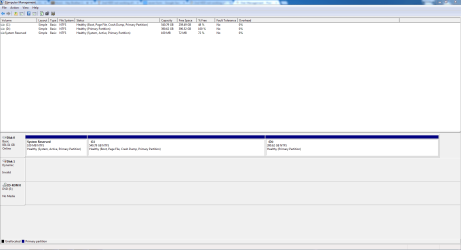
A week ago I had to change my Sata Controller in Bios to AHCI from IDE. I installed a new windows and my 1 Primary HDD is working just fine but my storage HDD doesn't show in windows.
My Bios shows both HDD but windows only one. (My primary HDD got 2 partitions 1-is for Windows and the other one is still empty but after sorting out my HDD problem will use it for duel booting)
Can someone please help my how do I get my 2ND HDD to work in windows without loosing all my data on it?
Regards
I have 2X HDD's 1 running windows and other for storage, both were working just fine.
A week ago I had to change my Sata Controller in Bios to AHCI from IDE. I installed a new windows and my 1 Primary HDD is working just fine but my storage HDD doesn't show in windows.
My Bios shows both HDD but windows only one. (My primary HDD got 2 partitions 1-is for Windows and the other one is still empty but after sorting out my HDD problem will use it for duel booting)
Can someone please help my how do I get my 2ND HDD to work in windows without loosing all my data on it?
Regards
My Computer
At a glance
Windows 7 Ultimate x64I5 - 3570Corsair 8GBNvidia Geforce GTX 650
- Computer type
- PC/Desktop
- Computer Manufacturer/Model Number
- custom build
- OS
- Windows 7 Ultimate x64
- CPU
- I5 - 3570
- Motherboard
- Asus
- Memory
- Corsair 8GB
- Graphics Card(s)
- Nvidia Geforce GTX 650
- Hard Drives
- 1TB - Samsung Sata 3 - with 2 Partitions 1 running Windows.
2TB - WD Black Sata 3 - For storage
- Antivirus
- Kaspersky 2014
- Browser
- Crome