2nd HDD SATA

Sallad61

New member
Local time
7:08 AM
Messages
2
Hi to you,am in a bit of jam &need some advice please?.have built my wife a new PC & dismantled the old one so I could use her 2nd HDD with all her music & important data on it ( D/:drive on XP machine).Problem is that the new build has Win7 Pro installed on it & partitioned the 1TB SATA HDD to have space 350GB, so could xfer all old files from xp HDD after adding it to the new PC!. At time did not know that Win7 doesn`t recognise XP data when I add 2nd drive:o, so need to workout how I can do this without sacrificing all the memorabilea?. Any advice is going to help me heaps. Am cert3 Cisco Qualified Network Admin &you`d think I`d of known better!,prob being Learnt all my skills on &thru XP era.:confused: thanking you Dallas
 

My Computer

Computer Manufacturer/Model Number
It independent client request build
OS
windows 7 Pro 32bit
CPU
AMD PhenomII x2555 black edition
Motherboard
Gigabyte GA-MA78LMT-S2 mATX
Memory
MUSHKINSILVERLINE PC3-10666 2X2GB DDR3
Graphics Card(s)
ON BOARD
Sound Card
ON BOARD
Monitor(s) Displays
ACER24INCH W/SCREEN
Hard Drives
WD GREEN 1TB wd10ears , trying to add 2nd hdd with XP data on it
PSU
550w Gigabyte superb
Case
coolmaster elite 341 mATX
Cooling
180mm fan
Welcome to the Seven Forums! Sallad61

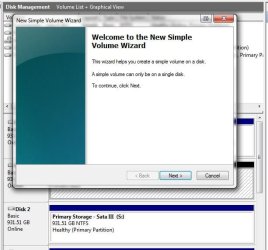
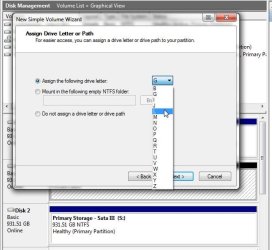
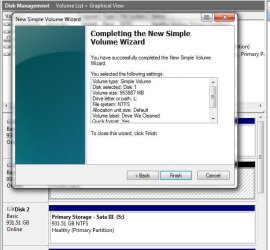
Your problem is a quick fix requiring a quick trip in the Disk Management tool in Windows 7 in order to make sure the old drive is seen as "online" and you are able to right lcick on the main volume of the drive to select a drive letter.

Once you had gone through the "new hardware found" and seen the autoplay flashing if Windows has already initialized the drive the drive will seen with a drive letter already selected by Windows. If you have to go into the DM to manually see this taken care of.

Often the New Volume wizard will appear once you first go to right click on the drive listing there if found online. The attached images show how that works.
 

Attachments

  • New Volume Wizard.jpg
    New Volume Wizard.jpg
    48.3 KB · Views: 5
  • New Volume Drive Letter.jpg
    New Volume Drive Letter.jpg
    47.9 KB · Views: 4
  • New Volume Click Finish.jpg
    New Volume Click Finish.jpg
    54.8 KB · Views: 5

My Computers

System One System Two

  • Computer type
    PC/Desktop
    Computer Manufacturer/Model Number
    Custom builds = 2
    OS
    W7 Ultimate x64/W10 Pro x64/W11 Pro Triple Boot - Main PC W7 Remote PC Micro ATX W7 Pro x64/W11 Pro
    CPU
    AMD Phenom II X4 975 Deneb 3.6ghz - 965 2nd remote pc
    Motherboard
    Gigabyte GA-790XTA-UD4-Gigabyte GA-880GM-D2H remote pc
    Memory
    Kingston Hyper X DDR3 1600 1.5v 16gb - Hyper X Fury 8gb 2nd
    Graphics Card(s)
    MSI HD Radeon 5750 1gb - MSI HD Radeon 6450 on mini tower
    Sound Card
    Creative Labs X-Fi Xtreme Audio P - Realtek onooard 2nd case
    Monitor(s) Displays
    ASUS VW199T-P 19" HP 2082a Main-HP 2082a 20" remote pc
    Screen Resolution
    Asus 1440x900 - HP 1600x900
    Hard Drives
    WD Black 1TB HD per OS W7, W10, and pending W11 presently on 500gb OS Drive - Pending Triple 1TB HDs for Spanned Storage/backup volume
    Single 2TB external USB enclosure, single 1TB System 7 Host/Boot drive, Pending 8TB external HD for system image b
    PSU
    Corsair 750TX - primary / Corsair CX600 - second
    Case
    Antec 900-2 - SSD compatible / NZXT Vulcan mini tower
    Cooling
    Zalman CNPS9900A
    Keyboard
    AZIO L70 Backlit Letters Gaming - ONN Cordless/USB
    Mouse
    MSI DS200 Programmable, Logitech Cordless
    Internet Speed
    30mbps upgrade - primary hard wired - mini tower usb WiFi
    Antivirus
    GFI VIPRE Internet Security 2014 on W7 2016 beta on W10,
    Browser
    Cyberfox, WaterFox 64bit FF variants, FireFox x64, Pale Moon
    Other Info
    Accomdata fan cooled usb 2.0 PIDE/Sata II, III external enclosure.
    Sambient usb/eSata PATA/Sata II, III external enclosure.
  • Computer type
    PC/Desktop
    System Manufacturer/Model Number
    CUSTOM ASSEMBLY
    OS
    W7 Pro x64/W11 Pro
    CPU
    AMD Deneb 3.6ghz - 965
    Motherboard
    Gigabyte GA-880GM-D2H remote pc
    Memory
    Kingston Hyper X Fury 8gb
    Graphics Card(s)
    MSI HD Radeon 6450 DVI Output
    Sound Card
    Realtek onooard Creative or Other separate PENDING
    Monitor(s) Displays
    VIZIO 32" LCD TV Separate LCD Pending
    Screen Resolution
    1600x1080
    Hard Drives
    WD 500GB OS Host/Boot WD Green 1TB Storage/Backup
    PSU
    Corsair 600W - THERMALTAKE 600W spare case
    Case
    NZXT Vulcan mini tower
    Cooling
    Twin 120mm Top Fans - 240mm Side Cover
    Keyboard
    ONN Cordless/USB Logitech Cordless
    Mouse
    ONN USB/Cordless - Logitech Cordless
    Internet Speed
    DSL 5G
    Browser
    MS Edge, FireFox, WaterFox x64, FireFox Nightly
    Other Info
    OS Testing-Remote Access to Main TeamViewer
Hi NightHawk, yes I got the PC to recognise the drive &assigned a drive letter &that is the easy part ok?,now the big problem is that what is on the old drive is not being shown. Things like our photo`s,music poetry plus lots of other stuff that was on the drive orignally in 1st place & am not sure how to get the new PC to read it!. My wife is heartbroken as it has all her nostalgic memories on it. Can anyone explain what to do now please?
 

My Computer

Computer Manufacturer/Model Number
It independent client request build
OS
windows 7 Pro 32bit
CPU
AMD PhenomII x2555 black edition
Motherboard
Gigabyte GA-MA78LMT-S2 mATX
Memory
MUSHKINSILVERLINE PC3-10666 2X2GB DDR3
Graphics Card(s)
ON BOARD
Sound Card
ON BOARD
Monitor(s) Displays
ACER24INCH W/SCREEN
Hard Drives
WD GREEN 1TB wd10ears , trying to add 2nd hdd with XP data on it
PSU
550w Gigabyte superb
Case
coolmaster elite 341 mATX
Cooling
180mm fan
Is the drive letter you assigned seen in Windows Explorer? The first thing is to make sure you have full access to the drive once Windows has mounted the present volume on it as a logical drive. And the word logical doesn't specify an extended volume since that applies to primary partitions as well to avoid any confusion on that.

The next step when no files are found is the use of a data recovery program that can detect and reassemble the structures of each file and folder. Someone who reformatted a storage drive by accident found the use of the freeware Recuva was able to rescue some 95% of the files thought lost from one drive. The retail programs on the other hand run about $70-!

The lack of finding files is a little buggy suggesting the Master File Table(MFT) may have lost some information or the drive still hasn't been fully initialized.

Can you post a snipping of the Disk Management view of the drives. Once you have the DM open for viewing you can use the snipping tool found in the Start>Accessories and grab a capture of that and upload it here with the paperclip option.

That will show the state of the drives as they appear now and can useful in diagnosing problems. You also may only have to see a full system restart with the drive letter now assigned for the files to appear. This would be another thing to try.
 

My Computers

System One System Two

  • Computer type
    PC/Desktop
    Computer Manufacturer/Model Number
    Custom builds = 2
    OS
    W7 Ultimate x64/W10 Pro x64/W11 Pro Triple Boot - Main PC W7 Remote PC Micro ATX W7 Pro x64/W11 Pro
    CPU
    AMD Phenom II X4 975 Deneb 3.6ghz - 965 2nd remote pc
    Motherboard
    Gigabyte GA-790XTA-UD4-Gigabyte GA-880GM-D2H remote pc
    Memory
    Kingston Hyper X DDR3 1600 1.5v 16gb - Hyper X Fury 8gb 2nd
    Graphics Card(s)
    MSI HD Radeon 5750 1gb - MSI HD Radeon 6450 on mini tower
    Sound Card
    Creative Labs X-Fi Xtreme Audio P - Realtek onooard 2nd case
    Monitor(s) Displays
    ASUS VW199T-P 19" HP 2082a Main-HP 2082a 20" remote pc
    Screen Resolution
    Asus 1440x900 - HP 1600x900
    Hard Drives
    WD Black 1TB HD per OS W7, W10, and pending W11 presently on 500gb OS Drive - Pending Triple 1TB HDs for Spanned Storage/backup volume
    Single 2TB external USB enclosure, single 1TB System 7 Host/Boot drive, Pending 8TB external HD for system image b
    PSU
    Corsair 750TX - primary / Corsair CX600 - second
    Case
    Antec 900-2 - SSD compatible / NZXT Vulcan mini tower
    Cooling
    Zalman CNPS9900A
    Keyboard
    AZIO L70 Backlit Letters Gaming - ONN Cordless/USB
    Mouse
    MSI DS200 Programmable, Logitech Cordless
    Internet Speed
    30mbps upgrade - primary hard wired - mini tower usb WiFi
    Antivirus
    GFI VIPRE Internet Security 2014 on W7 2016 beta on W10,
    Browser
    Cyberfox, WaterFox 64bit FF variants, FireFox x64, Pale Moon
    Other Info
    Accomdata fan cooled usb 2.0 PIDE/Sata II, III external enclosure.
    Sambient usb/eSata PATA/Sata II, III external enclosure.
  • Computer type
    PC/Desktop
    System Manufacturer/Model Number
    CUSTOM ASSEMBLY
    OS
    W7 Pro x64/W11 Pro
    CPU
    AMD Deneb 3.6ghz - 965
    Motherboard
    Gigabyte GA-880GM-D2H remote pc
    Memory
    Kingston Hyper X Fury 8gb
    Graphics Card(s)
    MSI HD Radeon 6450 DVI Output
    Sound Card
    Realtek onooard Creative or Other separate PENDING
    Monitor(s) Displays
    VIZIO 32" LCD TV Separate LCD Pending
    Screen Resolution
    1600x1080
    Hard Drives
    WD 500GB OS Host/Boot WD Green 1TB Storage/Backup
    PSU
    Corsair 600W - THERMALTAKE 600W spare case
    Case
    NZXT Vulcan mini tower
    Cooling
    Twin 120mm Top Fans - 240mm Side Cover
    Keyboard
    ONN Cordless/USB Logitech Cordless
    Mouse
    ONN USB/Cordless - Logitech Cordless
    Internet Speed
    DSL 5G
    Browser
    MS Edge, FireFox, WaterFox x64, FireFox Nightly
    Other Info
    OS Testing-Remote Access to Main TeamViewer
Can you put the HD back in the XP machine and transfer the data over using another method?

Wireless network, ethernet cable ad-hoc network, USB flash stick, external USB HD or DVD are all options.

The data from an XP HD should be readable by Win7 unless you formatted over it. The way to know for sure you have not is to put it back in the XP machine to read it.
 
Another thought to consider is the amount of file fragmentation. You can have a drive with 0% fragmentation while individual files can see a high fragmentation level. I've run into here when files have been moved around from drive to drive or even trying to recover files from data disks burned on an older system that became unreadable.

Meanwhile the latest version of Recuva can be downloaded from the home site seen at Recuva - Undelete, Unerase, File and Disk Recovery - Free Download
 

My Computers

System One System Two

  • Computer type
    PC/Desktop
    Computer Manufacturer/Model Number
    Custom builds = 2
    OS
    W7 Ultimate x64/W10 Pro x64/W11 Pro Triple Boot - Main PC W7 Remote PC Micro ATX W7 Pro x64/W11 Pro
    CPU
    AMD Phenom II X4 975 Deneb 3.6ghz - 965 2nd remote pc
    Motherboard
    Gigabyte GA-790XTA-UD4-Gigabyte GA-880GM-D2H remote pc
    Memory
    Kingston Hyper X DDR3 1600 1.5v 16gb - Hyper X Fury 8gb 2nd
    Graphics Card(s)
    MSI HD Radeon 5750 1gb - MSI HD Radeon 6450 on mini tower
    Sound Card
    Creative Labs X-Fi Xtreme Audio P - Realtek onooard 2nd case
    Monitor(s) Displays
    ASUS VW199T-P 19" HP 2082a Main-HP 2082a 20" remote pc
    Screen Resolution
    Asus 1440x900 - HP 1600x900
    Hard Drives
    WD Black 1TB HD per OS W7, W10, and pending W11 presently on 500gb OS Drive - Pending Triple 1TB HDs for Spanned Storage/backup volume
    Single 2TB external USB enclosure, single 1TB System 7 Host/Boot drive, Pending 8TB external HD for system image b
    PSU
    Corsair 750TX - primary / Corsair CX600 - second
    Case
    Antec 900-2 - SSD compatible / NZXT Vulcan mini tower
    Cooling
    Zalman CNPS9900A
    Keyboard
    AZIO L70 Backlit Letters Gaming - ONN Cordless/USB
    Mouse
    MSI DS200 Programmable, Logitech Cordless
    Internet Speed
    30mbps upgrade - primary hard wired - mini tower usb WiFi
    Antivirus
    GFI VIPRE Internet Security 2014 on W7 2016 beta on W10,
    Browser
    Cyberfox, WaterFox 64bit FF variants, FireFox x64, Pale Moon
    Other Info
    Accomdata fan cooled usb 2.0 PIDE/Sata II, III external enclosure.
    Sambient usb/eSata PATA/Sata II, III external enclosure.
  • Computer type
    PC/Desktop
    System Manufacturer/Model Number
    CUSTOM ASSEMBLY
    OS
    W7 Pro x64/W11 Pro
    CPU
    AMD Deneb 3.6ghz - 965
    Motherboard
    Gigabyte GA-880GM-D2H remote pc
    Memory
    Kingston Hyper X Fury 8gb
    Graphics Card(s)
    MSI HD Radeon 6450 DVI Output
    Sound Card
    Realtek onooard Creative or Other separate PENDING
    Monitor(s) Displays
    VIZIO 32" LCD TV Separate LCD Pending
    Screen Resolution
    1600x1080
    Hard Drives
    WD 500GB OS Host/Boot WD Green 1TB Storage/Backup
    PSU
    Corsair 600W - THERMALTAKE 600W spare case
    Case
    NZXT Vulcan mini tower
    Cooling
    Twin 120mm Top Fans - 240mm Side Cover
    Keyboard
    ONN Cordless/USB Logitech Cordless
    Mouse
    ONN USB/Cordless - Logitech Cordless
    Internet Speed
    DSL 5G
    Browser
    MS Edge, FireFox, WaterFox x64, FireFox Nightly
    Other Info
    OS Testing-Remote Access to Main TeamViewer
Back
Top