2nd Monitor: Can't Extend Desktop? Win7

TomBrooklyn

New member
Member
Local time
2:11 AM
Messages
75
Win 7 Pro
i7 2600K Integrated Graphics
Monitor 1: HP ZR24W
Monitor 2: Dell U2311H


Why can't I extend the desktop onto my second monitor?


After Right Click on the Desktop (Control Panel/Appearance and Personalization/Display)/Screen Resolution, clicking "Detect" does not detect the second monitor.


The second monitor is working, but it is just duplicating what shows on the first monitor.

I just reloaded a new copy of Windows on a new hard drive and then added the second monitor.

I had these same two monitors working on this computer before Win 7 got corrupted and I added a new hard drive and installed a fresh copy of Windows 7.
 

My Computer My Computer

At a glance

Win 7 ProIntel i7 2600K16 GB 1333 Crucial Hyper-X Blu I thinkIntegrated
Computer Manufacturer/Model Number
Home Built
OS
Win 7 Pro
CPU
Intel i7 2600K
Motherboard
Asus P8Z68-V LX
Memory
16 GB 1333 Crucial Hyper-X Blu I think
Graphics Card(s)
Integrated
Sound Card
Integrated
Monitor(s) Displays
Dual LCD IPS panels
Screen Resolution
1980x1200, 1980x1080
Hard Drives
3 SATA: 250, 160, 2000 GB, External USB 3TB
PSU
OCZ modular 500W
Case
Antec 300
Cooling
Case: 2 Stock fans, CPU: CoolerMaster Evo 212; PSU: fan
Keyboard
Dell Logitech wireless
Mouse
Logitech Wireless 510
Internet Speed
1.0 Mbps down, 448 Kbps up
Other Info
Case is too small.
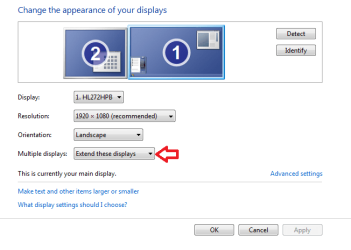
Proberly a stupid question, but you have changed this bit to "extend displays" haven't you?

Paul.

Edit, if it's not showing the 2nd display, have you tried disconnecting and reconnecting the monitor cable from your PC, it may find it then.
 

Attachments

  • ed.PNG
    ed.PNG
    17.4 KB · Views: 6

My Computer My Computer

At a glance

Windows 7 Professional 64 bit
OS
Windows 7 Professional 64 bit
Proberly a stupid question, but you have changed this bit to "extend displays" haven't you?
Hi Paul, It's not showing the 2nd display. The menu items for a second display as shown in the screenshot you've displayed, are not there for me. I'll try removing and replacing the cable. The monitor is working though. It's displaying a picture. It's just displaying a copy of the what appears on the first monitor.
 

My Computer My Computer

At a glance

Win 7 ProIntel i7 2600K16 GB 1333 Crucial Hyper-X Blu I thinkIntegrated
Computer Manufacturer/Model Number
Home Built
OS
Win 7 Pro
CPU
Intel i7 2600K
Motherboard
Asus P8Z68-V LX
Memory
16 GB 1333 Crucial Hyper-X Blu I think
Graphics Card(s)
Integrated
Sound Card
Integrated
Monitor(s) Displays
Dual LCD IPS panels
Screen Resolution
1980x1200, 1980x1080
Hard Drives
3 SATA: 250, 160, 2000 GB, External USB 3TB
PSU
OCZ modular 500W
Case
Antec 300
Cooling
Case: 2 Stock fans, CPU: CoolerMaster Evo 212; PSU: fan
Keyboard
Dell Logitech wireless
Mouse
Logitech Wireless 510
Internet Speed
1.0 Mbps down, 448 Kbps up
Other Info
Case is too small.
Strange one. I see you are using integrated graphics. You reinstalled all the motherboard drivers after the clean Windows install right?
 

My Computer My Computer

At a glance

Windows 7 Professional 64 bit
OS
Windows 7 Professional 64 bit
I see you are using integrated graphics. You reinstalled all the motherboard drivers after the clean Windows install right?
Motherboard drivers? What are those? I'll take another look at the Windows disk, and see if there is a menu with any mention of drivers.
 

My Computer My Computer

At a glance

Win 7 ProIntel i7 2600K16 GB 1333 Crucial Hyper-X Blu I thinkIntegrated
Computer Manufacturer/Model Number
Home Built
OS
Win 7 Pro
CPU
Intel i7 2600K
Motherboard
Asus P8Z68-V LX
Memory
16 GB 1333 Crucial Hyper-X Blu I think
Graphics Card(s)
Integrated
Sound Card
Integrated
Monitor(s) Displays
Dual LCD IPS panels
Screen Resolution
1980x1200, 1980x1080
Hard Drives
3 SATA: 250, 160, 2000 GB, External USB 3TB
PSU
OCZ modular 500W
Case
Antec 300
Cooling
Case: 2 Stock fans, CPU: CoolerMaster Evo 212; PSU: fan
Keyboard
Dell Logitech wireless
Mouse
Logitech Wireless 510
Internet Speed
1.0 Mbps down, 448 Kbps up
Other Info
Case is too small.
They won't be on the Windows disk.

It says in your system spec your PC is home built. With your Motherboard in the box there should have been a cd with all the drivers on it. Normal procedure is to install Windows and then install all the drivers from the Motherboard cd.

It doesn't matter if you don't have it as they will all be available to download online from the Asus website.
 

My Computer My Computer

At a glance

Windows 7 Professional 64 bit
OS
Windows 7 Professional 64 bit
Normal procedure is to install Windows and then install all the drivers from the Motherboard cd.
Installing the drivers from Asus (the motherboard manufacturer) did it. Thanks a bunch.
 

My Computer My Computer

At a glance

Win 7 ProIntel i7 2600K16 GB 1333 Crucial Hyper-X Blu I thinkIntegrated
Computer Manufacturer/Model Number
Home Built
OS
Win 7 Pro
CPU
Intel i7 2600K
Motherboard
Asus P8Z68-V LX
Memory
16 GB 1333 Crucial Hyper-X Blu I think
Graphics Card(s)
Integrated
Sound Card
Integrated
Monitor(s) Displays
Dual LCD IPS panels
Screen Resolution
1980x1200, 1980x1080
Hard Drives
3 SATA: 250, 160, 2000 GB, External USB 3TB
PSU
OCZ modular 500W
Case
Antec 300
Cooling
Case: 2 Stock fans, CPU: CoolerMaster Evo 212; PSU: fan
Keyboard
Dell Logitech wireless
Mouse
Logitech Wireless 510
Internet Speed
1.0 Mbps down, 448 Kbps up
Other Info
Case is too small.
Great news, glad to hear your all sorted.


Paul.
 

My Computer My Computer

At a glance

Windows 7 Professional 64 bit
OS
Windows 7 Professional 64 bit
Back
Top