Solved 2tb internal drive unallocated

Gsearch

New member
Local time
6:53 PM
Messages
39
Location
Georgia, USA
On my desktop PC, I ran a windows update. After the update, the machine would not boot up stating "no operating system"

After trying everything I could, I bought an internal 250gb SSD, put it in the machine, loaded Windows 7 pro 64 bit back on the PC.
I plug in the original 2tb Seagate Baracuda drive and it shows in bios and is listed in disk management as unallocated. There is no drive letter on the drive and it is not listed in MY Computer.

I need the data on this drive.

After reading many thread here (most from 2014) I have looked at and downloaded different software to attempt to fix the drive.

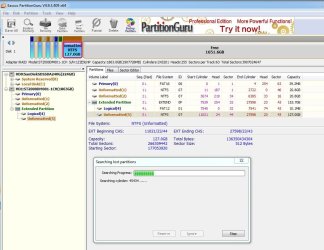
Partition Guru (eassos) listed what seemed to be all the files from the disk. However, in the scan they all lose their names and this would be a tragedy for me.

It seems from what I am reading, that the partition/partitions were deleted?

Mini Tool Partition Wiz stopped working at 85%

At a bit of a loss and throwing myself at the mercy of the experts.
 

Attachments
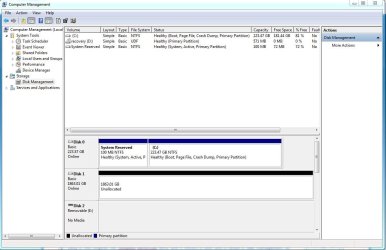
  • seagate1.JPG
    seagate1.JPG
    86.1 KB · Views: 1

My Computer My Computer

Computer type
PC/Desktop
Computer Manufacturer/Model Number
Del XPS8500
OS
Windows 7 Pro 64bit
CPU
Intel(R) Core(TM) i7-3770 CPU @ 3.40GHz
Memory
12gb
Graphics Card(s)
AMD Radeon HD 7700 Series
Hard Drives
Seagate 2tb baracuda
Hi Gsearch,

Welcome to Seven Forums. Windows update causing the PC unbootable is not heard of - atleast till now.. It may just be a coincidence driven by other factors.

Now do not do anything till I return. Most OPs try to do this or that and only make the HDD worse.Just relax.

And tell me which version of MiniTool Partition Wizard you had downloaded.

Will be back after another hour.
 

My Computer My Computer

OS
Windows 7 Home Premium 32 bit
MiniTool ver 10.2.1

I am running Partition GURU test as we speak (sorry, already started it) Just a test though, here are the results thus far. and Thank you very much.
 

Attachments

  • seagate2.JPG
    seagate2.JPG
    108.3 KB · Views: 2

My Computer My Computer

Computer type
PC/Desktop
Computer Manufacturer/Model Number
Del XPS8500
OS
Windows 7 Pro 64bit
CPU
Intel(R) Core(TM) i7-3770 CPU @ 3.40GHz
Memory
12gb
Graphics Card(s)
AMD Radeon HD 7700 Series
Hard Drives
Seagate 2tb baracuda
I would suggest Aomei part assist - even the free version does an excellent job with partition recovery.

However, see what Pguru finds since you have already started.
 

My Computers My Computers

System One System Two

  • Computer type
    PC/Desktop
    OS
    7 X64
    CPU
    i5 8400
    Motherboard
    gigabyte b365m ds3h
    Memory
    2x8gb 3200mhz
    Hard Drives
    various
    PSU
    pure power 11 400w cm
    Case
    Coolermaster
    Cooling
    cryorig m9i
  • Computer type
    PC/Desktop
    OS
    7x64
    CPU
    g5400
    Motherboard
    ga b365m ds3h
    Memory
    8gb ddr4 2400
    PSU
    xfx pro 450w
OK Let it complete. When complete post the results. In any case, I may not continue with Partition Guru and I shall go my own way :).
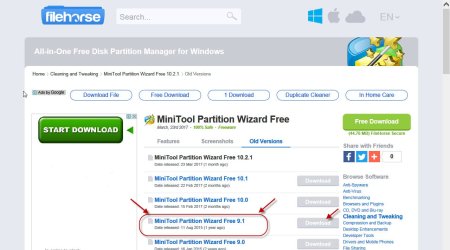
Please uninstall PW 10.2.1. Many of the features in it are no longer free. Download and install PW v9.1 from here http://www.filehorse.com/download-partition-wizard-home/old-versions/

10-05-2017 18-40-00.jpg

OK, apart from 100MB MSR partition, how many partitions did you have ? Can you list alongwith the volume capacity?

How much data in GB do you have in all?

Do you have another External drive with sufficient capacity to copy all that data if it can be recovered?( I am always pessimistic as far as data recovery is concerned - nature of the job :))
 

My Computer My Computer

OS
Windows 7 Home Premium 32 bit
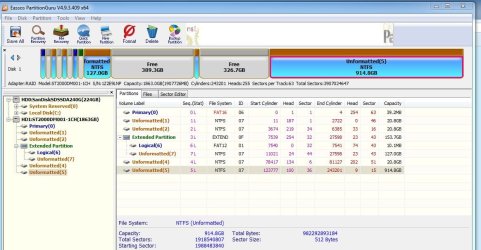
Partition Guru finished its search:
 

Attachments

  • seagate3.JPG
    seagate3.JPG
    105.3 KB · Views: 1

My Computer My Computer

Computer type
PC/Desktop
Computer Manufacturer/Model Number
Del XPS8500
OS
Windows 7 Pro 64bit
CPU
Intel(R) Core(TM) i7-3770 CPU @ 3.40GHz
Memory
12gb
Graphics Card(s)
AMD Radeon HD 7700 Series
Hard Drives
Seagate 2tb baracuda
OK, I had seen that SIW2 had in the past always recommending Partition Guru. He is more conversant in using Partition Guru. So I would request SIW2 to assist you and continue with Partition Guru.
 

My Computer My Computer

OS
Windows 7 Home Premium 32 bit
I do not know what partitions were on the drive prior to fail.
I do have an external with the capacity to hold any data from the trouble drive.

I have downloaded and installed 9.1
 

My Computer My Computer

Computer type
PC/Desktop
Computer Manufacturer/Model Number
Del XPS8500
OS
Windows 7 Pro 64bit
CPU
Intel(R) Core(TM) i7-3770 CPU @ 3.40GHz
Memory
12gb
Graphics Card(s)
AMD Radeon HD 7700 Series
Hard Drives
Seagate 2tb baracuda
Does it look like it could be the correct layout? Check under the Pguru "files" tab. You should be able to view the files in the virtual partitions.

Only if you are confident, you can confirm. "Unformatted" doesn't look right to me.

Alternatively, you can run Aomei part Assist partition recovery module. It has worked for me when others wouldn't . It recovered "unformatted" as a perfect ntfs partition. It may also work in this case. Worth a try.

Best Free Partition Magic Software & Disk Manager 2017 | AOMEI Partition Assistant Standard
 

My Computers My Computers

System One System Two

  • Computer type
    PC/Desktop
    OS
    7 X64
    CPU
    i5 8400
    Motherboard
    gigabyte b365m ds3h
    Memory
    2x8gb 3200mhz
    Hard Drives
    various
    PSU
    pure power 11 400w cm
    Case
    Coolermaster
    Cooling
    cryorig m9i
  • Computer type
    PC/Desktop
    OS
    7x64
    CPU
    g5400
    Motherboard
    ga b365m ds3h
    Memory
    8gb ddr4 2400
    PSU
    xfx pro 450w
SIW2, I do not know if it looks correct in layout. I am not sure what partitions were there. I am sure that the Dell partition is correct, it is on most Dell PCs

My Dell laptop has 4. Oem, Recovery, OS, and hibernation
 

My Computer My Computer

Computer type
PC/Desktop
Computer Manufacturer/Model Number
Del XPS8500
OS
Windows 7 Pro 64bit
CPU
Intel(R) Core(TM) i7-3770 CPU @ 3.40GHz
Memory
12gb
Graphics Card(s)
AMD Radeon HD 7700 Series
Hard Drives
Seagate 2tb baracuda
That large virtual partition shows ntfs and unformatted.

Try Aomei - it won't do any harm to run it. It may be able to recover it fully. Run it and see what it says. No changes will be made by Aomei unless you clcik "Apply" at top left.

Try fast search first.
 

My Computers My Computers

System One System Two

  • Computer type
    PC/Desktop
    OS
    7 X64
    CPU
    i5 8400
    Motherboard
    gigabyte b365m ds3h
    Memory
    2x8gb 3200mhz
    Hard Drives
    various
    PSU
    pure power 11 400w cm
    Case
    Coolermaster
    Cooling
    cryorig m9i
  • Computer type
    PC/Desktop
    OS
    7x64
    CPU
    g5400
    Motherboard
    ga b365m ds3h
    Memory
    8gb ddr4 2400
    PSU
    xfx pro 450w
Ok, so with Pguru what would be the next step.

If not, what are the steps with MiniTool 9.1? I have downloaded it and am at the ready.

EDIT: Sorry, replied to fast. What function on Aomei? Looks like the partition recover wizard will take about a day to run on quick.
 

My Computer My Computer

Computer type
PC/Desktop
Computer Manufacturer/Model Number
Del XPS8500
OS
Windows 7 Pro 64bit
CPU
Intel(R) Core(TM) i7-3770 CPU @ 3.40GHz
Memory
12gb
Graphics Card(s)
AMD Radeon HD 7700 Series
Hard Drives
Seagate 2tb baracuda
Pguru isn't offereing to recover it formatted as it was.

Aomei might.

I doubt part Wiz 9.1 will work, because the recovery module is the same one you used in Part Wiz 10.2

Mini Tool Partition Wiz stopped working at 85%
 

My Computers My Computers

System One System Two

  • Computer type
    PC/Desktop
    OS
    7 X64
    CPU
    i5 8400
    Motherboard
    gigabyte b365m ds3h
    Memory
    2x8gb 3200mhz
    Hard Drives
    various
    PSU
    pure power 11 400w cm
    Case
    Coolermaster
    Cooling
    cryorig m9i
  • Computer type
    PC/Desktop
    OS
    7x64
    CPU
    g5400
    Motherboard
    ga b365m ds3h
    Memory
    8gb ddr4 2400
    PSU
    xfx pro 450w
Ok, so Aomei.
Run Partition Reco Wizard? Any reasonable estimation of time on the fast scan?

I am running it now.
 

My Computer My Computer

Computer type
PC/Desktop
Computer Manufacturer/Model Number
Del XPS8500
OS
Windows 7 Pro 64bit
CPU
Intel(R) Core(TM) i7-3770 CPU @ 3.40GHz
Memory
12gb
Graphics Card(s)
AMD Radeon HD 7700 Series
Hard Drives
Seagate 2tb baracuda
I used it on 1Tb recently. Can't recall how long, not hours, or I would remember that. A 2tb will take twice as long, presumably.

Just be patient. If it offers to recover as formatted ntfs, everything should be perfect and you won't need file recovery.
 

My Computers My Computers

System One System Two

  • Computer type
    PC/Desktop
    OS
    7 X64
    CPU
    i5 8400
    Motherboard
    gigabyte b365m ds3h
    Memory
    2x8gb 3200mhz
    Hard Drives
    various
    PSU
    pure power 11 400w cm
    Case
    Coolermaster
    Cooling
    cryorig m9i
  • Computer type
    PC/Desktop
    OS
    7x64
    CPU
    g5400
    Motherboard
    ga b365m ds3h
    Memory
    8gb ddr4 2400
    PSU
    xfx pro 450w
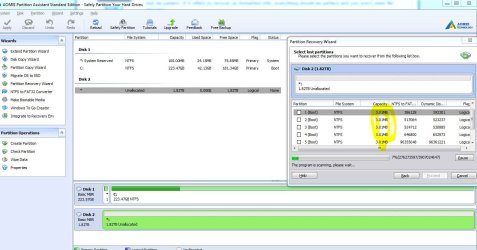
Fast is not an accurate description of this scan.. "faster" than the long scan may be what they mean. lol.
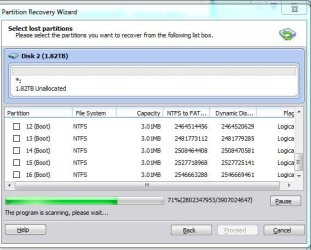
What are all these 3.01 mb partitions it is finding?
 

Attachments

  • seagate4.JPG
    seagate4.JPG
    118.3 KB · Views: 1

My Computer My Computer

Computer type
PC/Desktop
Computer Manufacturer/Model Number
Del XPS8500
OS
Windows 7 Pro 64bit
CPU
Intel(R) Core(TM) i7-3770 CPU @ 3.40GHz
Memory
12gb
Graphics Card(s)
AMD Radeon HD 7700 Series
Hard Drives
Seagate 2tb baracuda
Wow. so I reached 70% on the Aomei software and I took this snapshot to ask why there were already 15 partitions listed at 3.01 mb. Then in true idiot fashion, I closed the scan instead of the snipping tool.

Just wow.
 

Attachments

  • seagate5.JPG
    seagate5.JPG
    48.3 KB · Views: 16

My Computer My Computer

Computer type
PC/Desktop
Computer Manufacturer/Model Number
Del XPS8500
OS
Windows 7 Pro 64bit
CPU
Intel(R) Core(TM) i7-3770 CPU @ 3.40GHz
Memory
12gb
Graphics Card(s)
AMD Radeon HD 7700 Series
Hard Drives
Seagate 2tb baracuda
Ooops.

There is a chance it may be able to recover everything. I would start the scan again, go and have dinner, or watch tv or whatever. Then come back and see what it has found in a couple of hours.
 

My Computers My Computers

System One System Two

  • Computer type
    PC/Desktop
    OS
    7 X64
    CPU
    i5 8400
    Motherboard
    gigabyte b365m ds3h
    Memory
    2x8gb 3200mhz
    Hard Drives
    various
    PSU
    pure power 11 400w cm
    Case
    Coolermaster
    Cooling
    cryorig m9i
  • Computer type
    PC/Desktop
    OS
    7x64
    CPU
    g5400
    Motherboard
    ga b365m ds3h
    Memory
    8gb ddr4 2400
    PSU
    xfx pro 450w
If Aomei doesn't come up with anything useful ( at over 70% when you stopped - it isn't promising ), you could have a go with paragon, otherwise you are into file recovery..
 

My Computers My Computers

System One System Two

  • Computer type
    PC/Desktop
    OS
    7 X64
    CPU
    i5 8400
    Motherboard
    gigabyte b365m ds3h
    Memory
    2x8gb 3200mhz
    Hard Drives
    various
    PSU
    pure power 11 400w cm
    Case
    Coolermaster
    Cooling
    cryorig m9i
  • Computer type
    PC/Desktop
    OS
    7x64
    CPU
    g5400
    Motherboard
    ga b365m ds3h
    Memory
    8gb ddr4 2400
    PSU
    xfx pro 450w
Ok, talk to me about Paragon. Free software? I would rather take a different path than to wait another few hours for a scan that looks as though it wasn't finding what we are looking for.

I will give Jumaji's plan a go if he is willing to give me the steps.

I am open.

Thanks to both of you for taking the time to help, regardless of the outcome.
 

My Computer My Computer

Computer type
PC/Desktop
Computer Manufacturer/Model Number
Del XPS8500
OS
Windows 7 Pro 64bit
CPU
Intel(R) Core(TM) i7-3770 CPU @ 3.40GHz
Memory
12gb
Graphics Card(s)
AMD Radeon HD 7700 Series
Hard Drives
Seagate 2tb baracuda
Back
Top