3 Gigs Ram or 4?

I swear I've had Dell OEM systems with 945 chipsets running with 4 GB of usable memory.
If you're talking about Vista SP1 or Win7, the number the OS reports in all the obvious places was changed to show "installed", not "available" because this was confusing people (obviously it still does) and probably generated support calls to the OEMs (resmon still shows you the actual numbers, and at least on Win7, shows you the hardware reserved bits as well).

http://support.microsoft.com/kb/946003
 

My Computer

Computer type
PC/Desktop
Computer Manufacturer/Model Number
Custom
OS
Windows 10 Pro x64
CPU
Intel Core i7 4790K @ 4.5GHz
Motherboard
Asus Maximus Hero VII
Memory
32GB DDR3
Graphics Card(s)
Nvidia GeForce GTX970
Sound Card
Realtek HD Audio
Screen Resolution
1920x1200
Hard Drives
1x Samsung 250GB SSD
4x WD RE 2TB (RAIDZ)
PSU
Corsair AX760i
Case
Fractal Design Define R4
Cooling
Noctua NH-D15
I'm well aware of the change in what's displayed in system properties. I still have scars from all the battles on other forums where users argued tooth and nail that Microsoft "fixed" their x86 versions to support 4 GB because their computers suddenly showed 4 GB, rather than 3.25 GB. My therapist says I'll soon be able to repress those memories.
 

My Computer

OS
Windows 7 Ultimate x64 SP1
CPU
Intel Core i7-2600
Motherboard
Gigabyte GA-P67A-UD3P-B3
Memory
12 GB Patriot Extreme DDR3-1333
Graphics Card(s)
Nvidia GTX 470
Monitor(s) Displays
Dell UltraSharp 2209WA
Hard Drives
OCZ Agility3 240 GB, WD5001AALS, WD7501AALS
PSU
OCZ ModStream 700W
Case
CoolerMaster HAF 912 Advanced
Cooling
CoolerMaster Hyper 212 Plus
I'm well aware of the change in what's displayed in system properties. I still have scars from all the battles on other forums where users argued tooth and nail that Microsoft "fixed" their x86 versions to support 4 GB because their computers suddenly showed 4 GB, rather than 3.25 GB. My therapist says I'll soon be able to repress those memories.

:roflmao:

That's about as good as a guy I saw on another forum that didn't want to use Vista or 7 due to the increased memory use, which for some odd reason he claimed would also cause an increase in power use.

:doh:
 

My Computer

Computer type
PC/Desktop
Computer Manufacturer/Model Number
Me
OS
Win 7 Ultimate x64
CPU
FX-8350 @ 4.6 GHz so far
Motherboard
Asus M5A97 EVO
Memory
ADATA XPG V1 Series Black 8GB DDR3 1600
Graphics Card(s)
Sapphire R9 270x Dual-X
Sound Card
Xonar DGX w/ Corsair Vengence 1300
Monitor(s) Displays
Acer S232HL Abid
Screen Resolution
1920x1080
Hard Drives
120 GB OCZ Vertex 3
500 GB Seagate 7200.12
PSU
Antec Earthwatts 650W Green
Case
Antec Three Hundred
Cooling
Cooler Master 212 EVO
Keyboard
Logitech G510
Mouse
Logitech G500s
Internet Speed
35000/3000
Heh - scars indeed.

:)
 

My Computer

Computer type
PC/Desktop
Computer Manufacturer/Model Number
Custom
OS
Windows 10 Pro x64
CPU
Intel Core i7 4790K @ 4.5GHz
Motherboard
Asus Maximus Hero VII
Memory
32GB DDR3
Graphics Card(s)
Nvidia GeForce GTX970
Sound Card
Realtek HD Audio
Screen Resolution
1920x1200
Hard Drives
1x Samsung 250GB SSD
4x WD RE 2TB (RAIDZ)
PSU
Corsair AX760i
Case
Fractal Design Define R4
Cooling
Noctua NH-D15
Hmm... This is very weird... If what GeneO wrote is true, then I should only have less than 3GB available to my OS (which is NOT the case). I know that the chipset (or the memory controller in particular) needs to have the ability to access all of those memory banks that it's connected to, but Wow... This topic is very interesting indeed.

If you read my system specs, I have 2 display adapters, a GTX285 1GB and 8800 512MB... Those two alone should reduce my 4GB installed RAM to 2.5GB available to the system... But currently, all 4GB RAM is usable, even back in WinXP 32bit, I have around 3GB RAM available (with 4x1GB sticks installed). This is still not counting all other devices that are installed on my PCI(e) bus. As for display adapter's local RAM, it's a whole different device, and it uses different access method, and is addressed differently. In case you're wondering by this fact, the simple question would be: can you access the graphic adapter's local cache as a "real" RAM and have CPU a complete control over it? As if it's an extension of main memory...? Hint: display adapters have firmware that governs it self, we can say that it's more like a BIOS for display adapters, thus you can't really access it's RAM directly, not with that firmware in the way.

But enough... What to remember is, before you put in more RAM to your computer, you should ALWAYS read what's the maximum RAM size supported by your motherboard's memory controller. This is the main requirement of how many memory banks the memory controller can access/control. Regarding memory mapping feature, this is perquisite with the chipset's ability to address it's RAM. If it supports more than 4GB, it will have memory mapping feature.
The next factor is the OS. To be able to use all of those RAM, we need an OS that have enough address space to use all of those RAM. http://www.sevenforums.com/general-discussion/86886-32-bit-vs-64-bit-comparison.html have all the info.

As for the OP, as stated by rich64, Darician, Zeplash, stormy13, and many others (and my self): Stick with 3GB if you're planning on using 32bit OS, upgrade to 4GB if you wish to use 64bit OS... As simple as that.

zzz2496

Edit: I'm not sure if I read the thread starter correctly... The OP have a physical display adapter card, which is the same as me. After that, I re-read GeneO's post once more. If I read it correctly, maybe GeneO means display adapter that's embedded on the motherboard's chipset (an onboard display adapter). If this is the case, then we are not talking about the same thing. Onboard display adapter's local cache uses main RAM, this is true, but the OP's are using a dedicated display adapter card, which doesn't share it's local cache with main RAM...

 

My Computer

Computer Manufacturer/Model Number
Self Built
OS
Windows7 Ultimate 64bit
CPU
Intel Core 2 Quad Q6600
Motherboard
Abit IN9-32X-MMAX
Memory
DDR2 Adata 4GB
Graphics Card(s)
Nvidia GeForce GTX 285 1024 and Nvidia GeForce 8800GT 512
Sound Card
Asus Xonar HDAV 1.3
Monitor(s) Displays
Dell 2407WFP and BenQ 2400v and Philips 150v3
Screen Resolution
3840x1200 and 1024x768
Hard Drives
2 WDC 1TB
1 WDC 1.5TB
1 WDC 640GB
1 WDC 320GB
1 Seagate 200GB
PSU
Corsair TX 850W
Case
Cooler Master HAF932
Cooling
Arctic Cooling Freezer Extreme and plenty of fans...
Keyboard
MicrosoftNaturalKeyboard 4000/Apple Alu keyboard/Dinovo mini
Mouse
Logitech G5/MarbleMouseTrackball/PerformanceMX/SpacePilotPRO
Internet Speed
1.5Mbps down/384Kbps up
Other Info
APC SURT 1000XL
Logitech Z-560
Wiimote
Mikrotik Router
Linksys (now Cisco) SD2008 8 port Gigabit switch
Linksys WRT54G (acting as AP)
Apple wireless Aluminium keyboard
Apple Magic Mouse
Xbox360 wired controller
Aftermarket GPU's have their own memory. The onboard graphics draw from installed RAM, usually.
 

My Computer

Computer Manufacturer/Model Number
Pugh Technologies
OS
W7 Professional x64
CPU
AMD Athlon II X3 445 Rana 3.10 GHz
Motherboard
MSI 870A-G54
Memory
PNY XLR DDR3 1600 4x2GB
Graphics Card(s)
NVIDIA GeForce GTS 450 (fermi) 1GB GDDR5
Sound Card
Realtek ALC892 onboard
Monitor(s) Displays
ASUS VE205t, Viewsonic VX2035WM
Screen Resolution
1600x900, 1600x1050
Hard Drives
977GB Hitachi Hitachi HDS721010CLA332
244GB Western Digital WDC WD2500AAJS-65B4A0
488GB Western Digital WDC WD5000AAJS-00A8B0
488GB Western Digital WDC WD5000AAKS-00UU3A0
PSU
Antec EarthWatts EA650 650W
Case
ThermalTake Armor A90 Mid Tower
Cooling
3x 120mm in, 1x 120mm & 200mm out, self built hydro-cooler
Keyboard
Logitec 55
Mouse
Razer Deathadder
Internet Speed
20 Mbps D/L, 9 Mbps U/L
Some good stuff here, learned a few things.

Thread bookmarked.

Thanks guys :)
 

My Computer

Computer type
PC/Desktop
Computer Manufacturer/Model Number
Custom built by me.
OS
Windows 10 Pro
CPU
Intel Core i7-4770K (3.5Ghz)
Motherboard
Gigabyte G1 Sniper 5 (F10 Bios)
Memory
32 gig Corsair Dominator Platinum (4x8Gig)
Graphics Card(s)
Sapphire Tri-X R9 Fury
Sound Card
Soundblaster ZXR
Monitor(s) Displays
NEC PA242W 24" LCD Monitor
Screen Resolution
1920 x 1200
Hard Drives
Primary - Samsung 850 Pro (512gig), Samsung 840 Pro (256gig), 2TB WD Caviar Black.
PSU
EVGA Supernova 1000 G2
Case
Cooler Master HAF X
Cooling
Corsair H100i with Corsair Air Series SP120 Quiet Fans
Keyboard
Logitech Wireless Wave
Mouse
Logitech Performance MX
Internet Speed
High Speed Cable
Antivirus
Norton Security
Browser
IE11
Other Info
Memory Timings - 1866MHz @ 9-9-9-27-1T @ 1.5 volts
Aftermarket GPU's have their own memory. The onboard graphics draw from installed RAM, usually.

They still use system address space. Their memory is mapped to a range of system system addresses. When OS reads or writes to that range, it translates to moving the data to/from the video memory over PCI-e or whatever bus.

The range of addresses that the video card memory is mapped are not accessible for other use. Hence if you have only 4GB of address space supported by your chipset and a video card with 1GB of on-board memory, you will have only have 3GB or less of useable memory.
 

My Computer

Computer type
PC/Desktop
Computer Manufacturer/Model Number
Home built (GeneO industries)/Model 4
OS
Windows 10 Pro. EFI boot partition, full EFI boot
CPU
i7 4770k 4.4GHz (44-44-43-43 turbo) @ 1.248V
Motherboard
ASUS Maximus VI Hero
Memory
16GB (8GBx2) @2200 MHz G.skill Sniper 10-11-10-30-1, 1.6V
Graphics Card(s)
MSI GTX 970 Gaming 4G
Sound Card
Onboard SupremeFX Audio
Monitor(s) Displays
NEC Spectraview 2490WUXi-SV
Screen Resolution
1920 x 1200
Hard Drives
Samsung 850 Pro 256GB (OS), Samsung 2x 128GB 840 Pro SSD in RAID0, 3x WD Blue 6Gb/s 1TB RAID0, WD 2TB Black external USB 3.0, 2TB WD20EARS Green external USB 3.0, 2x 500GB Seagate and 1 750 GB external USB, 1x 350GB external USB3
PSU
Seasonic X-850 (2012 KM3 model)
Case
Fractal Design Define R4
Cooling
NH-D14, NF-F12, NF-A15; NF-P14, NF-P12,NF-A14, S12A PWM
Keyboard
Cooler Master Storm Quickfire Rapid - Brown
Mouse
Logitech G602
Internet Speed
126.4 Mb/s down, 24.3 Mb/s up
Other Info
USB 3.0 x8 , SATA III x8, eSATA, USB 2.0 x6. Samsung DVD R/W drive.

WEI: CPU 7.8, Memory 7.9, Graphics 7.9, Disk 7.9
Hmm... This is very weird... If what GeneO wrote is true, then I should only have less than 3GB available to my OS (which is NOT the case). I know that the chipset (or the memory controller in particular) needs to have the ability to access all of those memory banks that it's connected to, but Wow... This topic is very interesting indeed.

If you read my system specs, I have 2 display adapters, a GTX285 1GB and 8800 512MB... Those two alone should reduce my 4GB installed RAM to 2.5GB available to the system... But currently, all 4GB RAM is usable, even back in WinXP 32bit, I have around 3GB RAM available (with 4x1GB sticks installed). This is still not counting all other devices that are installed on my PCI(e) bus. As for display adapter's local RAM, it's a whole different device, and it uses different access method, and is addressed differently. In case you're wondering by this fact, the simple question would be: can you access the graphic adapter's local cache as a "real" RAM and have CPU a complete control over it? As if it's an extension of main memory...? Hint: display adapters have firmware that governs it self, we can say that it's more like a BIOS for display adapters, thus you can't really access it's RAM directly, not with that firmware in the way.

But enough... What to remember is, before you put in more RAM to your computer, you should ALWAYS read what's the maximum RAM size supported by your motherboard's memory controller. This is the main requirement of how many memory banks the memory controller can access/control. Regarding memory mapping feature, this is perquisite with the chipset's ability to address it's RAM. If it supports more than 4GB, it will have memory mapping feature.
The next factor is the OS. To be able to use all of those RAM, we need an OS that have enough address space to use all of those RAM. http://www.sevenforums.com/general-discussion/86886-32-bit-vs-64-bit-comparison.html have all the info.

As for the OP, as stated by rich64, Darician, Zeplash, stormy13, and many others (and my self): Stick with 3GB if you're planning on using 32bit OS, upgrade to 4GB if you wish to use 64bit OS... As simple as that.

zzz2496

Edit: I'm not sure if I read the thread starter correctly... The OP have a physical display adapter card, which is the same as me. After that, I re-read GeneO's post once more. If I read it correctly, maybe GeneO means display adapter that's embedded on the motherboard's chipset (an onboard display adapter). If this is the case, then we are not talking about the same thing. Onboard display adapter's local cache uses main RAM, this is true, but the OP's are using a dedicated display adapter card, which doesn't share it's local cache with main RAM...

Your motherboard supports up to 32 GB of RAM hence it supports up to 32 GB of address space and you are running x64 and I expect that you have memory remapping (or hole remapping) set in your BIOS, or your BIOS does this automatically. So you should see all of your memory. Your video graphics cards are probably mapped to the unused upper addresses of the 32GB of address space.

You will only see less usable than the amount of RAM you have installed if your installed RAM > MAX RAM supported by board minus your video RAM. In your case if the installed RAM is greater than 32-1.5 = 30.5GB. Approximately. Also you may need to have the remapping feature set on some BIOS.

- Gene
 

My Computer

Computer type
PC/Desktop
Computer Manufacturer/Model Number
Home built (GeneO industries)/Model 4
OS
Windows 10 Pro. EFI boot partition, full EFI boot
CPU
i7 4770k 4.4GHz (44-44-43-43 turbo) @ 1.248V
Motherboard
ASUS Maximus VI Hero
Memory
16GB (8GBx2) @2200 MHz G.skill Sniper 10-11-10-30-1, 1.6V
Graphics Card(s)
MSI GTX 970 Gaming 4G
Sound Card
Onboard SupremeFX Audio
Monitor(s) Displays
NEC Spectraview 2490WUXi-SV
Screen Resolution
1920 x 1200
Hard Drives
Samsung 850 Pro 256GB (OS), Samsung 2x 128GB 840 Pro SSD in RAID0, 3x WD Blue 6Gb/s 1TB RAID0, WD 2TB Black external USB 3.0, 2TB WD20EARS Green external USB 3.0, 2x 500GB Seagate and 1 750 GB external USB, 1x 350GB external USB3
PSU
Seasonic X-850 (2012 KM3 model)
Case
Fractal Design Define R4
Cooling
NH-D14, NF-F12, NF-A15; NF-P14, NF-P12,NF-A14, S12A PWM
Keyboard
Cooler Master Storm Quickfire Rapid - Brown
Mouse
Logitech G602
Internet Speed
126.4 Mb/s down, 24.3 Mb/s up
Other Info
USB 3.0 x8 , SATA III x8, eSATA, USB 2.0 x6. Samsung DVD R/W drive.

WEI: CPU 7.8, Memory 7.9, Graphics 7.9, Disk 7.9
GeneO, your description of the issue in post #28 makes perfect sense, but I have never heard that in relation to the amount of memory a motherboard supports. That just seems strange to be discussing accessing memory beyong what is physically installed...such as the case above with 4 GB installed, and a 1 GB video board being present in the system. Again, I'm not saying you are wrong, but I worked for a major system builder for quite some time, and never heard of the physical limitations of the board having anything to do with how much of the physically installed memory can be accessed.
 

My Computer

OS
Windows 7 Ultimate x64 SP1
CPU
Intel Core i7-2600
Motherboard
Gigabyte GA-P67A-UD3P-B3
Memory
12 GB Patriot Extreme DDR3-1333
Graphics Card(s)
Nvidia GTX 470
Monitor(s) Displays
Dell UltraSharp 2209WA
Hard Drives
OCZ Agility3 240 GB, WD5001AALS, WD7501AALS
PSU
OCZ ModStream 700W
Case
CoolerMaster HAF 912 Advanced
Cooling
CoolerMaster Hyper 212 Plus
Last edited:

My Computer

Computer type
PC/Desktop
Computer Manufacturer/Model Number
Custom built by me.
OS
Windows 10 Pro
CPU
Intel Core i7-4770K (3.5Ghz)
Motherboard
Gigabyte G1 Sniper 5 (F10 Bios)
Memory
32 gig Corsair Dominator Platinum (4x8Gig)
Graphics Card(s)
Sapphire Tri-X R9 Fury
Sound Card
Soundblaster ZXR
Monitor(s) Displays
NEC PA242W 24" LCD Monitor
Screen Resolution
1920 x 1200
Hard Drives
Primary - Samsung 850 Pro (512gig), Samsung 840 Pro (256gig), 2TB WD Caviar Black.
PSU
EVGA Supernova 1000 G2
Case
Cooler Master HAF X
Cooling
Corsair H100i with Corsair Air Series SP120 Quiet Fans
Keyboard
Logitech Wireless Wave
Mouse
Logitech Performance MX
Internet Speed
High Speed Cable
Antivirus
Norton Security
Browser
IE11
Other Info
Memory Timings - 1866MHz @ 9-9-9-27-1T @ 1.5 volts
I'm not debating the validity of the claim...I'm just saying that's honestly the first I've ever heard of a link between max memory supported by the motherboard, and what an x64 OS can still use. I think maybe you guys are misunderstanding me. I'm not suggesting the info is wrong or that the links are wrong.
 

My Computer

OS
Windows 7 Ultimate x64 SP1
CPU
Intel Core i7-2600
Motherboard
Gigabyte GA-P67A-UD3P-B3
Memory
12 GB Patriot Extreme DDR3-1333
Graphics Card(s)
Nvidia GTX 470
Monitor(s) Displays
Dell UltraSharp 2209WA
Hard Drives
OCZ Agility3 240 GB, WD5001AALS, WD7501AALS
PSU
OCZ ModStream 700W
Case
CoolerMaster HAF 912 Advanced
Cooling
CoolerMaster Hyper 212 Plus
Last edited:

My Computer

Computer type
PC/Desktop
Computer Manufacturer/Model Number
Home built (GeneO industries)/Model 4
OS
Windows 10 Pro. EFI boot partition, full EFI boot
CPU
i7 4770k 4.4GHz (44-44-43-43 turbo) @ 1.248V
Motherboard
ASUS Maximus VI Hero
Memory
16GB (8GBx2) @2200 MHz G.skill Sniper 10-11-10-30-1, 1.6V
Graphics Card(s)
MSI GTX 970 Gaming 4G
Sound Card
Onboard SupremeFX Audio
Monitor(s) Displays
NEC Spectraview 2490WUXi-SV
Screen Resolution
1920 x 1200
Hard Drives
Samsung 850 Pro 256GB (OS), Samsung 2x 128GB 840 Pro SSD in RAID0, 3x WD Blue 6Gb/s 1TB RAID0, WD 2TB Black external USB 3.0, 2TB WD20EARS Green external USB 3.0, 2x 500GB Seagate and 1 750 GB external USB, 1x 350GB external USB3
PSU
Seasonic X-850 (2012 KM3 model)
Case
Fractal Design Define R4
Cooling
NH-D14, NF-F12, NF-A15; NF-P14, NF-P12,NF-A14, S12A PWM
Keyboard
Cooler Master Storm Quickfire Rapid - Brown
Mouse
Logitech G602
Internet Speed
126.4 Mb/s down, 24.3 Mb/s up
Other Info
USB 3.0 x8 , SATA III x8, eSATA, USB 2.0 x6. Samsung DVD R/W drive.

WEI: CPU 7.8, Memory 7.9, Graphics 7.9, Disk 7.9
I remember me and geno kinda talked about the memeory remapping/ memory hole feature as well to pci latency Depending on the amount of ram you are allowed or using at the time the memory is remapped through the pci devices

Pci latency is how effective you want the cycles to be between devices settings from 32 to 248 on some you would think higher is better but not always

then you have crackle hissing noises period from to high of a latency settings are far as the memory goes even if the board supported 4 gigs of ram it is still going to remap it to a pci device anyway and you wont get that full 4


like was said before you can get a higher ram device but even though it has its own ram some of the installed will be ramped anyway


pretty much this is what im reading ? Right or wrong ?
 

My Computer

Computer type
PC/Desktop
Computer Manufacturer/Model Number
CoreI7-6700K MrFingerIII Special Builds
OS
Windows 10 Home Premium 64bit sp1
CPU
Intel I7-6700K @ 4.6 Ghz 1.344 volts everyday OC
Motherboard
Asrock Fatality K6 Z170 Socket 1151
Memory
32GB G-Skill TridentZ 3200mhz 16-18-18-38 DDR4
Graphics Card(s)
Sli Gigabyte Windforce GTX 980 G1
Sound Card
AC97 Creative Rage Tactic 3D Headphones Bluetooth
Monitor(s) Displays
27" Asus ROG Swift PG278Q G-Sync 48" Vizio Smart HD TV
Screen Resolution
2560x1440p 27"- 48" Currently Gaming at 2560x1440p Res 2K
Hard Drives
250GB Samsung Evo840SSD Seagate baracuda 500 GB WD Mybook 500Gb 1TB Seagate Barracuda
PSU
HX1050w Corsair Silver 80plus certified crosfire/sli
Case
Enthod Pro Full Tower
Cooling
Corsair H110i GT 280 mm High Performance WaterBlock
Keyboard
Logitech wireless keyboard
Mouse
Logitech wireless mouse
Internet Speed
Cox Cable 100+ mb
Antivirus
WebRoot Spysweeper with Antivirus
Browser
IE-10, Chrome, Opera
Other Info
My Other Rig is a AMD FX8320E @4.6Ghz 16GB Ballistic Sport Ram
Mobo Asrock Fatality 990FX 120GB OCZ SSD 1TB Seagate Barracuda Corsair H75 Cooling PSU Corsair CX750
GPU GTX Gigabyte 970G1
Deacon,

I had tried to simplify my explanation and misspoke when I said the amount avail = max memory your MB support - video ram. It is max address space your chipset supports - video ram. The two are not always the same.

The latest Intel X chipsets have 36 bit (64GB) of addressing so this is no longer a problem.
 
Last edited:

My Computer

Computer type
PC/Desktop
Computer Manufacturer/Model Number
Home built (GeneO industries)/Model 4
OS
Windows 10 Pro. EFI boot partition, full EFI boot
CPU
i7 4770k 4.4GHz (44-44-43-43 turbo) @ 1.248V
Motherboard
ASUS Maximus VI Hero
Memory
16GB (8GBx2) @2200 MHz G.skill Sniper 10-11-10-30-1, 1.6V
Graphics Card(s)
MSI GTX 970 Gaming 4G
Sound Card
Onboard SupremeFX Audio
Monitor(s) Displays
NEC Spectraview 2490WUXi-SV
Screen Resolution
1920 x 1200
Hard Drives
Samsung 850 Pro 256GB (OS), Samsung 2x 128GB 840 Pro SSD in RAID0, 3x WD Blue 6Gb/s 1TB RAID0, WD 2TB Black external USB 3.0, 2TB WD20EARS Green external USB 3.0, 2x 500GB Seagate and 1 750 GB external USB, 1x 350GB external USB3
PSU
Seasonic X-850 (2012 KM3 model)
Case
Fractal Design Define R4
Cooling
NH-D14, NF-F12, NF-A15; NF-P14, NF-P12,NF-A14, S12A PWM
Keyboard
Cooler Master Storm Quickfire Rapid - Brown
Mouse
Logitech G602
Internet Speed
126.4 Mb/s down, 24.3 Mb/s up
Other Info
USB 3.0 x8 , SATA III x8, eSATA, USB 2.0 x6. Samsung DVD R/W drive.

WEI: CPU 7.8, Memory 7.9, Graphics 7.9, Disk 7.9
Hmm... This is very weird... If what GeneO wrote is true, then I should only have less than 3GB available to my OS (which is NOT the case). I know that the chipset (or the memory controller in particular) needs to have the ability to access all of those memory banks that it's connected to, but Wow... This topic is very interesting indeed.

If you read my system specs, I have 2 display adapters, a GTX285 1GB and 8800 512MB... Those two alone should reduce my 4GB installed RAM to 2.5GB available to the system... But currently, all 4GB RAM is usable, even back in WinXP 32bit, I have around 3GB RAM available (with 4x1GB sticks installed). This is still not counting all other devices that are installed on my PCI(e) bus. As for display adapter's local RAM, it's a whole different device, and it uses different access method, and is addressed differently. In case you're wondering by this fact, the simple question would be: can you access the graphic adapter's local cache as a "real" RAM and have CPU a complete control over it? As if it's an extension of main memory...? Hint: display adapters have firmware that governs it self, we can say that it's more like a BIOS for display adapters, thus you can't really access it's RAM directly, not with that firmware in the way.

But enough... What to remember is, before you put in more RAM to your computer, you should ALWAYS read what's the maximum RAM size supported by your motherboard's memory controller. This is the main requirement of how many memory banks the memory controller can access/control. Regarding memory mapping feature, this is perquisite with the chipset's ability to address it's RAM. If it supports more than 4GB, it will have memory mapping feature.
The next factor is the OS. To be able to use all of those RAM, we need an OS that have enough address space to use all of those RAM. http://www.sevenforums.com/general-discussion/86886-32-bit-vs-64-bit-comparison.html have all the info.

As for the OP, as stated by rich64, Darician, Zeplash, stormy13, and many others (and my self): Stick with 3GB if you're planning on using 32bit OS, upgrade to 4GB if you wish to use 64bit OS... As simple as that.

zzz2496

Edit: I'm not sure if I read the thread starter correctly... The OP have a physical display adapter card, which is the same as me. After that, I re-read GeneO's post once more. If I read it correctly, maybe GeneO means display adapter that's embedded on the motherboard's chipset (an onboard display adapter). If this is the case, then we are not talking about the same thing. Onboard display adapter's local cache uses main RAM, this is true, but the OP's are using a dedicated display adapter card, which doesn't share it's local cache with main RAM...

Your motherboard supports up to 32 GB of RAM hence it supports up to 32 GB of address space and you are running x64 and I expect that you have memory remapping (or hole remapping) set in your BIOS, or your BIOS does this automatically. So you should see all of your memory. Your video graphics cards are probably mapped to the unused upper addresses of the 32GB of address space.

You will only see less usable than the amount of RAM you have installed if your installed RAM > MAX RAM supported by board minus your video RAM. In your case if the installed RAM is greater than 32-1.5 = 30.5GB. Approximately. Also you may need to have the remapping feature set on some BIOS.

- Gene

Aftermarket GPU's have their own memory. The onboard graphics draw from installed RAM, usually.

They still use system address space. Their memory is mapped to a range of system system addresses. When OS reads or writes to that range, it translates to moving the data to/from the video memory over PCI-e or whatever bus.

The range of addresses that the video card memory is mapped are not accessible for other use. Hence if you have only 4GB of address space supported by your chipset and a video card with 1GB of on-board memory, you will have only have 3GB or less of useable memory.

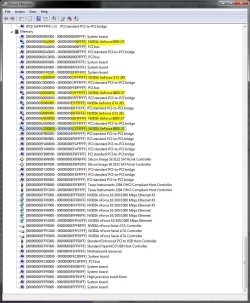
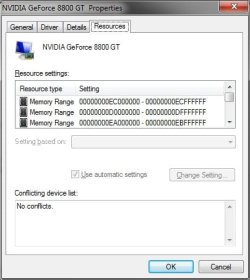
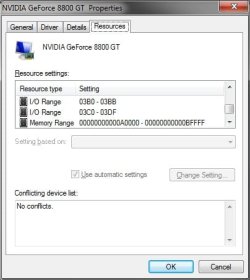
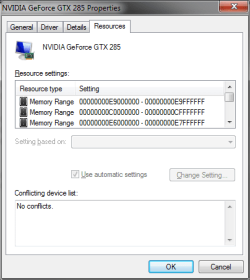
Hmm... GeneO, yes my motherboard supports up to 32GB RAM. It means that the memory controller can address memory banks as many as 32GB at all times. There is no relation between my memory controller's capability to address these RAM banks with the MMU in my CPU. See, the governor of all is the CPU. It got MMU integrated to it (Memory Management Unit). This little bugger controls the memory controller on the chipset (in my motherboard) or controls it's own embedded memory controller (in case of Phenom/Nehalem-like processor). It only controls what it's directly connected to it, in this case - RAM. The local cache of a graphic card (graphic card's "RAM") is NOT controlled nor mapped by MMU. Here's the proof of my statement: open device manager, change the view to "Resource by type". That's the whole address space your computer can have. Look for your display adapter and watch it's memory address reservation. Here are mine:

3rd_8800gt.JPG

2nd_8800gt.JPG

1st_8800gt.JPG

1st_gtx285.JPG

Those are not 512MB times 3 (for 8800GT) nor it's 1GB (for GTX285).

If the case were to use a motherboard with onboard graphics,
Deacon,

I had tried to simplify my explanation and misspoke when I said the amount avail = max memory your MB support - video ram. It is max address space your chipset supports - video ram. The two are not always the same.

The latest Intel X chipsets have 36 bit (64GB) of addressing so this is no longer a problem.

Your statement is true, because the onboard graphics will reserve the main RAM as it's local cache, thus "max address space the memory controller supports - video ram = amount available to the system". But in the case of dedicated card, this statement is incorrect, as you can see in Device manager. These add in cards have it's own firmware, it's own governor, it's own memory table, in short, it's a "microscopic computer" attached to PCIe bus.

Edit: Btw, if you read ASUS's P5N32-E SLI's spec, it only supports up to 8GB RAM. That motherboard has the same chipset as mine...

Edit2: If you're interested, expand the memory part in Device manager, I'll be updating this post on this segment once I got my screenshots... Here's the screenshot:

mem_reserv.JPG

000A 0000 - 000B FFFF = 131.071 8800GT
C000 0000 - CFFF FFFF = 268.435.455 GTX285
D000 0000 - DFFF FFFF = 268.435.455 8800GT
E600 0000 - E7FF FFFF = 33.554.431 GTX285
E900 0000 - E9FF FFFF = 16.777.215 GTX285
EC00 0000 - ECFF FFFF = 16.777.215 8800GT
EA00 0000 - EBFF FFFF = 33.554.431 8800GT

8800GT total: 318.898.172
GTX285 total: 318.767.101

Still not showing complete 1024MB + 512MB memory reservation...

GeneO, your description of the issue in post #28 makes perfect sense, but I have never heard that in relation to the amount of memory a motherboard supports. That just seems strange to be discussing accessing memory beyong what is physically installed...such as the case above with 4 GB installed, and a 1 GB video board being present in the system. Again, I'm not saying you are wrong, but I worked for a major system builder for quite some time, and never heard of the physical limitations of the board having anything to do with how much of the physically installed memory can be accessed.

You're right all along, it is strange... Don't start doubting your self... :p

zzz2496
 
Last edited:

My Computer

Computer Manufacturer/Model Number
Self Built
OS
Windows7 Ultimate 64bit
CPU
Intel Core 2 Quad Q6600
Motherboard
Abit IN9-32X-MMAX
Memory
DDR2 Adata 4GB
Graphics Card(s)
Nvidia GeForce GTX 285 1024 and Nvidia GeForce 8800GT 512
Sound Card
Asus Xonar HDAV 1.3
Monitor(s) Displays
Dell 2407WFP and BenQ 2400v and Philips 150v3
Screen Resolution
3840x1200 and 1024x768
Hard Drives
2 WDC 1TB
1 WDC 1.5TB
1 WDC 640GB
1 WDC 320GB
1 Seagate 200GB
PSU
Corsair TX 850W
Case
Cooler Master HAF932
Cooling
Arctic Cooling Freezer Extreme and plenty of fans...
Keyboard
MicrosoftNaturalKeyboard 4000/Apple Alu keyboard/Dinovo mini
Mouse
Logitech G5/MarbleMouseTrackball/PerformanceMX/SpacePilotPRO
Internet Speed
1.5Mbps down/384Kbps up
Other Info
APC SURT 1000XL
Logitech Z-560
Wiimote
Mikrotik Router
Linksys (now Cisco) SD2008 8 port Gigabit switch
Linksys WRT54G (acting as AP)
Apple wireless Aluminium keyboard
Apple Magic Mouse
Xbox360 wired controller
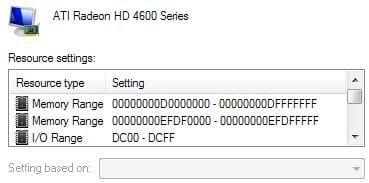
I am afraid you are wrong zzz2496. Your memory doesn't "cache" your video RAM, it is directly mapped.

You are not looking at the memory address mapped for the device, but the IO register address Range. Go to the device manager, select your display adapter, select properties, then go to the Resources tab. You will see something like below. What you are looking at is the IO mapping at the bottom. Above that is the address range that maps to my video card and what takes up 0.5GB of my 4GB of memory. Some more advanced chipsets might make the remapping of the holes transparently, I don't know. But do this exercise and see if you have similar Memory range.

What you are looking at is Resources by type -> Input/Output (IO)
Instead look at Resources by type -> Memory to see how your memory is mapped to devices.

Note in the included jpeg there are two address ranges for my video card. D0000000 = 3489660928 and goes up to DFFFFFFF = 3758096383 and from 4024369152 to 4024434687 i.e., 512MB mapped to the upper part of my 4GB of address space. There is also a smaller reserved address range in low memory, not shown, for booting in low res graphics.

Edit, so I see your edit. Yes it doesn;t add up.


- Gene
 

Attachments

  • video.JPG
    video.JPG
    18 KB · Views: 3
Last edited:

My Computer

Computer type
PC/Desktop
Computer Manufacturer/Model Number
Home built (GeneO industries)/Model 4
OS
Windows 10 Pro. EFI boot partition, full EFI boot
CPU
i7 4770k 4.4GHz (44-44-43-43 turbo) @ 1.248V
Motherboard
ASUS Maximus VI Hero
Memory
16GB (8GBx2) @2200 MHz G.skill Sniper 10-11-10-30-1, 1.6V
Graphics Card(s)
MSI GTX 970 Gaming 4G
Sound Card
Onboard SupremeFX Audio
Monitor(s) Displays
NEC Spectraview 2490WUXi-SV
Screen Resolution
1920 x 1200
Hard Drives
Samsung 850 Pro 256GB (OS), Samsung 2x 128GB 840 Pro SSD in RAID0, 3x WD Blue 6Gb/s 1TB RAID0, WD 2TB Black external USB 3.0, 2TB WD20EARS Green external USB 3.0, 2x 500GB Seagate and 1 750 GB external USB, 1x 350GB external USB3
PSU
Seasonic X-850 (2012 KM3 model)
Case
Fractal Design Define R4
Cooling
NH-D14, NF-F12, NF-A15; NF-P14, NF-P12,NF-A14, S12A PWM
Keyboard
Cooler Master Storm Quickfire Rapid - Brown
Mouse
Logitech G602
Internet Speed
126.4 Mb/s down, 24.3 Mb/s up
Other Info
USB 3.0 x8 , SATA III x8, eSATA, USB 2.0 x6. Samsung DVD R/W drive.

WEI: CPU 7.8, Memory 7.9, Graphics 7.9, Disk 7.9
GeneO - I'm on it, will update this post once have everything...

I got the picture, it's the second one (I updated my post earlier, post 36), the one large Device manager screenshot. It shows me the exact memory maps/address reservation as your screenshot... But I'll post it for simplicity sake:

8800GT
8800gt_mem_range.jpg
8800gt_mem_range2.jpg

GTX285
285_mem_range.png

Both shows the same value as my earlier post... I'm still seeing around 400MB per card address mapped to my display adapter instead of 1.5GB... And on your screenshot (and your calculation): "D0000000 = 3489660928 and goes up to DFFFFFFF = 3758096383" = 268.435.455, not 512MB.

zzz2496
 

My Computer

Computer Manufacturer/Model Number
Self Built
OS
Windows7 Ultimate 64bit
CPU
Intel Core 2 Quad Q6600
Motherboard
Abit IN9-32X-MMAX
Memory
DDR2 Adata 4GB
Graphics Card(s)
Nvidia GeForce GTX 285 1024 and Nvidia GeForce 8800GT 512
Sound Card
Asus Xonar HDAV 1.3
Monitor(s) Displays
Dell 2407WFP and BenQ 2400v and Philips 150v3
Screen Resolution
3840x1200 and 1024x768
Hard Drives
2 WDC 1TB
1 WDC 1.5TB
1 WDC 640GB
1 WDC 320GB
1 Seagate 200GB
PSU
Corsair TX 850W
Case
Cooler Master HAF932
Cooling
Arctic Cooling Freezer Extreme and plenty of fans...
Keyboard
MicrosoftNaturalKeyboard 4000/Apple Alu keyboard/Dinovo mini
Mouse
Logitech G5/MarbleMouseTrackball/PerformanceMX/SpacePilotPRO
Internet Speed
1.5Mbps down/384Kbps up
Other Info
APC SURT 1000XL
Logitech Z-560
Wiimote
Mikrotik Router
Linksys (now Cisco) SD2008 8 port Gigabit switch
Linksys WRT54G (acting as AP)
Apple wireless Aluminium keyboard
Apple Magic Mouse
Xbox360 wired controller
Whatever decision you make, the way I see it, you can never have too much RAM.
 

My Computer

OS
Windows 7 Ultimate x64 SP1
CPU
Intel Core i3 530 2.93 Ghz Clarkdale
Motherboard
ASRock P55 PRO/USB3 LGA 1156
Memory
4 GB OCZ DDR3 1600 (PC12800) Low Voltage Desktop Memory
Graphics Card(s)
Nvidia GeForce GTX 550 Ti with 1 GB of RAM
Sound Card
Realtek HD ALC892
Monitor(s) Displays
20'' eMachines E202HDbmd Glare Panel Widescreen
Screen Resolution
1600 x 900
Hard Drives
Western Digital 1 TB Caviar Black Edition (7200 RPM) SATA
Hitachi Deskstar 500 GB (7200 RPM) SATA
Samsung SpinPoint 400 GB (7200 RPM) SATA
PSU
Rosewill Xtreme Series RX750-D-B ATX12V v2.2 & EPS12V (750W)
Case
Cooler Master Centurion 534 RC-534-KKN2-GP Mid-Tower
Cooling
Standard Case Fans and Stock CPU Heatsink
Keyboard
Microsoft Wireless Optical Desktop Elite
Mouse
Microsoft Wireless Optical Desktop Elite
Internet Speed
7.1 Mbps Verizon DSL

My Computer

Computer Manufacturer/Model Number
Self Built
OS
Windows7 Ultimate 64bit
CPU
Intel Core 2 Quad Q6600
Motherboard
Abit IN9-32X-MMAX
Memory
DDR2 Adata 4GB
Graphics Card(s)
Nvidia GeForce GTX 285 1024 and Nvidia GeForce 8800GT 512
Sound Card
Asus Xonar HDAV 1.3
Monitor(s) Displays
Dell 2407WFP and BenQ 2400v and Philips 150v3
Screen Resolution
3840x1200 and 1024x768
Hard Drives
2 WDC 1TB
1 WDC 1.5TB
1 WDC 640GB
1 WDC 320GB
1 Seagate 200GB
PSU
Corsair TX 850W
Case
Cooler Master HAF932
Cooling
Arctic Cooling Freezer Extreme and plenty of fans...
Keyboard
MicrosoftNaturalKeyboard 4000/Apple Alu keyboard/Dinovo mini
Mouse
Logitech G5/MarbleMouseTrackball/PerformanceMX/SpacePilotPRO
Internet Speed
1.5Mbps down/384Kbps up
Other Info
APC SURT 1000XL
Logitech Z-560
Wiimote
Mikrotik Router
Linksys (now Cisco) SD2008 8 port Gigabit switch
Linksys WRT54G (acting as AP)
Apple wireless Aluminium keyboard
Apple Magic Mouse
Xbox360 wired controller
Back
Top