
3 Major Window 7 Complaints

garret334

New member
Local time
6:44 AM
Messages
13
I have 3 major complaints about changes made to Windows since XP Pro that are not just really annoying but were valuable functionality removed and it seems as though Microsoft has no intention of restoring these back. I would really like to know WHY?

1. Advanced Search - (XP options got the job done, Vista's A.S. was very workable and Windows 7 is completely and totally unacceptable!). (I have been in the IT field for 37 years, I had worked with dozens of operating systems before Microsoft had DOS. I am proficient with every operating system Microsoft has released with the exception Windows Server 2008 and even with that I am working towards my certification. How could you deliver an OPERATING SYSTEM with such a poor search function? The search functionality in Windows 7 is beneath Microsoft. A screen/form similar to the Advanced Search in Vista is something Microsoft could probably due is Days. Why you haven’t done it is beyond comprehension!)

2. Computer Management - Missing the Properties Menu (was on option was initiated via Right click).
In XP PRO it worked as follows:
Right click on My Computer->Manage->Action->Connect to another computer
->Right click on "Computer Management" -> Properties - Now missing
There were 2 tabs (Computer Name and Advanced)
In Computer Name you could change the "Computer Description associated with a PC"
In Advanced tab you had the same options as the Advanced Tab as in XP's
system properties advanced tab.
I am an IT Manager for 2 companies currently and I have managed sites for most of the last 25 years. I have used this management function daily for the last 7 years, viewed events and monitor systems throughout our company both locally and remotely. I have seen/reviewed some of the proposed solutions for remotely logging off or shutdown and systems. Why should we have to go through this with your latest release operation systems supposedly designed to improve our productivity? Improved productivity is how I convince my employers that it makes since to invest in your new products.

3. Desktop Tool bars – Since Windows 7 you can no longer have/allow desktop tool bars. Again for the last 8 years, I have for used and configured desktop tool bars for users of just about every system I have installed both as a Reseller and as an IT manager. A single line of icons at the top of each screen representing each user’s most actively used programs. The location along with single click functionality equals productivity. Why would you prevent this function? If you your answer is to allow a moved Window to the top of screen to provide full screen display, I would say to you that this “so called option or enhancement” is one of the most annoying features you have added.

Please Microsoft, address these issues. We need your help to sell our company’s management on the advantages of your new products! PLEASE
 

My Computer My Computer

Computer Manufacturer/Model Number
Custom Build
OS
Windows 7 Ultimate x64
CPU
Core I7 950
Motherboard
Asus P6TD Deluxe
Memory
12GB OCZ
Graphics Card(s)
Nvidia Geforce 8800 GTS
Sound Card
Integrated
Monitor(s) Displays
24" Samsung 2493
Hard Drives
3 x 150GB VelociRaptors
PSU
Enermax 620 Watt
Case
Cooler Master CM690
Cooling
lots
hi and welcome to the forums:)

well i can see you are not happy with windows 7
1) the search function i believe has much improved just type away in the start menu box have you got the drive/drives indexed?
2) Computer Management in my opinion much better over xp
3)Desktop Tool bars no problems here

but of course this is my opinion :)
 

My Computer My Computer

Computer Manufacturer/Model Number
packard bell IXTREME M5722
OS
Operating System : Windows 7 Home Premium Edition 6.01.7600 SP1 (x64)
CPU
Processor : Intel Core 2 Quad Q8300 @ 2500 MHz
Motherboard
Mainboard : Packard Bell (Acer EG43M )
Memory
Physical Memory :8GB Corsair4x 2GB 800MHz C5 DDR2
Graphics Card(s)
Video Card : XFX 6700 AMD
Monitor(s) Displays
Maestro 234DL - BenQ V2220 - BenQ VW2420H
Screen Resolution
Current Display :1920x1080p pixels at 60 Hz in HD LED
Hard Drives
Hard Disks : WDC (1000 GB)
Drive C: (Hard Disk) : 428 GB available on 491 GB
Drive D: (Hard Disk) : 426 GB available on 492 GB
SAMSUNG spinpoint HD103SJ 1000.2 GB
(X 2) KINGSTON SSD NOW V 30GB
PSU
XFX ProSeries 550W PSU
Case
PACKARD BELL IXTREME
Cooling
System Blower Current: 150mA Air Flow16CFM ;Akasa 90mm rear
Keyboard
Gigabyte Aivia K8100
Mouse
TRUST-Wireless Laser Mouse - Carbon edition MI-7770C
Internet Speed
TP-LINK > TL-WN951N / AV500 Gigabit Powerline Adapters
Browser
chrome dev
Other Info
EXTRA COOLING>(FAN CONTROLLER) PC Bay Cooler 3 x 40mm fans; Akasa AK-HD-BL Blue hard drive cooler 2 x 40 mm fan 4500 rpm 29.7 dBA
Bios> American Megatrends Inc.
Version : P01-A1
Date : 08/31/2009

My Computer My Computer

Computer Manufacturer/Model Number
HP, Dell, Gateway, Toshiba - 4 laptops and 2 desktops
OS
Vista, Windows7, Mint Mate, Zorin, Windows 8
CPU
from 1.6GHz Duo to i7
Monitor(s) Displays
2x HP w2207
Hard Drives
5x HDD, 7x SSD, 12x Externals
Keyboard
with trackball - no mices
Mouse
Trackball mice
Internet Speed
DSL 6000
Sounds like it's time to stop letting those 37 years of doing things one way pull you down and learn some new ways! Join us in 2011 :)
 

My Computer My Computer

Computer Manufacturer/Model Number
Custom
OS
Windows 7 Ultimate RTM (Technet)
CPU
3.00 gigahertz Intel Core2 Duo E8400
Motherboard
ASUSTeK Computer INC. P5K/EPU Rev 1.xx
Memory
4GB
Graphics Card(s)
ATI Radeon X1950 Pro
Sound Card
Built in HD Audio
Monitor(s) Displays
22" Gateway LCD
Screen Resolution
1920 x 1200
Hard Drives
ST3160023A [Hard drive] (160.04 GB) -- drive 0, rev 8.01, ST3500630AS [Hard drive] (500.11 GB) -- drive 2, rev 3.AAK
ST3500630AS [Hard drive] (500.11 GB) -- drive 1, rev 3.AAK
Keyboard
Logitech G11
Mouse
Microsoft Wireless Laser Mouse 5000
Internet Speed
13.44 Mbps
  • Like
Reactions: whs
Please before you comment, I hope everyone else will know what they are talking about.

1) Windows 7 does not allow desktop tool bars period!

2) Windows 7 advanced search uses a text match string of sorts example: name:*.doc datemodified:01/11/2011 as opposed to the form more like that which Vista has.

3) In Computer Management the properties tab is completely missing. It sounds more like you all should come up to speed!
 

My Computer My Computer

Computer Manufacturer/Model Number
Custom Build
OS
Windows 7 Ultimate x64
CPU
Core I7 950
Motherboard
Asus P6TD Deluxe
Memory
12GB OCZ
Graphics Card(s)
Nvidia Geforce 8800 GTS
Sound Card
Integrated
Monitor(s) Displays
24" Samsung 2493
Hard Drives
3 x 150GB VelociRaptors
PSU
Enermax 620 Watt
Case
Cooler Master CM690
Cooling
lots
3 Major Complaints response

:geek:Hopefully you will know what you are talking about before you comment again!
1) Windows 7 does not allow desktop tool bars period!

2) Windows 7 advanced search uses a text match string of sorts example: name:*.doc datemodified:01/11/2011 as opposed to the form more like that which Vista has.

3) In Computer Management the properties tab is completely missing. It sounds more like you are the one who needs to come up to speed!
 

My Computer My Computer

Computer Manufacturer/Model Number
Custom Build
OS
Windows 7 Ultimate x64
CPU
Core I7 950
Motherboard
Asus P6TD Deluxe
Memory
12GB OCZ
Graphics Card(s)
Nvidia Geforce 8800 GTS
Sound Card
Integrated
Monitor(s) Displays
24" Samsung 2493
Hard Drives
3 x 150GB VelociRaptors
PSU
Enermax 620 Watt
Case
Cooler Master CM690
Cooling
lots
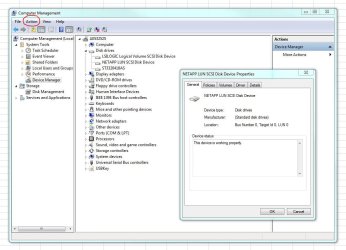
3) In Computer Management the properties tab is completely missing. It sounds more like you all should come up to speed!

Come up to speed this way rather - Under Action, is an option called Properties, or you can right-click on the device and select Properties. This is what happens when you select Properties, either way.
 

Attachments

  • Capture.JPG
    Capture.JPG
    91 KB · Views: 95

My Computer My Computer

Computer type
PC/Desktop
Computer Manufacturer/Model Number
Golden Mk. I.4
OS
Windows 10 Pro x64 ; Xubuntu x64
CPU
Intel i7 860 @ 2.80 GHz O/C'ed to 4.0GHz
Motherboard
Gigabyte P55A-UD3R Rev.1. Award BIOS F13
Memory
16GB Corsair Vengance DDR3 @ 661 MHz Dual Channel (9-9-9-24)
Graphics Card(s)
EVGA NVidia GTX 560 1024MB
Sound Card
Realtek Integrated
Monitor(s) Displays
Dual Samsung SyncMaster 2494HS
Screen Resolution
1920*1080 and 1920*1080
Hard Drives
1*Samsung 840 EVO 120GB SSD;
1*OCZ Vertex 2 60GB SSD;
2*Samsung F3 SpinPoint 1TB in RAID0;
1*Samsung F1 SpinPoint 1TB;
2*Western Digital 1TB External USB 3.0
1*Western Digital 500GB External USB 3.0
1*Seagate 500GB External USB 2.0
PSU
Thermaltake ToughPower QFan 750W
Case
Thermaltake Element S VK60001W2Z
Cooling
Corsair H60 Water Cooling, 2*230mm and 2*80mm case fans
Keyboard
Logitech G110
Mouse
Logitech MX518
Maybe you should stay on XP - how is that for an alternative. Try to find the Ford Model T controls on a 2011 Ford. They even had a crank in the front in those days.
 

My Computer My Computer

Computer Manufacturer/Model Number
HP, Dell, Gateway, Toshiba - 4 laptops and 2 desktops
OS
Vista, Windows7, Mint Mate, Zorin, Windows 8
CPU
from 1.6GHz Duo to i7
Monitor(s) Displays
2x HP w2207
Hard Drives
5x HDD, 7x SSD, 12x Externals
Keyboard
with trackball - no mices
Mouse
Trackball mice
Internet Speed
DSL 6000
Sounds like it's time to stop letting those 37 years of doing things one way pull you down and learn some new ways! Join us in 2011 :)
+1.

I have always wondered why it's precisely us, the geeks and nerds, who so often have enormous problems to understand that as everything else, also operating systems evolve. How can someone still think that when hardware is changing and developing so incredible fast, the OS should stay as it has always been and not change at all.

In my opinion, it's time to get a new job or retire when we are no longer willing to learn something new our job requires.

Kari
 

My Computer My Computer

Computer type
Laptop
Computer Manufacturer/Model Number
HP ENVY 17-1150eg
OS
Windows 10 Pro x64 EN-GB
CPU
1.6 GHz Intel Core i7-720QM Processor
Memory
6 GB
Graphics Card(s)
ATI Mobility Radeon HD 5850 Graphics
Sound Card
Beats sound system with integrated subwoofer
Monitor(s) Displays
17" laptop display, 22" LED and 32" Full HD TV through HDMI
Screen Resolution
1600*900 (1), 1920*1080 (2&3)
Hard Drives
Internal: 2 x 500 GB SATA Hard Disk Drive 7200 rpm
External: 2TB for backups, 3TB USB3 network drive for media
Cooling
As Envy runs a bit warm, I have it on a Cooler Master pad
Keyboard
Logitech diNovo Media Desktop Laser (bluetooth)
Mouse
Logitech Performance Mouse MX
Internet Speed
50/10 Mbps VDSL
Antivirus
Windows Defender 4.3.9431.0
Browser
Maxthon 3.5.2., IE11
3 Major complaints - Computer Management missing properties tab explained in detail.

Please ignore this if you are already familiar with how it use to work.

In XP PRO it worked as follows:
Right click on Computer Management -take the Action- ->Connect to another computer
->Right click on "Computer Management" (at the top of the tree)
->Properties - Now missing
There were 2 tabs (Computer Name and Advanced)
In Computer Name you could change the "Computer Description"
In Advanced you had the same option as the Advanced Tab with XP's
system properties advanced tab.

The Advanced tab showed the "System properties advanced tab" which includes the following:
Performance <settings>
Environmental variables <settings>
startup and recovery <settings>

Vista and Windows 7 the last step(Properties) is missing from Computer Management period!

:)I hope this helps.
 

My Computer My Computer

Computer Manufacturer/Model Number
Custom Build
OS
Windows 7 Ultimate x64
CPU
Core I7 950
Motherboard
Asus P6TD Deluxe
Memory
12GB OCZ
Graphics Card(s)
Nvidia Geforce 8800 GTS
Sound Card
Integrated
Monitor(s) Displays
24" Samsung 2493
Hard Drives
3 x 150GB VelociRaptors
PSU
Enermax 620 Watt
Case
Cooler Master CM690
Cooling
lots
3 Major complaints - Computer Management missing properties tab explained in detail.

Please ignore this if you are already familiar with how it use to work.

In XP PRO it worked as follows:
Right click on Computer Management -take the Action- ->Connect to another computer
->Right click on "Computer Management" (at the top of the tree)
->Properties - Now missing
There were 2 tabs (Computer Name and Advanced)
In Computer Name you could change the "Computer Description"
In Advanced you had the same option as the Advanced Tab with XP's
system properties advanced tab.

The Advanced tab showed the "System properties advanced tab" which includes the following:
Performance <settings>
Environmental variables <settings>
startup and recovery <settings>

Vista and Windows 7 the last step(Properties) is missing from Computer Management period!

:)I hope this helps.
How is this supposed to help. Who wants to go back to XP. All those functions are available. Go on an egg hunt and you shall find.
 

My Computer My Computer

Computer Manufacturer/Model Number
HP, Dell, Gateway, Toshiba - 4 laptops and 2 desktops
OS
Vista, Windows7, Mint Mate, Zorin, Windows 8
CPU
from 1.6GHz Duo to i7
Monitor(s) Displays
2x HP w2207
Hard Drives
5x HDD, 7x SSD, 12x Externals
Keyboard
with trackball - no mices
Mouse
Trackball mice
Internet Speed
DSL 6000
For all of you critical guru, I think you have wasted enough of my time.

I posted this complaint hoping that someone from Microsoft monitored it this site. Or maybe a professional who manages a lot of systems on a domain might have some helpful suggestions. It is a little disappointing the "senior members" and "seven guru" have so little to contribute.

I also prefer Windows 7 but/and it could be much better.

Good Luck all of you rookies.
 

My Computer My Computer

Computer Manufacturer/Model Number
Custom Build
OS
Windows 7 Ultimate x64
CPU
Core I7 950
Motherboard
Asus P6TD Deluxe
Memory
12GB OCZ
Graphics Card(s)
Nvidia Geforce 8800 GTS
Sound Card
Integrated
Monitor(s) Displays
24" Samsung 2493
Hard Drives
3 x 150GB VelociRaptors
PSU
Enermax 620 Watt
Case
Cooler Master CM690
Cooling
lots
Sorry, but a rookie would still be doing this stuff manually though the GUI like yourself. I think it is time you learn to automate all this stuff you have been doing for the last, 37 years was it? Windows 7 comes bundled with PowerShell, very versatile scripting environment. A lot of the management interface coming from Microsoft these days are built right on top of PowerShell.

As for your number three complaint, there are so many "dock" programs out there that offer a lot more features and look heelava lot better. Furthermore, the users can pin their most used applications right on the taskbar itself.
 

My Computer My Computer

Computer type
PC/Desktop
Computer Manufacturer/Model Number
Alienware Aurora ALX R4
OS
Windows 10 Pro (x64)
CPU
Intel Core i7-3930K (3.2GHz - 4.5GHz)
Motherboard
Alienware Aurora-R4 x79
Memory
4x Samsung 4GB PC3-12800 DDR3 (16GB 1600MHz)
Graphics Card(s)
Nvidia Geforce GTX 690
Sound Card
SteelSeries Siberia Elite
Monitor(s) Displays
Dell UltraSharp U3011
Screen Resolution
2560x1600
Hard Drives
Samsung 850 Pro 256 GB, Seagate 1TB Desktop Hybrid HDD, 2x Western Digital 4TB Green HDD
PSU
875W Some Dell PSU <.<
Case
Alienware Aurora ALX
Cooling
Custom Liquid Cooling (EK CPU & GPU blocks) dual EK 480RAD
Keyboard
Logitech G710+ Mechanical
Mouse
Logitech G700s
Internet Speed
Verizon Fios (50 mbps average)
Other Info
Server: Intel NUC D54250WYK: i5-4250U, 16GB, 256 GB mSATA, Windows Server 2012 R2

My Computer My Computer

Computer Manufacturer/Model Number
Hopalong/ Godzilla
OS
Windows7 Pro 64bit SP-1; Windows XP Pro 32bit
CPU
Intel Core i7-870 Lynnfield 2.93GHz LGA 1156 95W Quad-Core
Motherboard
ASUS P7P55D-E PRO
Memory
8GB@1400MHz Crucial Ballistix DDR3-1600 4x2GB
Graphics Card(s)
ASUS ENGTX460 DirectCU/2DI/1GD5 1GB 256-bit GDDR5
Sound Card
VIA Onboard
Monitor(s) Displays
Asus VS248H-P 24"; Samsung SyncMaster 941BW 19"ws
Screen Resolution
1920x1080; 1440x900
Hard Drives
Samsung 830 120GB SSD
Intel 320 120GB SSD
Western Digital Caviar Black WD7501AALS 750GB 7200 RPM SATA 3.0Gb/s
Western Digital Caviar Black WD6401AALS 640GB 7200 RPM SATA 3.0Gb/s
PSU
COOLER MASTER Silent Pro RS850-AMBAJ3-US 850W Modular
Case
COOLER MASTER HAF 932 RC-932-KKN5-GP Black
Cooling
Scythe "Mugen-2 Rev.B" (2 ScytheKaze-Jyuni PWM fans)
Keyboard
Logitech K-320
Mouse
Kensington
Antivirus
Avast Inernet Suite
Browser
IE 9 ; Chrome
hoping that someone from Microsoft monitored it this site
Shows how little this newbie knows.
 

My Computer My Computer

Computer Manufacturer/Model Number
HP, Dell, Gateway, Toshiba - 4 laptops and 2 desktops
OS
Vista, Windows7, Mint Mate, Zorin, Windows 8
CPU
from 1.6GHz Duo to i7
Monitor(s) Displays
2x HP w2207
Hard Drives
5x HDD, 7x SSD, 12x Externals
Keyboard
with trackball - no mices
Mouse
Trackball mice
Internet Speed
DSL 6000
Please Microsoft, address these issues. We need your help to sell our company’s management on the advantages of your new products! PLEASE

Here is what he may be looking for.

Contact Us
 

My Computer My Computer

Computer Manufacturer/Model Number
Hopalong/ Godzilla
OS
Windows7 Pro 64bit SP-1; Windows XP Pro 32bit
CPU
Intel Core i7-870 Lynnfield 2.93GHz LGA 1156 95W Quad-Core
Motherboard
ASUS P7P55D-E PRO
Memory
8GB@1400MHz Crucial Ballistix DDR3-1600 4x2GB
Graphics Card(s)
ASUS ENGTX460 DirectCU/2DI/1GD5 1GB 256-bit GDDR5
Sound Card
VIA Onboard
Monitor(s) Displays
Asus VS248H-P 24"; Samsung SyncMaster 941BW 19"ws
Screen Resolution
1920x1080; 1440x900
Hard Drives
Samsung 830 120GB SSD
Intel 320 120GB SSD
Western Digital Caviar Black WD7501AALS 750GB 7200 RPM SATA 3.0Gb/s
Western Digital Caviar Black WD6401AALS 640GB 7200 RPM SATA 3.0Gb/s
PSU
COOLER MASTER Silent Pro RS850-AMBAJ3-US 850W Modular
Case
COOLER MASTER HAF 932 RC-932-KKN5-GP Black
Cooling
Scythe "Mugen-2 Rev.B" (2 ScytheKaze-Jyuni PWM fans)
Keyboard
Logitech K-320
Mouse
Kensington
Antivirus
Avast Inernet Suite
Browser
IE 9 ; Chrome
Garrett 344,
You have an opinion and you're fully entitled to it. I think you should change your opinion if and when it suites you.
The reality is XP is an operating system at the end of it's life. Overall I think (my opinion) Windows 7 is a better operating system than XP but it certainly has some deficiencies. You can work around those deficiencies.
 

My Computer My Computer

Computer type
PC/Desktop
Computer Manufacturer/Model Number
Own build
OS
Windows 7x64 Home Premium SP1
CPU
Intel i7 2600k
Motherboard
ASUS P8Z68 Deluxe
Memory
G.Skill Ripjaws (DDR3-1600) 2x4GB
Graphics Card(s)
Nvidia GeForce GTS 450; Intel HD Graphics 3000(GT2+)
Monitor(s) Displays
Dell Ultrasharp IPS panel U2311H, Samsung SyncMaster P2350
Screen Resolution
1920x1080
Hard Drives
Samsung 850 Pro SSD 256GB, Samsung SSD 840 120GB, Seagates 1TB Barracuda ST31000528AS x2
PSU
Seasonic M12II 520W
Case
Lian Li Lancool PC-K60
Cooling
Case: 1x120mm, 3x140mm CPU: Hyper 212+
Keyboard
Logitech MK520 (wireless)
Mouse
Logitech MK520
Internet Speed
6-7 Mbps
Antivirus
Norton Security Premium, Malwarebytes on 2 (MSE on 3rd PC)
Browser
FireFox
Other Info
Audio: Logitech Z523 2.1
I posted this complaint hoping that someone from Microsoft monitored it this site. Or maybe a professional who manages a lot of systems on a domain might have some helpful suggestions. It is a little disappointing the "senior members" and "seven guru" have so little to contribute.
I have to ask....if you know so much, and we are all clueless, with so little to contribute....why wouldn't you direct your complaints to the source, rather than some random forum board that has no affiliation with Microsoft? Microsoft has their own forums to post complaints about Windows 7. They monitor those complaints. However, I'll warn you in advance...if you didn't like the responses here, you won't like getting the same ones from an official source.

I'm disappointed as well...that people like you think rants and ravings will yield results. If you have legitimate complaints, create threads asking for options or workarounds. Simple venting isn't going to work.

Besides, Kari hit the nail right on the head. In this business, if you stop learning, you start failing.
 

My Computer My Computer

OS
Windows 7 Ultimate x64 SP1
CPU
Intel Core i7-2600
Motherboard
Gigabyte GA-P67A-UD3P-B3
Memory
12 GB Patriot Extreme DDR3-1333
Graphics Card(s)
Nvidia GTX 470
Monitor(s) Displays
Dell UltraSharp 2209WA
Hard Drives
OCZ Agility3 240 GB, WD5001AALS, WD7501AALS
PSU
OCZ ModStream 700W
Case
CoolerMaster HAF 912 Advanced
Cooling
CoolerMaster Hyper 212 Plus
For all of you critical guru, I think you have wasted enough of my time.

I posted this complaint hoping that someone from Microsoft monitored it this site. Or maybe a professional who manages a lot of systems on a domain might have some helpful suggestions. It is a little disappointing the "senior members" and "seven guru" have so little to contribute.

I also prefer Windows 7 but/and it could be much better.

Good Luck all of you rookies.

After 46 years of working for a living, except for a 4 year vacation that Uncle Sam sent me on to a pretty well know Asian country, I decided I was becoming too quarrelsome and grumpy with my bosses and the public, so I called it a day. And a career.

Looked in the mirror lately?
 

My Computer My Computer

Computer type
PC/Desktop
Computer Manufacturer/Model Number
Self build
OS
Windows 10 Home
CPU
Intel Core i5 3550
Motherboard
ASUS P8Z77-V LX (LGA1155)
Memory
Corsair Vengeance DDR3 16GB
Graphics Card(s)
Nvidia GEForce GTX 970 SSC
Monitor(s) Displays
Hanns-G 23.6", Acer 17"
Screen Resolution
1920x1080, 1440x900
Hard Drives
Sandisk SSD 256 GB
WD500GB
WD640GB
Seagage Ultra + 1TB ext.
BWD 800GB
WD 1TB ext
PSU
Antec 650w
Case
Cooler Master Centurion 534
Cooling
COOLER MASTER GeminII S524, 3 120 mm case fans.
Keyboard
Logitech MK300
Mouse
Logitech MK300
Internet Speed
Cable
Antivirus
MSSE, Malwarebytes
Browser
IE 10, Chrome
I dunno, the guy brings a few legitimate complaints to the table and he's met with ... derision?

I hate the Search function in Win 7. Have I learned to use it and tweak the indexing? Sure. Was it much, much easier in XP? Sure.

A bit of help and guidance in regard to his complaints would go much further than retorts simply saying "learn the new way."

My very humble opinion ...
 

My Computer My Computer

Computer Manufacturer/Model Number
Toshiba L355D
OS
Windows 7 Ultimate x64 SP1
CPU
Core2 Duo
Motherboard
Intel
Memory
4 GB
Graphics Card(s)
GM965 on-board
Sound Card
RealTek on-board
Monitor(s) Displays
19"+17"(laptop)
Screen Resolution
1440x900 (x 2)
Hard Drives
500GB Ext. 200GB Internal
PSU
N/A
Case
N/A
Cooling
N/A
Back
Top