

[My apologies if this is in the wrong sub-forum]
I am using Windows 7 Home Premium 64-bit (original + some updates, not SP1)
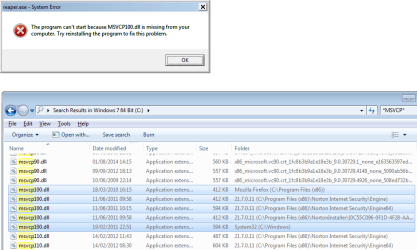
I wish to run a 32-bit application extension which requires MSVCP100.dll. The screenshot below shows the MSVCP100.dll files on my PC. I understand that the one in C:\Windows\System32\ is the 64-bit edition. And that I need an equivalent 32-bit edition to be in C:\Windows\SysWOW64.
Could someone let me know how do that?
One person suggested installing this:
Download Microsoft Visual C++ 2010 Redistributable Package (x86) from Official Microsoft Download Center
Another suggested this one:
https://www.microsoft.com/en-us/download/details.aspx?id=8328
But I would like to make sure that the solution is right for installing the 32-bit package on a Window 7 64-bit system.
Also:
-- is the SP1 package backward-compatible?
-- can this installation corrupt Windows itself?
-- this article was interesting reading too:
The 'Program Files (x86)' and 'SysWOW64' folders explained / Windows 64-bit (Technical Article)
I am using Windows 7 Home Premium 64-bit (original + some updates, not SP1)
I wish to run a 32-bit application extension which requires MSVCP100.dll. The screenshot below shows the MSVCP100.dll files on my PC. I understand that the one in C:\Windows\System32\ is the 64-bit edition. And that I need an equivalent 32-bit edition to be in C:\Windows\SysWOW64.
Could someone let me know how do that?
One person suggested installing this:
Download Microsoft Visual C++ 2010 Redistributable Package (x86) from Official Microsoft Download Center
Another suggested this one:
https://www.microsoft.com/en-us/download/details.aspx?id=8328
But I would like to make sure that the solution is right for installing the 32-bit package on a Window 7 64-bit system.
Also:
-- is the SP1 package backward-compatible?
-- can this installation corrupt Windows itself?
-- this article was interesting reading too:
The 'Program Files (x86)' and 'SysWOW64' folders explained / Windows 64-bit (Technical Article)
Attachments
My Computer
- Computer type
- PC/Desktop
- Computer Manufacturer/Model Number
- Scan 3XS P55 liteDAW
- OS
- Windows Home Premium (64)
- CPU
- Intel Core i7 860
- Motherboard
- Gigabyte GA-P55A-UD4
- Memory
- 8GB (4x2GB) Corsair TwinX XMS3
- Graphics Card(s)
- 1GB Gainward 9500 GT
- Sound Card
- M-Audio Delta 66
- Monitor(s) Displays
- Acer v223wBBd
- Screen Resolution
- 1680 x 1050
- Hard Drives
- 1 x 500 GB WD Barracuda (OS+Docs)
2 x 1TB Samsung Spinpoint F3 (Data)
- PSU
- Enermax EMD625AWT II - 625W Enermax Modu82+ II
- Case
- Fractal Design Define R2 Black
- Cooling
- Prolima Megahalems Super 6 Heatpipe Tower Cooler
- Keyboard
- Microsoft Digital Media Pro
- Mouse
- Belkin Optical Ergo
- Internet Speed
- 8 Mbps nominal (14.9 achieved !)
- Other Info
- Digital Audio Workstation


