3TB became 2 unallocated partions

RukatheBlackfis

New member
Local time
7:27 PM
Messages
3
I have read through a few of these older threads and it didn't seem like they exactly matched up to my problem but this thread was very close. I have a 3TB seagate external. I believe the bridge controller died but in this process I was able to get 95-98% of the data. I bought a new external case and put the drive in there. When I did this, it showed up as 1 healthy partition, and 2 unallocated partitions. Originally it was all one partition.
The OP from that thread ended up using Minitool PowerData Recovery to recover data. But I noticed a few posters had told the OP they had messed up trying to do data recovery. However it was suggested they use Partition Recovery Wizard in Partition Wizard Home Edition 8.1.1 even though it didn't end up working and then later PhotoRec or TestDisk. Minitool was one of the first companies I ran into as well but I'm waiting to hear back from them before I buy it.
I'm very sure the 349GB is the free space I had before and the two unallocated partitions have the data.

I just want to know if I'm on the right track. I guess I'm not too picky how the data is recovered as long as it is. I would prefer the structure, but I'd rather have the files intact than not at all.
 

Attachments

  • disk.jpg
    disk.jpg
    76.2 KB · Views: 2

My Computer My Computer

Computer type
PC/Desktop
OS
Windows 7 Ultimate 32bit
Hi RukatheBlackfis,

Welcome to Seven Forums.

Now do not mess up your drive trying this or that, that would make data recovery difficult or even impossible.

Your problem is a very simple problem and all your data can be recovered complete with its original structure onto another drive.

Just go to this thread mentioned below and read it and reread it carefully and understand how another jumanji there ;) helped the OP in the same predicament there, to recover all his data.

Hard Drive seems corrupt. 1 Partition now showing now as 2 Partitions? ( I don't know why the OP put two "nows" - Is it because he saw two additional partitions? :))

https://www.tenforums.com/drivers-h...upt-1-partition-now-showing-3-partitions.html

Basically you will use TestDisk, change sector size to 4096 and ask TestDisk to read the data as coming from 4096 bytes/sector.

Please make sure you do not write anything using the TestDisk. The only operation to be performed is changing the Sector size on the faulty drive to 4096 in TestDisk.

If you have any doubts, do not hesitate to ask.
 
Last edited:

My Computer My Computer

OS
Windows 7 Home Premium 32 bit
Thank you! I've read through most of that thread. This case seems very similar only I didn't mess with my harddrive as much as that OP.
I don't have enough time in the next couple days to do this. I will however do this next week (Thursday) on my day off. It will give me a lot of time to read over that thread.

I do have a couple questions. If the process works, can I leave and come back to it? Will it basically become a functioning harddrive once again? Or do I need to straight copy to another harddrive at the time of recovery?
Basically I need to set up a harddrive and a time to which I can do this. If I can leave and come back to it, that's better. If not, I have to prepare.
 

My Computer My Computer

Computer type
PC/Desktop
OS
Windows 7 Ultimate 32bit
If the local time shown in your post is correct it is your sleep time now. Go to sleep. When you wake up you can see my reply. ( Hmmm........... that gives me enough time to compose my reply at my leisure.. :))
 

My Computer My Computer

OS
Windows 7 Home Premium 32 bit
Continuing....

"If the process works, can I leave and come back to it?"

The process will work. Once you know what to do and how to do, you can run TestDisk anytime and recover the data.

"Will it basically become a functioning harddrive once again? Or do I need to straight copy to another harddrive at the time of recovery?"

Your 3TB hdd is functional and will be functional. (In the current state the drive translation circuitry that was in the original enclosure, had written the data in 4096 byte streams instead of the usual 512 byte stream. In the absence of that drive translation circuitry which reconverts the 4096 byte data stream coming out of the platters during the read operation into 512 byte streams, the OS misinterprets and shows your drive with three partitions. TestDisk will now perform the reconversion process and present that data in 512 byte stream to the OS to be visible.) Once the data is visible in TestDisk, you have to copy all those data into another HDD and this data will now be written into the destination drive in the conventional 512 byte stream. So You have to do a straight copy to another HDD.

Once all the data in the 3TB MBR drive has been copied, you can do a clean wipe ( Diskpart Clean), initialise the drive as GPT and format it. You will now have a functional 3TB drive.

"Basically I need to set up a harddrive and a time to which I can do this. If I can leave and come back to it, that's better. If not, I have to prepare"

Yes, depending upon the amount of data, the copying process can take many hours. You can run TestDisk before you go to sleep and start the copy process and allow it to run overnight.( I presume you will have no power breakdowns, thunderstorms and tornadoes :geek:)

I shall break here for a breather and return after sometime to complete this post.
 

My Computer My Computer

OS
Windows 7 Home Premium 32 bit
Continuing.......

"I don't have enough time in the next couple days to do this. I will however do this next week (Thursday) on my day off. It will give me a lot of time to read over that thread."

There is absolutely no need to hurry up things. But do not keep the enclosure containing your 3TB Seagate plugged in always. Safely remove it and keep till you are ready to try.

Next Thursday is 01 June 2017. Your Friday 2nd morning, my Friday evening, I will already be in the Airport to catch the flight to Bali, Indonesia. For 1 week thereafter I will be off the internet ( I may not count on the free internet that may be available in the resort where I stay). So I cannot monitor or clarify on anything you do.

Perhaps by tomorrow, I shall consolidate what had been done in the Ten forums thread and put it in one post here with screenshots. ( I see that the OP in Ten Forums had deleted many screenshots later for privacy)

You can then follow these screenshots instead of wading through the complete thread in Ten Forums which may be confusing at times because of the deleted screenshots there.

Till 31 May I am still here. Even if you do not have another external drive to copy the files, you can go upto the stage of listing the files in TestDisk. In fact you can even select just one or two files and copy it to your system drive provided you have enough space for that. By default TestDisk will save the files in its own folder.( Normally I do not recommend this.) But do not overdo it to consume all space on your system drive.
 
Last edited:

My Computer My Computer

OS
Windows 7 Home Premium 32 bit
Preparation:

1. Download and install Windows version of TestDisk & PhotoRec 7.0 (18 April 2015), Data Recovery from http://www.cgsecurity.org/wiki/TestDisk_Download (Do not download beta 7.1-WIP or Windows 64-bit version even if your system is 64 bit). Extract the testdisk-7.0.win.zip(11.8MB) to the root of your System drive. You will run testdisk_win.exe in the extracted testdisk-7.0 folder. ( Should be run as administrator in case you are not an User with Administrator privileges)

2. On your Destination Drive where you want to copy your files, create a folder named Recovery.( In TestDisk you will have to navigate to your Destination Drive letter: \Recovery to copy the files.)

3. Read my post#28 Copying files listed by TestDisk during Recovery in My external hard drive suddenly became unllocated:

Procedure:

1. Please remove all other USB storage devices/hubs/docks. Plug in your larger than 2TB problem HDD either internally or in a working external enclosure.

2. Run testdisk_win.exe (as an administrator or user with Administrator privileges). In the TestDisk window you will navigate using Left/Right, Up/Down arrow keys.

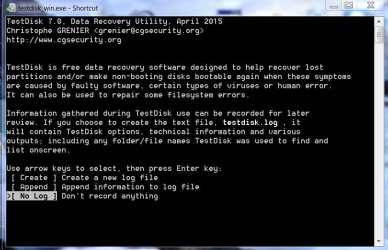
First Screen:

1 No Log.jpg

Highlight [No Log] and Press Enter key

Second Screen:

2 Sel sourcedisk.jpg

You should see your System disk, problem >2TB disk and the Destination Disk alongwith the drives. (Identify your disks by their capacity). Highlight your problem Disk. Also note down the drive letter of your Destination Disk. Press Enter key ( In the screenshot my Destination Disk is 500GB and its drive letter is J: When copy time comes I will show Directory J: \Recovery as the destination to copy files to.)

Third Screen:

3 Intel.jpg

Highlight [Intel] and press Enter key

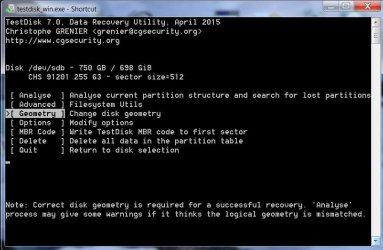
Fourth Screen:

4Geometry.jpg

Highlight [Geometry] and press Enter key

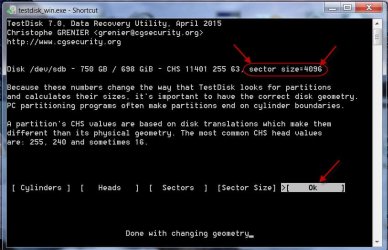
Fifth Screen:

5 Sector size.jpg

Is the Sector Size of the HDD shown as 512 at the top? If yes, move the highlight to [Sector Size] command at the bottom and Press Enter Key

Sixth Screen:

6 4096.jpg

Type 4096 and press Enter Key to change the sector size

Seventh Screen:

7 OK.jpg

Does the sector size show as 4096 at the top of the Window? If yes, highlight [OK] and Press Enter key

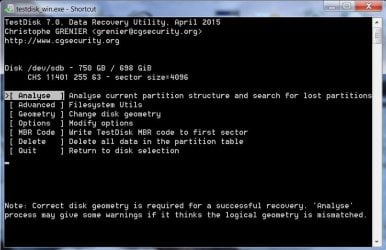
Eighth Screen:

8 Analyse.jpg

Highlight [Analyse] and press Enter key

Ninth Screen

9QSearch.jpg

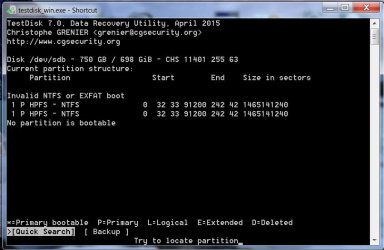
This screen may show a wrong Partition Structure. If it does, highlight [Quick Search] and press Enter key. ( There is a possibility that TestDisk may skip this screen and straightaway go to Tenth Screen. Do not mind.)

Tenth Screen:

10Type P.jpg

Does this screen show the correct partition/s and read as "Structure OK ....blah blah......." ? Thank your stars and give a clap. ( Do you have a brick and/or an egg to throw at too? :D). You can now type P (upper case, Shift+P) and press Enter to list the files
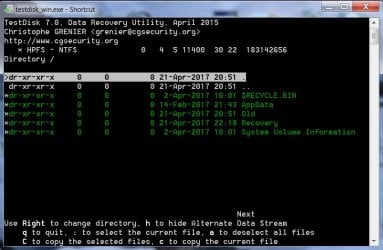
Eleventh Screen:

11 Copy.jpg

Do you see all your folders/files listed? Copy time ( Coffee time for me :)) . Select and issue the appropriate command to copy the files.

My post#28 Copying files listed by TestDisk during Recovery in My external hard drive suddenly became unllocated:
 
Last edited:

My Computer My Computer

OS
Windows 7 Home Premium 32 bit
I wasn't able to do this week either. I read your post. It looks like I have to save up to get another harddrive. Thankfully these 3TB are only about $100 (If I can get another 4Tb that would be better though). So it might be a couple weeks before I am able to do this, just because I don't have the drives to do it on. It will be nice to have all these drives though, then I'll have no excuse for up to date back ups.

Unfortunately the amount of data large, as you can see. All the unallocated "space" is all the data I will need to transfer. Usually I don't do it all at once (so I don't know how long, but I'm guessing around an actual day), never been a fan of transferring terabytes of data at a time. I'm sure there is math you can do to figure out how long it would take to transfer all that. However I don't mind, whatever it takes to have it all back.
When I have another HDD to transfer the data onto, I'll be sure to post again. I can't appreciate this enough and I'm going to study hard before I start!

(Honestly it's so rare that I have to transfer the whole thing, I just add my new photos to the back up. It's my photography, so once my events are sorted through I don't do anything to them other than read the files, so backups for the most part just have to be added to. Only when I run out space do I have to transfer the whole thing)
 

My Computer My Computer

Computer type
PC/Desktop
OS
Windows 7 Ultimate 32bit
No probs.You can do it anytime.Also it is not necessary that you should copy all files at one go.You can select few files also and copy to a pendrive. You can run testdisk as many times as you want.Just stick to the given procedure -- sector change to 4096 and copy.

- posted from Bali
 

My Computer My Computer

OS
Windows 7 Home Premium 32 bit
...It looks like I have to save up to get another harddrive. Thankfully these 3TB are only about $100 (If I can get another 4Tb that would be better though)...

If you can afford it without selling a kidney or your first born, you would probably be better off with a 4TB drive. For some odd reason, other than 1 TB drives, the odd number TB sized drives get poorer reviews than the even number TB drives.
 

My Computer My Computer

Computer type
PC/Desktop
Computer Manufacturer/Model Number
Custom Build
OS
Win 7 Ultimate 64 bit
CPU
Intel i7-3930K
Motherboard
ASUS P9X79 WS
Memory
Kingston HyperX Genesis 32GB Kit (8x4GB Modules) 1600MHz DDR
Graphics Card(s)
MSI R7850 Twin Frozr 2GD5/OC Radeon HD 7850 2GB 256-bit GDDR
Sound Card
Asus Xonar Essence STX
Monitor(s) Displays
3x Asus VG248QE 24", Vizio 32" TV
Screen Resolution
1920 x 1080, ?
Hard Drives
Samsung 128GB 840 Pro SSD (1),
Samsung 4TB 850 EVO SSDs (4)
Samsung 4TB 850 EVO SSDs (16) external backup drives used in 2.5" hot swap bays in the computer.
PSU
Corsair HX750w
Case
Antec Two Hundred v2 (modified)
Cooling
Cooler Master GeminII S524 120mm (fan replaced with a 140mm)
Keyboard
Logitech G510s
Mouse
Logitech M525 (two in use)
Internet Speed
=< 32Mbps down, 8Mbps up
Antivirus
AVAST!, MBAM, SAS, Spybot S&D (all but MBAM free) Glary Util
Browser
IE11
Other Info
LSI 9211-8i HBA card (8 SATA III ports), 2.5" & 3.5" Hot Swap Bays, HooToo HT-CR001 PCI-E to USB 3.0 Internal Hub + 6 Slot Card Reader, and LG Model CH12LS28 BD-ROM Optical Drive. Also, ScanSnap S1500 ADF duplexing scanner, Canon 9000F flat bed scanner, Corsair SP2500 2.1 speakers, Samsung CLP 415nw laser color printer, Cyberpower PP2200SW UPS
Back
Top