[FONT="] [Dell Inspiron 560 desktop; MS Windows 7 Home Premium SP1 64bit; Windows Live Mail 2012; MS Word Pro 2003; Mozilla Firefox 22.0]
After I reinstalled WLMail2011 and upgraded to WLMail2012; and after a techy made a Windows clean install...I still get some annoying glitches. Could someone help please?:
1. No auto-complete function.
2. The undo function from the little “Undo” arrow function doesn’t work!
3. There’s nothing ever in the “Junk” folders. Only the ones I send to them. How to train it to dump the spam?
4. Files in Sent and in Inbox arrive in multiple sub-files i.e.: each time there’s an answer it lands under the original name of file. How can I have it as before, one by one where sent files go to the Sent folder and not to the Inbox. Confusing!!!
[/FONT]Thanks ever so much for any ideas to fix these. Adela
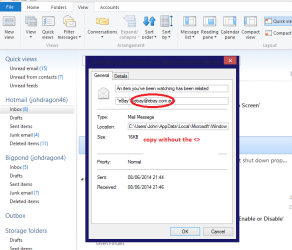
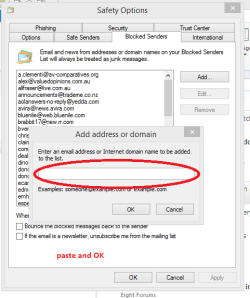
I would say the WLM has installed badly the way to stop spam and other junk mail you don't want is to go to your emails > right click on the email > go to properties it will give you the address > copy it and then go to top left hand blue button > Options > Safety options > Blocked senders > Add paste that address in the box > OK > Apply and no more from that site
However I think you might have to reinstall the WLM if the scans cannot cure the problem
My Computer
Computer type
PC/Desktop
Computer Manufacturer/Model Number
Own build (new) Desk1 / Asus ROG Win 7 / Desk2 1st build
OS
Desk1 7 Home Prem / Desk2 10 Pro / Main lap Asus ROG 10 Pro 2 laptop Toshiba 7 Pro Asus P2520 7 & 10
One other Desktop (tester) and spare Toshba laptop both with SSD's
Running Kaspersky 2016 ISS on all machines config'd identically
Logitec audio stereo systems on each machine (x3)
Canon MG5250MFC
Router/modem TP-Link running WPA2SK
One other Desktop (tester) and spare Toshba laptop both with SSD's
Running Kaspersky 2016 ISS on all machines config'd identically
Logitec audio stereo systems on each machine (x3)
Canon MG5250MFC
Router/modem TP-Link running WPA2SK
2nd ASUS X299 Apex/Intel i9-9940x with Custom water loop/7H-Prem-x64/Corsair 450D case/Ram Trident-z 3600C16 4x8gb / Samsung970Evo plus 500gb SSD/Dual ssd EZ swap evo/PSU EVGA SuperNova 1200w-P2 80+Platinum/GPU Titan Xp /8-ML-140 on push-pull on 2-280GTX rads
Yep TZ but thee is the matter of no junk files either and why I asked for the sfc and chkdsk
Oh the unwanted stuff too one just needs to right click the Properties and copy he address go to File > Options > Safety options > Blocked senders > Add > paste the address > OK then it just gets blocked.
Attachments
EMAIL.PNG
25 KB
· Views: 1
EMAIL2.PNG
14.2 KB
· Views: 20
My Computer
Computer type
PC/Desktop
Computer Manufacturer/Model Number
Own build (new) Desk1 / Asus ROG Win 7 / Desk2 1st build
OS
Desk1 7 Home Prem / Desk2 10 Pro / Main lap Asus ROG 10 Pro 2 laptop Toshiba 7 Pro Asus P2520 7 & 10
One other Desktop (tester) and spare Toshba laptop both with SSD's
Running Kaspersky 2016 ISS on all machines config'd identically
Logitec audio stereo systems on each machine (x3)
Canon MG5250MFC
Router/modem TP-Link running WPA2SK
2nd ASUS X299 Apex/Intel i9-9940x with Custom water loop/7H-Prem-x64/Corsair 450D case/Ram Trident-z 3600C16 4x8gb / Samsung970Evo plus 500gb SSD/Dual ssd EZ swap evo/PSU EVGA SuperNova 1200w-P2 80+Platinum/GPU Titan Xp /8-ML-140 on push-pull on 2-280GTX rads
One other Desktop (tester) and spare Toshba laptop both with SSD's
Running Kaspersky 2016 ISS on all machines config'd identically
Logitec audio stereo systems on each machine (x3)
Canon MG5250MFC
Router/modem TP-Link running WPA2SK