4 GB Installed 2 GB Usable Memory issue.

ctdummy

New member
Local time
6:22 AM
Messages
4
I just built a PC and installed Windows 7 Home Premium x64. My system shows 4 gigs of ram installed but only 1.99 GB usable. I'm not sure what else I can check here. I'm using an EVGA P55 LE with the latest bios.

Latest Bios
Memory remapping enabled
Check MSCONFIG max memory isn't limited.

I noticed that on EVGAs performance tool the memory is reading as single channel when it should read dual channel.

I'm using a Radeon HD 4890 1GB DDR5
OCZ Low Voltage Platinum PC-10666 Dual Channel 2GBx2 DIMMS

I've been scouring the internet in search of some sort of answer. Please Help!
 

My Computer

Computer Manufacturer/Model Number
Self
OS
Windows 7 Home Premium 64-bit
CPU
iCore 5 - 750
Motherboard
EVGA P55 LE
Memory
OCZ DDR3 PC3-10666 Platinum Low Voltage 2GBx2
Graphics Card(s)
XFX Radeon HD 4980 PCIE 2.0 1GB DDR5
Sound Card
Onboard
Monitor(s) Displays
LG W2343T
Hard Drives
Western Digital Caviar 7200 RPM 1TB
PSU
OCZ StealthXstream 750 Watt
Case
Antec Lasing Full Tower
Its just the way win 7 manages memory.

If you have 4GB and windows sees it then whats happening is that windows is taking
2 GB as a primary superfetch, in addition to other functions.

Makes apps load faster and other things.

If the task manager shows 4 GB, then you are ok.
 

My Computer

Computer type
PC/Desktop
Computer Manufacturer/Model Number
Dell XPS 420
OS
Windows 10, Home Clean Install
CPU
Intel Core2 processsor Q8200(2.33Ghz 1333FSB) Quad Core Tech
Motherboard
Dell
Memory
6 gb
Graphics Card(s)
ATI Radeon 256MB HD3650
Sound Card
Intergrated 7.1 Channel Audio
Monitor(s) Displays
Dell SP2009W 20"
Hard Drives
640 GB Serial ATA Hard drive
Cooling
Fan
Keyboard
Dell USB Keyboard
Mouse
Dell Premium Optical USB
Internet Speed
DSL 2.85
Hello ctdummy,

Welcome to Seven Forums.

As Rich says, it is superfetch loading parts of your most used programs into ram so that they can open faster when you want them. If the ram is needed by running apps, superfetch will release the ram for that use. Nothing to worry about.

Gary
 

My Computer

Computer Manufacturer/Model Number
Dell XPS420
OS
Vista Ult 64 bit Seven Ult RTM x64
CPU
Intel Core2 Quad Q6600 2.40 gigahertz
Memory
Crucial Ballistix 4x2GB PC2 6400
Graphics Card(s)
NVIDIA GeForce 8600 GTS 256 MB
Sound Card
Creative SB X-Fi audio
Monitor(s) Displays
HP w2207 + HPvs15
Screen Resolution
1680x1050 + 1024x768
Hard Drives
2-WD5000AAKS-500 GB
WD5000AAV-500 GB external
Keyboard
Microsoft Comfort Curve
Mouse
MX Revolution
Other Info
Wacom Intuos 2 Graphics Tablet
Experience Index=5.5
I'm still rather confused. This isn't exactly how the windows help describes this activity. Any guess as to why it doesn't recognize the ram as dual channel?
 

My Computer

Computer Manufacturer/Model Number
Self
OS
Windows 7 Home Premium 64-bit
CPU
iCore 5 - 750
Motherboard
EVGA P55 LE
Memory
OCZ DDR3 PC3-10666 Platinum Low Voltage 2GBx2
Graphics Card(s)
XFX Radeon HD 4980 PCIE 2.0 1GB DDR5
Sound Card
Onboard
Monitor(s) Displays
LG W2343T
Hard Drives
Western Digital Caviar 7200 RPM 1TB
PSU
OCZ StealthXstream 750 Watt
Case
Antec Lasing Full Tower
Try setting maximum memory in msconfig to 4096MB
 

My Computer

Computer type
PC/Desktop
Computer Manufacturer/Model Number
Custom Built
OS
Windows 10 Pro x64, Windows 8.1 Pro x64, Windows 7 Ultimate x64 SP1,
CPU
INTEL i9-7920X LGA 2066
Motherboard
Gigabyte X299-WU8 F3
Memory
64 GB (4 X 16 GB) G-Skill V Series DDR4 3200 Quad Channel
Graphics Card(s)
EVGA GTX 1060 SC 3 GB
Sound Card
Realtek Onboard ALC1220
Monitor(s) Displays
2 x Samsung S27E310
Screen Resolution
1920x1080
Hard Drives
Samsung 2 x 970 EVO Plus 500 GB NVMe
1 x 6TB WD 6003FZBX SATA
1 x 6TB WD 60EFRX SATA
12 x 3TB WD 30EFRX SATA
PSU
Seasonic X-1050
Case
Thermaltake Armor+
Cooling
Corsair H80i V2 Liquid AOI Cooler
Keyboard
Logitech G510s
Mouse
Logitech MX Master 2S
Internet Speed
200 Mb/s
Antivirus
ESET NOD32 13.1
Browser
EDGE (Dev, Canary, Beta), Chrome
Other Info
ASUS RT-AC68U router
Malwarebytes 4.0.4
Try CPU-Z. See if it shows dual channel

CPUID
 

My Computer

Computer type
PC/Desktop
Computer Manufacturer/Model Number
Custom Built
OS
Windows 10 Pro x64, Windows 8.1 Pro x64, Windows 7 Ultimate x64 SP1,
CPU
INTEL i9-7920X LGA 2066
Motherboard
Gigabyte X299-WU8 F3
Memory
64 GB (4 X 16 GB) G-Skill V Series DDR4 3200 Quad Channel
Graphics Card(s)
EVGA GTX 1060 SC 3 GB
Sound Card
Realtek Onboard ALC1220
Monitor(s) Displays
2 x Samsung S27E310
Screen Resolution
1920x1080
Hard Drives
Samsung 2 x 970 EVO Plus 500 GB NVMe
1 x 6TB WD 6003FZBX SATA
1 x 6TB WD 60EFRX SATA
12 x 3TB WD 30EFRX SATA
PSU
Seasonic X-1050
Case
Thermaltake Armor+
Cooling
Corsair H80i V2 Liquid AOI Cooler
Keyboard
Logitech G510s
Mouse
Logitech MX Master 2S
Internet Speed
200 Mb/s
Antivirus
ESET NOD32 13.1
Browser
EDGE (Dev, Canary, Beta), Chrome
Other Info
ASUS RT-AC68U router
Malwarebytes 4.0.4
It is showing as single channel there as well and it's only running at about half it's rated frequency.
 

My Computer

Computer Manufacturer/Model Number
Self
OS
Windows 7 Home Premium 64-bit
CPU
iCore 5 - 750
Motherboard
EVGA P55 LE
Memory
OCZ DDR3 PC3-10666 Platinum Low Voltage 2GBx2
Graphics Card(s)
XFX Radeon HD 4980 PCIE 2.0 1GB DDR5
Sound Card
Onboard
Monitor(s) Displays
LG W2343T
Hard Drives
Western Digital Caviar 7200 RPM 1TB
PSU
OCZ StealthXstream 750 Watt
Case
Antec Lasing Full Tower
Have you tired switching the ram to different slots? 1-3 or 2-4 that usually is the culprit.


Steve
 

My Computer

Computer Manufacturer/Model Number
Over Clockers Ultima Viper 2.80Ghz
OS
Windows 7 Ultimate 64 - OEM Service Pack 1
CPU
Intel Core i7 930 2.80Ghz Bloomfield Socket LGA 1366
Motherboard
Gigabyte GA-X58A-UD3R Intel X58 Socket 1366 DDR3
Memory
Patriot Viper 6GB 3x2GB DDR3 PC3-1200C9 1600Mhz Tri Channel
Graphics Card(s)
Asus ATI Radeon HD 5770 CuCore 1024MB GDDR5 PCI Express
Sound Card
Realtek ALC889 @ Intel 82801JB ICH10 - High Definition Audio
Monitor(s) Displays
Samsung SyncMaster 920N 19"
Screen Resolution
1280*1024
Hard Drives
1 x OCZ Vertex2 Series 120GB 2.5" SATA-II SSD
1 x Seagate Barracuda 7200.12 1TB SATA-II 32MB Cache
1 x Western Digital Caviar Green 2TB SATA-II 64 MB Cache
PSU
Corsair TX 650W ATX SLi
Case
Antec 902 Ultimate Gaming Case Black
Cooling
Prolimatech Megahalems Rev B CPU Cooler Socket 775/1156/1366
Keyboard
Microsoft Comfort Curve Keyboard
Mouse
Microsoft Optical USB
Internet Speed
ADSL24 FTTC 34.2 Mbps Down 7.1Mbps Up
Other Info
OcUK 22x DVDSATA ReWriter Black
Akasa AK-FN058 Apache Black Super Silent 120mm Fan
Printer Epson Stylus Photo R300
Scanner Canon Canoscan 8000F
Since it is Double Data Rate RAM, 1066 will show as 533, that is normal.

I would follow Steve's suggestion regarding the RAM slots for Dual channel.
 

My Computer

Computer type
PC/Desktop
Computer Manufacturer/Model Number
Custom Built
OS
Windows 10 Pro x64, Windows 8.1 Pro x64, Windows 7 Ultimate x64 SP1,
CPU
INTEL i9-7920X LGA 2066
Motherboard
Gigabyte X299-WU8 F3
Memory
64 GB (4 X 16 GB) G-Skill V Series DDR4 3200 Quad Channel
Graphics Card(s)
EVGA GTX 1060 SC 3 GB
Sound Card
Realtek Onboard ALC1220
Monitor(s) Displays
2 x Samsung S27E310
Screen Resolution
1920x1080
Hard Drives
Samsung 2 x 970 EVO Plus 500 GB NVMe
1 x 6TB WD 6003FZBX SATA
1 x 6TB WD 60EFRX SATA
12 x 3TB WD 30EFRX SATA
PSU
Seasonic X-1050
Case
Thermaltake Armor+
Cooling
Corsair H80i V2 Liquid AOI Cooler
Keyboard
Logitech G510s
Mouse
Logitech MX Master 2S
Internet Speed
200 Mb/s
Antivirus
ESET NOD32 13.1
Browser
EDGE (Dev, Canary, Beta), Chrome
Other Info
ASUS RT-AC68U router
Malwarebytes 4.0.4
it seems to be performing well enough so I'm going to leave it be. They are pretty specific about which slots to use and I know it is set up correct. My main concern was system bios and whether or not windows would call on the remaining 2 GB of memory when needed.
 

My Computer

Computer Manufacturer/Model Number
Self
OS
Windows 7 Home Premium 64-bit
CPU
iCore 5 - 750
Motherboard
EVGA P55 LE
Memory
OCZ DDR3 PC3-10666 Platinum Low Voltage 2GBx2
Graphics Card(s)
XFX Radeon HD 4980 PCIE 2.0 1GB DDR5
Sound Card
Onboard
Monitor(s) Displays
LG W2343T
Hard Drives
Western Digital Caviar 7200 RPM 1TB
PSU
OCZ StealthXstream 750 Watt
Case
Antec Lasing Full Tower
I just built a PC and installed Windows 7 Home Premium x64. My system shows 4 gigs of ram installed but only 1.99 GB usable. I'm not sure what else I can check here. I'm using an EVGA P55 LE with the latest bios.

Latest Bios
Memory remapping enabled
Check MSCONFIG max memory isn't limited.

I noticed that on EVGAs performance tool the memory is reading as single channel when it should read dual channel.

I'm using a Radeon HD 4890 1GB DDR5
OCZ Low Voltage Platinum PC-10666 Dual Channel 2GBx2 DIMMS

I've been scouring the internet in search of some sort of answer. Please Help!

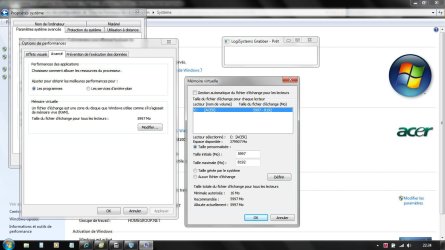
Force windows 7 to set memory at

5997 to 8143 as you have to set at x1,5 the amount of 4Gb Ram aviable,

In the System Properties tab=> Avanced System Parameters tab=>Performances=>Modidy...

Don't let automatic setting. Don't use any LargeSystemCache in the registry

Anyway, on 4095 ram only 3998 are there, 97 ram amount are reserved for Hardware purpose.
 

Attachments

  • GRAB0000 copie.jpg
    GRAB0000 copie.jpg
    161.9 KB · Views: 548
  • GRAB0002 copie.jpg
    GRAB0002 copie.jpg
    119.4 KB · Views: 532
Last edited:

My Computer

Computer type
PC/Desktop
Computer Manufacturer/Model Number
Custom Build
OS
Windows 7 Professional SP1 - x64 [Non-UEFI Boot]
CPU
Ivy Bridge Core i5 3570K (Delidded)
Motherboard
Asus P8Z77-V LE PLUS
Memory
G.Skill "Ares" DDR3 PC3-12800 - 1600MHz (16Gb)
Graphics Card(s)
Asus Dual-RX480-O4G
Sound Card
Creative Sound Blaster Z w/5.1 sound system
Monitor(s) Displays
Asus IPS 23"
Screen Resolution
16/9
Hard Drives
Internal:
500Go Sata 6Gb/s (x2)
500Go Sata 3Gb/s (x2)
SSD 60Go Sata 6Gb/s
PSU
In Win C 900W Series 80+ Platinum
Case
Thermaltake Chaser A71
Cooling
Custom Water Cooling Loop
Keyboard
Cooler Master QuickFire XTi
Mouse
Razer Imperator 2012 (4G)
Antivirus
MSE
Browser
IE 11.0.xxx Rtm
Other Info
"Raid0" with Intel Smart Response Technology (HDD/SSD)
If you are using Windows 7 x64 then it should show 4GB installed under System especially if memory remap is set, with no mention of usable. It will only show usable if something less than the full amount is usable.
 

My Computer

Computer type
PC/Desktop
Computer Manufacturer/Model Number
Custom Built
OS
Windows 10 Pro x64, Windows 8.1 Pro x64, Windows 7 Ultimate x64 SP1,
CPU
INTEL i9-7920X LGA 2066
Motherboard
Gigabyte X299-WU8 F3
Memory
64 GB (4 X 16 GB) G-Skill V Series DDR4 3200 Quad Channel
Graphics Card(s)
EVGA GTX 1060 SC 3 GB
Sound Card
Realtek Onboard ALC1220
Monitor(s) Displays
2 x Samsung S27E310
Screen Resolution
1920x1080
Hard Drives
Samsung 2 x 970 EVO Plus 500 GB NVMe
1 x 6TB WD 6003FZBX SATA
1 x 6TB WD 60EFRX SATA
12 x 3TB WD 30EFRX SATA
PSU
Seasonic X-1050
Case
Thermaltake Armor+
Cooling
Corsair H80i V2 Liquid AOI Cooler
Keyboard
Logitech G510s
Mouse
Logitech MX Master 2S
Internet Speed
200 Mb/s
Antivirus
ESET NOD32 13.1
Browser
EDGE (Dev, Canary, Beta), Chrome
Other Info
ASUS RT-AC68U router
Malwarebytes 4.0.4
What is the total ram it shows in the bios? If it is anything less than 4 GB then the sticks are in the wrong slots (manuals have been getting it wrong from years), or you need to look through the bios to find something to do with memory remapping.
 

My Computer

Computer type
PC/Desktop
Computer Manufacturer/Model Number
Me
OS
Win 7 Ultimate x64
CPU
FX-8350 @ 4.6 GHz so far
Motherboard
Asus M5A97 EVO
Memory
ADATA XPG V1 Series Black 8GB DDR3 1600
Graphics Card(s)
Sapphire R9 270x Dual-X
Sound Card
Xonar DGX w/ Corsair Vengence 1300
Monitor(s) Displays
Acer S232HL Abid
Screen Resolution
1920x1080
Hard Drives
120 GB OCZ Vertex 3
500 GB Seagate 7200.12
PSU
Antec Earthwatts 650W Green
Case
Antec Three Hundred
Cooling
Cooler Master 212 EVO
Keyboard
Logitech G510
Mouse
Logitech G500s
Internet Speed
35000/3000
Back
Top