Solved 4 Updates Failed, 800B0100, 80073712, 8024200D (Win 7 Pro x64)

Overand

New member
Local time
5:54 AM
Messages
10
Updates Failed, strange 8.3 files in servicing\packages (7 Pro x64)

(Original title: 4 Updates Failed, 800B0100, 80073712, 8024200D (Win 7 Pro x64))

Edit: SEE the SECOND post (reply) now - most of the issues in this first one are resolved

Hey folks - this is a pretty-darned-close to factory Windows 7 X64 SP1 Pro system. (Acer TravelMate P645-MG-7653). (The good news is I imaged the drive when I first got the system, so if I *have* to I can restore to factory).

A number of Windows Updates have installed correctly, but I've gotten stuck on several (KB2871997, KB2892074, KB2982378).

Prior steps:

sfc /scannow - no errors
Ran the system update readiness check tool - found errors, fixed some, not others. (Windows Update error 0x8007000D(and a timestamp), Cryptographic service components are not registered)
Deleted the software distribution folder
(A few other things, MS fixits for update issues, etc).

Normally, this is the point where I'd reinstall, but given it's a laptop with some technologies i'm not very familiar with (Switchable radeon/intel graphics) and some installed tools I can't get an installer for, so I'm trying to fix it.


Here's the output from a tool called SFCFix that was recommended to me for diagnostic purposes:

Code:
Code:
SFCFix version 2.4.1.0 by niemiro.
Start time: 2014-09-28 19:05:57.959
Not using a script file.

-- snip whitespace--

AutoAnalysis::
WARNING: Manifest damage on component "x86_microsoft-windows-ncrypt-dll_31bf3856ad364e35_6.1.7601.22736_none_605ba822690a48d0". See CBS logfile for more details.

--snip whitespace--

SUMMARY: Some corruptions could not be fixed automatically. Seek advice from helper or sysnative.com.
   CBS & SFC total detected corruption count:     1
   CBS & SFC total unimportant corruption count:  0
   CBS & SFC total fixed corruption count:        0
   SURT total detected corruption count:          75
   SURT total unimportant corruption count:       0
   SURT total fixed corruption count:             0
AutoAnalysis:: directive completed successfully.

-- snip whitespace --

Successfully processed all directives.
SFCFix version 2.4.1.0 by niemiro has completed.
Currently storing 0 datablocks.
Finish time: 2014-09-28 19:10:35.686
----------------------EOF-----------------------
OLD. IGNORECBS File (14 MB) Dropbox Link: https://www.dropbox.com/s/rufij6mp8rx2gv7/CBS-overand-1.zip?dl=0

Snippet from the CheckSUR.log

Code:
Checking Package Manifests and Catalogs
(f)    CBS MUM Corrupt    0x00000000    servicing\Packages\PA1A4B~1.MUM        Expected file name Package_53_for_KB2791765~31bf3856ad364e35~amd64~~6.1.1.2.mum does not match the actual file name
(f)    CBS Catalog Missing    0x00000002    servicing\Packages\PA1A4B~1.cat        
(f)    CBS MUM Corrupt    0x00000000    servicing\Packages\PA2771~1.MUM        Expected file name Package_56_for_KB2868725~31bf3856ad364e35~amd64~~6.1.1.1.mum does not match the actual file name
(f)    CBS Catalog Missing    0x00000002    servicing\Packages\PA2771~1.cat        
(f)    CBS MUM Corrupt    0x00000000    servicing\Packages\PA543D~1.MUM        Expected file name Package_54_for_KB2492386~31bf3856ad364e35~amd64~~6.1.1.0.mum does not match the actual file name
(f)    CBS Catalog Missing    0x00000002    servicing\Packages\PA543D~1.cat        
(f)    CBS MUM Corrupt    0x00000000    servicing\Packages\PA6730~1.MUM        Expected file name Package_110_for_KB2570791~31bf3856ad364e35~amd64~~6.1.1.1.mum does not match the actual file name
(f)    CBS Catalog Missing    0x00000002    servicing\Packages\PA6730~1.cat        
(f)    CBS MUM Corrupt    0x00000000    servicing\Packages\PA89EF~1.MUM        Expected file name Package_53_for_KB2762895~31bf3856ad364e35~amd64~~6.1.1.0.mum does not match the actual file name
(f)    CBS Catalog Missing    0x00000002    servicing\Packages\PA89EF~1.cat        
(f)    CBS MUM Corrupt    0x800F0900    servicing\Packages\Package_102_for_KB2982378~31bf3856ad364e35~amd64~~6.1.1.0.mum        Line 1: 
(f)    CBS Catalog Corrupt    0x800B0100    servicing\Packages\Package_102_for_KB2982378~31bf3856ad364e35~amd64~~6.1.1.0.cat        
(f)    CBS MUM Corrupt    0x800F0900    servicing\Packages\Package_103_for_KB2982378~31bf3856ad364e35~amd64~~6.1.1.0.mum        Line 1: 
(f)    CBS Catalog Corrupt    0x800B0100    servicing\Packages\Package_103_for_KB2982378~31bf3856ad364e35~amd64~~6.1.1.0.cat        
(f)    CBS MUM Corrupt    0x800F0900    servicing\Packages\Package_104_for_KB2982378~31bf3856ad364e35~amd64~~6.1.1.0.mum        Line 1: 
(f)    CBS Catalog Corrupt    0x800B0100    servicing\Packages\Package_104_for_KB2982378~31bf3856ad364e35~amd64~~6.1.1.0.cat        
(f)    CBS MUM Corrupt    0x800F0900    servicing\Packages\Package_105_for_KB2982378~31bf3856ad364e35~amd64~~6.1.1.0.mum        Line 1: 
(f)    CBS Catalog Corrupt    0x800B0100    servicing\Packages\Package_105_for_KB2982378~31bf3856ad364e35~amd64~~6.1.1.0.cat        
(f)    CBS MUM Corrupt    0x800F0900    servicing\Packages\Package_108_for_KB2982378~31bf3856ad364e35~amd64~~6.1.1.0.mum        Line 1: 
(f)    CBS Catalog Corrupt    0x800B0100    servicing\Packages\Package_108_for_KB2982378~31bf3856ad364e35~amd64~~6.1.1.0.cat        
(f)    CBS MUM Corrupt    0x800F0900    servicing\Packages\Package_109_for_KB2982378~31bf3856ad364e35~amd64~~6.1.1.0.mum        Line 1: 
(f)    CBS Catalog Corrupt    0x800B0100    servicing\Packages\Package_109_for_KB2982378~31bf3856ad364e35~amd64~~6.1.1.0.cat        
(f)    CBS MUM Corrupt    0x800F0900    servicing\Packages\Package_110_for_KB2982378~31bf3856ad364e35~amd64~~6.1.1.0.mum        Line 1: 
(f)    CBS Catalog Corrupt    0x800B0100    servicing\Packages\Package_110_for_KB2982378~31bf3856ad364e35~amd64~~6.1.1.0.cat        
(f)    CBS MUM Corrupt    0x800F0900    servicing\Packages\Package_111_for_KB2982378~31bf3856ad364e35~amd64~~6.1.1.0.mum        Line 1: 
(f)    CBS Catalog Corrupt    0x800B0100    servicing\Packages\Package_111_for_KB2982378~31bf3856ad364e35~amd64~~6.1.1.0.cat        
(f)    CBS MUM Corrupt    0x800F0900    servicing\Packages\Package_129_for_KB2973351~31bf3856ad364e35~amd64~~6.1.1.1.mum        Line 1: 
(f)    CBS Catalog Corrupt    0x800B0100    servicing\Packages\Package_129_for_KB2973351~31bf3856ad364e35~amd64~~6.1.1.1.cat
 
Last edited:

My Computer My Computer

At a glance

Windows 7 Professional x64Intel Core i7-4500U8GBRadeon HD8750
Computer type
Laptop
Computer Manufacturer/Model Number
Acer
OS
Windows 7 Professional x64
CPU
Intel Core i7-4500U
Memory
8GB
Graphics Card(s)
Radeon HD8750
Hard Drives
256GB SSD
Browser
Chrome, Firefox
OK - I made some progress! I used the update readyness tool again, with the .MSU files from the Microsoft Updates Catalog in the c:\Windows\CheckSUR\packages folder, and got through *some* updates.

Now, however, what I have seems *weird.*

It seems that there are a number of 8.3 (short files names rather than the modern Long File Names) .MUM and .CAT files in c:\Windows\servicing\packages. They're all, in fact, referenced below.

I have NO idea why those are there - but I'm certainly wary of removing them without anyone telling me that's what I should do.

Current CBS log: https://www.dropbox.com/s/enoxlwgbz6fg8ov/CBS-overand-2.zip?dl=0

=================================
Checking System Update Readiness.
Binary Version 6.1.7601.22471
Package Version 25.0
2014-09-28 23:38

Checking Windows Servicing Packages

Checking Package Manifests and Catalogs
(f) CBS MUM Corrupt 0x00000000 servicing\Packages\PA1A4B~1.MUM Expected file name Package_53_for_KB2791765~31bf3856ad364e35~amd64~~6.1.1.2.mum does not match the actual file name
(f) CBS Catalog Missing 0x00000002 servicing\Packages\PA1A4B~1.cat
(f) CBS MUM Corrupt 0x00000000 servicing\Packages\PA2771~1.MUM Expected file name Package_56_for_KB2868725~31bf3856ad364e35~amd64~~6.1.1.1.mum does not match the actual file name
(f) CBS Catalog Missing 0x00000002 servicing\Packages\PA2771~1.cat
(f) CBS MUM Corrupt 0x00000000 servicing\Packages\PA543D~1.MUM Expected file name Package_54_for_KB2492386~31bf3856ad364e35~amd64~~6.1.1.0.mum does not match the actual file name
(f) CBS Catalog Missing 0x00000002 servicing\Packages\PA543D~1.cat
(f) CBS MUM Corrupt 0x00000000 servicing\Packages\PA6730~1.MUM Expected file name Package_110_for_KB2570791~31bf3856ad364e35~amd64~~6.1.1.1.mum does not match the actual file name
(f) CBS Catalog Missing 0x00000002 servicing\Packages\PA6730~1.cat
(f) CBS MUM Corrupt 0x00000000 servicing\Packages\PA89EF~1.MUM Expected file name Package_53_for_KB2762895~31bf3856ad364e35~amd64~~6.1.1.0.mum does not match the actual file name
(f) CBS Catalog Missing 0x00000002 servicing\Packages\PA89EF~1.cat

Checking Package Watchlist

Checking Component Watchlist

Checking Packages

Checking Component Store

Summary:
Seconds executed: 267
Found 10 errors
CBS MUM Corrupt Total count: 5
CBS Catalog Missing Total count: 5

Unavailable repair files:
servicing\packages\PA1A4B~1.mum
servicing\packages\PA2771~1.mum
servicing\packages\PA543D~1.mum
servicing\packages\PA6730~1.mum
servicing\packages\PA89EF~1.mum
servicing\packages\PA1A4B~1.cat
servicing\packages\PA2771~1.cat
servicing\packages\PA543D~1.cat
servicing\packages\PA6730~1.cat
servicing\packages\PA89EF~1.cat
 
Last edited:

My Computer My Computer

At a glance

Windows 7 Professional x64Intel Core i7-4500U8GBRadeon HD8750
Computer type
Laptop
Computer Manufacturer/Model Number
Acer
OS
Windows 7 Professional x64
CPU
Intel Core i7-4500U
Memory
8GB
Graphics Card(s)
Radeon HD8750
Hard Drives
256GB SSD
Browser
Chrome, Firefox
The latest batch of 'missing' files never actually existed - it seems that you have a problem with a pending installation.

It's an error type that I've only seen once before, and IIRC, we had to do a repair install to fix it.
I'm going to call for a second opinion on this as I don't have the time currently to do the research necessary.
Don't run away! ;)
 

My Computer My Computer

At a glance

Win 7 x64 Home Premium (and x86 VirtualBox VM...i3 370M/i7 6500U8GB - finally :)/8GBit's an i3, dude!/dual Intel&nVidia
Computer type
Laptop
Computer Manufacturer/Model Number
Asus K52F or Lenovo B51-80
OS
Win 7 x64 Home Premium (and x86 VirtualBox VM)/Win10
CPU
i3 370M/i7 6500U
Motherboard
Asus/Lenovo
Memory
8GB - finally :)/8GB
Graphics Card(s)
it's an i3, dude!/dual Intel&nVidia
Sound Card
onboard
Monitor(s) Displays
15.6" built-in
Screen Resolution
1366x768/1920x1080
Hard Drives
750GB Seagate internal
Sundry external drives attached to other computers on the local network
1TB SSD on the Lenovo
PSU
n/a
Internet Speed
as much as I can get - usually on a dongle/phone, so <1MB/s
Antivirus
MSE/Defender
Browser
IE11/12/Edge/Chrome/FF(if I must)
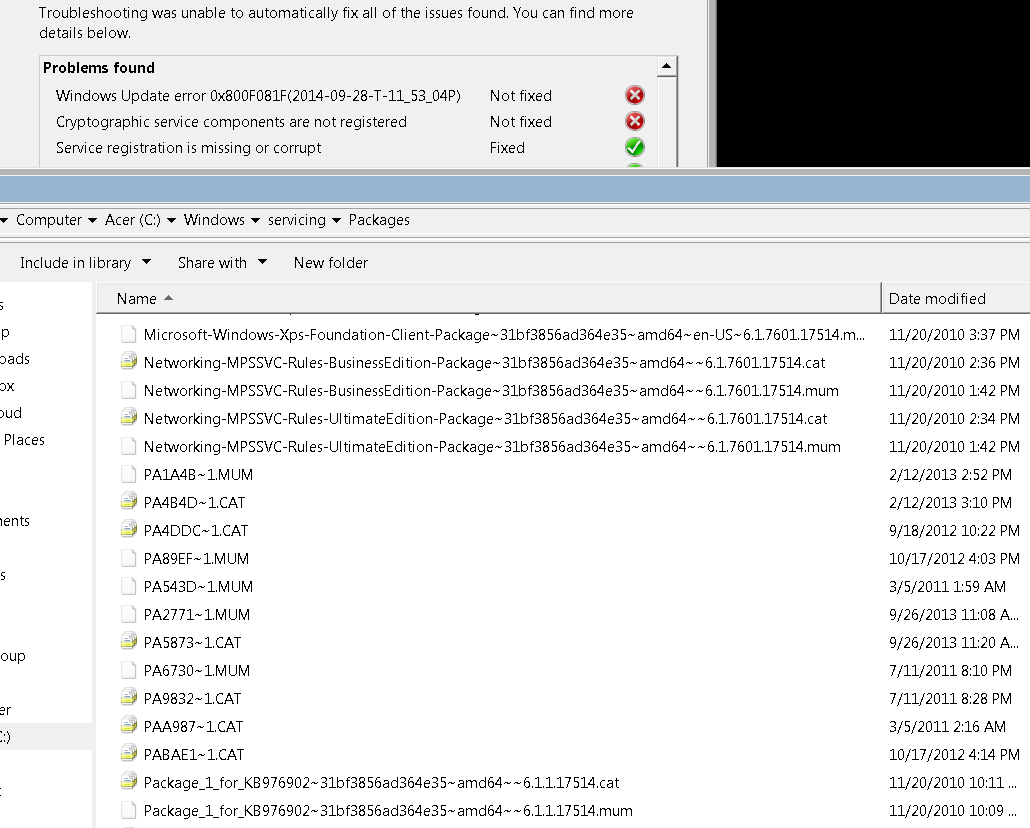
I'm not sure I concur! Those .cab and .mum files with the MSDOS style filenames do actually exist (in c:\windows\servicing\packages), see the (ugly, via RDP) screenshot below!

More possibly relevant info - this had some sort of McAfee trial on it, before any of these updates, but I uninstalled it *and* used the McAfee uninstaller tool. (Some sort of norton cloud backup tool too, and same deal, removed & used the norton tool).


ZcUXUhH.png
 

My Computer My Computer

At a glance

Windows 7 Professional x64Intel Core i7-4500U8GBRadeon HD8750
Computer type
Laptop
Computer Manufacturer/Model Number
Acer
OS
Windows 7 Professional x64
CPU
Intel Core i7-4500U
Memory
8GB
Graphics Card(s)
Radeon HD8750
Hard Drives
256GB SSD
Browser
Chrome, Firefox
They may exist on your machine - but they certainly shouldn't!

Please upload a couple of the .MUM files, and I'll take a look and see what they are supposed to be called.
 

My Computer My Computer

At a glance

Win 7 x64 Home Premium (and x86 VirtualBox VM...i3 370M/i7 6500U8GB - finally :)/8GBit's an i3, dude!/dual Intel&nVidia
Computer type
Laptop
Computer Manufacturer/Model Number
Asus K52F or Lenovo B51-80
OS
Win 7 x64 Home Premium (and x86 VirtualBox VM)/Win10
CPU
i3 370M/i7 6500U
Motherboard
Asus/Lenovo
Memory
8GB - finally :)/8GB
Graphics Card(s)
it's an i3, dude!/dual Intel&nVidia
Sound Card
onboard
Monitor(s) Displays
15.6" built-in
Screen Resolution
1366x768/1920x1080
Hard Drives
750GB Seagate internal
Sundry external drives attached to other computers on the local network
1TB SSD on the Lenovo
PSU
n/a
Internet Speed
as much as I can get - usually on a dongle/phone, so <1MB/s
Antivirus
MSE/Defender
Browser
IE11/12/Edge/Chrome/FF(if I must)

My Computer My Computer

At a glance

Windows 7 Professional x64Intel Core i7-4500U8GBRadeon HD8750
Computer type
Laptop
Computer Manufacturer/Model Number
Acer
OS
Windows 7 Professional x64
CPU
Intel Core i7-4500U
Memory
8GB
Graphics Card(s)
Radeon HD8750
Hard Drives
256GB SSD
Browser
Chrome, Firefox
...and to me!
Let's take an example...
The file "PA89EF~1.MUM"
Should be called "Package_53_for_KB2762895~31bf3856ad364e35~amd64~~6.1.1.0.mum"
It may be that Windows has recognised the file from its hash, rather than the filename - and this error is the result.
The question then becomes - does the final file exist at all in the folder?
If it does, what effect does removing the temporary file have?
If it doesn't - what would be the effect of adding the correct files via CheckSUR?

Also - is there a corresponding error in the registry which is linking to the 8.3 filename rather than the long one? If so, how do we deal with it?
Which of the CAT file is directly related to this file?

... and so on for each MUM file.

You appear to have one MUM/CAT pair from each of 5 updates - and a spare CAT file from another.
These problem updates date back as far as March 2011, and "Package_54_for_KB2492386~31bf3856ad364e35~amd64~~6.1.1.0.mum"

Do either of these files already exist in the Servicing\Packages folder?
 

My Computer My Computer

At a glance

Win 7 x64 Home Premium (and x86 VirtualBox VM...i3 370M/i7 6500U8GB - finally :)/8GBit's an i3, dude!/dual Intel&nVidia
Computer type
Laptop
Computer Manufacturer/Model Number
Asus K52F or Lenovo B51-80
OS
Win 7 x64 Home Premium (and x86 VirtualBox VM)/Win10
CPU
i3 370M/i7 6500U
Motherboard
Asus/Lenovo
Memory
8GB - finally :)/8GB
Graphics Card(s)
it's an i3, dude!/dual Intel&nVidia
Sound Card
onboard
Monitor(s) Displays
15.6" built-in
Screen Resolution
1366x768/1920x1080
Hard Drives
750GB Seagate internal
Sundry external drives attached to other computers on the local network
1TB SSD on the Lenovo
PSU
n/a
Internet Speed
as much as I can get - usually on a dongle/phone, so <1MB/s
Antivirus
MSE/Defender
Browser
IE11/12/Edge/Chrome/FF(if I must)
Intreresting! I checked, and all of the files those things are supposed to be (as in the CheckSUR.log) do exist, both as .cat and .mum.

Given the file dates on this, either they were extracted from somewhere with their datestamps intact, this is an issue dating to the original installation of the OS, there was some sort of filesystem corruption, or some sort of not-actually-filesystem-corruption but an erroneous copy made for some reason.

I went ahead and searched the entire registry for "PA89EF~1" - nothing. (That's one of the .MUM ones) - I also searched for PA4DDC~1 (which is one of the cat files), still nothing.

Even though I can't really tell which CAT files are what, I'm quite tempted to just move these files off, maybe re-run the Update Readiness tool (maybe) - and try to install updates again.

Thoughts?
 

My Computer My Computer

At a glance

Windows 7 Professional x64Intel Core i7-4500U8GBRadeon HD8750
Computer type
Laptop
Computer Manufacturer/Model Number
Acer
OS
Windows 7 Professional x64
CPU
Intel Core i7-4500U
Memory
8GB
Graphics Card(s)
Radeon HD8750
Hard Drives
256GB SSD
Browser
Chrome, Firefox
That's my thought as well - I've just never tried it before.
 

My Computer My Computer

At a glance

Win 7 x64 Home Premium (and x86 VirtualBox VM...i3 370M/i7 6500U8GB - finally :)/8GBit's an i3, dude!/dual Intel&nVidia
Computer type
Laptop
Computer Manufacturer/Model Number
Asus K52F or Lenovo B51-80
OS
Win 7 x64 Home Premium (and x86 VirtualBox VM)/Win10
CPU
i3 370M/i7 6500U
Motherboard
Asus/Lenovo
Memory
8GB - finally :)/8GB
Graphics Card(s)
it's an i3, dude!/dual Intel&nVidia
Sound Card
onboard
Monitor(s) Displays
15.6" built-in
Screen Resolution
1366x768/1920x1080
Hard Drives
750GB Seagate internal
Sundry external drives attached to other computers on the local network
1TB SSD on the Lenovo
PSU
n/a
Internet Speed
as much as I can get - usually on a dongle/phone, so <1MB/s
Antivirus
MSE/Defender
Browser
IE11/12/Edge/Chrome/FF(if I must)
Well, I deleted the files, then ran SURT. When I try to run updates, I get "Installation Failure: Windows failed to install the following update with error 0x8024200d: Security Update for Windows 7 for x64-based Systems (KB2892074)." in the event log.

The CBS directory is attached here, but you can see the basic log is clean.

https://www.dropbox.com/s/1su90gjy1l9e6n4/CBS-overand-afterdelete.zip?dl=0

Code:
=================================
Checking System Update Readiness.
Binary Version 6.1.7601.22471
Package Version 25.0
2014-09-30 23:31

Checking Windows Servicing Packages

Checking Package Manifests and Catalogs

Checking Package Watchlist

Checking Component Watchlist

Checking Packages

Checking Component Store

Summary:
Seconds executed: 200
 No errors detected
 

My Computer My Computer

At a glance

Windows 7 Professional x64Intel Core i7-4500U8GBRadeon HD8750
Computer type
Laptop
Computer Manufacturer/Model Number
Acer
OS
Windows 7 Professional x64
CPU
Intel Core i7-4500U
Memory
8GB
Graphics Card(s)
Radeon HD8750
Hard Drives
256GB SSD
Browser
Chrome, Firefox
I need to have a look at your COMPONENTS registry hive

Please copy the C:\Windows\System32\config\COMPONENTS file (no extension) to your desktop and then compress it - upload the compressed file to your favoured fileshare site (preferably Dropbox or OneDrive) and post a link.
 

My Computer My Computer

At a glance

Win 7 x64 Home Premium (and x86 VirtualBox VM...i3 370M/i7 6500U8GB - finally :)/8GBit's an i3, dude!/dual Intel&nVidia
Computer type
Laptop
Computer Manufacturer/Model Number
Asus K52F or Lenovo B51-80
OS
Win 7 x64 Home Premium (and x86 VirtualBox VM)/Win10
CPU
i3 370M/i7 6500U
Motherboard
Asus/Lenovo
Memory
8GB - finally :)/8GB
Graphics Card(s)
it's an i3, dude!/dual Intel&nVidia
Sound Card
onboard
Monitor(s) Displays
15.6" built-in
Screen Resolution
1366x768/1920x1080
Hard Drives
750GB Seagate internal
Sundry external drives attached to other computers on the local network
1TB SSD on the Lenovo
PSU
n/a
Internet Speed
as much as I can get - usually on a dongle/phone, so <1MB/s
Antivirus
MSE/Defender
Browser
IE11/12/Edge/Chrome/FF(if I must)
Also worth noting, the old error was 80246007 and the new one is 8024200D.

ANd the MS updated diag tool shows the same erros as before, with the crypto stuff.
 

My Computer My Computer

At a glance

Windows 7 Professional x64Intel Core i7-4500U8GBRadeon HD8750
Computer type
Laptop
Computer Manufacturer/Model Number
Acer
OS
Windows 7 Professional x64
CPU
Intel Core i7-4500U
Memory
8GB
Graphics Card(s)
Radeon HD8750
Hard Drives
256GB SSD
Browser
Chrome, Firefox
Hmmm.

Please run the following commands, and post the results...
Code:
REG QUERY "HKLM\SOFTWARE\Microsoft\Windows\CurrentVersion\Component Based Servicing\PackageIndex\Package_53_for_KB2762895~31bf3856ad364e35~amd64~~0.0.0.0"
REG QUERY "HKLM\SOFTWARE\Microsoft\Windows\CurrentVersion\Component Based Servicing\Packages\Package_53_for_KB2762895~31bf3856ad364e35~amd64~~6.1.1.0"
REG QUERY "HKLM\SOFTWARE\Microsoft\Windows\CurrentVersion\Component Based Servicing\ComponentDetect\amd64_microsoft-windows-a..tigations.resources_31bf3856ad364e35_0.0.0.0_zh-hk_f7e674b5785ba8af"
REG QUERY "HKLM\SOFTWARE\Microsoft\Windows\CurrentVersion\Component Based Servicing\ComponentDetect\x86_microsoft-windows-a..tigations.resources_31bf3856ad364e35_0.0.0.0_zh-hk_9bc7d931bffe3779"
REG QUERY "HKLM\SOFTWARE\Microsoft\Windows\CurrentVersion\Component Based Servicing\PackageDetect\WinEmb-Installers-AppCompat~31bf3856ad364e35~amd64~zh-HK~0.0.0.0"
 
.

Post the results.
 

My Computer My Computer

At a glance

Win 7 x64 Home Premium (and x86 VirtualBox VM...i3 370M/i7 6500U8GB - finally :)/8GBit's an i3, dude!/dual Intel&nVidia
Computer type
Laptop
Computer Manufacturer/Model Number
Asus K52F or Lenovo B51-80
OS
Win 7 x64 Home Premium (and x86 VirtualBox VM)/Win10
CPU
i3 370M/i7 6500U
Motherboard
Asus/Lenovo
Memory
8GB - finally :)/8GB
Graphics Card(s)
it's an i3, dude!/dual Intel&nVidia
Sound Card
onboard
Monitor(s) Displays
15.6" built-in
Screen Resolution
1366x768/1920x1080
Hard Drives
750GB Seagate internal
Sundry external drives attached to other computers on the local network
1TB SSD on the Lenovo
PSU
n/a
Internet Speed
as much as I can get - usually on a dongle/phone, so <1MB/s
Antivirus
MSE/Defender
Browser
IE11/12/Edge/Chrome/FF(if I must)
Code:
HKEY_LOCAL_MACHINE\SOFTWARE\Microsoft\Windows\CurrentVersion\Component Based Servicing\PackageIndex\Package_53_for_KB2762895~31bf3856ad364e35~amd64~~0.0.0.0
    Package_53_for_KB2762895~31bf3856ad364e35~amd64~~6.1.1.0    REG_DWORD    0x0


HKEY_LOCAL_MACHINE\SOFTWARE\Microsoft\Windows\CurrentVersion\Component Based Servicing\Packages\Package_53_for_KB2762895~31bf3856ad364e35~amd64~~6.1.1.0
    InstallClient    REG_SZ    DISM Package Manager Provider
    InstallName    REG_SZ    Package_53_for_KB2762895~31bf3856ad364e35~amd64~~6.1.1.0.mum
    InstallLocation    REG_SZ    \\?\C:\WOS_Injection\scratchdir\C7FD04F9-6CB1-41F6-8EF4-A3643DB25985\
    CurrentState    REG_DWORD    0x40
    SelfUpdate    REG_DWORD    0x0
    Visibility    REG_DWORD    0x2

HKEY_LOCAL_MACHINE\SOFTWARE\Microsoft\Windows\CurrentVersion\Component Based Servicing\Packages\Package_53_for_KB2762895~31bf3856ad364e35~amd64~~6.1.1.0\Owners

HKEY_LOCAL_MACHINE\SOFTWARE\Microsoft\Windows\CurrentVersion\Component Based Servicing\ComponentDetect\amd64_microsoft-windows-a..tigations.resources_31bf3856ad364e35_0.0.0.0_zh-hk_f7e674b5785ba8af
    Package_28_for_KB2492386~31bf3856ad364e35~amd64~~6.1.1.0.2492386-57_neutral_LDR    REG_SZ    6.1.7601.21674@2
    Package_28_for_KB2492386~31bf3856ad364e35~amd64~~6.1.1.0.2492386-58_neutral_GDR    REG_SZ    6.1.7601.17571@2
    Package_54_for_KB2492386~31bf3856ad364e35~amd64~~6.1.1.0.2492386-115_neutral_LDR    REG_SZ    6.1.7601.21674@2
    Package_54_for_KB2492386~31bf3856ad364e35~amd64~~6.1.1.0.2492386-116_neutral_GDR    REG_SZ    6.1.7601.17571@2
    Package_27_for_KB2762895~31bf3856ad364e35~amd64~~6.1.1.0.2762895-53_neutral_LDR    REG_SZ    6.1.7601.22134@2
    Package_27_for_KB2762895~31bf3856ad364e35~amd64~~6.1.1.0.2762895-54_neutral_GDR    REG_SZ    6.1.7601.17974@2
    Package_53_for_KB2762895~31bf3856ad364e35~amd64~~6.1.1.0.2762895-107_neutral_LDR    REG_SZ    6.1.7601.22134@2
    Package_53_for_KB2762895~31bf3856ad364e35~amd64~~6.1.1.0.2762895-108_neutral_GDR    REG_SZ    6.1.7601.17974@2
    Package_27_for_KB2791765~31bf3856ad364e35~amd64~~6.1.1.2.2791765-57_neutral_LDR    REG_SZ    6.1.7601.22248@2
    Package_27_for_KB2791765~31bf3856ad364e35~amd64~~6.1.1.2.2791765-58_neutral_GDR    REG_SZ    6.1.7601.18076@2
    Package_53_for_KB2791765~31bf3856ad364e35~amd64~~6.1.1.2.2791765-115_neutral_LDR    REG_SZ    6.1.7601.22248@2
    Package_53_for_KB2791765~31bf3856ad364e35~amd64~~6.1.1.2.2791765-116_neutral_GDR    REG_SZ    6.1.7601.18076@2


HKEY_LOCAL_MACHINE\SOFTWARE\Microsoft\Windows\CurrentVersion\Component Based Servicing\ComponentDetect\x86_microsoft-windows-a..tigations.resources_31bf3856ad364e35_0.0.0.0_zh-hk_9bc7d931bffe3779
    Package_28_for_KB2492386~31bf3856ad364e35~amd64~~6.1.1.0.2492386-57_neutral_LDR    REG_SZ    6.1.7601.21674@2
    Package_28_for_KB2492386~31bf3856ad364e35~amd64~~6.1.1.0.2492386-58_neutral_GDR    REG_SZ    6.1.7601.17571@2
    Package_54_for_KB2492386~31bf3856ad364e35~amd64~~6.1.1.0.2492386-115_neutral_LDR    REG_SZ    6.1.7601.21674@2
    Package_54_for_KB2492386~31bf3856ad364e35~amd64~~6.1.1.0.2492386-116_neutral_GDR    REG_SZ    6.1.7601.17571@2
    Package_27_for_KB2762895~31bf3856ad364e35~amd64~~6.1.1.0.2762895-53_neutral_LDR    REG_SZ    6.1.7601.22134@2
    Package_27_for_KB2762895~31bf3856ad364e35~amd64~~6.1.1.0.2762895-54_neutral_GDR    REG_SZ    6.1.7601.17974@2
    Package_53_for_KB2762895~31bf3856ad364e35~amd64~~6.1.1.0.2762895-107_neutral_LDR    REG_SZ    6.1.7601.22134@2
    Package_53_for_KB2762895~31bf3856ad364e35~amd64~~6.1.1.0.2762895-108_neutral_GDR    REG_SZ    6.1.7601.17974@2
    Package_27_for_KB2791765~31bf3856ad364e35~amd64~~6.1.1.2.2791765-57_neutral_LDR    REG_SZ    6.1.7601.22248@2
    Package_27_for_KB2791765~31bf3856ad364e35~amd64~~6.1.1.2.2791765-58_neutral_GDR    REG_SZ    6.1.7601.18076@2
    Package_53_for_KB2791765~31bf3856ad364e35~amd64~~6.1.1.2.2791765-115_neutral_LDR    REG_SZ    6.1.7601.22248@2
    Package_53_for_KB2791765~31bf3856ad364e35~amd64~~6.1.1.2.2791765-116_neutral_GDR    REG_SZ    6.1.7601.18076@2


HKEY_LOCAL_MACHINE\SOFTWARE\Microsoft\Windows\CurrentVersion\Component Based Servicing\PackageDetect\WinEmb-Installers-AppCompat~31bf3856ad364e35~amd64~zh-HK~0.0.0.0
    Package_for_KB2492386~31bf3856ad364e35~amd64~~6.1.1.0    REG_DWORD    0x2
    Package_for_KB2492386_SP1~31bf3856ad364e35~amd64~~6.1.1.0    REG_DWORD    0x2
    Package_54_for_KB2492386~31bf3856ad364e35~amd64~~6.1.1.0    REG_DWORD    0x2
    Package_for_KB2762895~31bf3856ad364e35~amd64~~6.1.1.0    REG_DWORD    0x2
    Package_for_KB2762895_SP1~31bf3856ad364e35~amd64~~6.1.1.0    REG_DWORD    0x2
    Package_53_for_KB2762895~31bf3856ad364e35~amd64~~6.1.1.0    REG_DWORD    0x2
    Package_for_KB2791765~31bf3856ad364e35~amd64~~6.1.1.2    REG_DWORD    0x2
    Package_for_KB2791765_SP1~31bf3856ad364e35~amd64~~6.1.1.2    REG_DWORD    0x2
    Package_53_for_KB2791765~31bf3856ad364e35~amd64~~6.1.1.2    REG_DWORD    0x2

thank goodness for unix pipes their ilk such as >> filename.txt
 

My Computer My Computer

At a glance

Windows 7 Professional x64Intel Core i7-4500U8GBRadeon HD8750
Computer type
Laptop
Computer Manufacturer/Model Number
Acer
OS
Windows 7 Professional x64
CPU
Intel Core i7-4500U
Memory
8GB
Graphics Card(s)
Radeon HD8750
Hard Drives
256GB SSD
Browser
Chrome, Firefox
Usually, people just copy/paste from the Command Prompt to their response - works fine! ;)
(Windows 10 will apparently have proper copy/paste and line-wrap capability in the Command window)
The only thing amiss there that I can see is the response to the second command - the output is missing the Trusted value, and the installLocation and InstallClient are unusual.
I'm not honestly sure what effect that has. (actually - I don't have a clue! ;))

Back later - after work
 

My Computer My Computer

At a glance

Win 7 x64 Home Premium (and x86 VirtualBox VM...i3 370M/i7 6500U8GB - finally :)/8GBit's an i3, dude!/dual Intel&nVidia
Computer type
Laptop
Computer Manufacturer/Model Number
Asus K52F or Lenovo B51-80
OS
Win 7 x64 Home Premium (and x86 VirtualBox VM)/Win10
CPU
i3 370M/i7 6500U
Motherboard
Asus/Lenovo
Memory
8GB - finally :)/8GB
Graphics Card(s)
it's an i3, dude!/dual Intel&nVidia
Sound Card
onboard
Monitor(s) Displays
15.6" built-in
Screen Resolution
1366x768/1920x1080
Hard Drives
750GB Seagate internal
Sundry external drives attached to other computers on the local network
1TB SSD on the Lenovo
PSU
n/a
Internet Speed
as much as I can get - usually on a dongle/phone, so <1MB/s
Antivirus
MSE/Defender
Browser
IE11/12/Edge/Chrome/FF(if I must)
Tenative "fixed" on this one - the last remaining updates I seem to have gotten installed by downloading manually.

I'm not sure if it'll work on the next updates, but I bet we're set! Think I should mark it solved?
 

My Computer My Computer

At a glance

Windows 7 Professional x64Intel Core i7-4500U8GBRadeon HD8750
Computer type
Laptop
Computer Manufacturer/Model Number
Acer
OS
Windows 7 Professional x64
CPU
Intel Core i7-4500U
Memory
8GB
Graphics Card(s)
Radeon HD8750
Hard Drives
256GB SSD
Browser
Chrome, Firefox
If you're still not getting any problems, by all means mark the thread as Solved ;)
 

My Computer My Computer

At a glance

Win 7 x64 Home Premium (and x86 VirtualBox VM...i3 370M/i7 6500U8GB - finally :)/8GBit's an i3, dude!/dual Intel&nVidia
Computer type
Laptop
Computer Manufacturer/Model Number
Asus K52F or Lenovo B51-80
OS
Win 7 x64 Home Premium (and x86 VirtualBox VM)/Win10
CPU
i3 370M/i7 6500U
Motherboard
Asus/Lenovo
Memory
8GB - finally :)/8GB
Graphics Card(s)
it's an i3, dude!/dual Intel&nVidia
Sound Card
onboard
Monitor(s) Displays
15.6" built-in
Screen Resolution
1366x768/1920x1080
Hard Drives
750GB Seagate internal
Sundry external drives attached to other computers on the local network
1TB SSD on the Lenovo
PSU
n/a
Internet Speed
as much as I can get - usually on a dongle/phone, so <1MB/s
Antivirus
MSE/Defender
Browser
IE11/12/Edge/Chrome/FF(if I must)
Back
Top