42 in lcd as second monitor with ATI 2600hd

No its since I now show a 3rd monitor. I show it as monitor 1 and the 2nd and 3rd are combined. Hey what ever works hehe

2 and 3 are combined? Is that monitor connected with a dual-link DVI cable? I've never seen that but Windows 7 display manager claims it's a new feature. Maybe that's some if the DVI display issues folks have been having...
 

My Computer My Computer

At a glance

El Capitan / Windows 10i7-4980HQ16GBIris 5200
Computer type
Laptop
Computer Manufacturer/Model Number
Apple
OS
El Capitan / Windows 10
CPU
i7-4980HQ
Memory
16GB
Graphics Card(s)
Iris 5200
Yes it is . Its an ati 2600 hd, TV is DVI to HDMI, monitor is DVI to DVI
 

My Computer My Computer

At a glance

windows 7 build 7000 64amd 5000+3gigati 2600HD
OS
windows 7 build 7000 64
CPU
amd 5000+
Memory
3gig
Graphics Card(s)
ati 2600HD
Sound Card
realtek 7.1
Monitor(s) Displays
22 IN Samsung
Hard Drives
200gig sata
160gig sata
300gig sata
PSU
650
That would explain it. The HD2400 I have is dual link DVI capable as well. Your monitor must also be -- what model is that? I know my monitor is not and even if it were I only have the single link cable with the center pins missing. Yours must have all the pins for digital 1, digital 2 and maybe even analog: http://upload.wikimedia.org/wikipedia/en/6/65/DVI_pinout.svg
 

My Computer My Computer

At a glance

El Capitan / Windows 10i7-4980HQ16GBIris 5200
Computer type
Laptop
Computer Manufacturer/Model Number
Apple
OS
El Capitan / Windows 10
CPU
i7-4980HQ
Memory
16GB
Graphics Card(s)
Iris 5200
I have a samsung syncmaster 226bw tv is a Sharp 46in lc46d62u
 

My Computer My Computer

At a glance

windows 7 build 7000 64amd 5000+3gigati 2600HD
OS
windows 7 build 7000 64
CPU
amd 5000+
Memory
3gig
Graphics Card(s)
ati 2600HD
Sound Card
realtek 7.1
Monitor(s) Displays
22 IN Samsung
Hard Drives
200gig sata
160gig sata
300gig sata
PSU
650
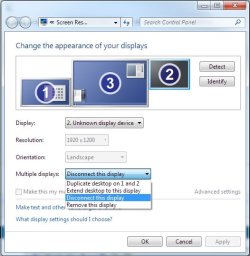
The 226bw does not require dual link so I doubt it would use it. I can't find definitive data either way. The HD2600 DOES output full dual link DVI so a single link cable can drive a single monitor up to WUXGA 1920 × 1200 @ 60 Hz. A dual link cable can drive a single monitor up to WQXGA (2560 × 1600) @ 60 Hz and a special dual-to-single Y-cable to drive two separate monitors up to WUXGA 1920 × 1200 @ 60 Hz each. To my knowledge only ATI does this. Seems that since the driver knows it's only using one monitor and can drive two it's showing the other as a "ghost". I've seen this before and have gotten rid of it this way:

Untitled.jpg

Does that look at all familiar?
 

My Computer My Computer

At a glance

El Capitan / Windows 10i7-4980HQ16GBIris 5200
Computer type
Laptop
Computer Manufacturer/Model Number
Apple
OS
El Capitan / Windows 10
CPU
i7-4980HQ
Memory
16GB
Graphics Card(s)
Iris 5200
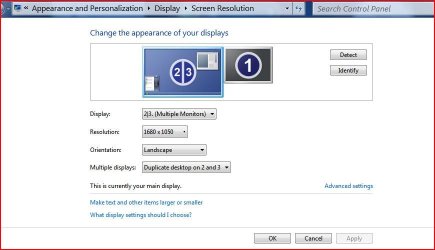
Heres mine
 

Attachments

  • Capture.JPG
    Capture.JPG
    46.4 KB · Views: 83

My Computer My Computer

At a glance

windows 7 build 7000 64amd 5000+3gigati 2600HD
OS
windows 7 build 7000 64
CPU
amd 5000+
Memory
3gig
Graphics Card(s)
ati 2600HD
Sound Card
realtek 7.1
Monitor(s) Displays
22 IN Samsung
Hard Drives
200gig sata
160gig sata
300gig sata
PSU
650
Heres mine

Have you tried switching off the duplicate desktop on 2,3 option so it shows only on 2 OR 3? You should then get the option like I have to delete the unused monitor.
 

My Computer My Computer

At a glance

El Capitan / Windows 10i7-4980HQ16GBIris 5200
Computer type
Laptop
Computer Manufacturer/Model Number
Apple
OS
El Capitan / Windows 10
CPU
i7-4980HQ
Memory
16GB
Graphics Card(s)
Iris 5200
Hey its working great .. im not touching anything hehe
 

My Computer My Computer

At a glance

windows 7 build 7000 64amd 5000+3gigati 2600HD
OS
windows 7 build 7000 64
CPU
amd 5000+
Memory
3gig
Graphics Card(s)
ati 2600HD
Sound Card
realtek 7.1
Monitor(s) Displays
22 IN Samsung
Hard Drives
200gig sata
160gig sata
300gig sata
PSU
650

My Computer My Computer

At a glance

El Capitan / Windows 10i7-4980HQ16GBIris 5200
Computer type
Laptop
Computer Manufacturer/Model Number
Apple
OS
El Capitan / Windows 10
CPU
i7-4980HQ
Memory
16GB
Graphics Card(s)
Iris 5200
Hello there!
I have the same problem (black borders at the left and right sides on TV as Clone desktop, but in Vista worked all fine) and can't reproduce here described trick with 3rd "ghost" monitor.
Video: HD2600XT
Monitor: Acer P223W (connected via Dual-Link cable)
TV: Panasonic TH-R42PV80 (connected via DVI-to-HDMI)
Driver: Latest ATI Catalyst 9.4
OS: Windows Se7en x64
MonInf utility EDID data is HERE
Any ideas?
Thanks in advance!
 
Last edited:

My Computer My Computer

At a glance

Windows 7
OS
Windows 7
This is what Ive been able to find out.

I can get the 46" LCD to work full screen only if I set windows display properties to use one display .

ie) " show desktop 2 only "

If I set the display properties to "duplicate these displays" I cannot fill the large 46" screen edge to edge , even with catalyst control.

So based on all that I think its a windows issue.

Anyone else having this type of issue?

I have the same problem using CCC 9.4. A Microsoft person said this is a known problem which they are working on.
 

My Computer My Computer

At a glance

Windows 7
OS
Windows 7
I get the same issue, I should be able to adjust the screen size and position using the Catalyst configure menu for the second monitor 42" LG however when I select this it defaults back to the home screen of Catalyst. It was fine in windows fista.
 

My Computer My Computer

At a glance

Windows 7
OS
Windows 7
Back
Top