Solved 4G hotspot problem with MSI Laptop

Yoko

New member
Local time
4:40 AM
Messages
13
So I have this MSI built and custom laptop.
My phone: LG G6


I use my phones 4G hotspot connection, but my laptop is having a communication errors with it.

I'm able to online play a video game I've happened to install on this computer (Star Wars Jedi Academy)
this game uses port 29070, atleast.
not even Steam can connect.

I've tried 3 different browsers but none of them are able to connect to the internet.


What I tried:
Reinstalling network drivers.
Disabling avast antivirus.
Setting 802.11n channel width for band 2.4 to 20 MHz only
disabling 802.11n mode
Disabling/enabling WMM (Ad Hoc QoS mode)
Changing the wireless mode.


My phone doesn't have port forwarding options.
 

My Computer My Computer

Computer type
Laptop
Computer Manufacturer/Model Number
MSI GT70 1762
OS
Windows 7 Home Premium 64bit
CPU
3rd Gen. Intel Ivy Bridge Core i7-3840QM 2,8Ghz - 3.8Ghz
Memory
12GB DDR3 1600MHz Dual Channel Memory [3x4GB SODIMMS]
Graphics Card(s)
nVidia GeForce GTX 680M 4,096MB PCI-Express GDDR5 DX11
Sound Card
Sound Blaster Compatible 3D Audio
Monitor(s) Displays
17.3" FHD 16:9 LED Glossy Screen w/72% NTSC Color Gamut
Screen Resolution
1920x1080
Keyboard
Blue blacklit Keyboard
Antivirus
Avast Antivirus
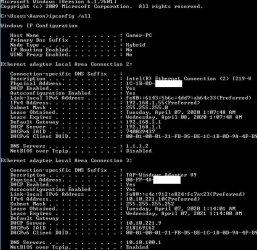
From a CMD prompt type
Ipconfig /all


Post results when connected
 

My Computer My Computer

Computer type
PC/Desktop
OS
win 8 32 bit
This
I didn't feel like post my ip here tho

(Image deleted, I do not need to keep this information here)
this was a screenshot of my cmd prompt.)
 
Last edited:

My Computer My Computer

Computer type
Laptop
Computer Manufacturer/Model Number
MSI GT70 1762
OS
Windows 7 Home Premium 64bit
CPU
3rd Gen. Intel Ivy Bridge Core i7-3840QM 2,8Ghz - 3.8Ghz
Memory
12GB DDR3 1600MHz Dual Channel Memory [3x4GB SODIMMS]
Graphics Card(s)
nVidia GeForce GTX 680M 4,096MB PCI-Express GDDR5 DX11
Sound Card
Sound Blaster Compatible 3D Audio
Monitor(s) Displays
17.3" FHD 16:9 LED Glossy Screen w/72% NTSC Color Gamut
Screen Resolution
1920x1080
Keyboard
Blue blacklit Keyboard
Antivirus
Avast Antivirus
First off, does your cell phone provider allow tethering for your plan?

Second, try PDANet. Install the App and program on your computer. Connect a USB cable between phone and computrer for your Internet connection. I'd shy away from a WiFi or Bluetooth tether. USB will be faster. Download PdaNet+

Another App is called Netshare. I have no experience with this, so I'm giving it as an option since PDANet can sometime lose a USB connection. It happens to me, but not all the time.

Is acell phone connection the only Internet connection you have? You really can't game with that at all. You're better off with a broadband home Internet ISP if at all possible. Satellite won't cut it for gaming either. Too much latency.


And no, you don't need to port forward anything. That's only if you host a server or for certain games for direct p2p multi playing. Also, port forwarding opens your computer up to the world so if you do use it for p2p muli player gaming with something like World Of Warcraft or what ever, use it and then turn it back off.
 

My Computer My Computer

Computer type
PC/Desktop
OS
Windows 7 Ultimate x64
This
I didn't feel like post my ip here tho


OEjFq8z.jpg


You don't have to worry about covering those up. Those are internal IP addresses. Not external IP addresses. Check out a partial of mine. I'm omitting the MAC addresses.
 

Attachments

  • hngffg.jpg
    hngffg.jpg
    70.8 KB · Views: 6

My Computer My Computer

Computer type
PC/Desktop
OS
Windows 7 Ultimate x64
I should say this 4G hotspot works completely okay on my Asus Desktop with Windows 10.
And my 4G connection here in Finland is so precise, I can get only 50ms delay on europian gaming servers which I've used.


Thanks I can try USB connected internet to my laptop if nothing else works.
 
Last edited:

My Computer My Computer

Computer type
Laptop
Computer Manufacturer/Model Number
MSI GT70 1762
OS
Windows 7 Home Premium 64bit
CPU
3rd Gen. Intel Ivy Bridge Core i7-3840QM 2,8Ghz - 3.8Ghz
Memory
12GB DDR3 1600MHz Dual Channel Memory [3x4GB SODIMMS]
Graphics Card(s)
nVidia GeForce GTX 680M 4,096MB PCI-Express GDDR5 DX11
Sound Card
Sound Blaster Compatible 3D Audio
Monitor(s) Displays
17.3" FHD 16:9 LED Glossy Screen w/72% NTSC Color Gamut
Screen Resolution
1920x1080
Keyboard
Blue blacklit Keyboard
Antivirus
Avast Antivirus
Is you network set to public or private from cmd prompt again type


tracert adobe.com
tracert 1.1.1.1


post results
 

My Computer My Computer

Computer type
PC/Desktop
OS
win 8 32 bit

My Computer My Computer

Computer type
Laptop
Computer Manufacturer/Model Number
MSI GT70 1762
OS
Windows 7 Home Premium 64bit
CPU
3rd Gen. Intel Ivy Bridge Core i7-3840QM 2,8Ghz - 3.8Ghz
Memory
12GB DDR3 1600MHz Dual Channel Memory [3x4GB SODIMMS]
Graphics Card(s)
nVidia GeForce GTX 680M 4,096MB PCI-Express GDDR5 DX11
Sound Card
Sound Blaster Compatible 3D Audio
Monitor(s) Displays
17.3" FHD 16:9 LED Glossy Screen w/72% NTSC Color Gamut
Screen Resolution
1920x1080
Keyboard
Blue blacklit Keyboard
Antivirus
Avast Antivirus
The trace proves you can get out on the internet but dns isn't working as you can't resolve Adobe set DNS to 1.1.1.1 & 1.0.0.1
 

My Computer My Computer

Computer type
PC/Desktop
OS
win 8 32 bit
Oh that was weird. The problem is solved.
>Internet protocol version 4 configure
>use the following DNS server addresses -> Obtain DNS server automatically.
I don't know why but my laptop was set to an improper DNS address
Solved.
 

My Computer My Computer

Computer type
Laptop
Computer Manufacturer/Model Number
MSI GT70 1762
OS
Windows 7 Home Premium 64bit
CPU
3rd Gen. Intel Ivy Bridge Core i7-3840QM 2,8Ghz - 3.8Ghz
Memory
12GB DDR3 1600MHz Dual Channel Memory [3x4GB SODIMMS]
Graphics Card(s)
nVidia GeForce GTX 680M 4,096MB PCI-Express GDDR5 DX11
Sound Card
Sound Blaster Compatible 3D Audio
Monitor(s) Displays
17.3" FHD 16:9 LED Glossy Screen w/72% NTSC Color Gamut
Screen Resolution
1920x1080
Keyboard
Blue blacklit Keyboard
Antivirus
Avast Antivirus
Back
Top