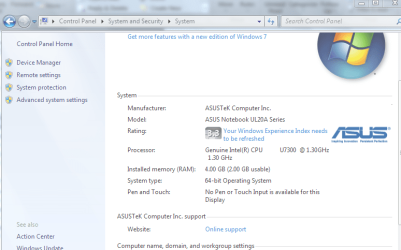
4GB memory, only 2GB usable?

what MOBO you're using??
 

My Computer

Computer Manufacturer/Model Number
built up
OS
windows 7
CPU
Phenom II AMD Dragon 3.5Ghz
Memory
DDR3 4GB
Graphics Card(s)
ATI Radeon 512Mb
Monitor(s) Displays
HP L1506
Screen Resolution
1152 x 864
Hard Drives
WDC 1 TB SATA-II Green Power
Keyboard
HP wireless keyboard
Mouse
HP Optic
Internet Speed
1GB
How is it that even on a Core 2 Duo with W7 64bit installed, only 2GB is usable out of the 4GB installed? Why?

In msconfig, I set the advanced boot option to 2 CPU cores and 4096 memory.

asusqhq.png at Pingy - Free Image Hosting

Type msconfig in search. You may have max mem set at 2 gigs. Max mem, and max cpu, should be unchecked
 

My Computer

Computer Manufacturer/Model Number
HP Pavillion dv-7 1005 Tx
OS
Win 8 Release candidate 8400
CPU
[email protected]
Memory
4 gigs
Graphics Card(s)
Nvidia 9600M
Sound Card
HD built-in
Monitor(s) Displays
17" Wxga
Screen Resolution
1440x900
Cooling
none
Internet Speed
45Mb down 5Mb up

My Computer

Computer type
PC/Desktop
Computer Manufacturer/Model Number
Self built custom
OS
64-bit Windows 11 Pro for Workstations
CPU
Intel i7-8700K OC'd to 5 GHz
Motherboard
ASUS ROG Maximus XI Formula Z390
Memory
64 GB (4x16GB) G.SKILL TridentZ RGB DDR4 3600 MHz
Graphics Card(s)
ASUS ROG-STRIX-GTX1080TI-O11G-GAMING
Sound Card
Integrated
Monitor(s) Displays
2 x Samsung Odyssey G7 27"
Screen Resolution
2560x1440
Hard Drives
1TB Samsung 990 PRO M.2,
4TB Samsung 990 PRO PRO M.2,
TerraMaster F8 SSD Plus NAS
PSU
Seasonic Prime Titanium 850W
Case
Thermaltake Core P3
Cooling
Corsair Hydro H115i
Keyboard
Logitech wireless K800
Mouse
Logitech MX Master 4
Internet Speed
2 Gb/s Download and 100 Mb/s Upload
Antivirus
Malwarebyte Anti-Malware Premium
Browser
Google Chrome
Other Info
Logitech Z625 speaker system,
Logitech BRIO 4K Pro webcam,
HP Color LaserJet Pro MFP M477fdn,
APC SMART-UPS RT 1000 XL - SURT1000XLI,
Galaxy S23 Plus phone
Just because it is a Core 2 Duo doesn't mean it will utilize 4GB of RAM. As Ryo pointed out, the Mobo matters as well.
 

My Computer

Computer Manufacturer/Model Number
Dell Inspiron 1520 (Laptop)/ Home (Desktop)
OS
Windows 7 x64 / Same
CPU
Intel Core 2 Duo T7250 / Intel Core i7 930
Motherboard
Intel 945 / Asus P6X58D-E
Memory
4GB / 6GB
Graphics Card(s)
NVIDIA GeForce 8400M GS / ASUS 1GB
Sound Card
Whatever Dell gave me :-( / Onboard
Monitor(s) Displays
15.4" LCD / Crappy CRT
Hard Drives
Seagate 500GB SATA; 7200 RPM / Seagate 1TB SATA; 7200 RPM
PSU
N/A / OCZ Fatal1ty 550W Modular
Case
N/A / Antec 900
Cooling
Air
Mouse
Microsoft Presenter (Bluetooth)
Also untick maximum memory. A setting of 4096 will not allow you to use all of your memory.
 

My Computer

OS
Windows
Some laptop chipsets have a maximum of 2GB of memory, no matter how much you put in.
 

My Computer

Computer Manufacturer/Model Number
Self-Built
OS
Windows 7 64 bit SP1
CPU
Core i7 920
Motherboard
Gigabyte GA-X58A-UD3R
Memory
12 GB (6x2GB Corsair)
Graphics Card(s)
nVidia 250GTS
Sound Card
Built-in
Monitor(s) Displays
2x Samsung SyncMaster 2343 (23" Widescreen)
Keyboard
Microsoft Natural Keyboard
Mouse
Logitech Laser
He likly only has 2GB installed. Someone just told him he had 4 or that intalling a x64 OS would give it to him.

I have seen it before. Guy swore he had 4 gigs. I pulled a chip to find it was a 1 gig chip. But it said 2048 on the chip because it was a set of 2 1gig chips for 2048. Therefore they though they had 2gig chips.

For 2 gigs to vanish would be either a bad memory controler, bad memory, improper install(not fully locked down).

If the PC is 2 years old or younger it very likly supports at least 4 gigs.

Probably user error.
 

My Computer

Computer Manufacturer/Model Number
I trust nobody!
OS
Windows 7 Ultimate x64/x86 Windows 7 Pro x64/x86 Windows 7 Home Premium x64/x86
CPU
Intel C2Q 9650
Motherboard
Intel
Memory
8GB DDR2800 Corsair
Graphics Card(s)
NVIDIA 260 GTX
Sound Card
Onboard
Monitor(s) Displays
Dell 2409w
Screen Resolution
1920x1080
Hard Drives
10 of em!
PSU
600 Watt FSP Group
Case
Antec
Cooling
Fresh Air
Keyboard
Microsoft
Mouse
Razer
Internet Speed
Fast enough
He likly only has 2GB installed. Someone just told him he had 4 or that intalling a x64 OS would give it to him.

I have seen it before. Guy swore he had 4 gigs. I pulled a chip to find it was a 1 gig chip. But it said 2048 on the chip because it was a set of 2 1gig chips for 2048. Therefore they though they had 2gig chips.

For 2 gigs to vanish would be either a bad memory controler, bad memory, improper install(not fully locked down).

If the PC is 2 years old or younger it very likly supports at least 4 gigs.

Probably user error.

The OP most likely has an integrated graphics controller that is sharing the available system memory.
 

My Computer

OS
Windows 7
He likly only has 2GB installed. Someone just told him he had 4 or that intalling a x64 OS would give it to him.

I have seen it before. Guy swore he had 4 gigs. I pulled a chip to find it was a 1 gig chip. But it said 2048 on the chip because it was a set of 2 1gig chips for 2048. Therefore they though they had 2gig chips.

For 2 gigs to vanish would be either a bad memory controler, bad memory, improper install(not fully locked down).

If the PC is 2 years old or younger it very likly supports at least 4 gigs.

Probably user error.

The OP most likely has an integrated graphics controller that is sharing the available system memory.

I have rarely seen more then 256mb alocated for Video for the onboard.
It dosent account for the entire 2GB.
 

My Computer

Computer Manufacturer/Model Number
I trust nobody!
OS
Windows 7 Ultimate x64/x86 Windows 7 Pro x64/x86 Windows 7 Home Premium x64/x86
CPU
Intel C2Q 9650
Motherboard
Intel
Memory
8GB DDR2800 Corsair
Graphics Card(s)
NVIDIA 260 GTX
Sound Card
Onboard
Monitor(s) Displays
Dell 2409w
Screen Resolution
1920x1080
Hard Drives
10 of em!
PSU
600 Watt FSP Group
Case
Antec
Cooling
Fresh Air
Keyboard
Microsoft
Mouse
Razer
Internet Speed
Fast enough
Just in case, test your memory using memtest86 boot CD overnight or for at least 6 passes.

Swap your memory sticks.
 
The link in his post shows an ASUS Laptop.

ASUS UL20a.PNG

Here is a link to the specs.
ASUSTeK Computer Inc.

It should have come with 2GB of ram and can be upgraded to 4GB.
I wonder if he got the right upgrade chip.

Jim :geek:
 

My Computer

Computer type
PC/Desktop
Computer Manufacturer/Model Number
Home Built
OS
Windows 8.1 Pro w/Media Center 64bit, Windows 7 HP 64bit
CPU
Phenom II X6 1100T
Motherboard
ASUS M5A99X EVO
Memory
Crucial Balistic 8gb DDR3-1866 CL9
Graphics Card(s)
MSI R6850 Cyclone IGD5 PE
Sound Card
On Board
Monitor(s) Displays
ASUS VE258Q 25" LED with DVI-HDMI-DisplayPort
Screen Resolution
1920 x 1080
Hard Drives
Two WD Cavier Black 2TB Sata III, WD My Book Essential 2TB USB 3.0
PSU
Seasonic X650 80 Plus GOLD Modular
Case
Corsair 400R
Cooling
Antec Kuhler H2O 620, Two 120mm and four 140mm
Keyboard
Logitech K120
Mouse
Logitech Marble Mouse USB, Logitech Precision Game Pad
Internet Speed
15MB
Antivirus
Norton IS 2013, Malwarebytes Pro Beta 2
Browser
IE-11, FF-27
Other Info
APC UPS ES 750, Netgear WNR3500L Gigabit & Wireless N Router with SamKnows Test Program, Motorola SB6120 Gigabit Cable Modem. Brother HL-2170W Laser Printer, Epson V300 Scanner
Since this is a netbook, it seems likely that it shipped with Windows 7 starter edition, which has a 2GB memory limitation.

However, the image seems to indicate that it's a 64 bit OS installed and i'm under the impression that Windows 7 starter only comes in 32 bit version, so that seems confusing.

The "Get more features with a new edition of Windows 7" link at the top also seems to indicate it's Windows 7 Starter.. Maybe Asus is somehow shipping a 64 bit Starter edition?

Scratch that, this model seems to ship with Windows 7 Home Premium, so that shouldn't be a problem. I'm going to have to go with improperly installed RAM, Damaged RAM, or Incorrect RAM as the answer.

One other thing to try:
  1. Press Windows Key + R and type msconfig into the run command box.
  2. On the "Boot" tab, click on advanced options.
  3. Make sure the box labelled "Maximum Memory" is NOT ticked. If it is, untick, save and restart.
 
Last edited:

My Computer

Computer Manufacturer/Model Number
Self-Built
OS
Windows 7 64 bit SP1
CPU
Core i7 920
Motherboard
Gigabyte GA-X58A-UD3R
Memory
12 GB (6x2GB Corsair)
Graphics Card(s)
nVidia 250GTS
Sound Card
Built-in
Monitor(s) Displays
2x Samsung SyncMaster 2343 (23" Widescreen)
Keyboard
Microsoft Natural Keyboard
Mouse
Logitech Laser
if it hasn't been mentioned, make sure your chipset drivers are installed and up to date.
 

My Computer

Computer Manufacturer/Model Number
Dell Inspiron 1520 (Laptop)/ Home (Desktop)
OS
Windows 7 x64 / Same
CPU
Intel Core 2 Duo T7250 / Intel Core i7 930
Motherboard
Intel 945 / Asus P6X58D-E
Memory
4GB / 6GB
Graphics Card(s)
NVIDIA GeForce 8400M GS / ASUS 1GB
Sound Card
Whatever Dell gave me :-( / Onboard
Monitor(s) Displays
15.4" LCD / Crappy CRT
Hard Drives
Seagate 500GB SATA; 7200 RPM / Seagate 1TB SATA; 7200 RPM
PSU
N/A / OCZ Fatal1ty 550W Modular
Case
N/A / Antec 900
Cooling
Air
Mouse
Microsoft Presenter (Bluetooth)
Back
Top