Solved 4TB HDD appears as 2tb

flows69

New member
Local time
3:31 AM
Messages
33
Hey guys,

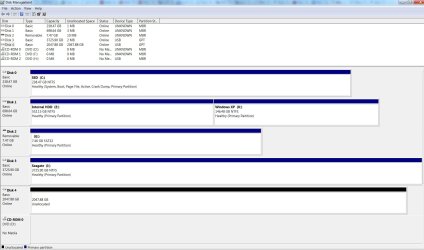
I have had problems with my current 4tb HDD (weird noises) and bought a new one to back up all my data before loosing everything. The 4tb I am currently using is a Seagate (if I remember well Barracuda) and the one I just bought is a WD Green. Apparently they are more reliable, however I can't get it to appear as a 4tb HDD.

There are a lot of posts about this topic and all I read was fixed switching from MBR to GPT or adjusting the Bios.

I shouldn't be a Bios problem as I am already using a 4tb and I made sure the new one is GPT. I attached a screenshot of Disk Management.

Thanks for you time and help :)
 

Attachments

  • 4tb Problem.jpg
    4tb Problem.jpg
    131 KB · Views: 10

My Computer My Computer

Computer type
Laptop
Computer Manufacturer/Model Number
Alienware M17X R2
OS
Windows 7 ultimate 64 bits
Hard Drives
1 SSD OCZ 256gb
1 HDD Western Digital 1tb black scorpion
1 external HDD Seagate 4tb connected with a USB docking station
Antivirus
Avast pro
I should have been more precise, the problematic disk is listed as Disk 4
 

My Computer My Computer

Computer type
Laptop
Computer Manufacturer/Model Number
Alienware M17X R2
OS
Windows 7 ultimate 64 bits
Hard Drives
1 SSD OCZ 256gb
1 HDD Western Digital 1tb black scorpion
1 external HDD Seagate 4tb connected with a USB docking station
Antivirus
Avast pro
Does anything change if you connect the problem drive to the motherboard port now occupied by the 4 TB Seagate, making the Western Digital disc 3?
 

My Computer My Computer

Computer type
PC/Desktop
Computer Manufacturer/Model Number
Ignatz Special; 4 speed manual gearbox; factory air conditioning; one of one
OS
Windows 7 Home Premium SP1, 64-bit
CPU
Intel Skylake i5-6600K, not overclocked
Motherboard
AsRock Z170M Extreme 4, micro ATX
Memory
8 GB HyperX DDR4-2666 (2 x 4 GB)
Graphics Card(s)
none; graphics are integrated on CPU
Sound Card
onboard: Realtek ALC1150; external: USB Behringer UF0-202
Monitor(s) Displays
Dell S2340M 23 inch IPS
Screen Resolution
1600 x 900
Hard Drives
System: Crucial MX100 series SSD, 128 GB;
Data: Samsung Spinpoint 103SJ, 1 TB;
Backup: WD Caviar Green WD30EZRX-00D8PB0, 3 TB
PSU
Rosewill SilentNight 500 watt fanless, semi-modular
Case
Antec Solo II
Cooling
Noctua NH-U12S; Noctua F12 intake, Noctua S12A exhaust
Keyboard
Microsoft 200 6JH-00001 USB
Mouse
Dell or Microsoft optical wired; USB
Antivirus
Microsoft Security Essentials and Malwarebytes Premium
Browser
Pale Moon
Other Info
All fans PWM; speeds at idle: CPU circa 500 rpm; intake circa 600 rpm; exhaust circa 600 rpm; CPU temps 27 idle and 47 C load in a warm room (27 C/81 F) when running Intel Extreme Tuning Utility stress test.
Hey ignatzatsonic,

I am using a laptop, those two drives are plugged on external docking stations connected via USB. I just switched the USB ports, nothing changed.
 

My Computer My Computer

Computer type
Laptop
Computer Manufacturer/Model Number
Alienware M17X R2
OS
Windows 7 ultimate 64 bits
Hard Drives
1 SSD OCZ 256gb
1 HDD Western Digital 1tb black scorpion
1 external HDD Seagate 4tb connected with a USB docking station
Antivirus
Avast pro
And the WD shows as 2 GB when it is inserted into the same dock/port combination as the 4 GB Seagate?

If so, I'm out of ideas. I suppose there may be motherboard/BIOS limitations that would have an effect. I'm generally skeptical of flashing to a new BIOS in hopes it might solve something.

Have you drilled into your laptop's documentation at Dell/Alienware, looking for the finer points on hard drive support?

You might try a "clean" or "clean all" on the WD in case there is some code on it that is preventing it from being read properly.

Do you know for a fact that the external dock supports 4 TB under all circumstances?
 

My Computer My Computer

Computer type
PC/Desktop
Computer Manufacturer/Model Number
Ignatz Special; 4 speed manual gearbox; factory air conditioning; one of one
OS
Windows 7 Home Premium SP1, 64-bit
CPU
Intel Skylake i5-6600K, not overclocked
Motherboard
AsRock Z170M Extreme 4, micro ATX
Memory
8 GB HyperX DDR4-2666 (2 x 4 GB)
Graphics Card(s)
none; graphics are integrated on CPU
Sound Card
onboard: Realtek ALC1150; external: USB Behringer UF0-202
Monitor(s) Displays
Dell S2340M 23 inch IPS
Screen Resolution
1600 x 900
Hard Drives
System: Crucial MX100 series SSD, 128 GB;
Data: Samsung Spinpoint 103SJ, 1 TB;
Backup: WD Caviar Green WD30EZRX-00D8PB0, 3 TB
PSU
Rosewill SilentNight 500 watt fanless, semi-modular
Case
Antec Solo II
Cooling
Noctua NH-U12S; Noctua F12 intake, Noctua S12A exhaust
Keyboard
Microsoft 200 6JH-00001 USB
Mouse
Dell or Microsoft optical wired; USB
Antivirus
Microsoft Security Essentials and Malwarebytes Premium
Browser
Pale Moon
Other Info
All fans PWM; speeds at idle: CPU circa 500 rpm; intake circa 600 rpm; exhaust circa 600 rpm; CPU temps 27 idle and 47 C load in a warm room (27 C/81 F) when running Intel Extreme Tuning Utility stress test.
Thank you very much, I switched of docking stations and it turns out the problem was solved ;-)

Kinda should have thought about that myself ...

Since we are at it, would you have a recommendation for an automatic back up software ? Basically I have a few folders where are all my current works which are stored online. When I am done I transfer them to storage folders. What I would like is a software which would automatically sync the storage folders on the other HDD.
 

My Computer My Computer

Computer type
Laptop
Computer Manufacturer/Model Number
Alienware M17X R2
OS
Windows 7 ultimate 64 bits
Hard Drives
1 SSD OCZ 256gb
1 HDD Western Digital 1tb black scorpion
1 external HDD Seagate 4tb connected with a USB docking station
Antivirus
Avast pro
FreeFileSync from sourceforge.net

I assume it can be set to run "automatically" through Task Scheduler, but I have mine set up to run on demand with a single mouse click. I don't really trust "automated" stuff as you get lulled into a sense of possibly false security--thinking everything is working OK when it isn't.

Works very well. You can include or exclude based on file, folder, file extension, etc.

You can set it up so that the destination drive is a mirror image of the source drive.

Or you can set it up so that if you delete file X from the source drive, file X is NOT deleted from the target drive.

Very flexible.

There's a bunch of programs out there that work in much the same way. The interfaces would differ, so you might find some easier to understand than others.

Others include Syncback, Second Copy ($30), Allway Sync, Folder Clone, and GFI Backup Home Edition. I used to use Second Copy and it works very well.
 

My Computer My Computer

Computer type
PC/Desktop
Computer Manufacturer/Model Number
Ignatz Special; 4 speed manual gearbox; factory air conditioning; one of one
OS
Windows 7 Home Premium SP1, 64-bit
CPU
Intel Skylake i5-6600K, not overclocked
Motherboard
AsRock Z170M Extreme 4, micro ATX
Memory
8 GB HyperX DDR4-2666 (2 x 4 GB)
Graphics Card(s)
none; graphics are integrated on CPU
Sound Card
onboard: Realtek ALC1150; external: USB Behringer UF0-202
Monitor(s) Displays
Dell S2340M 23 inch IPS
Screen Resolution
1600 x 900
Hard Drives
System: Crucial MX100 series SSD, 128 GB;
Data: Samsung Spinpoint 103SJ, 1 TB;
Backup: WD Caviar Green WD30EZRX-00D8PB0, 3 TB
PSU
Rosewill SilentNight 500 watt fanless, semi-modular
Case
Antec Solo II
Cooling
Noctua NH-U12S; Noctua F12 intake, Noctua S12A exhaust
Keyboard
Microsoft 200 6JH-00001 USB
Mouse
Dell or Microsoft optical wired; USB
Antivirus
Microsoft Security Essentials and Malwarebytes Premium
Browser
Pale Moon
Other Info
All fans PWM; speeds at idle: CPU circa 500 rpm; intake circa 600 rpm; exhaust circa 600 rpm; CPU temps 27 idle and 47 C load in a warm room (27 C/81 F) when running Intel Extreme Tuning Utility stress test.
You solves all my problems for today ;-)

Thank you very much for everything
 

My Computer My Computer

Computer type
Laptop
Computer Manufacturer/Model Number
Alienware M17X R2
OS
Windows 7 ultimate 64 bits
Hard Drives
1 SSD OCZ 256gb
1 HDD Western Digital 1tb black scorpion
1 external HDD Seagate 4tb connected with a USB docking station
Antivirus
Avast pro
Back
Top