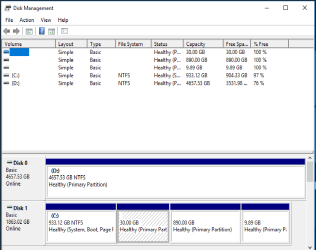
If you're still intent on multi-booting, just remember that all OSes will need to be on the MBR disk. That, of course, will require multiple partitions on the 2TB disk, but you should have no issues with the size of those partitions if, as I mentioned, you redirect your user data folders to the second disk.This all started with wanting to duel boot Win 10 and Linux, Win 98 for shits and giggles.
As for Win98, I would not even try adding that to your multi-boot plans. First, W98 SE can only work within the first 128 GB of a HDD (or 8 GB for W98 first edition). It will not be able to access anything beyond that point in the rest of the 2TB disk, and nothing at all on the GPT disk. Also, there was no NTFS support in W98, so it could only see FAT/FAT32 partitions. And even if you agree to work within those restrictions, it's unlikely you'll be able to find W98 drivers for your Vista/7-era hardware.
If you really want to toy around with W98 a bit, you'll be far better off installing VirtualBox and running W98 in a virtual machine.
Be prepared for some disagreement as to the "right way" to multi-boot. Basically, there are two general approaches: the Microsoft way, and the third-party way. The Microsoft way entails wrangling with the BCD and registry edits, while the third-party way is more straightforward but does require a third-party boot manager.I'll probably have quite a few more questions to make sure I do this right.
Personally, I would never, ever, condone the Microsoft way, which I consider fragile and kludgy. But others, including some people here, seem to like it.
If you're still in a learning mood, I wrote a couple webpages long ago that may help you get a better grasp of some of the issues:I wrote both a decade ago, yet their principles are still valid today. Nevertheless, they're old so don't get stuck on specifics (for example, the BCD has replaced the boot.ini file, I now recommend the BootIt-BM boot manager instead of XOSL), but peruse them to get a feel for the broader concepts involved.
Dan
P.S.: FTR, my main machine is a laptop with two MBR drives that include 6 multi-boot partitions, 2 data partitions, and 19 virtual machines--covering everything from DOS and Android VMs to Win10.
My workbench desktop multi-boots 3 OSes on a 500 GB MBR disk and a 4TB GPT disk for data--a scheme similar to what you might opt for.
My Computer
At a glance
Windows 7/8.1/10 multibootIntel Core i7-770048GB (2x16GB Crucial DDR4-3200 + 2x8GB Hynix ...Intel HD630 + AMD Radeon R7 450 PCIe
- Computer type
- PC/Desktop
- Computer Manufacturer/Model Number
- Dell Optiplex 7050
- OS
- Windows 7/8.1/10 multiboot
- CPU
- Intel Core i7-7700
- Motherboard
- Dell, Intel Q270 chipset
- Memory
- 48GB (2x16GB Crucial DDR4-3200 + 2x8GB Hynix DDR4-2400)
- Graphics Card(s)
- Intel HD630 + AMD Radeon R7 450 PCIe
- Monitor(s) Displays
- Asus VC279 (27")
- Screen Resolution
- 1920x1080
- Hard Drives
- Toshiba M.2 NVMe (256GB),
Samsung 960 Evo (500GB),
WD Red Plus 80EFBX (8TB)