Escar Frazzle
New member
- Local time
- 2:38 PM
- Messages
- 11
I had a local guy install a new hdd on my PC and asked him to install a 6TB WD HDD. This is before I realized that I can't run a HDD over 2TB. Coincidentally I had already upgrade to two 2TB HDD's a couple of years earlier so I never knew about the problem with my BIOS yet. When he went to change them he found out it wouldn't work, so he partitioned the 6TB HDD in to two 2TB partitions and left the rest unallocated. That covers the needed back story to my problem lol.
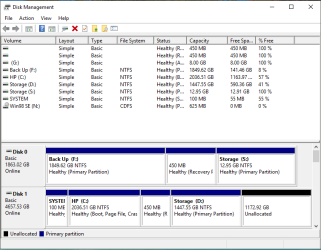
Now comes the problem. I wanted to start getting into running a duel boot system and I was going to allocate some room from my D: drive which is the 2TB of my 6TB drive. So I shrunk the D: drive from 2TB to 1.5TB for 0.5TB of space for my other OS. After I shrank it I can't allocate any of it or even expand it back into my unallocated part. I'm not sure how he got it to work in the first place now. I'm new at this so I should add some info that you might need (even tho you won't need it, but something else lol) I have one of my old 2TB drives as Disk 0 for back up and my C: and D: drives as Disk 1. Wiping D: if need isn't a problem, but I would like to avoid wiping C: if I can, but I do have my image for C: saved on my old hard drive.
I do have Paragon Parition Manager to help, but it reads an error that says, "I/O error on hard disk drive 6 has occurred" when opening.
Any advice would be appreciated.
Here's the picture of Disk 1.
Now comes the problem. I wanted to start getting into running a duel boot system and I was going to allocate some room from my D: drive which is the 2TB of my 6TB drive. So I shrunk the D: drive from 2TB to 1.5TB for 0.5TB of space for my other OS. After I shrank it I can't allocate any of it or even expand it back into my unallocated part. I'm not sure how he got it to work in the first place now. I'm new at this so I should add some info that you might need (even tho you won't need it, but something else lol) I have one of my old 2TB drives as Disk 0 for back up and my C: and D: drives as Disk 1. Wiping D: if need isn't a problem, but I would like to avoid wiping C: if I can, but I do have my image for C: saved on my old hard drive.
I do have Paragon Parition Manager to help, but it reads an error that says, "I/O error on hard disk drive 6 has occurred" when opening.
Any advice would be appreciated.
Here's the picture of Disk 1.
Attachments

Last edited:
My Computer
At a glance
Windows 10 Home 64-bitAMD Phenom II X4 3GHzDDR3NVIDIA GTX 970
- Computer type
- PC/Desktop
- Computer Manufacturer/Model Number
- HP Pavilion Elite HPE-210y
- OS
- Windows 10 Home 64-bit
- CPU
- AMD Phenom II X4 3GHz
- Motherboard
- Foxconn Aloe v1.01
- Memory
- DDR3
- Graphics Card(s)
- NVIDIA GTX 970
- Hard Drives
- WD Black 6TB 7.2k RPM
WD Green 2TB 5.2k RPM X2
- PSU
- EVGA 850 G2
- Internet Speed
- 20Mbps
- Antivirus
- Kaspersky Total Security
- Browser
- Chrome v56