
Solved 5.1 Speakers only 3 are working, unique case

makarius007

New member
Local time
2:20 PM
Messages
10
My problem: Only 2 main speakers and sub buffer are working out of the whole 5.1 speaker set up.

I have:
Cyber Acoustics CA-5402 40Watts 5.1 5 Piece Flat Panel Design Subwoofer & Satellite Speaker System
and
GIGABYTE GA-970A-D3 AM3+ Motherboard
zbCoHV2.png


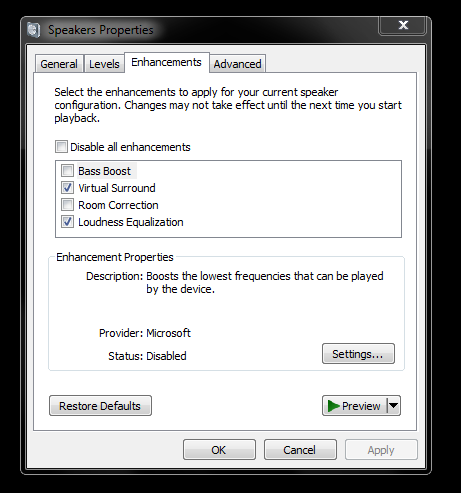
As you can see in the above image I have the box "Virtual Surround" checked which should enable surround sound. It does not do that.

So I went to this website:
Realtek

and installed the drivers both the 79mb one and 148mb one.

tqzqpKn.png

AS you can see in the above image the drivers are installed in my directory.

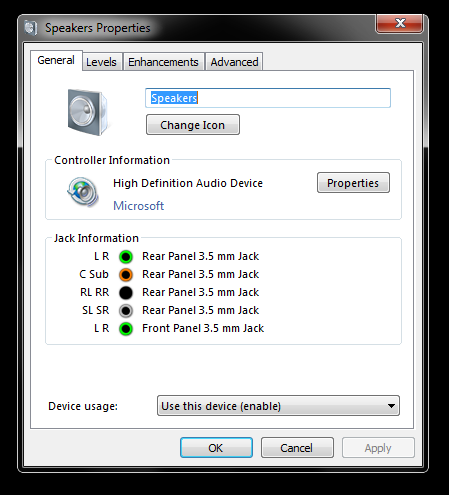
but when i open speaker properties it still says under Controller Information "Microsoft":
TFOGJqO.png


So at this point I am stuck. All the wires are plugged in correctly. Speakers work on my old computer, so they are functional.
 

My Computer My Computer

At a glance

Windows 7 Ultimate x64AMD FX-6350 Vishera 3.9GHz Socket AM3+CORSAIR Vengeance 8GB (2 x 4GB) DDR3 1600NVIDIA GeForce GT 430 (MSI N430GT 4GB DDR3)
Computer type
PC/Desktop
Computer Manufacturer/Model Number
Custom Build
OS
Windows 7 Ultimate x64
CPU
AMD FX-6350 Vishera 3.9GHz Socket AM3+
Motherboard
GIGABYTE GA-970A-D3
Memory
CORSAIR Vengeance 8GB (2 x 4GB) DDR3 1600
Graphics Card(s)
NVIDIA GeForce GT 430 (MSI N430GT 4GB DDR3)
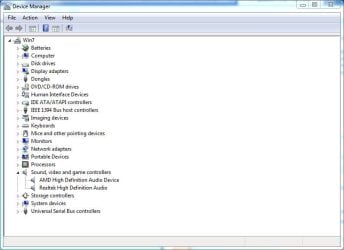
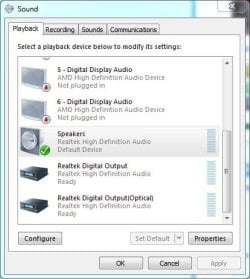
Sounds like the Microsoft HD Audio is still installed and set as the Default Audio Playback Device.

Go to the Device Manager, display what is in the Sound section. You should have the RealTek, possibly HDMI audio (if your video card has that) and nothing else. If the HD Audio is listed, RIGHT click on that to highlight it and then LEFT click "Uninstall". Restart the PC and then check the Sound Panel/Playback section. Your "Speakers" (RealTek) should be set as default playback device. You can go to configure and set the speaker type as 5.1.
 

Attachments

  • device manager capture.JPG
    device manager capture.JPG
    45.9 KB · Views: 4
  • playback capture.JPG
    playback capture.JPG
    38.1 KB · Views: 1

My Computer My Computer

At a glance

Windows 10 64 bitIntel i7 6700K16GB Corsair DominatorIntel CPU Graphics
Computer type
PC/Desktop
Computer Manufacturer/Model Number
My Own Build
OS
Windows 10 64 bit
CPU
Intel i7 6700K
Motherboard
ASUS ROG Maximus VIII Hero
Memory
16GB Corsair Dominator
Graphics Card(s)
Intel CPU Graphics
Sound Card
RealTek
Monitor(s) Displays
27" Dell S2719dgf
Screen Resolution
2560X1440
Hard Drives
1 TB Samsung 850 EVO SSD for Win 10 Pro
500GB Samsung 850 EVO SSD for Win 10 Insider
2 TB drive for backup
PSU
EVGA Supernova 750G2
Case
BeQuiet Silent Base 600
Cooling
Deepcool Captain 120EX
Keyboard
Microsoft Wireless 2000
Mouse
Microsoft wireless
Internet Speed
100 MB/sec (Cable)
Antivirus
Microsoft Defender and Malwarebytes
Browser
Edge/Firefox
Other Info
Cakewalk (Sonar) by BandLab and Studio One 4.1 Pro recording studio software. MOTU 896Mk3 Hybrid recording interface, Frontier Tranzport wireless control unit, Behringer X-Touch Control Surface.
Five USB connected optical drives for CD Audio production using Nero BurningROM
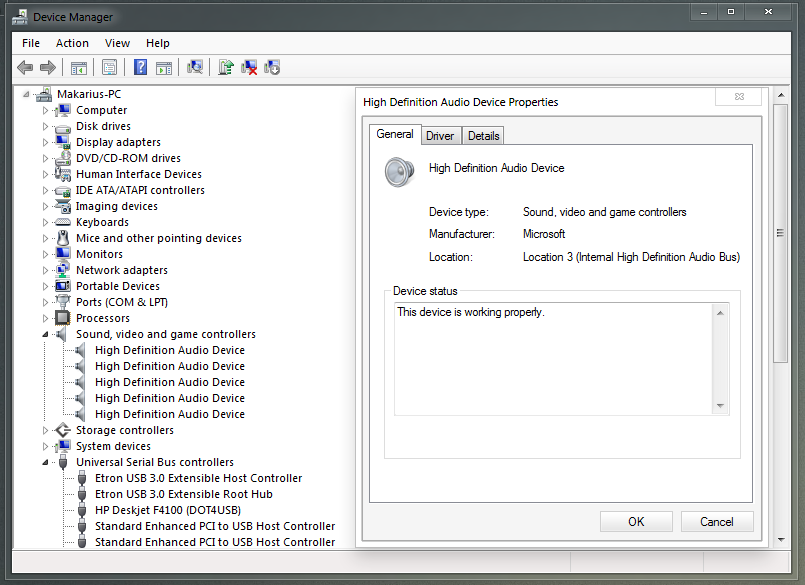
This is what appears in my Device manager under sound drop down:
m4iau3C.png


I tried uninstalling all of those "High Definition Audio Device" and then uninstalling and reinstalling realtek drivers. But when I would restart windows just installs those "High Definition Audio Device" drivers back...

And as you can see Realtek drivers do not appear in the device manager.

My speakers are set as default audio device as shown in your second thumbnail.

PS thank you for responding...
 

My Computer My Computer

At a glance

Windows 7 Ultimate x64AMD FX-6350 Vishera 3.9GHz Socket AM3+CORSAIR Vengeance 8GB (2 x 4GB) DDR3 1600NVIDIA GeForce GT 430 (MSI N430GT 4GB DDR3)
Computer type
PC/Desktop
Computer Manufacturer/Model Number
Custom Build
OS
Windows 7 Ultimate x64
CPU
AMD FX-6350 Vishera 3.9GHz Socket AM3+
Motherboard
GIGABYTE GA-970A-D3
Memory
CORSAIR Vengeance 8GB (2 x 4GB) DDR3 1600
Graphics Card(s)
NVIDIA GeForce GT 430 (MSI N430GT 4GB DDR3)
Try a Manual install of the drivers through the device manager.

Download the ZIP version of the driver from realtek (if you have been using executable version) and extract the folder (to desktop or your choice)

Then in the device manager right click a HD adio device and select update driver, Browse my computer, Specify the 64bit or 32bit section of the extracted folder as required. Hopefully this is the job done, repeat for other "HD audios" as needed.

If the driver scanner does not recognise any compatible drivers, you have a problem, you can force them manually by selecting "let me choose a drive" and then pressing have disk, but that realtek driver covers hundreds of devices, you will struggle to find the right .inf for your needs.
 

My Computer My Computer

At a glance

Windows 7 Ultimate x64Intel Core2 Quad Q8300 2.5GhzKingston HyperX 4x1GB DDR2 1066MhzAsus/Nvidia 9500GT 1GB
Computer type
PC/Desktop
Computer Manufacturer/Model Number
Self Build
OS
Windows 7 Ultimate x64
CPU
Intel Core2 Quad Q8300 2.5Ghz
Motherboard
Asus P5QD Turbo
Memory
Kingston HyperX 4x1GB DDR2 1066Mhz
Graphics Card(s)
Asus/Nvidia 9500GT 1GB
Sound Card
On-Board HD
Monitor(s) Displays
22" Widescreen TFT
Screen Resolution
1920x1080
Hard Drives
2x 320Gb Seagate SATAII RAID 0
2x 80Gb Seagate SATAII RAID 0
1x 1tb hybrid (8gb ssd)
PSU
650w
Case
ATX
Cooling
140mm front, 120mm Rear, 80mm Chipset + stock CPU and GPU
Keyboard
Plastic one
Mouse
Plastic one
Internet Speed
4Mbps
Other Info
Laptop: HP Elitebook 2560p
i5 @2.7Ghz 4GB DDR3

My Computer My Computer

At a glance

Windows 10 64 bitIntel i7 6700K16GB Corsair DominatorIntel CPU Graphics
Computer type
PC/Desktop
Computer Manufacturer/Model Number
My Own Build
OS
Windows 10 64 bit
CPU
Intel i7 6700K
Motherboard
ASUS ROG Maximus VIII Hero
Memory
16GB Corsair Dominator
Graphics Card(s)
Intel CPU Graphics
Sound Card
RealTek
Monitor(s) Displays
27" Dell S2719dgf
Screen Resolution
2560X1440
Hard Drives
1 TB Samsung 850 EVO SSD for Win 10 Pro
500GB Samsung 850 EVO SSD for Win 10 Insider
2 TB drive for backup
PSU
EVGA Supernova 750G2
Case
BeQuiet Silent Base 600
Cooling
Deepcool Captain 120EX
Keyboard
Microsoft Wireless 2000
Mouse
Microsoft wireless
Internet Speed
100 MB/sec (Cable)
Antivirus
Microsoft Defender and Malwarebytes
Browser
Edge/Firefox
Other Info
Cakewalk (Sonar) by BandLab and Studio One 4.1 Pro recording studio software. MOTU 896Mk3 Hybrid recording interface, Frontier Tranzport wireless control unit, Behringer X-Touch Control Surface.
Five USB connected optical drives for CD Audio production using Nero BurningROM
So my driver scanner does not recognize any compatible drivers. I tried "let me choose the drive" option and browsed for .inf file. There were many, I tried one and then another one both caused blue screen of death.

Ill try installing the AMD chip driver.
 

My Computer My Computer

At a glance

Windows 7 Ultimate x64AMD FX-6350 Vishera 3.9GHz Socket AM3+CORSAIR Vengeance 8GB (2 x 4GB) DDR3 1600NVIDIA GeForce GT 430 (MSI N430GT 4GB DDR3)
Computer type
PC/Desktop
Computer Manufacturer/Model Number
Custom Build
OS
Windows 7 Ultimate x64
CPU
AMD FX-6350 Vishera 3.9GHz Socket AM3+
Motherboard
GIGABYTE GA-970A-D3
Memory
CORSAIR Vengeance 8GB (2 x 4GB) DDR3 1600
Graphics Card(s)
NVIDIA GeForce GT 430 (MSI N430GT 4GB DDR3)
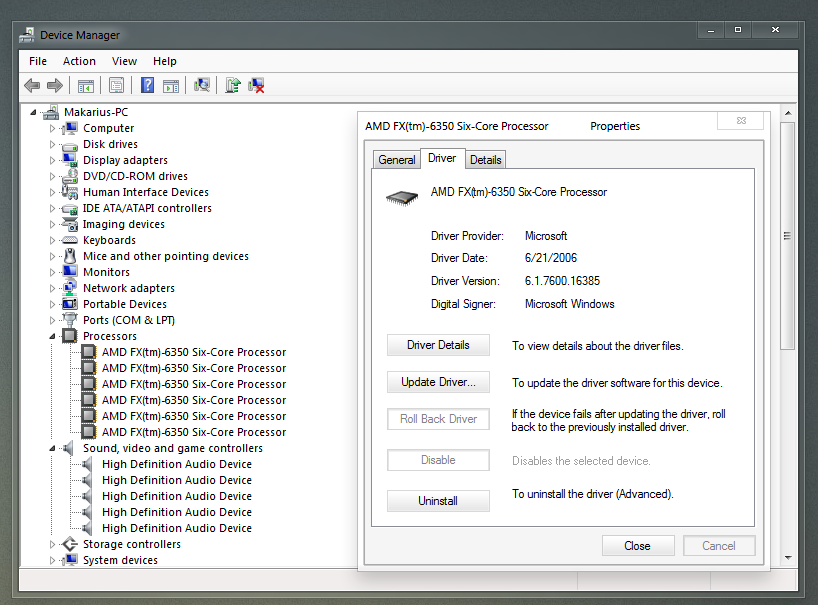
Installed the chipset driver but it does not show up in the device manager ( not sure if it is suppose to) as seen here:
PVrcsZe.png


Driver scanner still does not recognize any compatible drivers when trying to install manually the .zip version of realtek drivers.
 

My Computer My Computer

At a glance

Windows 7 Ultimate x64AMD FX-6350 Vishera 3.9GHz Socket AM3+CORSAIR Vengeance 8GB (2 x 4GB) DDR3 1600NVIDIA GeForce GT 430 (MSI N430GT 4GB DDR3)
Computer type
PC/Desktop
Computer Manufacturer/Model Number
Custom Build
OS
Windows 7 Ultimate x64
CPU
AMD FX-6350 Vishera 3.9GHz Socket AM3+
Motherboard
GIGABYTE GA-970A-D3
Memory
CORSAIR Vengeance 8GB (2 x 4GB) DDR3 1600
Graphics Card(s)
NVIDIA GeForce GT 430 (MSI N430GT 4GB DDR3)
What is "driver scanner"? When you install a driver you do it directly from the driver's install procedure, nothing extra is needed.

If driver scanner is a program to detect what drivers are needed, that could be your problem. Those programs are not very reliable and not needed.
 

My Computer My Computer

At a glance

Windows 10 64 bitIntel i7 6700K16GB Corsair DominatorIntel CPU Graphics
Computer type
PC/Desktop
Computer Manufacturer/Model Number
My Own Build
OS
Windows 10 64 bit
CPU
Intel i7 6700K
Motherboard
ASUS ROG Maximus VIII Hero
Memory
16GB Corsair Dominator
Graphics Card(s)
Intel CPU Graphics
Sound Card
RealTek
Monitor(s) Displays
27" Dell S2719dgf
Screen Resolution
2560X1440
Hard Drives
1 TB Samsung 850 EVO SSD for Win 10 Pro
500GB Samsung 850 EVO SSD for Win 10 Insider
2 TB drive for backup
PSU
EVGA Supernova 750G2
Case
BeQuiet Silent Base 600
Cooling
Deepcool Captain 120EX
Keyboard
Microsoft Wireless 2000
Mouse
Microsoft wireless
Internet Speed
100 MB/sec (Cable)
Antivirus
Microsoft Defender and Malwarebytes
Browser
Edge/Firefox
Other Info
Cakewalk (Sonar) by BandLab and Studio One 4.1 Pro recording studio software. MOTU 896Mk3 Hybrid recording interface, Frontier Tranzport wireless control unit, Behringer X-Touch Control Surface.
Five USB connected optical drives for CD Audio production using Nero BurningROM
I think the OP is referring to windows compatible INF search. The correct drivers should be available from the MFR website, if not included with chipset then as audio driver for the model.
 

My Computer My Computer

At a glance

Windows 7 Ultimate x64Intel Core2 Quad Q8300 2.5GhzKingston HyperX 4x1GB DDR2 1066MhzAsus/Nvidia 9500GT 1GB
Computer type
PC/Desktop
Computer Manufacturer/Model Number
Self Build
OS
Windows 7 Ultimate x64
CPU
Intel Core2 Quad Q8300 2.5Ghz
Motherboard
Asus P5QD Turbo
Memory
Kingston HyperX 4x1GB DDR2 1066Mhz
Graphics Card(s)
Asus/Nvidia 9500GT 1GB
Sound Card
On-Board HD
Monitor(s) Displays
22" Widescreen TFT
Screen Resolution
1920x1080
Hard Drives
2x 320Gb Seagate SATAII RAID 0
2x 80Gb Seagate SATAII RAID 0
1x 1tb hybrid (8gb ssd)
PSU
650w
Case
ATX
Cooling
140mm front, 120mm Rear, 80mm Chipset + stock CPU and GPU
Keyboard
Plastic one
Mouse
Plastic one
Internet Speed
4Mbps
Other Info
Laptop: HP Elitebook 2560p
i5 @2.7Ghz 4GB DDR3

My Computer My Computer

At a glance

Windows 7 Ultimate x64Intel Core2 Quad Q8300 2.5GhzKingston HyperX 4x1GB DDR2 1066MhzAsus/Nvidia 9500GT 1GB
Computer type
PC/Desktop
Computer Manufacturer/Model Number
Self Build
OS
Windows 7 Ultimate x64
CPU
Intel Core2 Quad Q8300 2.5Ghz
Motherboard
Asus P5QD Turbo
Memory
Kingston HyperX 4x1GB DDR2 1066Mhz
Graphics Card(s)
Asus/Nvidia 9500GT 1GB
Sound Card
On-Board HD
Monitor(s) Displays
22" Widescreen TFT
Screen Resolution
1920x1080
Hard Drives
2x 320Gb Seagate SATAII RAID 0
2x 80Gb Seagate SATAII RAID 0
1x 1tb hybrid (8gb ssd)
PSU
650w
Case
ATX
Cooling
140mm front, 120mm Rear, 80mm Chipset + stock CPU and GPU
Keyboard
Plastic one
Mouse
Plastic one
Internet Speed
4Mbps
Other Info
Laptop: HP Elitebook 2560p
i5 @2.7Ghz 4GB DDR3
I tried using Gigabyte's website to download drivers right when I build my computer, but the thing that I was doing wrong is downloading the rev 1.0/1.1 versions...

Your link worked! I downloaded the drivers and installed them.

THANK YOU!
 

My Computer My Computer

At a glance

Windows 7 Ultimate x64AMD FX-6350 Vishera 3.9GHz Socket AM3+CORSAIR Vengeance 8GB (2 x 4GB) DDR3 1600NVIDIA GeForce GT 430 (MSI N430GT 4GB DDR3)
Computer type
PC/Desktop
Computer Manufacturer/Model Number
Custom Build
OS
Windows 7 Ultimate x64
CPU
AMD FX-6350 Vishera 3.9GHz Socket AM3+
Motherboard
GIGABYTE GA-970A-D3
Memory
CORSAIR Vengeance 8GB (2 x 4GB) DDR3 1600
Graphics Card(s)
NVIDIA GeForce GT 430 (MSI N430GT 4GB DDR3)
Back
Top